
Runspace
An open-source LLM workspace — the one your team already knows how to use. Shared
channels, threads, @mentions, uploads and history — except the people you
tag are agents, and they have tools.
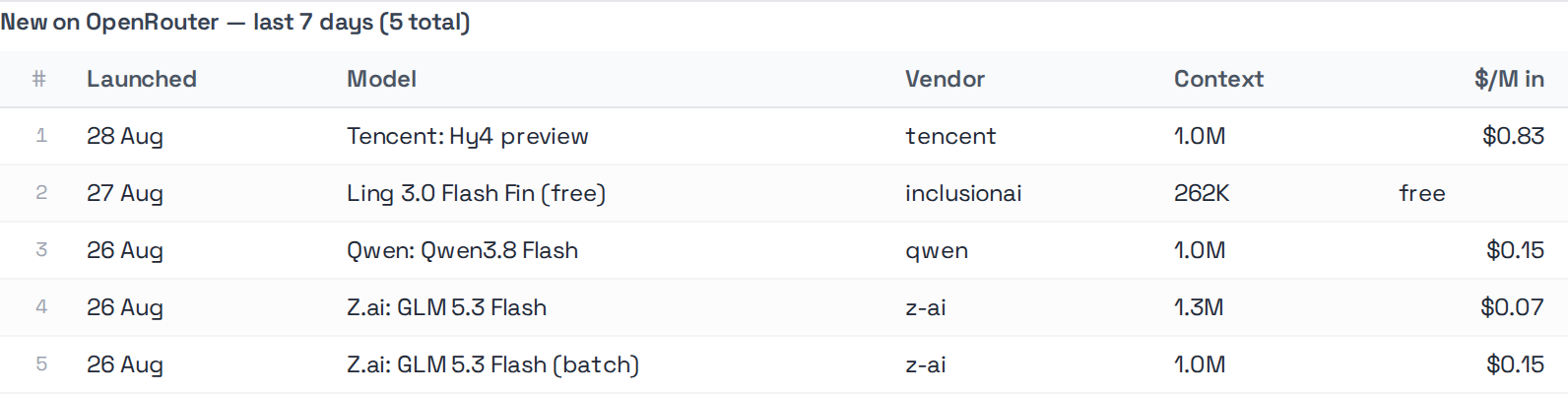
Ask one a question and the answer arrives as a chart, a sortable table or a row of KPI cards — not a paragraph describing one. Some of the work nobody has to ask for: a routine is a cron line and a prompt, so the morning read is filed before anyone opens the tab.
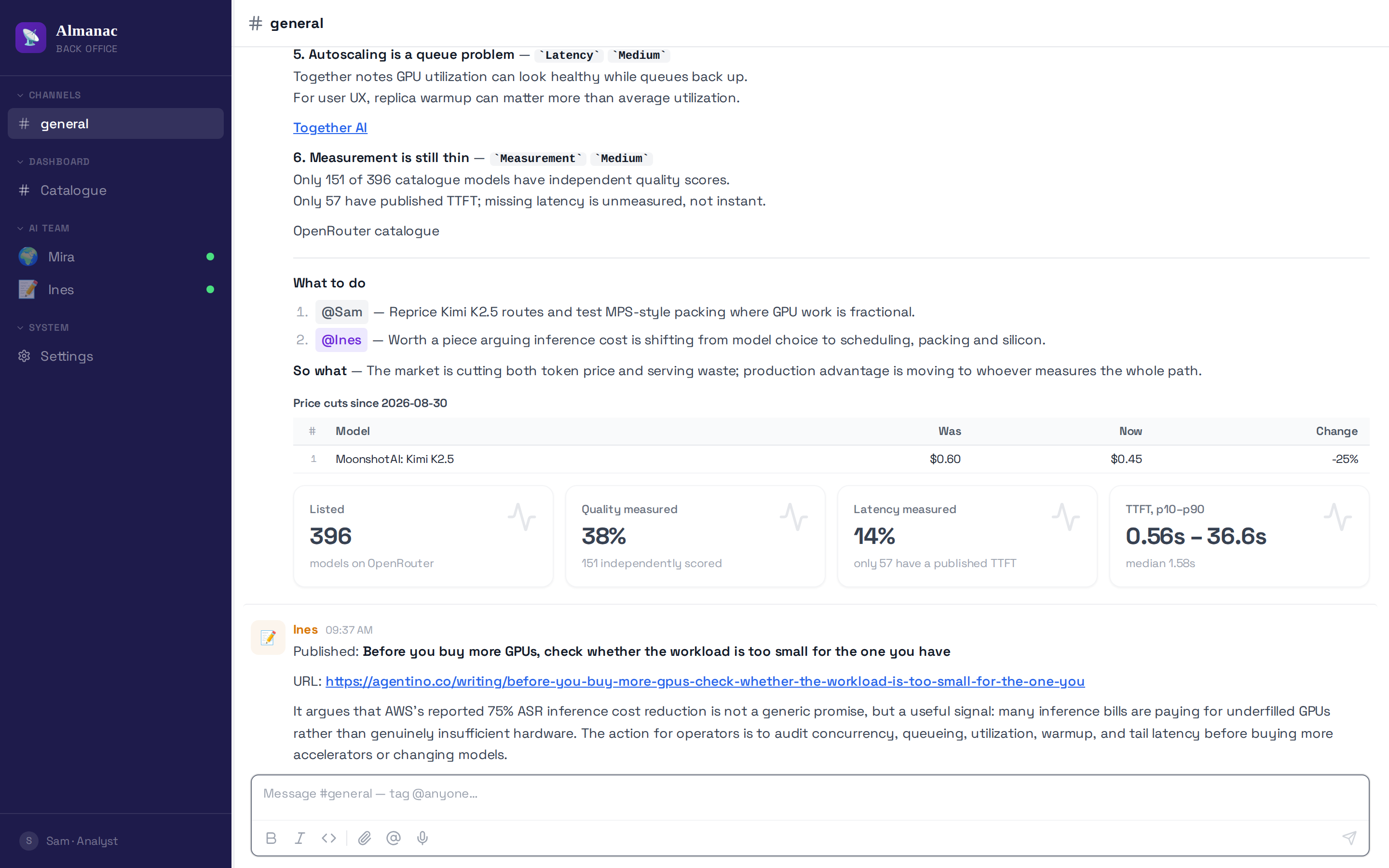
The whole thing is one YAML file. Below is a workspace that actually runs — Almanac, the demo, is about this size.
Answers that render
An agent emits a fenced block; the frontend renders it as a component. The model never sees the renderer, and a block with the wrong keys shows a visible error rather than failing quietly.
 |
 |
```chart — ten types, bar through sankey and treemap |
```kpi — headline figures |
 |
 |
```datatable — row links, expandable detail, per-row actions |
```insight — the one finding worth flagging |
```mermaid renders natively too, for when the answer is a process rather
than a number.
Bring your own runtime
Runspace is not tied to any one agent framework. Five adapters ship, and an app picks one with a single line of config:
type: |
runs |
|---|---|
agentino |
Agentino, in-process |
codex |
codex exec --json |
claude_code |
claude -p --output-format stream-json |
pi |
pi --print |
openclaw |
openclaw agent --local --json |
The four CLI adapters shell out to a binary you install, so Runspace depends on none of them — and the workspace itself never knows which one answered.
pip install "runspace[agentino,workspace,server]"
A workspace in one file
# workspace.yml
name: Acme Back Office
icon: 🗂
brand_color: '#2F5D62'

apps:
  analyst:
    name: Ada
    role: Data analyst
    soul: agents/analyst/SOUL.md
    tools: agents/analyst/tools/
    model: gpt-5.4-codex
    max_turns: 10
python -m runspace.workspace.serve workspace.yml
That gives you chat with streaming, file upload and attachment rendering, message history, a scheduler, and a settings surface — for every agent the file declares.
A complete one is Almanac: three agents that track the LLM inference market, file a digest to a channel on a schedule and publish to a blog. Its whole configuration — agents, prompts, tools and routines — is public, and it runs live at almanac.agentino.co.
What you get
| Chat | Server-sent event streaming, tool-call progress, attachments, history that survives a client disconnect |
| Apps | Many agents in one workspace, each with its own persona, tools and model |
| Channels | Inbound Telegram with pairing and group mention routing; outbound replies back to the same thread |
| Routines | Scheduled work declared in routines.yml, executed by a cron service |
| Widgets | Agents emit fenced ```chart, ```datatable, ```kpi, ```insight, ```form, ```file and ```mermaid blocks that the frontend renders as components |
| Runners | Replay a workload or A/B two agent variants, scored by a pluggable scorer |
| Frontend | React components published as @runspace/ui — a single-pane chat and a multi-channel team workspace |
Swappable everything
Storage, vision, transport, embeddings and the clock all sit behind
typing.Protocol definitions, selected from the environment. Tests run
against in-memory and fixture implementations; production picks real ones.
from runspace.protocols import get_store, get_vision, get_file_storage

store = get_store()          # FileStore | InMemoryStore | SupabaseStore
vision = get_vision()        # CodexVision | FixtureVision
files = get_file_storage()   # LocalFileStorage | ...
Which backend you get is decided by environment variables, so the same image runs in a sandbox and in production without a code branch.
Three levels of control
Config only. Ship a workspace.yml and, if you need custom endpoints,
plugin modules. No Python entry point:
plugins:
  - myapp.plugins.invoices
CMD ["python", "-m", "workspace.serve"]
A plugin module simply defines whatever it wants collected — router,
cron_executors, startup_hooks, shutdown_hooks, middlewares.
A little code. Call create_app() and pass extras:
from runspace.workspace import create_app

app = create_app(
    workspace_yml="workspace.yml",
    tenant_id="acme",
    extra_routers=[my_router],
    extra_startup_hooks=[warm_caches],
)
Full control. Build your own FastAPI app and wire WorkspaceGateway and
AppRegistry yourself. That is the same API the bootstrap uses.
Installing
pip install runspace                              # contracts, protocols, workspace
pip install "runspace[agentino,workspace,server]"  # runtime + FastAPI + uvicorn
The core install stays light — pydantic, pyyaml and httpx, nothing else.
Everything beyond the contracts is an extra you opt into: [agentino] for the
agent runtime, [workspace] for the FastAPI gateway, [server] for uvicorn,
plus [redis], [documents], [scheduler] and [crawler]. [all] takes
the lot.
Runspace does not require any particular agent runtime — that is why the framework is an extra and not a dependency.
Layout
src/runspace/
  contracts/   wire shapes — chat, runtime, tool, workspace.yml, scheduling
  protocols/   swappable adapters: store, vision, transport, file_storage,
               embeddings, transcriber, clock, prompt flattening
  workspace/
    backend/   gateway, app registry, runtimes, messaging, routines,
               attachments, runners, scoring
  ingestion/   inbound channels — Telegram polling, pairing, discovery
  helpers/     session, messaging and document utilities
  runspace_cli/  helper commands behind `runspace <subcommand>`
workspace/
  frontend/    React components published as @runspace/ui (an npm package,
               deliberately outside the Python tree)
Configuration
| Variable | Purpose |
|---|---|
AI_BASE_URL / AI_API_KEY |
The OpenAI-compatible endpoint agents call |
EMBEDDINGS_BACKEND |
openai or fixture |
EMBEDDINGS_BASE_URL / EMBEDDINGS_API_KEY |
Overrides the AI_* pair for embeddings |
VISION_API_KEY |
Credentials for the vision adapter |
STORE_BACKEND / STORAGE_BACKEND |
Which store and file-storage implementation to build |
CHAT_HISTORY_BACKEND |
sqlite to persist chat history across restarts; in-memory otherwise |
CHAT_HISTORY_DB |
Where that file lives (default .runspace/history.sqlite) |
YAML values support ${VAR:-default}, expanded at load time.
Development
pip install -e ".[dev]"

PYTHONPATH=src pytest -q         # the whole suite; testpaths covers every location
ruff check . && ruff format --check .

node --experimental-strip-types workspace/frontend/shared/utils/loosePayload.test.mjs
node --experimental-strip-types --test workspace/frontend/shared/utils/describeSchedule.test.mjs
[dev] exists because the suite needs more than pytest: the protocol tests are
property-based, the document tests need agentino's libraries, and the mirror
tests patch a Supabase client. Installing pytest alone gives a checkout whose
tests cannot collect.
See CONTRIBUTING.md.
Licence
1 maintainer

Metadata
1 maintainer
Release files for runspace 0.2.14
For a detailed explanation of source distributions (sdists) and built distributions (wheels), please see the package formats documentation.
Source distribution (sdist)
| File | Size | Uploaded | |
|---|---|---|---|
| runspace-0.2.14.tar.gz | 577.7 kB | Details |
Built distribution (wheel)
| File | Interpreter | ABI | Platform | Reset |
|---|---|---|---|---|
| runspace-0.2.14-py3-none-any.whl | Python 3 | none | any | Details |
Total release size: 1.0 MB
Release files / runspace-0.2.14.tar.gz
| Download URL | runspace-0.2.14.tar.gz |
|---|---|
| Size | 577.7 kB |
| Tags | Source |
|
SHA-256 checksum How to use checksums |
d3b141018ec6099241c4a2c29bf4fdbb170375c3850a735714b1432b7d28422b
|
|
BLAKE2b-256 checksum How to use checksums |
7f5e15390527b13c42c22a9571a0ebc45886d2986758323503ceb6e2aaacf70e
|
| Upload date | |
|
Uploaded using Trusted Publishing? What is trusted publishing? |
Yes |
| Uploaded via |
twine/7.0.0 CPython/3.13.14
|
Provenance
Provenance describes where a file came from. On PyPI, provenance is shared via attestations, which provide a verifiable record of the build or publishing details. View details, limitations and caveats.


PyPI Publish Attestation
PyPI verified that this artifact, at this checksum, originated from the publisher listed below.
Signed by GitHub Actions, verified by PyPI on Sep 12, 2026.
Transparency logRelease files / runspace-0.2.14-py3-none-any.whl
| Download URL | runspace-0.2.14-py3-none-any.whl |
|---|---|
| Size | 453.4 kB |
| Tags | Python 3 |
|
SHA-256 checksum How to use checksums |
56d8022da495ffec586bc8c4b9ef008f6e510a71816c1110fe8611393b943322
|
|
BLAKE2b-256 checksum How to use checksums |
64592c35193846710ba033d984b9fe3ca1eb8ad7f3de36e7290c2a22a65d8147
|
| Upload date | |
|
Uploaded using Trusted Publishing? What is trusted publishing? |
Yes |
| Uploaded via |
twine/7.0.0 CPython/3.13.14
|
Provenance
Provenance describes where a file came from. On PyPI, provenance is shared via attestations, which provide a verifiable record of the build or publishing details. View details, limitations and caveats.
PyPI Publish Attestation
PyPI verified that this artifact, at this checksum, originated from the publisher listed below.
Signed by GitHub Actions, verified by PyPI on Sep 12, 2026.
Transparency log













