

A terminal workspace for containers and their machines. MIT licensed for personal and commercial use.

Choose the full edition for a machines sidebar, grouped containers, an inspector, project logs, archive recording, search, and mouse-driven workspace controls. Choose lite for a compact screen, fast startup, and a small standalone executable. Both editions work with existing local engines and read-only remote contexts.
Documentation is available online and
inside either edition: runtop docs, rt docs agents, or runtop docs --json.
Install
For installation without a compiler, follow the guided installer. It handles edition selection, updates and full-edition dependencies.
Full edition, requiring Python 3.11 or later:
uv tool install 'runtop>=0.1.2'
runtop --demo
Lite edition:
cargo install --locked runtop
rt --demo
Prebuilt lite executables are attached to the repository’s releases. Extract the
archive, verify its checksum, and place rt and runtop on your executable path.
rt always opens lite. When both editions are installed in separate executable
locations on your path, runtop opens full. The lite launcher recognizes the full
entry point and hands over the original arguments. rt remains the direct route
to lite. --version and --edition identify the executable you are running.
Full workspace
- Choose Containers or Images using the boxed view selector above Machines.
The view applies to the selected machine; VMs stay in Machines. Use
←→on the selector, then Enter to browse its contents. - Browse machines and containers grouped by project.
/filters;attentionfinds unhealthy, restarting, dead, and failed containers. - Inspect ports, mounts, networks, restart counts, memory failures, and health
output.
1,2,3select Info, Logs, and Stats;iopens narrow-mode details. - Select a project and press
lfor combined logs.s,x,Rstart, stop, or restart the listed existing members after a preview. Filters limit membership. Dopens storage accounting on demand. Shared layers, unknown usage, and machine capacity are presented separately.ctrl+popens the command palette;?lists keys. Use the mouse to navigate, select tabs, and resize panes.tchanges theme.
Lite workspace
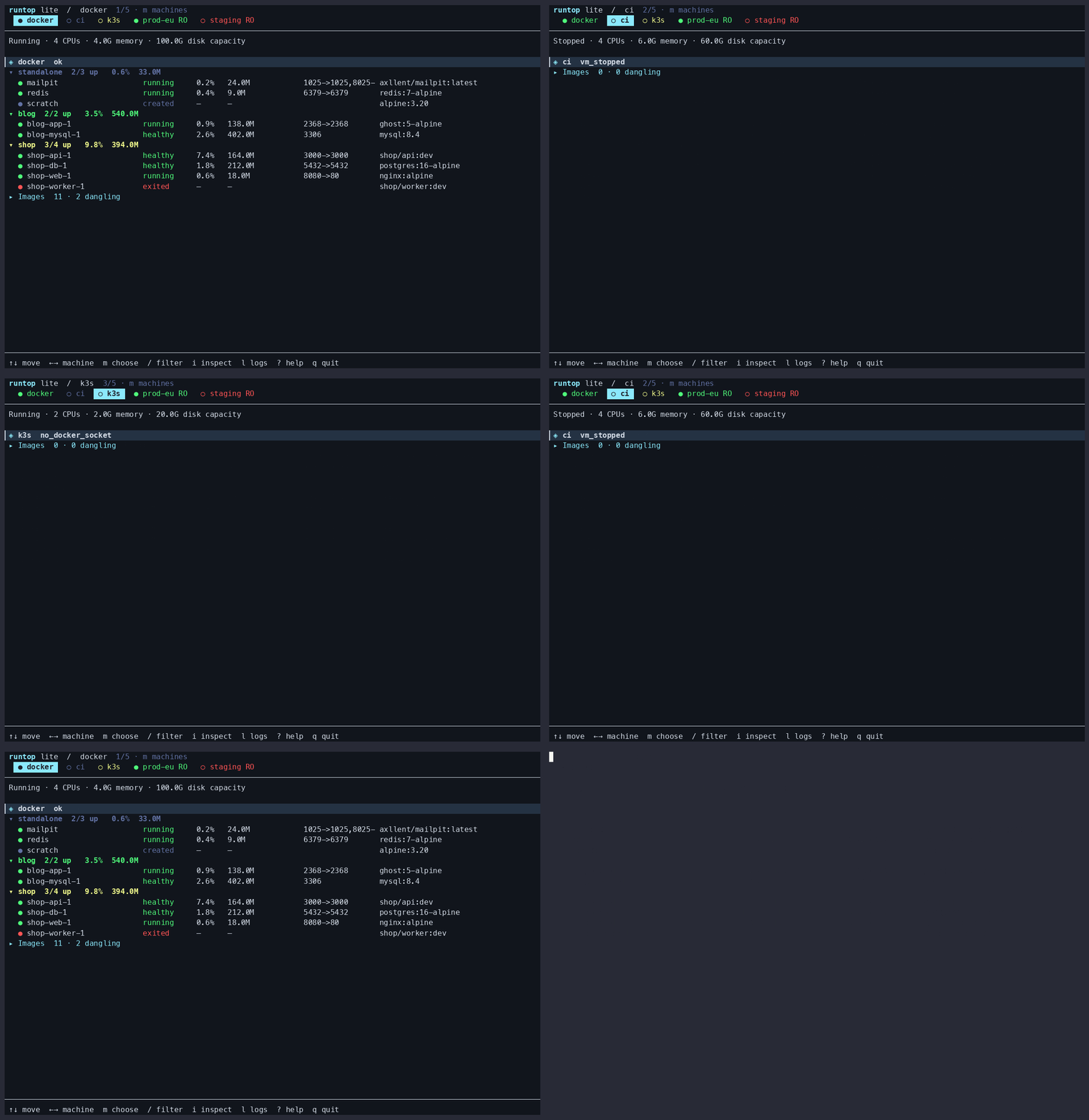
A visible machine strip, one grouped list, and one footer. The active machine stays highlighted as you switch. Columns adapt to terminal width. Container statistics and project totals remain close to their rows.
↑↓/jkmove;←→/[/]switch machines; Space folds a section.mopens the machine chooser with names and status. Enter switches; Esc cancels. You can also click a machine in the strip./filters,osorts by name, CPU, or memory, andrrefreshes.iinspects,lopens container or project logs, andDshows storage.s,x,R,Xstart, stop, restart, or remove selected containers; actions preview the captured selection and require confirmation.eopens a shell;ppreviews dangling-image pruning;?shows all keys.- In logs,
ftoggles following,wwraps, and Esc returns to the list. --read-onlydisables all mutations.--no-mousedisables mouse capture.
Lite keeps at most 2,000 log lines and 2 MiB of log text, and follows at most 64 selected sources. Archive recording, export, and archive search belong to full.
Listings and diagnostics
See the CLI reference for all commands, options, edition differences,
JSON output and exit codes. runtop ps --help and runtop logs --help show command help.
runtop ps -a --json
rt ps -a --stats
rt ps --images
runtop --doctor
rt --doctor
runtop --dump lima:docker
ps lists local targets by default. Add --contexts to include remote targets,
or select one explicitly with --target KEY. --json uses the shared
snapshot contract. Exit codes are 0 for success, 1 for no targets
or a discovery failure, 2 for invalid input, and 3 for unavailable or partial data.
Failed interactive refreshes retain the last successful data with a stale warning and disable actions. Image-list failures leave containers usable. Remote contexts are always read-only. No engine is installed and no machine is created on startup.
Record and search logs
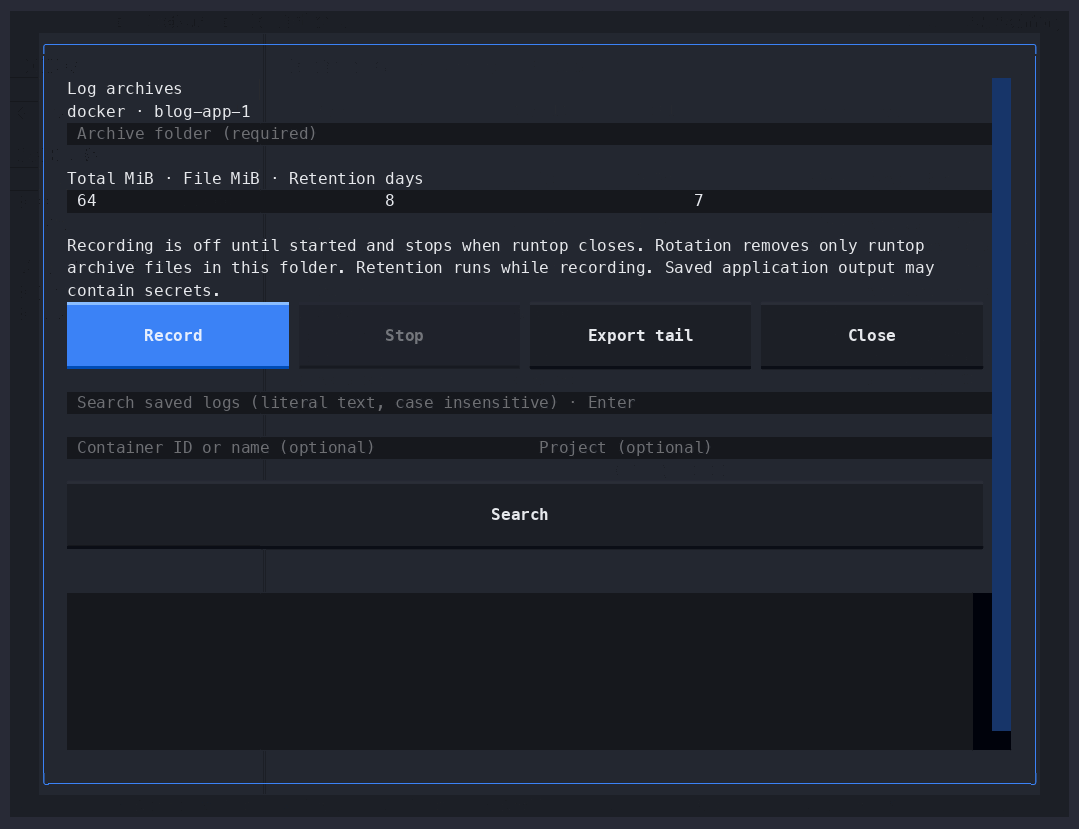
In full, L opens Log archives for the selected container or project. Choose a
folder and limits, then press Record. Stop ends capture. Closing the
controls keeps recording active until the app exits; an indicator stays visible.
Export tail saves recent output without following.
runtop logs record --target lima:docker --project shop --directory ~/logs/shop \
  --max-mib 64 --file-mib 8 --keep-days 7
runtop logs export --target lima:docker --container api --directory ~/logs/api --tail 500
runtop logs search error -i --directory ~/logs/shop --limit 200 --json
runtop logs status --directory ~/logs/shop --json
Recording is off by default. Defaults are 64 MiB total, 8 MiB per file, and seven days retention. Rotation removes only owned archive files; one writer may use a folder at a time. Search streams saved files with bounded results. Exit codes are 0 for matches, 1 for none, and 2 for invalid input or an archive error.
Archives retain capture time, source identity, output stream, message, and
truncation markers. --since filters capture time. Queue or disk errors stop
capture visibly. Recording follows existing container IDs and does not reconnect
across their recreation. Saved output may contain application secrets.
Resource use
On a 24-container fixture, lite 0.1.1 displayed its first data frame in 13 ms and used 8.3 MiB of steady process memory; full displayed data in 325 ms and used 69.6 MiB. These are medians of five warm-cache runs on one ARM64 machine, excluding engine I/O and terminal rendering. See raw results, reproducible commands and measurement limits, including a separate sustained-log test.
Develop
uv sync --locked
uv run ruff check
uv run ty check --error-on-warning
uv run pytest
cargo fmt --check
cargo clippy --locked --all-targets -- -D warnings
cargo test --locked
cargo build --locked --release
Both editions share normalization fixtures. Interface recordings use synthetic
--demo data. Local runtime workloads and development measurements are kept
outside distributed packages.
1 maintainer

Metadata
1 maintainer
Release files for runtop 0.1.2
For a detailed explanation of source distributions (sdists) and built distributions (wheels), please see the package formats documentation.
Source distribution (sdist)
| File | Size | Uploaded | Provenance | Actions |
|---|---|---|---|---|
| runtop-0.1.2.tar.gz | 111.9 kB | Without provenance | Details for runtop-0.1.2.tar.gz |
Built distribution (wheel)
| File | Interpreter | ABI | Platform | Actions Reset |
|---|---|---|---|---|
| runtop-0.1.2-py3-none-any.whl | Python 3 | none | any | Details for runtop-0.1.2-py3-none-any.whl |
Total release size: 248.8 kB
Release files / runtop-0.1.2.tar.gz
| Download URL | runtop-0.1.2.tar.gz |
|---|---|
| Size | 111.9 kB |
| Tags | Source |
|
SHA-256 checksum How to use checksums |
d389694fab343278541f8d7ab2bb5b6db92fcbe18e6df277bebdac475fad9644
|
|
BLAKE2b-256 checksum How to use checksums |
a3b5281da0fe296f06412d61aa3cb8e27f1306391f8de3cae7da8d5bfd91eb98
|
| Upload date | |
|
Uploaded using Trusted Publishing? What is trusted publishing? |
Yes |
| Uploaded via |
uv/0.12.15 {"installer":{"name":"uv","version":"0.12.15","subcommand":["publish"]},"python":null,"implementation":{"name":null,"version":null},"distro":{"name":"Ubuntu","version":"24.04","id":"noble","libc":null},"system":{"name":null,"release":null},"cpu":null,"openssl_version":null,"setuptools_version":null,"rustc_version":null,"ci":true}
|
Release files / runtop-0.1.2-py3-none-any.whl
| Download URL | runtop-0.1.2-py3-none-any.whl |
|---|---|
| Size | 136.9 kB |
| Tags | Python 3 |
|
SHA-256 checksum How to use checksums |
3f455fe6f6cb648654e0ff0dc087ac9c42f687a6372c0917cef62e6442f62df8
|
|
BLAKE2b-256 checksum How to use checksums |
e7362b204969cc28a2323283e3b4b5efdb763b9853a2a0115ed658ad251e20fb
|
| Upload date | |
|
Uploaded using Trusted Publishing? What is trusted publishing? |
Yes |
| Uploaded via |
uv/0.12.15 {"installer":{"name":"uv","version":"0.12.15","subcommand":["publish"]},"python":null,"implementation":{"name":null,"version":null},"distro":{"name":"Ubuntu","version":"24.04","id":"noble","libc":null},"system":{"name":null,"release":null},"cpu":null,"openssl_version":null,"setuptools_version":null,"rustc_version":null,"ci":true}
|
Security for runtop 0.1.2
Provenance
Provenance describes where a file came from. On PyPI, provenance is shared via attestations, which provide a verifiable record of the build or publishing details. View details, limitations and caveats.
No provenance found
None of the files in this release were uploaded with provenance metadata.
A note on package security
PyPI is a repository for distributing packages, not a service for auditing them. While third-party security researchers and our staff do their best to detect and remove malicious packages, PyPI cannot guarantee the quality, security or suitability of any given package.
To learn more about protecting yourself from malicious actors, visit our package security documentation.














