
Rusty Desktop Icons for Python







A Rust-powered desktop icon controller and GPU-backed animator, with Python bindings built using PyO3 and maturin. Inspect and restore desktop layouts, animate transitions, and apply built-in or custom shader effects.
Main GitHub repository | Documentation | Python guide | Report an issue

Features
- Enumerate desktop icons, positions, monitors, DPI and grid information.
- Move icons directly and read or change Windows desktop folder flags.
- Animate with configurable curves, independent axis motion and reversible timelines.
- Apply Glitch, Particle Vortex, Dust Transfer and Silk Flow effects, or trusted custom HLSL.
- Render scenes off-screen and export frames without moving real icons.
Showcases
These looping previews are off-screen renders over a desktop mockup, not screen recordings or FPS benchmarks. Click a preview to open its full-size version.
Movement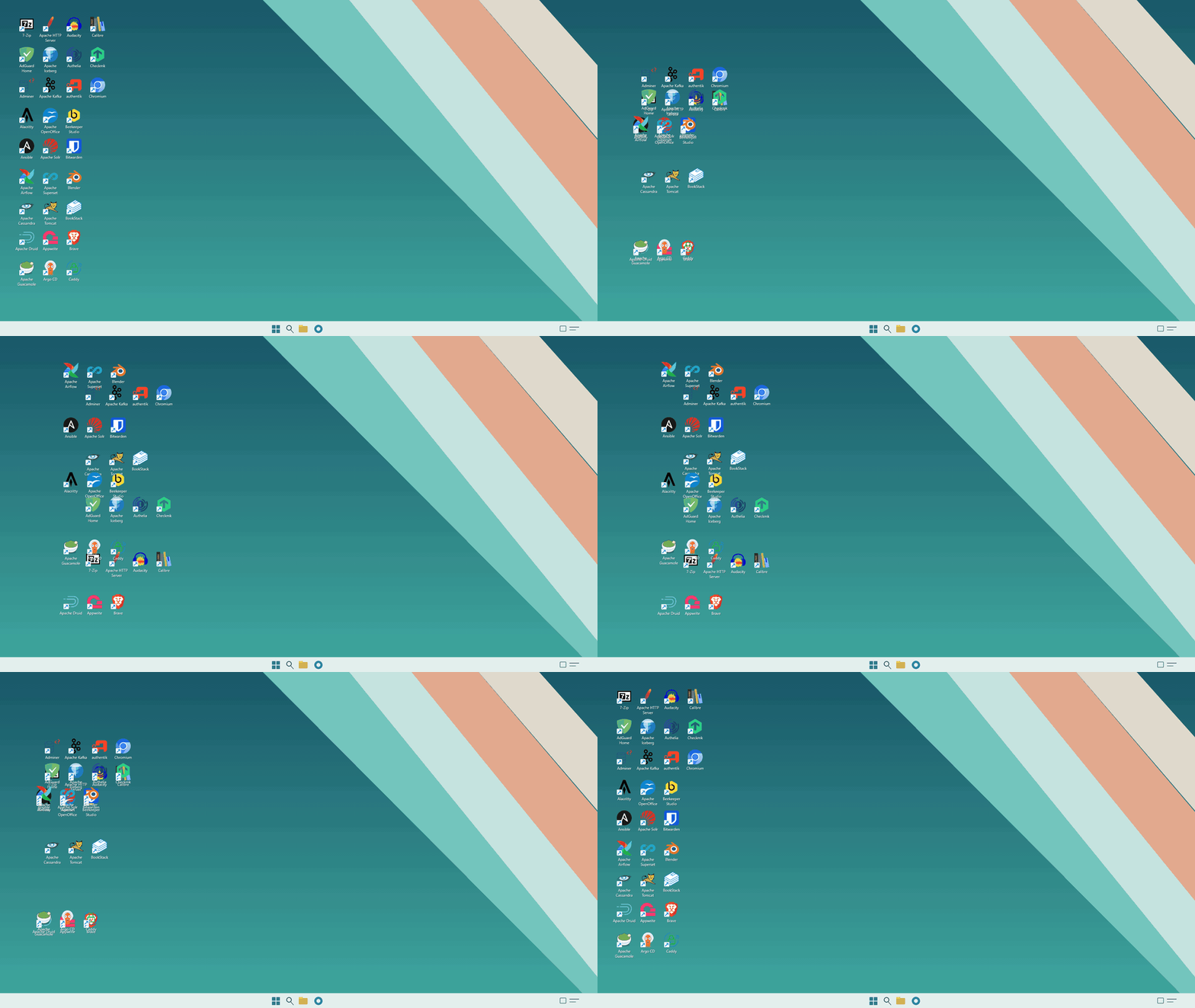 |
Glitch |
Particle Vortex |
Dust Transfer |
Silk Flow |
|

See the showcase export guide to render your own scenes.
Install (from PyPI)
Use CPython 3.9+ on Windows 10/11 x64 with a compatible wheel. Prebuilt wheels do not require Rust.
python -m pip install rusty-desktop-icons
Install (from source)
Install Rust 1.88+ and Visual Studio C++ Build Tools with the Windows SDK, then clone the repository:
git clone https://github.com/s0d3s/rusty-desktop-icons.git
cd rusty-desktop-icons
python -m venv .venv
.\.venv\Scripts\Activate.ps1
python -m pip install maturin==1.15.0
python scripts/generate-stubs.py
maturin develop --release -m crates/rdi-python/Cargo.toml
See the Python installation guide for build and troubleshooting details.
Example: Dust Transfer Round Trip
Turn two icons into drifting particles, swap their positions, then animate
them home. Change DustTransfer to SilkFlow, ParticleVortex or Glitch
to try another effect with its recommended movement and timing.
This changes your real desktop. Disable View > Auto arrange icons and start with a non-overlapping layout. The example selects the first two icons; use two on the same monitor, and do not rearrange icons or change display settings while it runs. Cleanup restores saved positions and the snap setting after normal completion or ordinary errors, but cannot survive force-killing the process.
from __future__ import annotations

import rusty_desktop_icons as rdi


def main() -> None:
  controller = rdi.DesktopController()
  original_flags = controller.get_flags()
  if original_flags & rdi.FolderFlag.FWF_AUTOARRANGE:
    raise RuntimeError("Disable desktop Auto arrange before running")
  icons = controller.list_icons()[:2]
  if len(icons) < 2:
    print("This example needs at least two desktop icons")
    return

  origins = [(icon.id, icon.position) for icon in icons]
  targets = [(icons[0].id, icons[1].position),
         (icons[1].id, icons[0].position)]
  name = rdi.BuiltinShader.DustTransfer
  preset = rdi.AnimationPreset.builtin(name)
  shader = rdi.Shader.compile(rdi.ShaderSource.builtin(name))
  effect = rdi.Effect(shader, envelope=preset.envelope)

  def play(positions: list[tuple[str, tuple[int, int]]]) -> None:
    specs = [
      rdi.IconAnimationSpec(
        icon_id, target, preset.duration, preset.movement, effect=effect
      )
      for icon_id, target in positions
    ]
    handle = controller.prepare(specs).start()
    try:
      reason = handle.wait()
      if reason.kind != rdi.FinishReasonKind.Completed:
        raise RuntimeError(str(reason))
      commit = handle.final_commit()
      if commit is not None and commit.missing_ids:
        raise RuntimeError(f"Unresolved icons: {commit.missing_ids}")
    finally:
      handle.stop()
      handle.wait()

  snap = rdi.FolderFlag.FWF_SNAPTOGRID
  try:
    controller.unset_flags(snap)
    play(targets)
    play(origins)
  finally:
    try:
      missing = controller.set_positions(origins)
      if missing:
        raise RuntimeError(f"Could not restore icons: {missing}")
    finally:
      controller.apply_flags(snap, original_flags)


if __name__ == "__main__":
  main()
Demo App
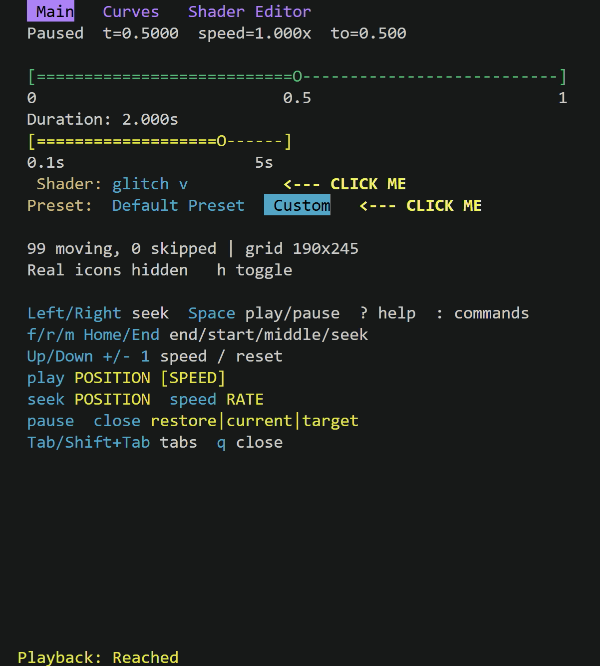
animate_timeline is a separate Rust terminal app for exploring animation
without writing Python. Its Main, Curves and Shader Editor tabs
provide reversible playback, timeline seeking, movement/envelope editing and
built-in or custom HLSL shaders. It is not installed by pip.
Download animate_timeline.exe from the Assets section of the
latest GitHub release.
From PowerShell, in the download directory:
.\animate_timeline.exe --shader dust-transfer
Or build it with the Rust/Windows prerequisites listed above:
cargo install rusty-desktop-icons --bin animate_timeline
animate_timeline
Disable View > Auto arrange icons before launching. The demo moves real
icons; press q to quit normally and restore their original positions. Avoid
force-killing it. See the Demo App guide
for controls, installation details and limitations.
Examples in this crate
- Smoke example — end-to-end sanity check.
- Function-sampled curves —
demonstrates
Curve.from_functionwith a damped-cosine curve. - Motion-aware curves —
demonstrates
Curve.from_motion_functionwith a parametric gravity curve.
More recipes: layout and playback, timelines, and shaders.
Status and limitations
This is a proof of concept, with no stable API promise. Windows is the only working desktop backend; multi-monitor and mixed-DPI behavior remain work in progress. Thumbnail, shortcut-arrow and label rendering can differ from Explorer. Only one overlay session can run per process.
Use trusted shaders only. Custom HLSL is not sandboxed: expensive or malicious shaders can freeze the display or reset the GPU driver. Review third-party and AI-generated shader sources before compiling them.
Tests
.venv\Scripts\python.exe -m pytest crates\rdi-python\tests -v
License
Licensed under the Apache License 2.0. The license text is included in the distribution.
1 maintainer

Release files for rusty-desktop-icons 0.2.30
For a detailed explanation of source distributions (sdists) and built distributions (wheels), please see the package formats documentation.
Source distribution (sdist)
| File | Size | Uploaded | |
|---|---|---|---|
| rusty_desktop_icons-0.2.30.tar.gz | 278.4 kB | Details |
Built distributions (wheels)
| File | Reset | |||
|---|---|---|---|---|
| rusty_desktop_icons-0.2.30-cp314-cp314-win_amd64.whl | CPython 3.14 | CPython 3.14 | Windows x86-64 | Details |
| rusty_desktop_icons-0.2.30-cp313-cp313-win_amd64.whl | CPython 3.13 | CPython 3.13 | Windows x86-64 | Details |
| rusty_desktop_icons-0.2.30-cp312-cp312-win_amd64.whl | CPython 3.12 | CPython 3.12 | Windows x86-64 | Details |
| rusty_desktop_icons-0.2.30-cp311-cp311-win_amd64.whl | CPython 3.11 | CPython 3.11 | Windows x86-64 | Details |
| rusty_desktop_icons-0.2.30-cp310-cp310-win_amd64.whl | CPython 3.10 | CPython 3.10 | Windows x86-64 | Details |
| rusty_desktop_icons-0.2.30-cp39-cp39-win_amd64.whl | CPython 3.9 | CPython 3.9 | Windows x86-64 | Details |
Total release size: 6.6 MB
Release files / rusty_desktop_icons-0.2.30.tar.gz
| Download URL | rusty_desktop_icons-0.2.30.tar.gz |
|---|---|
| Size | 278.4 kB |
| Tags | Source |
|
SHA-256 checksum How to use checksums |
2acca948935910a2f7e7497d46debc00da9af98903ae1d4aaa492eb4f02d60a2
|
|
BLAKE2b-256 checksum How to use checksums |
de4c00e2615f1a10ecdfa5cc9e0d8b66354342f9db8d643b84bda34a92ea7f3f
|
| Upload date | |
|
Uploaded using Trusted Publishing? What is trusted publishing? |
Yes |
| Uploaded via |
twine/7.0.0 CPython/3.13.14
|
Provenance
Provenance describes where a file came from. On PyPI, provenance is shared via attestations, which provide a verifiable record of the build or publishing details. View details, limitations and caveats.


PyPI Publish Attestation
PyPI verified that this artifact, at this checksum, originated from the publisher listed below.
Signed by GitHub Actions, verified by PyPI on Sep 26, 2026.
Transparency logRelease files / rusty_desktop_icons-0.2.30-cp314-cp314-win_amd64.whl
| Download URL | rusty_desktop_icons-0.2.30-cp314-cp314-win_amd64.whl |
|---|---|
| Size | 1.0 MB |
| Tags | CPython 3.14 Windows x86-64 |
|
SHA-256 checksum How to use checksums |
67d10d658f1bcab39abe05782d40a3de4a331697514f5306a3589534aeaa3d8b
|
|
BLAKE2b-256 checksum How to use checksums |
01133f41597a71b069981428f9a893bd61603374913431354e1a476d1fac1b5c
|
| Upload date | |
|
Uploaded using Trusted Publishing? What is trusted publishing? |
Yes |
| Uploaded via |
twine/7.0.0 CPython/3.13.14
|
Provenance
Provenance describes where a file came from. On PyPI, provenance is shared via attestations, which provide a verifiable record of the build or publishing details. View details, limitations and caveats.
PyPI Publish Attestation
PyPI verified that this artifact, at this checksum, originated from the publisher listed below.
Signed by GitHub Actions, verified by PyPI on Sep 26, 2026.
Transparency logRelease files / rusty_desktop_icons-0.2.30-cp313-cp313-win_amd64.whl
| Download URL | rusty_desktop_icons-0.2.30-cp313-cp313-win_amd64.whl |
|---|---|
| Size | 1.1 MB |
| Tags | CPython 3.13 Windows x86-64 |
|
SHA-256 checksum How to use checksums |
486a29d04216e31c027ce9df7f6e4078b8cbee7e162e541a104f4c5f48823cd5
|
|
BLAKE2b-256 checksum How to use checksums |
09c887cc17fa8100d5a9de4c6336f68601e3bd618606d124fe16a4182ff3ed9b
|
| Upload date | |
|
Uploaded using Trusted Publishing? What is trusted publishing? |
Yes |
| Uploaded via |
twine/7.0.0 CPython/3.13.14
|
Provenance
Provenance describes where a file came from. On PyPI, provenance is shared via attestations, which provide a verifiable record of the build or publishing details. View details, limitations and caveats.
PyPI Publish Attestation
PyPI verified that this artifact, at this checksum, originated from the publisher listed below.
Signed by GitHub Actions, verified by PyPI on Sep 26, 2026.
Transparency logRelease files / rusty_desktop_icons-0.2.30-cp312-cp312-win_amd64.whl
| Download URL | rusty_desktop_icons-0.2.30-cp312-cp312-win_amd64.whl |
|---|---|
| Size | 1.1 MB |
| Tags | CPython 3.12 Windows x86-64 |
|
SHA-256 checksum How to use checksums |
17866aa9e46d8d36a87f7827e81a2f1dcd039315374cafa3cec58ff7a1297e1f
|
|
BLAKE2b-256 checksum How to use checksums |
22731186308e64558adbb1447fb2dee3b9bf17c4031ae47317e088e59e37dec7
|
| Upload date | |
|
Uploaded using Trusted Publishing? What is trusted publishing? |
Yes |
| Uploaded via |
twine/7.0.0 CPython/3.13.14
|
Provenance
Provenance describes where a file came from. On PyPI, provenance is shared via attestations, which provide a verifiable record of the build or publishing details. View details, limitations and caveats.
PyPI Publish Attestation
PyPI verified that this artifact, at this checksum, originated from the publisher listed below.
Signed by GitHub Actions, verified by PyPI on Sep 26, 2026.
Transparency logRelease files / rusty_desktop_icons-0.2.30-cp311-cp311-win_amd64.whl
| Download URL | rusty_desktop_icons-0.2.30-cp311-cp311-win_amd64.whl |
|---|---|
| Size | 1.1 MB |
| Tags | CPython 3.11 Windows x86-64 |
|
SHA-256 checksum How to use checksums |
6d793617267138a8a2dc2bd9ef971db964d8b40f7f104847061c64d0d69b3500
|
|
BLAKE2b-256 checksum How to use checksums |
cf42d73bc1f5022b1864c9a10c5ebd58007945c7a3167ff07fc94888e88c8367
|
| Upload date | |
|
Uploaded using Trusted Publishing? What is trusted publishing? |
Yes |
| Uploaded via |
twine/7.0.0 CPython/3.13.14
|
Provenance
Provenance describes where a file came from. On PyPI, provenance is shared via attestations, which provide a verifiable record of the build or publishing details. View details, limitations and caveats.
PyPI Publish Attestation
PyPI verified that this artifact, at this checksum, originated from the publisher listed below.
Signed by GitHub Actions, verified by PyPI on Sep 26, 2026.
Transparency logRelease files / rusty_desktop_icons-0.2.30-cp310-cp310-win_amd64.whl
| Download URL | rusty_desktop_icons-0.2.30-cp310-cp310-win_amd64.whl |
|---|---|
| Size | 1.1 MB |
| Tags | CPython 3.10 Windows x86-64 |
|
SHA-256 checksum How to use checksums |
bbcb7093e69e42ada32bb8f68ebae4a1f32bce7dc0358e268c7fb7ca4fc6ea90
|
|
BLAKE2b-256 checksum How to use checksums |
af39516c7f70bd32a6b7e01cb11bf9be09e85e1cfa9bd89114d2ecbd1bbf2a80
|
| Upload date | |
|
Uploaded using Trusted Publishing? What is trusted publishing? |
Yes |
| Uploaded via |
twine/7.0.0 CPython/3.13.14
|
Provenance
Provenance describes where a file came from. On PyPI, provenance is shared via attestations, which provide a verifiable record of the build or publishing details. View details, limitations and caveats.
PyPI Publish Attestation
PyPI verified that this artifact, at this checksum, originated from the publisher listed below.
Signed by GitHub Actions, verified by PyPI on Sep 26, 2026.
Transparency logRelease files / rusty_desktop_icons-0.2.30-cp39-cp39-win_amd64.whl
| Download URL | rusty_desktop_icons-0.2.30-cp39-cp39-win_amd64.whl |
|---|---|
| Size | 1.1 MB |
| Tags | CPython 3.9 Windows x86-64 |
|
SHA-256 checksum How to use checksums |
f886034a8308a334420a37c0abd2631b0f2ba86a42c1c946292ed10b58273e02
|
|
BLAKE2b-256 checksum How to use checksums |
01210f2b8d530f72a882e87fae90182bbd44fafe1109ff09775358904d092c1c
|
| Upload date | |
|
Uploaded using Trusted Publishing? What is trusted publishing? |
Yes |
| Uploaded via |
twine/7.0.0 CPython/3.13.14
|
Provenance
Provenance describes where a file came from. On PyPI, provenance is shared via attestations, which provide a verifiable record of the build or publishing details. View details, limitations and caveats.
PyPI Publish Attestation
PyPI verified that this artifact, at this checksum, originated from the publisher listed below.
Signed by GitHub Actions, verified by PyPI on Sep 26, 2026.
Transparency log













