
⚡ High-performance async HTTP client in Rust with Python bindings for blazing-fast batch requests.

Project description
rusty-req


A high-performance asynchronous request library based on Rust and Python, suitable for scenarios that require high-throughput concurrent HTTP requests. It implements the core concurrent logic in Rust and packages it into a Python module using PyO3 and maturin, combining Rust's performance with Python's ease of use.
🌐 English | 中文
🚀 Features
- Dual Request Modes: Supports both batch concurrent requests (
fetch_requests) and single asynchronous requests (fetch_single). - High Performance: Built with Rust, Tokio, and a shared
reqwestclient for maximum throughput. - Highly Customizable: Allows custom headers, parameters/body, per-request timeouts, and tags.
- Flexible Concurrency Modes: Choose between
SELECT_ALL(default, get results as they complete) andJOIN_ALL(wait for all requests to finish) to fit your use case. - Smart Response Handling: Automatically decompresses
gzip,brotli, anddeflateencoded responses. - Global Timeout Control: Use
total_timeoutin batch requests to prevent hangs. - Detailed Results: Each response includes the HTTP status, body, metadata (like processing time), and any exceptions.
- Debug Mode: An optional debug mode (
set_debug(True)) prints detailed request/response information.
🔧 Installation
pip install rusty-req
Or build from source:
# This will compile the Rust code and create a .whl file
maturin build --release

# Install from the generated wheel
pip install target/wheels/rusty_req-*.whl
Development & Debugging
cargo watch -s "maturin develop"
⚙️ Proxy Configuration & Debug
1. Using Proxy
If you need to access external networks through a proxy, create a ProxyConfig object and set it as a global proxy:
import asyncio
import rusty_req

async def proxy_example():
    # Create ProxyConfig object
    proxy = rusty_req.ProxyConfig(
        http="http://127.0.0.1:7890",
        https="http://127.0.0.1:7890"
    )

    # Set global proxy (all requests will use this proxy)
    await rusty_req.set_global_proxy(proxy)

    # Send request (will go through proxy automatically)
    resp = await rusty_req.fetch_single(url="https://httpbin.org/get")
    print(resp)

if __name__ == "__main__":
    asyncio.run(proxy_example())
2. Debug Logging
set_debug enables debug mode, supporting console output and log file writing:
import rusty_req

# Print debug logs to console only
rusty_req.set_debug(True)

# Print to console and write to log file
rusty_req.set_debug(True, "logs/debug.log")

# Disable debug mode
rusty_req.set_debug(False)
📦 Example Usage
1. Fetching a Single Request (fetch_single)
Perfect for making a single asynchronous call and awaiting its result.
import asyncio
import pprint
import rusty_req

async def single_request_example():
    """Demonstrates how to use fetch_single for a POST request."""
    print("🚀 Fetching a single POST request to httpbin.org...")

    # Enable debug mode to see detailed logs in the console
    rusty_req.set_debug(True)

    response = await rusty_req.fetch_single(
        url="https://httpbin.org/post",
        method="POST",
        params={"user_id": 123, "source": "example"},
        headers={"X-Client-Version": "1.0"},
        tag="my-single-post"
    )

    print("\n✅ Request finished. Response:")
    pprint.pprint(response)

if __name__ == "__main__":
    asyncio.run(single_request_example())
2. Fetching Batch Requests (fetch_requests)
The core feature for handling a large number of requests concurrently. This example simulates a simple load test.
import asyncio
import time
import rusty_req
from rusty_req import ConcurrencyMode

async def batch_requests_example():
    """Demonstrates 100 concurrent requests with a global timeout."""
    requests = [
        rusty_req.RequestItem(
            url="https://httpbin.org/delay/2",  # This endpoint waits 2 seconds
            method="GET",
            timeout=2.9,  # Per-request timeout, should succeed
            tag=f"test-req-{i}",
        )
        for i in range(100)
    ]

    # Disable debug logs for cleaner output
    rusty_req.set_debug(False)

    print("🚀 Starting 100 concurrent requests...")
    start_time = time.perf_counter()

    # Set a global timeout of 3.0 seconds. Some requests will be cut off.
    responses = await rusty_req.fetch_requests(
        requests,
        total_timeout=3.0,
        mode=ConcurrencyMode.SELECT_ALL # Explicitly use SELECT_ALL mode
    )

    total_time = time.perf_counter() - start_time

    # --- Process results ---
    success_count = 0
    failed_count = 0
    for r in responses:
        # Check the 'exception' field to see if the request was successful
        if r.get("exception") and r["exception"].get("type"):
            failed_count += 1
        else:
            success_count += 1

    print("\n📊 Load Test Summary:")
    print(f"⏱️  Total time taken: {total_time:.2f}s")
    print(f"✅ Successful requests: {success_count}")
    print(f"⚠️ Failed or timed-out requests: {failed_count}")

if __name__ == "__main__":
    asyncio.run(batch_requests_example())
3. Understanding Concurrency Modes (SELECT_ALL vs JOIN_ALL)
The fetch_requests function supports two powerful concurrency strategies. Choosing the right one is key to building robust applications.
-
ConcurrencyMode.SELECT_ALL(Default): Best-Effort Collector This mode operates on a "first come, first served" or "best-effort" basis. It aims to collect as many successful results as possible within the giventotal_timeout.- It returns results as soon as they complete.
- If the
total_timeoutis reached, it gracefully returns all the requests that have already succeeded, while marking any still-pending requests as timed out. - A failure in one request does not affect others.
-
ConcurrencyMode.JOIN_ALL: Transactional (All-or-Nothing) This mode treats the entire batch of requests as a single, atomic transaction. It is much stricter.- It waits for all submitted requests to complete first.
- It then inspects the results.
- Success Case: Only if every single request was successful will it return the complete list of successful results.
- Failure Case: If even one request fails for any reason (e.g., its individual timeout, a network error, or a non-2xx status code), this mode will discard all results and return a list where every request is marked as a global failure.
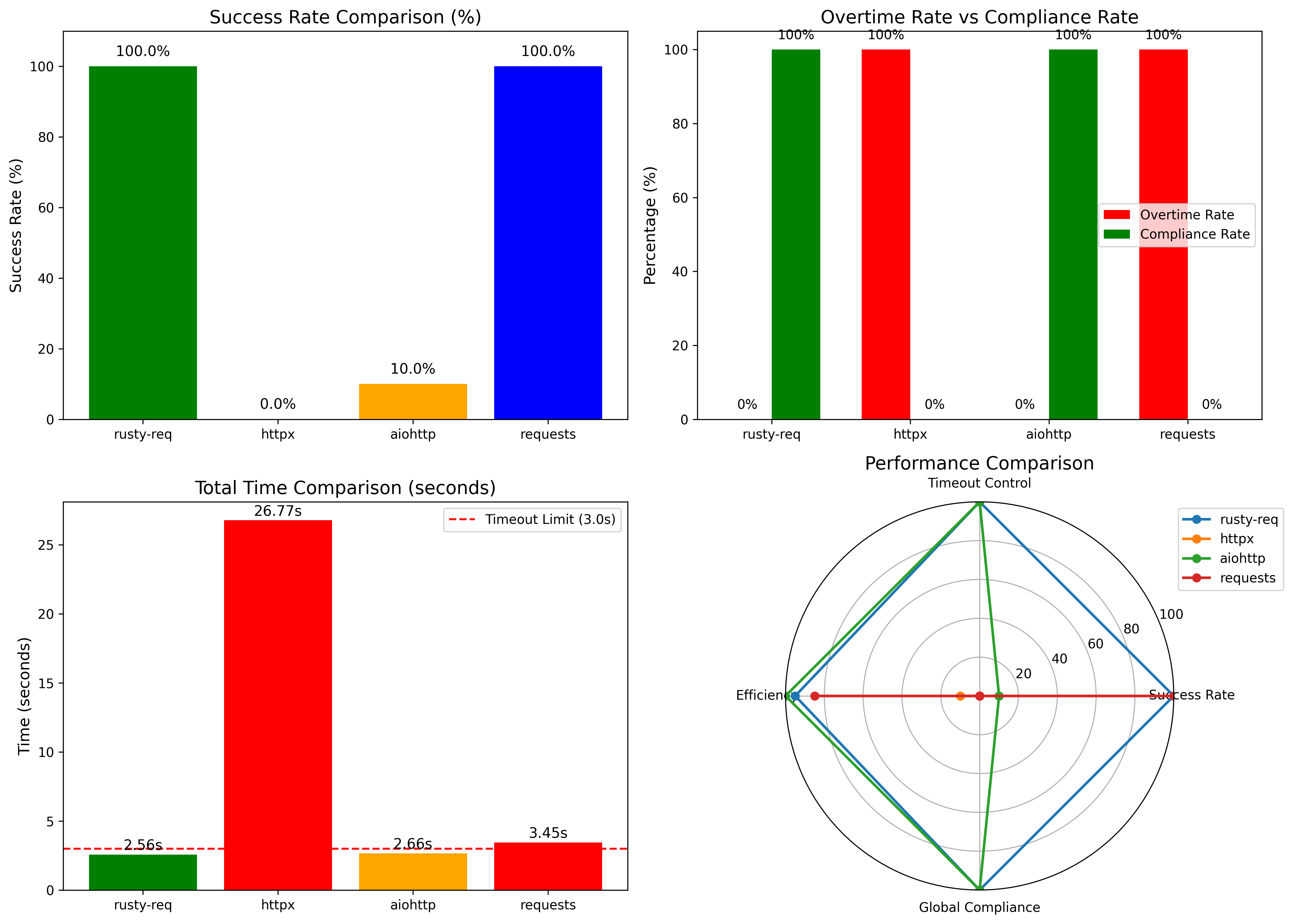
4. Timeout Performance Comparison
Under the same test conditions (global timeout 3s, per-request timeout 2.6s, httpbin delay 2.3s), we compared the performance of different libraries:
| Library / Framework | Total Requests | Successful | Timed Out | Success Rate | Actual Total Time | Notes / Description |
|---|---|---|---|---|---|---|
| Rusty-req | 1000 | 1000 | 0 | 100.0% | 2.56s | Stable performance under high concurrency; precise control of per-request and total timeouts |
| httpx | 1000 | 0 | 0 | 0.0% | 26.77s | Timeout parameters did not take effect; overall performance abnormal |
| aiohttp | 1000 | 100 | 900 | 10.0% | 2.66s | Per-request timeout effective, but global timeout control insufficient |
| requests | 1000 | 1000 | 0 | 100.0% | 3.45s | Synchronous blocking mode; not suitable for large-scale concurrent requests |
Key takeaways:
- Rusty-req can complete tasks within strict global timeout limits while maintaining high concurrency and stability.
- Traditional asynchronous libraries struggle with global timeout enforcement and extreme concurrency scenarios.
- Synchronous libraries like
requestsproduce correct results but are not scalable for large-scale concurrent requests.
Quick Comparison
| Aspect | ConcurrencyMode.SELECT_ALL (Default) |
ConcurrencyMode.JOIN_ALL |
|---|---|---|
| Failure Handling | Tolerant. One failure does not affect other successful requests. | Strict / Atomic. One failure causes the entire batch to fail. |
| Primary Use Case | Maximizing throughput; getting as much data as possible. | Tasks that must succeed or fail as a single unit (e.g., transactions). |
| Result Order | By completion time (fastest first). | By original submission order. |
| "When do I get results?" | As they complete, one by one. | All at once, only after every request has finished and been validated. |
Code Example
The example below clearly demonstrates the difference in behavior.
import asyncio
import rusty_req
from rusty_req import ConcurrencyMode

async def concurrency_modes_example():
    """Demonstrates the difference between SELECT_ALL and JOIN_ALL modes."""
    # Note: We are using an endpoint that returns 500 to force a failure.
    requests = [
        rusty_req.RequestItem(url="https://httpbin.org/delay/2", tag="should_succeed"),
        rusty_req.RequestItem(url="https://httpbin.org/status/500", tag="will_fail"),
        rusty_req.RequestItem(url="https://httpbin.org/delay/1", tag="should_also_succeed"),
    ]

    # --- 1. Test SELECT_ALL ---
    print("--- 🚀 Testing SELECT_ALL (Best-Effort) ---")
    results_select = await rusty_req.fetch_requests(
        requests,
        mode=ConcurrencyMode.SELECT_ALL,
        total_timeout=3.0
    )

    print("Results:")
    for res in results_select:
        tag = res.get("meta", {}).get("tag")
        status = res.get("http_status")
        err_type = res.get("exception", {}).get("type")
        print(f"  - Tag: {tag}, Status: {status}, Exception: {err_type}")

    print("\n" + "="*50 + "\n")

    # --- 2. Test JOIN_ALL ---
    print("--- 🚀 Testing JOIN_ALL (All-or-Nothing) ---")
    results_join = await rusty_req.fetch_requests(
        requests,
        mode=ConcurrencyMode.JOIN_ALL,
        total_timeout=3.0
    )

    print("Results:")
    for res in results_join:
        tag = res.get("meta", {}).get("tag")
        status = res.get("http_status")
        err_type = res.get("exception", {}).get("type")
        print(f"  - Tag: {tag}, Status: {status}, Exception: {err_type}")

if __name__ == "__main__":
    asyncio.run(concurrency_modes_example())
The expected output from the script above:
--- 🚀 Testing SELECT_ALL (Best-Effort) ---
Results:
  - Tag: should_also_succeed, Status: 200, Exception: None
  - Tag: will_fail, Status: 500, Exception: HttpStatusError
  - Tag: should_succeed, Status: 200, Exception: None

==================================================

--- 🚀 Testing JOIN_ALL (All-or-Nothing) ---
Results:
  - Tag: should_succeed, Status: 0, Exception: GlobalTimeout
  - Tag: will_fail, Status: 0, Exception: GlobalTimeout
  - Tag: should_also_succeed, Status: 0, Exception: GlobalTimeout
🧱 Data Structures
RequestItem Parameters
| Field | Type | Required | Description |
|---|---|---|---|
url |
str |
✅ | The target URL. |
method |
str |
✅ | The HTTP method. |
params |
dict / None |
No | For GET/DELETE, converted to URL query parameters. For POST/PUT/PATCH, sent as a JSON body. |
headers |
dict / None |
No | Custom HTTP headers. |
tag |
str |
No | An arbitrary tag to help identify or index the response. |
http_version |
str |
No | The default behavior when the HTTP version is set to “Auto” is to attempt HTTP/2 first, and fall back to HTTP/1.1 if HTTP/2 is not supported. |
ssl_verify |
bool |
No | SSL certificate verification (default True, set False to disable for self-signed certificates) |
timeout |
float |
✅ | Timeout for this individual request in seconds. Defaults to 30s. |
ProxyConfig Parameters
| Field | Type | Required | Description |
|---|---|---|---|
http |
str / None |
No | Proxy URL for HTTP requests (e.g. http://127.0.0.1:8080). |
https |
str / None |
No | Proxy URL for HTTPS requests. |
all |
str / None |
No | A single proxy URL applied to all schemes (overrides http/https). |
no_proxy |
List[str] / None |
No | List of hostnames/IPs to exclude from proxying. |
username |
str / None |
No | Optional proxy authentication username. |
password |
str / None |
No | Optional proxy authentication password. |
trust_env |
bool / None |
No | Whether to respect system environment variables (HTTP_PROXY, NO_PROXY). |
fetch_requests Parameters
| Field | Type | Required | Description |
|---|---|---|---|
requests |
List[RequestItem] |
✅ | A list of RequestItem objects to be executed concurrently. |
total_timeout |
float |
No | A global timeout in seconds for the entire batch operation. |
mode |
ConcurrencyMode |
No | The concurrency strategy. SELECT_ALL (default) for best-effort collection. JOIN_ALL for atomic (all-or-nothing) execution. See Section 3 for a detailed comparison. |
fetch_single Parameters
| Field | Type | Required | Description |
|---|---|---|---|
url |
str |
✅ | The target request URL. |
method |
str / None |
No | HTTP method, e.g., "GET", "POST". If not provided, the client may handle defaults. |
params |
dict / None |
No | Request parameters. For GET/DELETE, converted to URL query parameters; for POST/PUT/PATCH, sent as JSON body. |
timeout |
float / None |
No | Timeout for this request in seconds. Defaults to 30s. |
headers |
dict / None |
No | Custom HTTP request headers. |
tag |
str / None |
No | Arbitrary tag to help identify or index the response. |
proxy |
ProxyConfig / None |
No | Optional proxy configuration. Applied to this request if provided. |
http_version |
HttpVersion / None |
No | HTTP version choice, usually supports "Auto" (try HTTP/2, fallback to HTTP/1.1), "1.1", "2", etc. |
ssl_verify |
bool / None |
No | Whether to verify SSL certificates. Defaults to True; set False to ignore self-signed certificates. |
Response Dictionary Format
Both fetch_single and fetch_requests return a dictionary (or a list of dictionaries) with a consistent structure.
Example of a successful response:
{
  "http_status": 200,
  "response": {
    "headers": {
      "access-control-allow-credentials": "true",
      "access-control-allow-origin": "*",
      "connection": "keep-alive",
      "content-length": "314",
      "content-type": "application/json",
      "date": "Wed, 10 Sep 2025 03:15:31 GMT",
      "server": "gunicorn/19.9.0"
    },
    "content": "{\"data\":\"...\", \"headers\":{\"...\"}}"
  },
  "meta": {
    "process_time": "2.0846",
    "request_time": "2025-09-10 11:22:46 -> 2025-09-10 11:22:48",
    "tag": "req-0"
  },
  "exception": {}
}
Example of a failed response (e.g., timeout):
{
  "http_status": 0,
  "response": {
    "headers": {
      "access-control-allow-credentials": "true",
      "access-control-allow-origin": "*",
      "connection": "keep-alive",
      "content-length": "314",
      "content-type": "application/json",
      "date": "Wed, 10 Sep 2025 03:15:31 GMT",
      "server": "gunicorn/19.9.0"
    },
    "content": ""
  },
  "meta": {
    "process_time": "3.0012",
    "request_time": "2025-08-08 03:15:05 -> 2025-08-08 03:15:08",
    "tag": "test-req-50"
  },
  "exception": {
    "type": "Timeout",
    "message": "Request timeout after 3.00 seconds"
  }
}
Changelog
For a detailed list of changes, see the CHANGELOG
↳ Stargazers

↳ Forkers

📄 License
This project is licensed under the MIT License.
Release history Release notifications | RSS feed


Download files
Download the file for your platform. If you're not sure which to choose, learn more about installing packages.
Source Distributions
Built Distributions
Filter files by name, interpreter, ABI, and platform.
If you're not sure about the file name format, learn more about wheel file names.
Copy a direct link to the current filters
File details
Details for the file rusty_req-0.4.21-cp313-cp313t-manylinux_2_28_x86_64.whl.
File metadata
- Download URL: rusty_req-0.4.21-cp313-cp313t-manylinux_2_28_x86_64.whl
- Upload date:
- Size: 3.8 MB
- Tags: CPython 3.13t, manylinux: glibc 2.28+ x86-64
- Uploaded using Trusted Publishing? No
- Uploaded via: twine/6.2.0 CPython/3.12.3
File hashes
| Algorithm | Hash digest | |
|---|---|---|
| SHA256 |
745dd47759ce8da53faedad9e0bc975311f09ed4e4603a8ce843921deda34a0e
|
|
| MD5 |
62367949743d0eedf4410d766a093a75
|
|
| BLAKE2b-256 |
787a0144aacbc2986d135b83e4acc52b206a0a60e1cb4f37643446eb7d5bf065
|
File details
Details for the file rusty_req-0.4.21-cp39-abi3-win_amd64.whl.
File metadata
- Download URL: rusty_req-0.4.21-cp39-abi3-win_amd64.whl
- Upload date:
- Size: 1.7 MB
- Tags: CPython 3.9+, Windows x86-64
- Uploaded using Trusted Publishing? No
- Uploaded via: twine/6.2.0 CPython/3.12.3
File hashes
| Algorithm | Hash digest | |
|---|---|---|
| SHA256 |
4c030bbd33c62630e2ef6cb3b353c78c9ea1e135ed18d86755c492e25a7487f8
|
|
| MD5 |
2d246f9c7322548a2567b3cac2934de8
|
|
| BLAKE2b-256 |
6c001571587ec7bb4647ee7a5cc1dbb5c47384a71b222033c49ae768e2055920
|
File details
Details for the file rusty_req-0.4.21-cp39-abi3-manylinux_2_28_x86_64.whl.
File metadata
- Download URL: rusty_req-0.4.21-cp39-abi3-manylinux_2_28_x86_64.whl
- Upload date:
- Size: 3.8 MB
- Tags: CPython 3.9+, manylinux: glibc 2.28+ x86-64
- Uploaded using Trusted Publishing? No
- Uploaded via: twine/6.2.0 CPython/3.12.3
File hashes
| Algorithm | Hash digest | |
|---|---|---|
| SHA256 |
13d9713df8696f20214293a1607f7483225a10b4f9046bb5bcbc38c305e806cf
|
|
| MD5 |
7ca747ae0864f75c65f348dad4c27c3f
|
|
| BLAKE2b-256 |
74015bf5d2abdbd6eb9a03bc09423f0fae853e7d15a58002ae7d4d6b053af621
|
File details
Details for the file rusty_req-0.4.21-cp39-abi3-macosx_11_0_arm64.whl.
File metadata
- Download URL: rusty_req-0.4.21-cp39-abi3-macosx_11_0_arm64.whl
- Upload date:
- Size: 1.9 MB
- Tags: CPython 3.9+, macOS 11.0+ ARM64
- Uploaded using Trusted Publishing? No
- Uploaded via: twine/6.2.0 CPython/3.12.3
File hashes
| Algorithm | Hash digest | |
|---|---|---|
| SHA256 |
c6b70d1722e704cd74402fce1c0f33bdd3d565b11f55ca566a7aded9d7b97047
|
|
| MD5 |
dadde401a650bdf039dbe6f5908fc696
|
|
| BLAKE2b-256 |
94d7eace76bb68eeb59e0c5cd9cd5c3f58a886f6363e2e0e051cfe62cb2ca6ef
|
File details
Details for the file rusty_req-0.4.21-cp39-abi3-macosx_10_12_x86_64.whl.
File metadata
- Download URL: rusty_req-0.4.21-cp39-abi3-macosx_10_12_x86_64.whl
- Upload date:
- Size: 2.0 MB
- Tags: CPython 3.9+, macOS 10.12+ x86-64
- Uploaded using Trusted Publishing? No
- Uploaded via: twine/6.2.0 CPython/3.12.3
File hashes
| Algorithm | Hash digest | |
|---|---|---|
| SHA256 |
63dc34138ee3f0aa28276c1f2d49facdff8790dc637c42ab8b382bf73fa82b8c
|
|
| MD5 |
863767748bc84231fde1c2c655dd920c
|
|
| BLAKE2b-256 |
592e1c297954d115fb7782a417ab827d8e370d73cf066e808707852d4dd0f00d
|






