
OpenNMT-py: Open-Source Neural Machine Translation
This is the RXN fork of OpenNMT-py.
It can be installed from Pypi with:
pip install rxn-opennmt-py
Links:
OpenNMT-py
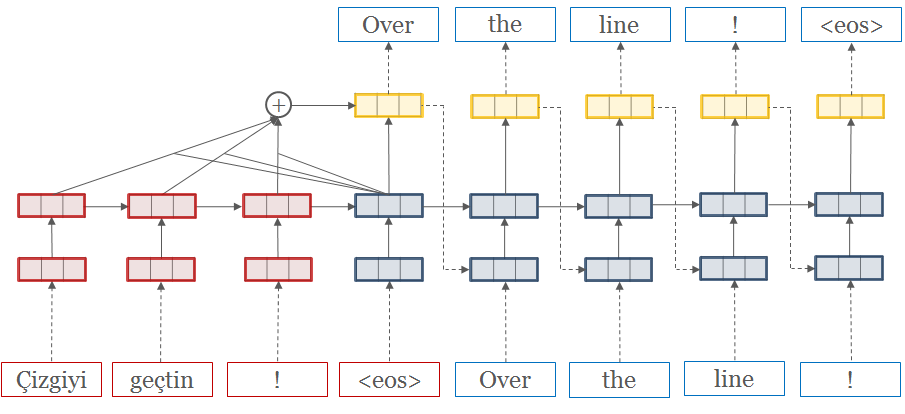
This is a Pytorch port of OpenNMT, an open-source (MIT) neural machine translation system. It is designed to be research friendly to try out new ideas in translation, summary, image-to-text, morphology, and many other domains. Some companies have proven the code to be production ready.
We love contributions. Please consult the Issues page for any Contributions Welcome tagged post.
Before raising an issue, make sure you read the requirements and the documentation examples.
Unless there is a bug, please use the Forum or Gitter to ask questions.
Table of Contents
Requirements
Install OpenNMT-py from pip:
pip install OpenNMT-py
or from the sources:
git clone https://github.com/OpenNMT/OpenNMT-py.git
cd OpenNMT-py
python setup.py install
Note: If you have MemoryError in the install try to use pip with --no-cache-dir.
(Optionnal) some advanced features (e.g. working audio, image or pretrained models) requires extra packages, you can install it with:
pip install -r requirements.opt.txt
Note:
- some features require Python 3.5 and after (eg: Distributed multigpu, entmax)
- we currently only support PyTorch 1.2 (should work with 1.1)
Features
- Seq2Seq models (encoder-decoder) with multiple RNN cells (lstm/gru) and attention (dotprod/mlp) types
- Transformer models"
- Copy and Coverage Attention
- Pretrained Embeddings
- Source word features
- Image-to-text processing
- Speech-to-text processing
- TensorBoard logging
- Multi-GPU training
- Data preprocessing
- Inference (translation) with batching and beam search
- Inference time loss functions.
- [Conv2Conv convolution model]
- SRU "RNNs faster than CNN" paper
- Mixed-precision training with APEX, optimized on Tensor Cores
Quickstart
Step 1: Preprocess the data
onmt_preprocess -train_src data/src-train.txt -train_tgt data/tgt-train.txt -valid_src data/src-val.txt -valid_tgt data/tgt-val.txt -save_data data/demo
We will be working with some example data in data/ folder.
The data consists of parallel source (src) and target (tgt) data containing one sentence per line with tokens separated by a space:
src-train.txttgt-train.txtsrc-val.txttgt-val.txt
Validation files are required and used to evaluate the convergence of the training. It usually contains no more than 5000 sentences.
After running the preprocessing, the following files are generated:
demo.train.pt: serialized PyTorch file containing training datademo.valid.pt: serialized PyTorch file containing validation datademo.vocab.pt: serialized PyTorch file containing vocabulary data
Internally the system never touches the words themselves, but uses these indices.
Step 2: Train the model
onmt_train -data data/demo -save_model demo-model
The main train command is quite simple. Minimally it takes a data file
and a save file. This will run the default model, which consists of a
2-layer LSTM with 500 hidden units on both the encoder/decoder.
If you want to train on GPU, you need to set, as an example:
CUDA_VISIBLE_DEVICES=1,3
-world_size 2 -gpu_ranks 0 1 to use (say) GPU 1 and 3 on this node only.
To know more about distributed training on single or multi nodes, read the FAQ section.
Step 3: Translate
onmt_translate -model demo-model_acc_XX.XX_ppl_XXX.XX_eX.pt -src data/src-test.txt -output pred.txt -replace_unk -verbose
Now you have a model which you can use to predict on new data. We do this by running beam search. This will output predictions into pred.txt.
!!! note "Note" The predictions are going to be quite terrible, as the demo dataset is small. Try running on some larger datasets! For example you can download millions of parallel sentences for translation or summarization.
Alternative: Run on FloydHub

Click this button to open a Workspace on FloydHub for training/testing your code.
Pretrained embeddings (e.g. GloVe)
Please see the FAQ: How to use GloVe pre-trained embeddings in OpenNMT-py
Pretrained Models
The following pretrained models can be downloaded and used with translate.py.
Acknowledgements
OpenNMT-py is run as a collaborative open-source project. The original code was written by Adam Lerer (NYC) to reproduce OpenNMT-Lua using Pytorch.
Major contributors are: Sasha Rush (Cambridge, MA) Vincent Nguyen (Ubiqus) Ben Peters (Lisbon) Sebastian Gehrmann (Harvard NLP) Yuntian Deng (Harvard NLP) Guillaume Klein (Systran) Paul Tardy (Ubiqus / Lium) François Hernandez (Ubiqus) Jianyu Zhan (Shanghai) [Dylan Flaute](http://github.com/flauted (University of Dayton) and more !
OpentNMT-py belongs to the OpenNMT project along with OpenNMT-Lua and OpenNMT-tf.
Citation
OpenNMT: Neural Machine Translation Toolkit
@inproceedings{opennmt,
  author    = {Guillaume Klein and
               Yoon Kim and
               Yuntian Deng and
               Jean Senellart and
               Alexander M. Rush},
  title     = {Open{NMT}: Open-Source Toolkit for Neural Machine Translation},
  booktitle = {Proc. ACL},
  year      = {2017},
  url       = {https://doi.org/10.18653/v1/P17-4012},
  doi       = {10.18653/v1/P17-4012}
}
3 maintainers


Metadata
3 maintainers
Release files for rxn-opennmt-py 1.1.5
For a detailed explanation of source distributions (sdists) and built distributions (wheels), please see the package formats documentation.
Source distribution (sdist)
| File | Size | Uploaded | Provenance | |
|---|---|---|---|---|
| rxn-opennmt-py-1.1.5.tar.gz | 149.4 kB | Without provenance | Details |
Built distribution (wheel)
| File | Interpreter | ABI | Platform | Reset |
|---|---|---|---|---|
| rxn_opennmt_py-1.1.5-py3-none-any.whl | Python 3 | none | any | Details |
Total release size: 333.2 kB
Release files / rxn-opennmt-py-1.1.5.tar.gz
| Download URL | rxn-opennmt-py-1.1.5.tar.gz |
|---|---|
| Size | 149.4 kB |
| Tags | Source |
|
SHA-256 checksum How to use checksums |
07c60af08b699fab5fd76579afec1cdaec7e9fb263a5a542a6b79278d1330235
|
|
BLAKE2b-256 checksum How to use checksums |
ba3ffac721f9c7c9dc43acf05d59d5a8fba7ec5d03cd805dc4d26f93541fd0ea
|
| Upload date | |
|
Uploaded using Trusted Publishing? What is trusted publishing? |
No |
| Uploaded via |
twine/4.0.2 CPython/3.11.5
|
Release files / rxn_opennmt_py-1.1.5-py3-none-any.whl
| Download URL | rxn_opennmt_py-1.1.5-py3-none-any.whl |
|---|---|
| Size | 183.8 kB |
| Tags | Python 3 |
|
SHA-256 checksum How to use checksums |
4ca3cc9d70cb39f2e945ca74a9b7b5cc22b6450cad9e5f1bf69b773ab3939110
|
|
BLAKE2b-256 checksum How to use checksums |
b670c1216e544dd11c24dc6d41c83c68b997d5fa5b5b487fb0a8ca3b1fbce202
|
| Upload date | |
|
Uploaded using Trusted Publishing? What is trusted publishing? |
No |
| Uploaded via |
twine/4.0.2 CPython/3.11.5
|
Security for rxn-opennmt-py 1.1.5
Provenance
Provenance describes where a file came from. On PyPI, provenance is shared via attestations, which provide a verifiable record of the build or publishing details. View details, limitations and caveats.
No provenance found
None of the files in this release were uploaded with provenance metadata.
A note on package security
PyPI is a repository for distributing packages, not a service for auditing them. While third-party security researchers and our staff do their best to detect and remove malicious packages, PyPI cannot guarantee the quality, security or suitability of any given package.
To learn more about protecting yourself from malicious actors, visit our package security documentation.














