

Ryde CLI







An unofficial CLI, local map dashboard, and MCP server for your Ryde account. Export ride history, map recorded routes, inspect passes and payments, and compare RidePass costs.
Login uses SMS. Account commands are read only.
Quick start · Dashboard · Commands · MCP · Claude / Codex · Development
Quick start
Requires uv on macOS or Linux. Python 3.11+ is required; uv can install a compatible interpreter. Windows is not currently supported because local secrets use Unix file permissions.
Run directly from PyPI, without cloning:
uvx --from ryde-cli ryde --help
uvx --from ryde-cli ryde login
uvx --from ryde-cli ryde stats
Or clone it for local use and development:
git clone https://github.com/HelgeSverre/ryde-cli.git
cd ryde-cli
uv sync --locked
uv run ryde --help
uv run ryde login
uv run ryde stats
The examples below use uv run from a checkout. To run them anywhere, replace
uv run with uvx --from ryde-cli.
For a persistent installation, see distribution.
Login
# Prompts for your phone number, asks before sending an SMS, then asks for the code.
uv run ryde login

# Supply your number and optional location explicitly.
uv run ryde login --phone '<your E.164 phone number>' --latitude 60.39 --longitude 5.32

# Non-interactive login: request one SMS, then complete that request separately.
uv run ryde login --phone '<your E.164 phone number>' --send-sms
uv run ryde login --phone '<your E.164 phone number>' --sms-code '<code>'
Local numbers default to country code +47; set --country-code for another
country. For an international number, supply the matching country code too.
A second SMS request is refused for 60 seconds unless --force is supplied.
Image challenges must be completed in the official app.
The token, stable device ID, and client profile are saved to
~/.config/ryde-cli/config.json with owner-only permissions (0600). Login
does not print the token. Use RYDE_CONFIG or --config FILE to select a
different config file. Never commit that file.
Map your rides
After authentication, one command fetches completed rides and opens the bundled dashboard:
uv run ryde stats

# Include precise stored GPS route traces; default uses ride start/end points.
uv run ryde stats --include-location

# Agent / headless use: fetch, start the local server, and return its URL.
uv run ryde stats --include-location --no-open

# Reopen cached data without API calls, or fetch without starting a server.
uv run ryde stats --no-fetch
uv run ryde stats --include-location --fetch-only

# Stop a running dashboard; it also expires after one hour by default.
uv run ryde stats --stop '<dashboard-url>'
No Node installation or separate webapp is needed. The dashboard links an interactive map with filters, charts, raw ride details, and pass-independent ride metrics. It centres on your rides rather than a fixed city. Failed or missing traces fall back to start/end arcs; completed route requests are cached so an interrupted export can resume.
Data is saved outside the repo in a private, login-scoped directory under
~/.local/share/ryde-cli/stats/ (or XDG_DATA_HOME). Standard ride records include
endpoint coordinates; --include-location also fetches the full recorded route.
The server uses a random 127.0.0.1 URL and serves only its dataset and bundled
UI. Treat the URL as private. OpenFreeMap supplies public map tiles; no Ryde
token or ride records are sent to it, but tile requests reveal the viewed area.
Remote agents cannot expose their loopback URL on a user's laptop automatically.
See dashboard storage and automation.
Dashboard preview
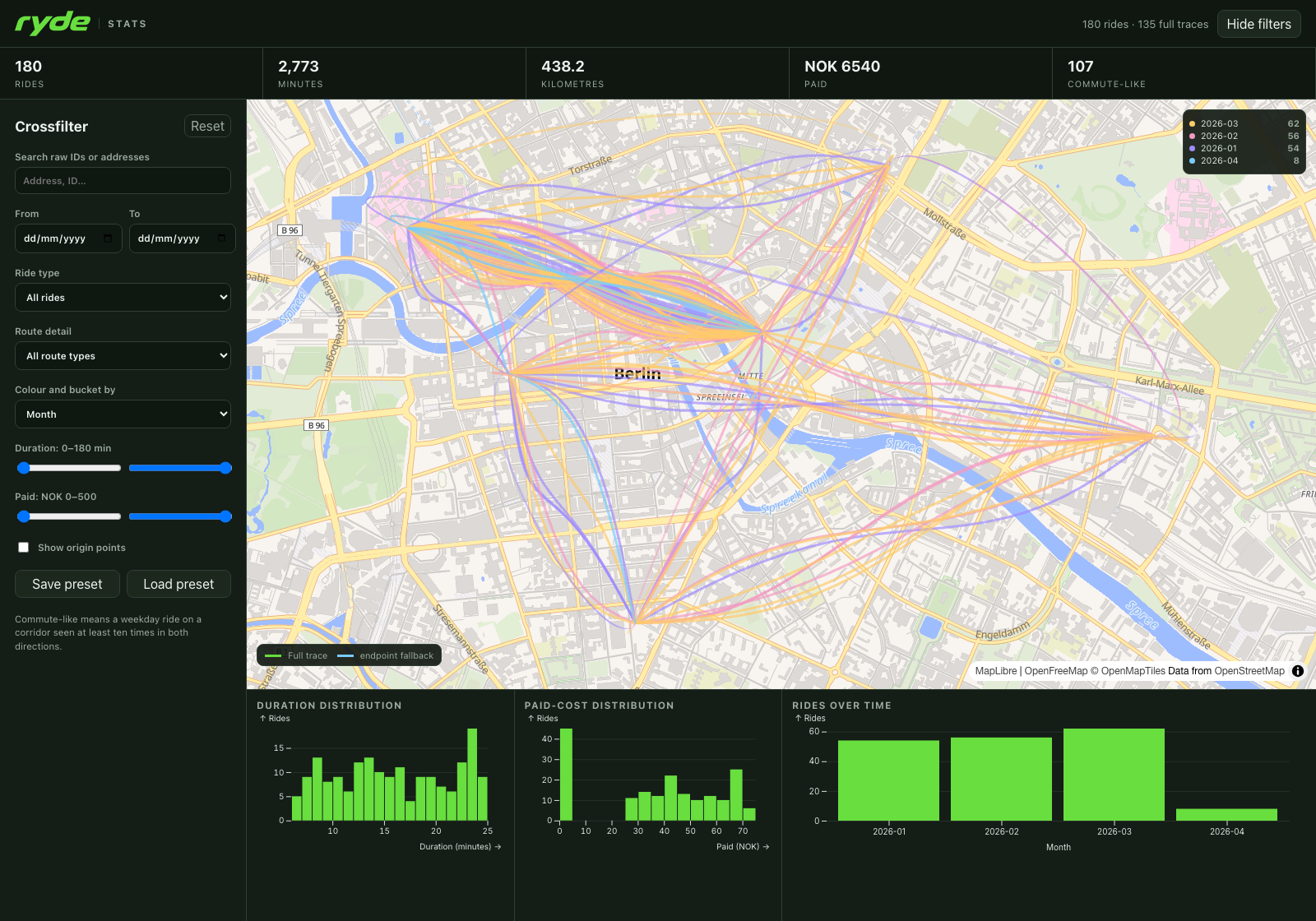
180 generated demo rides, including 135 route traces.
All commands
Every row below is prefixed with uv run ryde. The
full command reference includes every flag and help screen.
| Command | Purpose / command-specific arguments |
|---|---|
--help |
Show help; also available for every command and group |
--version |
Show package version |
login |
SMS login; --phone, --country-code, --send-sms, --sms-code, --force, --device, --phone-info, --latitude, --longitude |
account profile |
Your account/profile record |
account active-ride |
Current ride status |
rides list |
Completed rides; --start YYYY-MM-DD, --end YYYY-MM-DD |
rides detail USE_ID |
A completed ride |
rides order ORDER_ID |
A ride's linked charge/order |
rides route USE_ID --include-location |
Recorded GPS route; requires location acknowledgement |
passes catalogue --city-id CITY_ID |
Current RidePass products and prices |
passes owned |
Currently owned/active passes |
passes history |
Pass/recharge history; --page N or --all |
payments vipps |
Vipps order history; --page N or --all |
payments recharge-detail RECHARGE_ID |
One recharge/pass receipt |
payments month-amount YYYY-MM |
Monthly account amount data |
payments recharge-month YYYY-MM |
Monthly recharge data |
fees --city-id CITY_ID |
City fare rules |
summary |
Totals and monthly trends; --start, --end |
optimize --city-id CITY_ID |
Current-price pass comparison; --start, --end |
stats |
Fetch and open the map; --include-location, --fetch-only, --no-fetch, --no-open, --data-dir, --start, --end, --port, --ttl, --stop URL |
skill --agent codex|claude |
Install the workflow skill; --scope project|user (default project), --force |
export RESOURCE |
Save a resource; --start, --end, --city-id, --page, --all where applicable |
export supports all nine resources: rides, profile, catalogue,
owned-passes, recharges, vipps, fee-rule, summary, and recommendation.
For city-specific exports, pass --city-id explicitly; its export default is 15.
Page numbering starts at 0. Date ranges are inclusive and default to
2018-01-01 through today. Ride fetching starts with the requested start year's
archive and includes the current partition when applicable. Future-year
partitions are skipped. Available history depends on what Ryde retains.
Global options are --config FILE, --base-url URL, and --mobile-type TEXT.
All commands support --format json|csv|tsv|table; all data commands also
support --output FILE. Common options can appear before or after nested
subcommands when supplied as separate arguments (--format csv).
Output and exports
JSON is the default. CSV/TSV flatten nested objects into dot-separated fields and encode nested arrays as JSON. Table output is a compact preview limited to eight columns and 48 characters per cell; use JSON for complete records.
uv run ryde account profile --format table
uv run ryde rides list --start 2026-01-01 --end 2026-12-31 --format csv --output ryde-rides.csv
uv run ryde rides detail '<use-id>'
uv run ryde rides order '<order-id>'
uv run ryde rides route '<use-id>' --include-location --output ryde-route.json
uv run ryde passes catalogue --city-id 15 --format table
uv run ryde passes history --all --output ryde-passes.json
uv run ryde payments vipps --all --format tsv --output ryde-vipps.tsv
uv run ryde payments recharge-detail '<recharge-id>'
uv run ryde payments month-amount 2026-08
uv run ryde payments recharge-month 2026-08
uv run ryde fees --city-id 15
uv run ryde export rides --format csv --output ryde-rides.csv
uv run ryde export recommendation --city-id 15 --output ryde-analysis.json
--output writes atomically with permissions 0600. export saves to
ryde-RESOURCE.FORMAT if no path is supplied. Redirecting stdout uses your
shell's file permissions instead. Exports can contain addresses, payment
references, and account information; route exports include precise GPS history.
Summaries and RidePass analysis
uv run ryde summary --start 2026-08-01
uv run ryde optimize --city-id 15 --start 2026-08-01
summary reports paid and nominal amounts, distance, duration, averages,
currency grouping, and monthly trends. API amounts are converted from minor
units. Duration comes from a duration field or the ride's timestamps.
optimize compares your history with current city fares and pass prices.
It returns single-product comparisons and a non-overlapping mixed purchase
timeline. Included started minutes are consumed across rides inside each
pass's validity window; a ride crossing the allowance pays metered overflow.
Later rides in an exhausted pass window pay full PAYG.
The model assumes every ride is pass eligible. It does not reconstruct historic prices or unknown parking/geographic exclusions, and cannot guarantee future savings. Each result includes the assumptions used.
MCP server
The package also includes a stdio MCP server. Log in first using the same config path as your MCP client. Launch it through uv:
uvx --from ryde-cli ryde-mcp
# Or, from a local checkout:
uv run ryde-mcp
For clients that accept an mcpServers JSON configuration:
{
  "mcpServers": {
    "ryde": {
      "command": "uvx",
      "args": ["--from", "ryde-cli", "ryde-mcp"],
      "env": {"RYDE_CONFIG": "/absolute/path/to/your/ryde-config.json"}
    }
  }
}
Use an absolute path to uvx if a desktop app cannot find it on PATH. For
reproducible deployments, pin the package version (ryde-cli==0.1.1).
The server uses stdout for MCP messages and stderr for diagnostics.
| Tools | Purpose |
|---|---|
account_profile, current_ride |
Account and current status |
list_rides, ride_detail, ride_order |
Completed rides and charges |
ride_route |
GPS route; requires include_sensitive_location=true |
pass_catalogue, owned_passes |
Current products and owned passes |
recharge_history, recharge_detail, vipps_payment_history |
Purchase/payment history |
account_month_amount, recharge_month, city_fee_rule |
Monthly data and city fares |
ride_summary, recommend_ridepass |
Local summaries and cost comparisons |
prepare_stats, open_stats |
Start background export / fetch-and-open jobs |
stats_job_status, close_stats |
Poll a job / stop a dashboard |
There are 20 tools. open_stats and prepare_stats return a job_id immediately;
poll stats_job_status for completion. open_stats(refresh=false) opens an existing
dataset immediately. This lets large exports complete without one long tool call.
Resources: ryde://account/summary and ryde://city/{city_id}/passes.
For MCP registration commands and the bundled workflow skill, see Claude Code and Codex setup. From a checkout, explicit skill installation is:
uv run ryde skill --agent codex --scope user
uv run ryde skill --agent claude --scope user
Skill setup and MCP registration are separate steps.
Configuration
config.example.json documents non-secret config fields. Login creates the real config; copying the example does not authenticate you.
| Setting | CLI / environment | Notes |
|---|---|---|
| Config path | --config, RYDE_CONFIG |
Default: ~/.config/ryde-cli/config.json |
| Token | RYDE_TOKEN |
Overrides saved token |
| API URL | --base-url, RYDE_BASE_URL |
Overrides saved/default URL |
| Android descriptor | --mobile-type, RYDE_MOBILE_TYPE |
Overrides saved/default descriptor |
| Device ID | Login --device, RYDE_DEVICE_ID |
Generated if absent |
| Phone info | Login --phone-info, RYDE_PHONE_INFO |
Android phone string |
| Country code | Login --country-code, RYDE_COUNTRY_CODE |
Default: +47 |
| Login location | --latitude, --longitude, RYDE_LATITUDE, RYDE_LONGITUDE |
Defaults to 0, 0; used only for login |
Use only an account you own or are authorized to access. Keep configs and exports out of version control. Data may contain private identifiers beyond GPS, so review output before sharing it with another person or an AI agent. See API compatibility for request signing and endpoint mapping.
Shell completion
For Bash in a local checkout, install the project environment and register completion:
uv sync --locked
eval "$(uv run register-python-argcomplete ryde)"
For Zsh, enable Bash-compatible completion first:
autoload -U bashcompinit
bashcompinit
eval "$(uv run register-python-argcomplete ryde)"
Troubleshooting
- Authentication missing / 401: run
uv run ryde loginagain. Check whetherRYDE_TOKENis overriding a newer saved token. - 403 / version or network error: the private API or compatible request profile may have changed. Check for updates; retry with the default profile.
- Image challenge: complete login in the official app; this tool cannot bypass the challenge.
- Duplicate SMS refused: wait one minute. Use
--forceonly when you know the previous request did not reach Ryde. - Missing history: try
--allfor payment/pass history. For rides, set--startto include the years you want; the default starts in 2018. - Insecure config permissions: on macOS/Linux, run
chmod 600 /path/to/config.json. - MCP authentication fails: check that login and the server use the same
RYDE_CONFIG, then restart the MCP client.
Development and distribution
See CONTRIBUTING.md for uv setup, tests, linting, and packaging. CI tests Python 3.11–3.14 on Linux and Python 3.14 on macOS, checks generated docs, builds and smoke-tests distributions, and runs dependency audits and CodeQL.
See distribution and releases for installation options and the PyPI release workflow. Licensed under MIT.
1 maintainer

Metadata
1 maintainer
Release files for ryde-cli 0.1.1
For a detailed explanation of source distributions (sdists) and built distributions (wheels), please see the package formats documentation.
Source distribution (sdist)
| File | Size | Uploaded | |
|---|---|---|---|
| ryde_cli-0.1.1.tar.gz | 4.2 MB | Details |
Built distribution (wheel)
| File | Interpreter | ABI | Platform | Reset |
|---|---|---|---|---|
| ryde_cli-0.1.1-py3-none-any.whl | Python 3 | none | any | Details |
Total release size: 5.1 MB
Release files / ryde_cli-0.1.1.tar.gz
| Download URL | ryde_cli-0.1.1.tar.gz |
|---|---|
| Size | 4.2 MB |
| Tags | Source |
|
SHA-256 checksum How to use checksums |
d423063d57be552d363a9a1a49c7ad99f2ed096bcbc3af2ddac7a1a585d43463
|
|
BLAKE2b-256 checksum How to use checksums |
3d814f43618a04701fc7f34b073793ead084044031876a4075f450dc691b5a59
|
| Upload date | |
|
Uploaded using Trusted Publishing? What is trusted publishing? |
Yes |
| Uploaded via |
uv/0.13.1 {"installer":{"name":"uv","version":"0.13.1","subcommand":["publish"]},"python":null,"implementation":{"name":null,"version":null},"distro":{"name":"Ubuntu","version":"24.04","id":"noble","libc":null},"system":{"name":null,"release":null},"cpu":null,"openssl_version":null,"setuptools_version":null,"rustc_version":null,"ci":true}
|
Provenance
Provenance describes where a file came from. On PyPI, provenance is shared via attestations, which provide a verifiable record of the build or publishing details. View details, limitations and caveats.


PyPI Publish Attestation
PyPI verified that this artifact, at this checksum, originated from the publisher listed below.
Signed by GitHub Actions, verified by PyPI on Oct 16, 2026.
Transparency logRelease files / ryde_cli-0.1.1-py3-none-any.whl
| Download URL | ryde_cli-0.1.1-py3-none-any.whl |
|---|---|
| Size | 958.4 kB |
| Tags | Python 3 |
|
SHA-256 checksum How to use checksums |
ee1e1abde85a0c47671f4db921b9fc002cdf426535a5c7c4842b87848c3ce098
|
|
BLAKE2b-256 checksum How to use checksums |
e26db50370e9ed35e1fd6e55262db3117b05babbd29fdc412d927be56dfbb91d
|
| Upload date | |
|
Uploaded using Trusted Publishing? What is trusted publishing? |
Yes |
| Uploaded via |
uv/0.13.1 {"installer":{"name":"uv","version":"0.13.1","subcommand":["publish"]},"python":null,"implementation":{"name":null,"version":null},"distro":{"name":"Ubuntu","version":"24.04","id":"noble","libc":null},"system":{"name":null,"release":null},"cpu":null,"openssl_version":null,"setuptools_version":null,"rustc_version":null,"ci":true}
|
Provenance
Provenance describes where a file came from. On PyPI, provenance is shared via attestations, which provide a verifiable record of the build or publishing details. View details, limitations and caveats.
PyPI Publish Attestation
PyPI verified that this artifact, at this checksum, originated from the publisher listed below.
Signed by GitHub Actions, verified by PyPI on Oct 16, 2026.
Transparency log













