
Python CLI for convenient emptying of S3 bucket

Project description





S3Empty
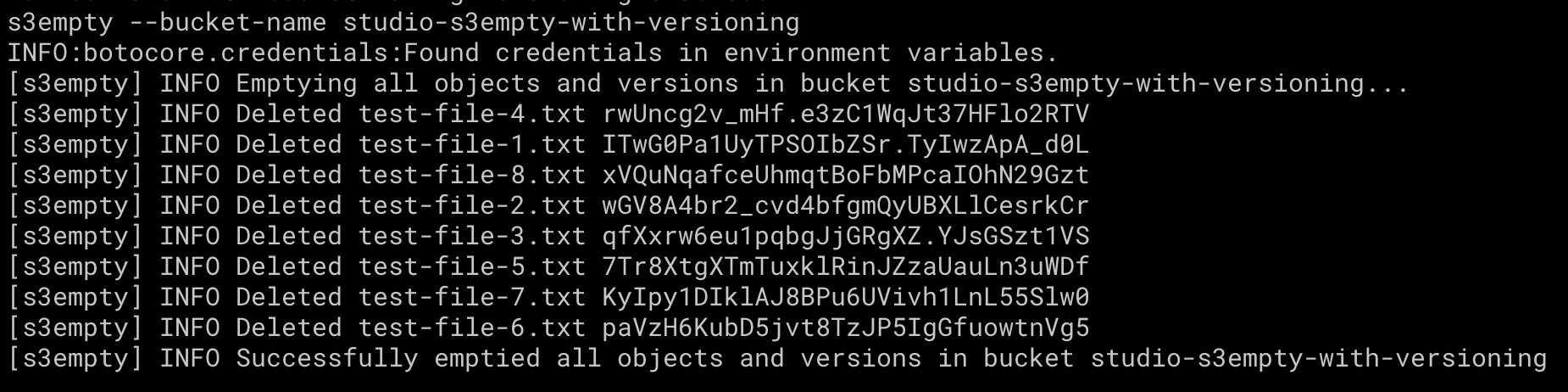
S3Empty is a Python CLI for conveniently emptying an AWS S3 bucket.
This tool is useful when you want to delete all objects in a bucket before deleting the bucket itself. It handles versioned and non-versioned S3 buckets.
BucketNotEmpty: The bucket you tried to delete is not empty. You must delete all versions in the bucket.
Installation
pip3 install s3empty
Usage
Run S3Empty with specified bucket name:
s3empty --bucket-name some-bucket
Run S3Empty with a configuration file containing the bucket names:
s3empty --conf-file path/to/some-conf-file.yaml
By default, S3Empty will raise an error if the bucket does not exist. However, there will be scenarios where the S3 bucket you want to empty does not exist or no longer exists. You can use the --allow-inexisting flag to allow inexisting buckets and S3Empty will display a warning message and exits without raising any error:
s3empty --bucket-name some-bucket --allow-inexisting
Show help guide:
s3empty --help
Configuration
You can specify multiple bucket names in S3Empty configuration file and give it a name with .yaml extension, e.g. some-conf-file.yaml :
---
bucket_names:
  - some-bucket-1
  - some-bucket-2
And then call S3Empty:
s3empty --conf-file path/to/some-conf-file.yaml
The configuration file also supports Jinja template where environment variables are available for use. You can give this configuration template a name with .yaml.j2 extension, e.g. some-conf-file.yaml.j2 .
For example, if there is an environment variable ACCOUNT_ID=1234567 , you can specify it in the configuration file:
---
bucket_names:
  - some-{{ env.ACCOUNT_ID }}-bucket-1
  - some-{{ env.ACCOUNT_ID }}-bucket-2
And then call S3Empty:
s3empty --conf-file path/to/some-conf-file.yaml.j2
Permission
Here's an IAM policy with minimum permissions required by S3Empty:
{
    "Version": "2012-10-17",
    "Statement": [
        {
            "Sid": "S3EmptyPolicy",
            "Effect": "Allow",
            "Action": [
                "s3:GetBucketVersioning",
                "s3:ListBucket",
                "s3:ListBucketVersions",
                "s3:DeleteObject",
                "s3:DeleteObjectVersion",
            ],
            "Resource": [
                "arn:aws:s3:::some-bucket",
                "arn:aws:s3:::some-bucket/*"
            ]
        }
    ]
}
Colophon
Build reports:


Download files
Download the file for your platform. If you're not sure which to choose, learn more about installing packages.
Source Distribution
Built Distribution
Filter files by name, interpreter, ABI, and platform.
If you're not sure about the file name format, learn more about wheel file names.
Copy a direct link to the current filters
File details
Details for the file s3empty-1.2.0.tar.gz.
File metadata
- Download URL: s3empty-1.2.0.tar.gz
- Upload date:
- Size: 7.8 kB
- Tags: Source
- Uploaded using Trusted Publishing? No
- Uploaded via: poetry/1.8.4 CPython/3.12.7 Linux/6.5.0-1025-azure
File hashes
| Algorithm | Hash digest | |
|---|---|---|
| SHA256 |
2525708b61523efcabb465e11e40dd2d2a61c96c55ef61ae3d929c28da6497d6
|
|
| MD5 |
26a7328b693ac74a894820cf5c0abc5b
|
|
| BLAKE2b-256 |
f5b34f39e08f2a193b59775e08ad28b8b2eb934270cb000ea90b48d65e6092c5
|
File details
Details for the file s3empty-1.2.0-py3-none-any.whl.
File metadata
- Download URL: s3empty-1.2.0-py3-none-any.whl
- Upload date:
- Size: 8.6 kB
- Tags: Python 3
- Uploaded using Trusted Publishing? No
- Uploaded via: poetry/1.8.4 CPython/3.12.7 Linux/6.5.0-1025-azure
File hashes
| Algorithm | Hash digest | |
|---|---|---|
| SHA256 |
8c378e077350a728f6f9d2764b31be57400ca519103673a5696a36b69fb51406
|
|
| MD5 |
ab2005c4d67b8003b6863cf63552fa4a
|
|
| BLAKE2b-256 |
6dc6d1abf03f2d1ef1b7ad2a850fe81fb306a2280aa6105da183abb51af12b3f
|






