
s3lst-ds: a package for downscaling Sentinel-3 LST data using a scale-invariance-based model










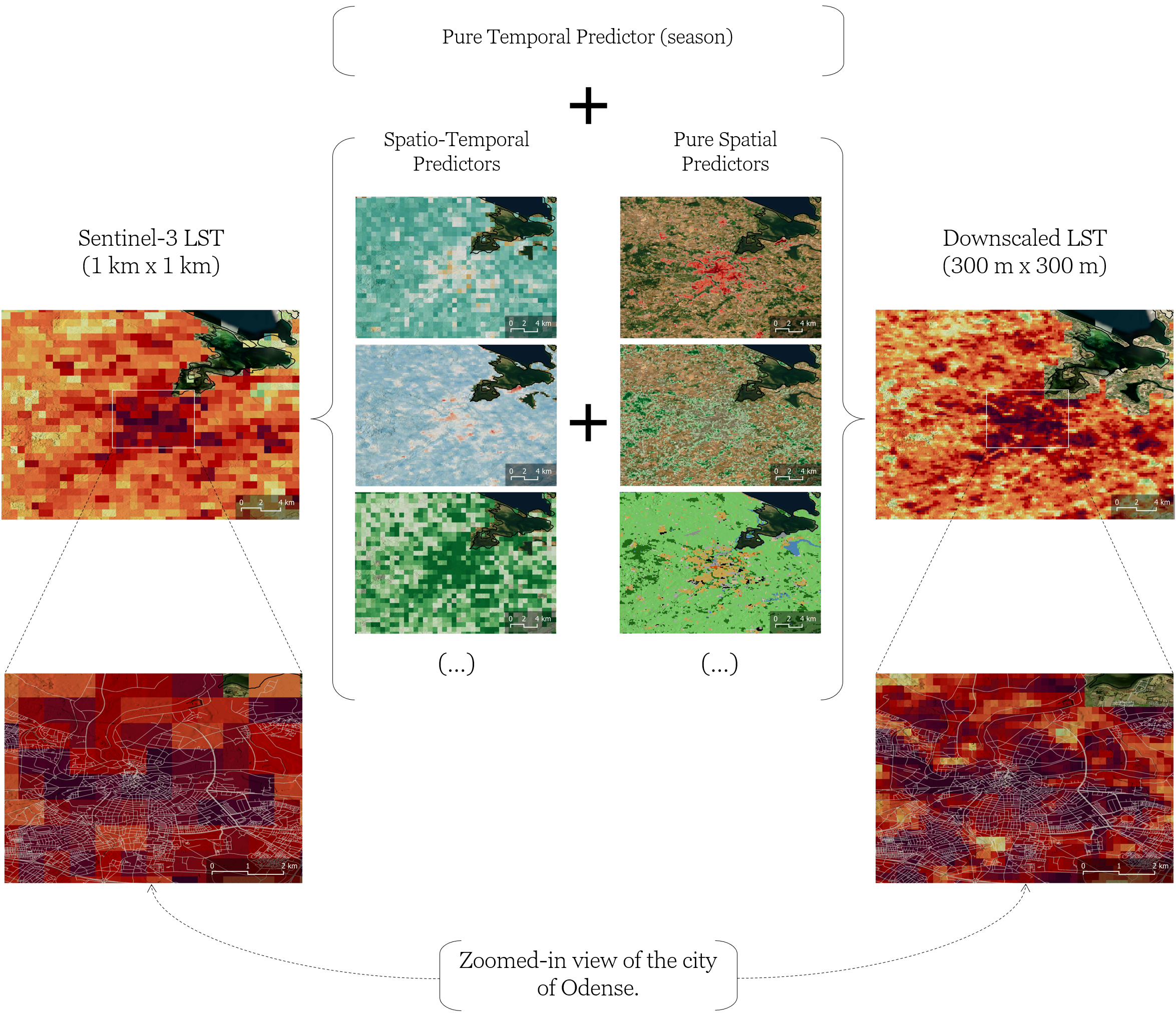
s3lst-ds provides pipelines for conveniently querying, downloading, filtering and downscaling Sentinel-3 LST data using either single or multi-timestamp scale-invariance-based models.
Requirements
To be able to install and use the s3lst-ds package in your project, you would need:
Installation
1. Install package from PyPI
-
Install the latest stable release from PyPI in the activated virtual environment using
uv:uv add s3lst-ds
2. Set CDSE credentials
-
Safely set your CDSE credentials as environment variables of the system:
uv run s3lst-ds-set-cdse
3. Install esa-snappy (optional)
-
Install
esa-snappyPython package usinguv:uv add s3lst-ds[snap]
-
Install the backend
SNAPJava package (if not already installed) and subsequently configure it usinguv:uv run s3lst-ds-install-snap
Documentation
The full documentation is available at GitHub Pages.
Contributing
If you are a project developer, please read CONTRIBUTING.md to assimilate the development workflow, build Docker images from the project source code and locally run them.
Releasing
If you are a project maintainer, please read RELEASING.md to know how to build and publish the package to PyPI, create GitHub releases and publish the documentation to GitHub Pages after successful merge pull requests.
Acknowledgments
This package was produced within the CLIM4cities project funded by the European Space Agency (ESA Contract No. 4000143628/24/I-DT, AI Trustworthy Applications for Climate) and by the Recovery and Resilience Plan Investment RE-C05-i02: Interface Mission - CoLAB, certified by the National Innovation Agency (Project N.º 01/C05-i02/2022).
Citation
If you use s3lst-ds in research or software, please cite the
companion paper. The respective citation
information is provided in
CITATION.cff and
may be download in APA or BibTeX formats through button Cite this repository in the
About section of the GitHub repo page.
License
s3lst-ds is licensed under the terms of the
MIT license.
1 maintainer

Metadata
1 maintainer
Release files for s3lst-ds 0.1.19
For a detailed explanation of source distributions (sdists) and built distributions (wheels), please see the package formats documentation.
Source distribution (sdist)
| File | Size | Uploaded | |
|---|---|---|---|
| s3lst_ds-0.1.19.tar.gz | 4.2 MB | Details |
Built distribution (wheel)
| File | Interpreter | ABI | Platform | Reset |
|---|---|---|---|---|
| s3lst_ds-0.1.19-py3-none-any.whl | Python 3 | none | any | Details |
Total release size: 4.4 MB
Release files / s3lst_ds-0.1.19.tar.gz
| Download URL | s3lst_ds-0.1.19.tar.gz |
|---|---|
| Size | 4.2 MB |
| Tags | Source |
|
SHA-256 checksum How to use checksums |
5d3e1eeb830050faeda6136634a11f967df1a2665cdea3d2dc8d7ba2a1fa0b51
|
|
BLAKE2b-256 checksum How to use checksums |
db1e19ee986981a075fb8536e53ce8b94074a22d9f000b259be7d8ef998b202a
|
| Upload date | |
|
Uploaded using Trusted Publishing? What is trusted publishing? |
Yes |
| Uploaded via |
uv/0.12.17 {"installer":{"name":"uv","version":"0.12.17","subcommand":["publish"]},"python":null,"implementation":{"name":null,"version":null},"distro":{"name":"Ubuntu","version":"24.04","id":"noble","libc":null},"system":{"name":null,"release":null},"cpu":null,"openssl_version":null,"setuptools_version":null,"rustc_version":null,"ci":true}
|
Provenance
Provenance describes where a file came from. On PyPI, provenance is shared via attestations, which provide a verifiable record of the build or publishing details. View details, limitations and caveats.


PyPI Publish Attestation
PyPI verified that this artifact, at this checksum, originated from the publisher listed below.
Signed by GitHub Actions, verified by PyPI on Sep 22, 2026.
Transparency logRelease files / s3lst_ds-0.1.19-py3-none-any.whl
| Download URL | s3lst_ds-0.1.19-py3-none-any.whl |
|---|---|
| Size | 166.0 kB |
| Tags | Python 3 |
|
SHA-256 checksum How to use checksums |
d6172f79fac7f46b79d9982d5a9d49b55a560c60e2fe38962bfb549b4faaeebf
|
|
BLAKE2b-256 checksum How to use checksums |
7dda058f35d81991049d784dfb744e0e53b08cfd5b329244bce4f2804847e915
|
| Upload date | |
|
Uploaded using Trusted Publishing? What is trusted publishing? |
Yes |
| Uploaded via |
uv/0.12.17 {"installer":{"name":"uv","version":"0.12.17","subcommand":["publish"]},"python":null,"implementation":{"name":null,"version":null},"distro":{"name":"Ubuntu","version":"24.04","id":"noble","libc":null},"system":{"name":null,"release":null},"cpu":null,"openssl_version":null,"setuptools_version":null,"rustc_version":null,"ci":true}
|
Provenance
Provenance describes where a file came from. On PyPI, provenance is shared via attestations, which provide a verifiable record of the build or publishing details. View details, limitations and caveats.
PyPI Publish Attestation
PyPI verified that this artifact, at this checksum, originated from the publisher listed below.
Signed by GitHub Actions, verified by PyPI on Sep 22, 2026.
Transparency log













