
Overview
Stream files to AWS S3 using multipart upload.
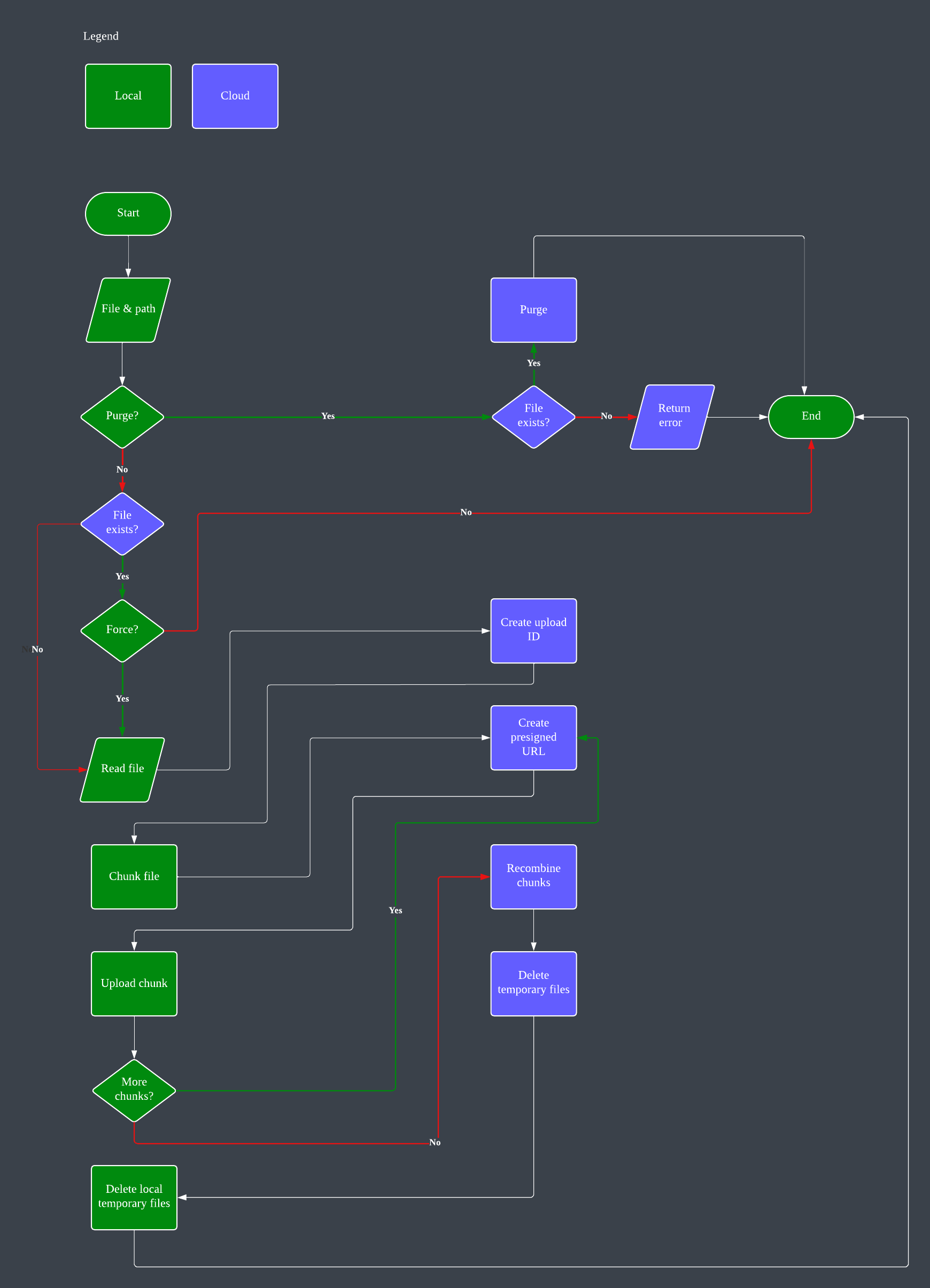
A frontend module to upload files to AWS S3 storage. The module supports large files as it chunks them into smaller sizes and recombines them into the original file in the specified S3 bucket. It employs multiprocessing, and there is the option of specifying the size of each chunk as well as how many chunks to send in a single run. The defaults are listed in Optional Arguments below.
The solution provides a dashboard in CloudWatch to monitor file operations. You may also need to manually deploy the API in API Gateway after deployment and changes.
Prerequisites
An AWS S3 bucket to receive uploads.
An AWS Lambda function to perform backend tasks.
The AWS CloudFormation template to create these resources is available, or login to your AWS account and click on this quick link.
The endpoint URL and API key will be created by CloudFormation. They can be found in the stack’s Outputs section.
Required Arguments
file_name (local full / relative path to the file)
Optional Arguments
path: Destination path in the S3 bucket (default: “” for the root of the bucket)
request_url: URL of the API endpoint (default: None)
request_api_key: API key for the endpoint (default: None)
parts: Number of multiprocessing parts to send simultaneously (default: 10)
part_size: Size of each part in MB (default: 100)
tmp_path: Location of local temporary directory to store temporary files created by the module (default: “/tmp”)
purge: Whether to purge the specified file instead of uploading it (default: False)
force: Whether to force the upload even if the file already exists in the S3 bucket (default: False)
Usage
Installation in BASH:
pip3 install s3streamer
# or
python3 -m pip install s3streamer
In Python3:
To upload a file to S3:
import s3streamer

if __name__ == "__main__":
   response = s3streamer.stream(
      "myfile.iso",
      path="",
      request_url="https://s3streamer.api.example.com/upload",
      request_api_key="my-api-key",
      parts=5,
      part_size=30,
      tmp_path="/Users/me/Desktop",
      purge=False,
      force=False
   )
   print(response)
To remove a file from S3:
import s3streamer

if __name__ == "__main__":
   response = s3streamer.stream(
      "myfile.iso",
      path="",
      request_url="https://s3streamer.api.example.com/upload",
      request_api_key="my-api-key",
      purge=True
   )
   print(response)
To simplify operations, the endpoint and API key can also be set as environment variables:
export S3STREAMER_ENDPOINT="https://s3streamer.api.example.com/upload"
export S3STREAMER_API_KEY="my-api-key"
By doing so, the upload command can be simplified to:
import s3streamer

if __name__ == "__main__":
   response = s3streamer.stream("myfile.iso")
   print(response)
with default values for the optional (keyword) arguments. Or you can use the included CLI tool (all arguments are applicable as shown in the help section below):
streams3 -f myfile.isoHelp can be accessed by running:
streams3 --help

usage: streams3 [options]

Stream files to AWS S3 using multipart upload.

options:
   -h, --help            show this help message and exit
   -V, --version         show program's version number and exit
   -f, --local_file_path [LOCAL_FILE_PATH]
                           Local file path to upload or purge.
   -y, --tgw_only        Transit Gateway details only, no other components.
   -r, --remote_file_path [REMOTE_FILE_PATH]
                           Remote file path in S3 bucket. Default: empty string
                           for root folder.
   -u, --request_url [REQUEST_URL]
                           S3Streamer API endpoint URL. Default:
                           S3STREAMER_ENDPOINT environment variable.
   -k, --request_api_key [REQUEST_API_KEY]
                           S3Streamer API key. Default: S3STREAMER_API_KEY
                           environment variable.
   -p, --parts [PARTS]   Number of parts to upload in parallel. Default: 10.
   -s, --part_size [PART_SIZE]
                           Size of each part in MB. Default: 100.
   -t, --tmp_path [TMP_PATH]
                           Temporary path for chunked files. Default: /tmp.
   -d, --purge [PURGE]   Purge file from S3 storage. Default: False.
   -o, --force [FORCE]   Force upload even if file already exists. Default:
                           False.
If the upload is successful, the file will be available at installer/images/myfile.iso.
1 maintainer

Release files for s3streamer 3.1.1
For a detailed explanation of source distributions (sdists) and built distributions (wheels), please see the package formats documentation.
Source distribution (sdist)
| File | Size | Uploaded | |
|---|---|---|---|
| s3streamer-3.1.1.tar.gz | 8.5 kB | Details |
Built distribution (wheel)
| File | Interpreter | ABI | Platform | Reset |
|---|---|---|---|---|
| s3streamer-3.1.1-py3-none-any.whl | Python 3 | none | any | Details |
Total release size: 16.7 kB
Release files / s3streamer-3.1.1.tar.gz
| Download URL | s3streamer-3.1.1.tar.gz |
|---|---|
| Size | 8.5 kB |
| Tags | Source |
|
SHA-256 checksum How to use checksums |
dedba6b8d2326fa20ccd438ea750f9f375fe3f19e4cbda0c92689c34809877a2
|
|
BLAKE2b-256 checksum How to use checksums |
c61084e55e7d17b97af2dc4be467b66026afeeebe08302d64aeedfbd1020aa86
|
| Upload date | |
|
Uploaded using Trusted Publishing? What is trusted publishing? |
No |
| Uploaded via |
poetry/1.8.2 CPython/3.12.3 Linux/5.15.154+
|
Release files / s3streamer-3.1.1-py3-none-any.whl
| Download URL | s3streamer-3.1.1-py3-none-any.whl |
|---|---|
| Size | 8.2 kB |
| Tags | Python 3 |
|
SHA-256 checksum How to use checksums |
7ae7badf98c997830d553d2c52527c6aa90d77878b5bc2e877307d764112c047
|
|
BLAKE2b-256 checksum How to use checksums |
8e1e30a9512992ccbe3ee3be53103c0552dadb42ad8fe2be52d8c3d5d893f31b
|
| Upload date | |
|
Uploaded using Trusted Publishing? What is trusted publishing? |
No |
| Uploaded via |
poetry/1.8.2 CPython/3.12.3 Linux/5.15.154+
|














