
SAEDashboard
SAEDashboard is a tool for visualizing and analyzing Sparse Autoencoders (SAEs) in neural networks. This repository is an adaptation and extension of Callum McDougal's SAEVis, providing enhanced functionality for feature visualization and analysis as well as feature dashboard creation at scale.
Overview
This codebase was originally designed to replicate Anthropic's sparse autoencoder visualizations, which you can see here. SAEDashboard primarily provides visualizations of features, including their activations, logits, and correlations--similar to what is shown in the Anthropic link.
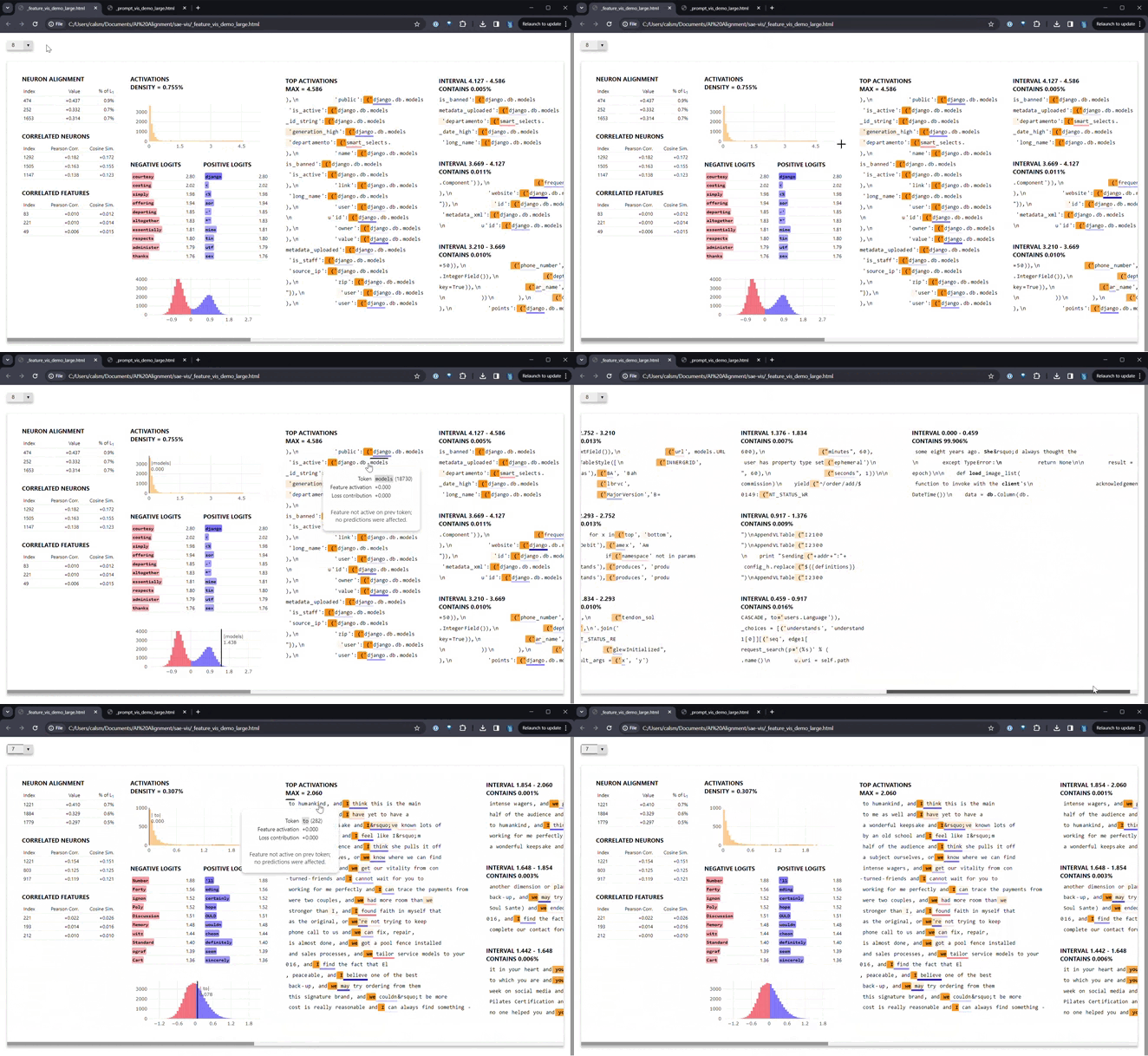
Features
- Customizable dashboards with various plots and data representations for SAE features
- Support for any SAE in the SAELens library
- Neuronpedia integration for hosting and comprehensive neuron analysis (note: this requires a Neuronpedia account and is currently only used internally)
- Ability to handle large datasets and models efficiently
Installation
Install SAEDashboard using pip:
pip install sae-dashboard
Quick Start
Here's a basic example of how to use SAEDashboard with SaeVisRunner:
from sae_lens import SAE
from transformer_lens import HookedTransformer
from sae_dashboard.sae_vis_data import SaeVisConfig
from sae_dashboard.sae_vis_runner import SaeVisRunner

# Load model and SAE
model = HookedTransformer.from_pretrained("gpt2-small", device="cuda", dtype="bfloat16")
sae, _, _ = SAE.from_pretrained(
    release="gpt2-small-res-jb",
    sae_id="blocks.6.hook_resid_pre",
    device="cuda"
)
sae.fold_W_dec_norm()

# Configure visualization
config = SaeVisConfig(
    hook_point=sae.cfg.hook_name,
    features=list(range(256)),
    minibatch_size_features=64,
    minibatch_size_tokens=256,
    device="cuda",
    dtype="bfloat16"
)

# Generate data
data = SaeVisRunner(config).run(encoder=sae, model=model, tokens=your_token_dataset)

# Save feature-centric visualization
from sae_dashboard.data_writing_fns import save_feature_centric_vis
save_feature_centric_vis(sae_vis_data=data, filename="feature_dashboard.html")
For a more detailed tutorial, check out our demo notebook.
Advanced Usage: Neuronpedia Runner
For internal use or advanced analysis, SAEDashboard provides a Neuronpedia runner that generates data compatible with Neuronpedia. Here's a basic example:
from sae_dashboard.neuronpedia.neuronpedia_runner_config import NeuronpediaRunnerConfig
from sae_dashboard.neuronpedia.neuronpedia_runner import NeuronpediaRunner

config = NeuronpediaRunnerConfig(
    sae_set="your_sae_set",
    sae_path="path/to/sae",
    np_set_name="your_neuronpedia_set_name",
    huggingface_dataset_path="dataset/path",
    n_prompts_total=1000,
    n_features_at_a_time=64
)

runner = NeuronpediaRunner(config)
runner.run()
For more options and detailed configuration, refer to the NeuronpediaRunnerConfig class in the code.
Cross-Layer Transcoder (CLT) Support
SAEDashboard now supports visualization of Cross-Layer Transcoders (CLTs), which are a variant of SAEs that process activations across transformer layers. To use CLT visualization:
Required Files
When using a CLT model, you'll need these files in your CLT model directory:
- Model weights: A
.safetensorsor.ptfile containing the CLT weights - Configuration: A
cfg.jsonfile with the CLT configuration, including:num_features: Number of features in the CLTnum_layers: Number of transformer layersd_model: Model dimensionactivation_fn: Activation function (e.g., "jumprelu", "relu")normalization_method: How inputs are normalized (e.g., "mean_std", "none")tl_input_template: TransformerLens hook template (e.g., "blocks.{}.ln2.hook_normalized"). Note that this will usually differ from the hook name in the model's cfg.json, which is based on NNsight/transformers. You will need to find the corresponding TransformerLens hook name.
- Normalization statistics (if
normalization_methodis "mean_std"): Anorm_stats.jsonfile containing the mean and standard deviation for each layer's inputs, generated from the dataset when activations were generated (or afterwards). The file should have this structure:{ "0": { "inputs": { "mean": [0.1, -0.2, ...], // Array of d_model values "std": [1.0, 0.9, ...] // Array of d_model values } }, "1": { "inputs": { "mean": [...], "std": [...] } }, // ... entries for each layer }
Example Usage
from sae_dashboard.neuronpedia.neuronpedia_runner_config import NeuronpediaRunnerConfig
from sae_dashboard.neuronpedia.neuronpedia_runner import NeuronpediaRunner

config = NeuronpediaRunnerConfig(
    sae_set="your_clt_set",
    sae_path="/path/to/clt/model/directory",  # Directory containing the files above
    model_id="gpt2",  # Base model the CLT was trained on
    outputs_dir="clt_outputs",
    huggingface_dataset_path="your/dataset",
    use_clt=True,  # Enable CLT mode
    clt_layer_idx=5,  # Which layer to visualize (0-indexed)
    clt_weights_filename="model.safetensors",  # Optional: specify exact weights file
    n_prompts_total=1000,
    n_features_at_a_time=64
)

runner = NeuronpediaRunner(config)
runner.run()
Notes on CLT Support
- CLTs must be loaded from local files (HuggingFace Hub loading not yet supported)
- The
--use-cltflag is mutually exclusive with--use-transcoderand--use-skip-transcoder - JumpReLU activation functions with learned thresholds are supported
- The visualization will show features for the specified layer only
Configuration Options
SAEDashboard offers a wide range of configuration options for both SaeVisRunner and NeuronpediaRunner. Key options include:
hook_point: The layer to analyze in the modelfeatures: List of feature indices to visualizeminibatch_size_features: Number of features to process in each batchminibatch_size_tokens: Number of tokens to process in each forward passdevice: Computation device (e.g., "cuda", "cpu")dtype: Data type for computationssparsity_threshold: Threshold for feature sparsity (Neuronpedia runner)n_prompts_total: Total number of prompts to analyzeuse_wandb: Enable logging with Weights & Biases
Refer to SaeVisConfig and NeuronpediaRunnerConfig for full lists of options.
Contributing
This project uses Poetry for dependency management. After cloning the repo, install dependencies with poetry lock && poetry install.
We welcome contributions to SAEDashboard! Please follow these steps:
- Fork the repository
- Create a new branch for your feature
- Implement your changes
- Run tests and checks:
- Use
make formatto format your code - Use
make check-cito run all checks and tests
- Use
- Submit a pull request
Ensure your code passes all checks, including:
- Black and Flake8 for formatting and linting
- Pyright for type-checking
- Pytest for tests
Citing This Work
To cite SAEDashboard in your research, please use the following BibTeX entry:
@misc{sae_dashboard,
    title  = {{SAE Dashboard}},
    author = {Decode Research},
    howpublished = {\url{https://github.com/jbloomAus/sae-dashboard}},
    year   = {2024}
}
License
SAE Dashboard is licensed under the MIT License. See the LICENSE file for details.
Acknowledgment and Citation
This project is based on the work by Callum McDougall. If you use SAEDashboard in your research, please cite the original SAEVis project as well:
@misc{sae_vis,
  title = {{SAE Visualizer}},
  author = {Callum McDougall},
  howpublished = {\url{https://github.com/callummcdougall/sae_vis}},
  year = {2024}
}
Contact
For questions or support, please open an issue on our GitHub repository.
1 maintainer

Metadata
1 maintainer
Release files for sae-dashboard 0.8.0
For a detailed explanation of source distributions (sdists) and built distributions (wheels), please see the package formats documentation.
Source distribution (sdist)
| File | Size | Uploaded | |
|---|---|---|---|
| sae_dashboard-0.8.0.tar.gz | 107.3 kB | Details |
Built distribution (wheel)
| File | Interpreter | ABI | Platform | Reset |
|---|---|---|---|---|
| sae_dashboard-0.8.0-py3-none-any.whl | Python 3 | none | any | Details |
Total release size: 234.4 kB
Release files / sae_dashboard-0.8.0.tar.gz
| Download URL | sae_dashboard-0.8.0.tar.gz |
|---|---|
| Size | 107.3 kB |
| Tags | Source |
|
SHA-256 checksum How to use checksums |
a80b968e4ee1378fbbaf9369d33391839f586dcb1b72132ae5435e309d6a1137
|
|
BLAKE2b-256 checksum How to use checksums |
a73c0f7c54ce0b5e075528dc5f4adeb1d1c5bb74d08890189177bc0fefaaf061
|
| Upload date | |
|
Uploaded using Trusted Publishing? What is trusted publishing? |
Yes |
| Uploaded via |
twine/6.1.0 CPython/3.13.12
|
Provenance
Provenance describes where a file came from. On PyPI, provenance is shared via attestations, which provide a verifiable record of the build or publishing details. View details, limitations and caveats.


PyPI Publish Attestation
PyPI verified that this artifact, at this checksum, originated from the publisher listed below.
Signed by GitHub Actions, verified by PyPI on Apr 24, 2026.
Transparency logRelease files / sae_dashboard-0.8.0-py3-none-any.whl
| Download URL | sae_dashboard-0.8.0-py3-none-any.whl |
|---|---|
| Size | 127.1 kB |
| Tags | Python 3 |
|
SHA-256 checksum How to use checksums |
9eb34e13a761d870d17a818338a944c3cf6092897f330ab5e49a11c2a503c635
|
|
BLAKE2b-256 checksum How to use checksums |
8fff69e61ad8d7c66697d865c484fbaff4250572387d68a39661c84f628e0c2b
|
| Upload date | |
|
Uploaded using Trusted Publishing? What is trusted publishing? |
Yes |
| Uploaded via |
twine/6.1.0 CPython/3.13.12
|
Provenance
Provenance describes where a file came from. On PyPI, provenance is shared via attestations, which provide a verifiable record of the build or publishing details. View details, limitations and caveats.
PyPI Publish Attestation
PyPI verified that this artifact, at this checksum, originated from the publisher listed below.
Signed by GitHub Actions, verified by PyPI on Apr 24, 2026.
Transparency log













