
Safe Environment Manager allows to manage secrets in environment variables in a safe way.

Project description
Safe Environment Manager (safe-env)
Safe Environment Manager allows to manage secrets in environment variables in a safe way. To achieve this, safe-env follows a set of principles:
- Configurations for different environments are stored in a set of yaml files, that have no secrets and can be safely pushed to git repository.
- Secrets are never written to local files, even temporarily (Note: also it is possible to save the output in the file, this is not recommended, and should be considered only as an exception for short term temporary use).
- Secrets are stored in one of the following safe locations:
- the resource itself (for example, access key in Azure Storage Account configuration);
- external vault (for example, Azure KeyVault);
- local keyring;
- environment variables (in memory).
- Access to required resources and vaults is controlled via standard user authentication mechanisms (for example,
az loginor interactive browser login for Azure).
When developer is on-boarding to a new project, that uses regular .env files, the process usually looks like this:
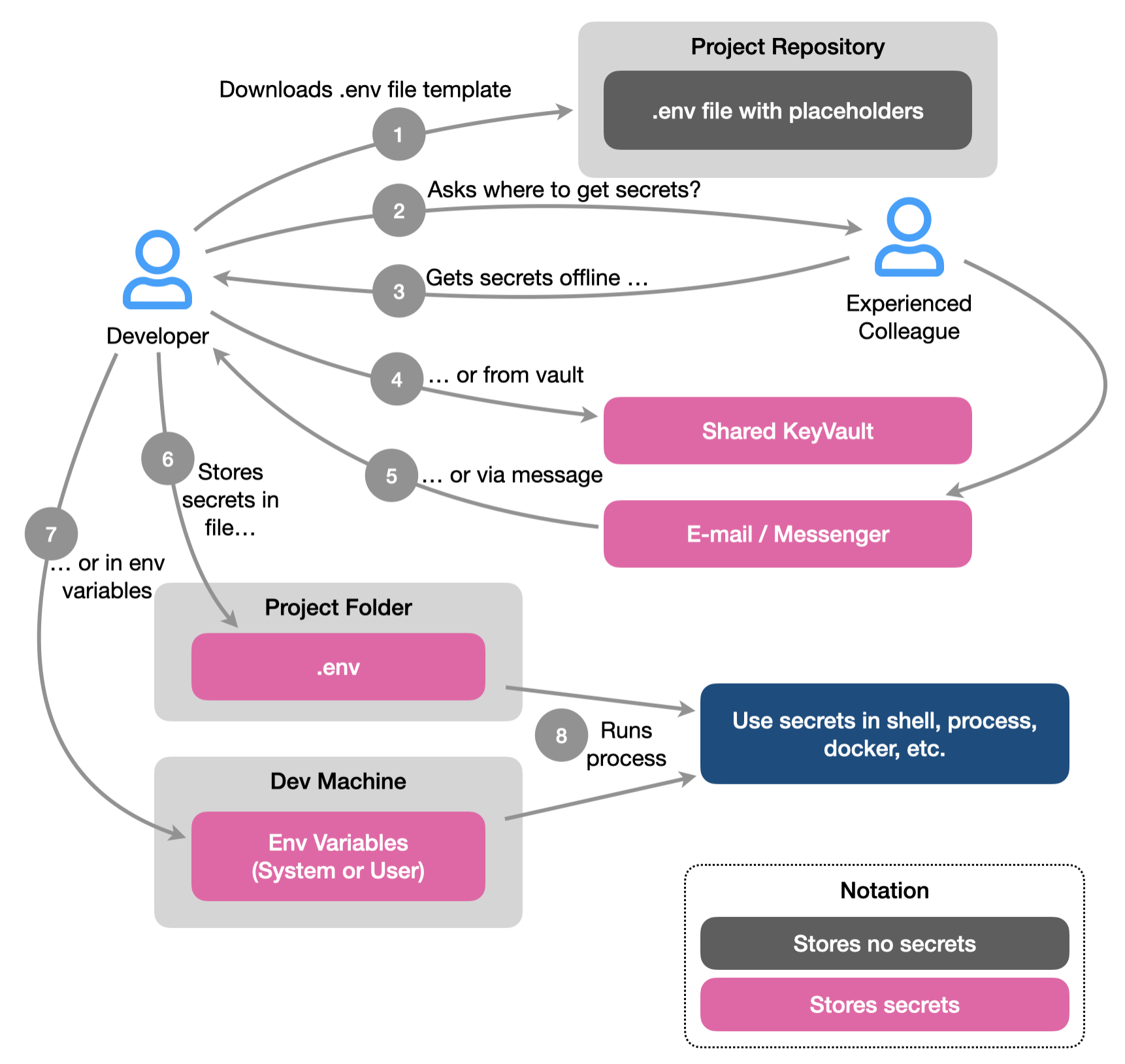
There are many steps involved, and a lot of opportunities for secrets to leak along the way. In addition, the secrets end up in unsecure places - local .env file in project folder, or environment variables on development machine.
safe-env helps to simplify on-boarding process, and ensure that secrets are stored only in-memory or in secure storage.
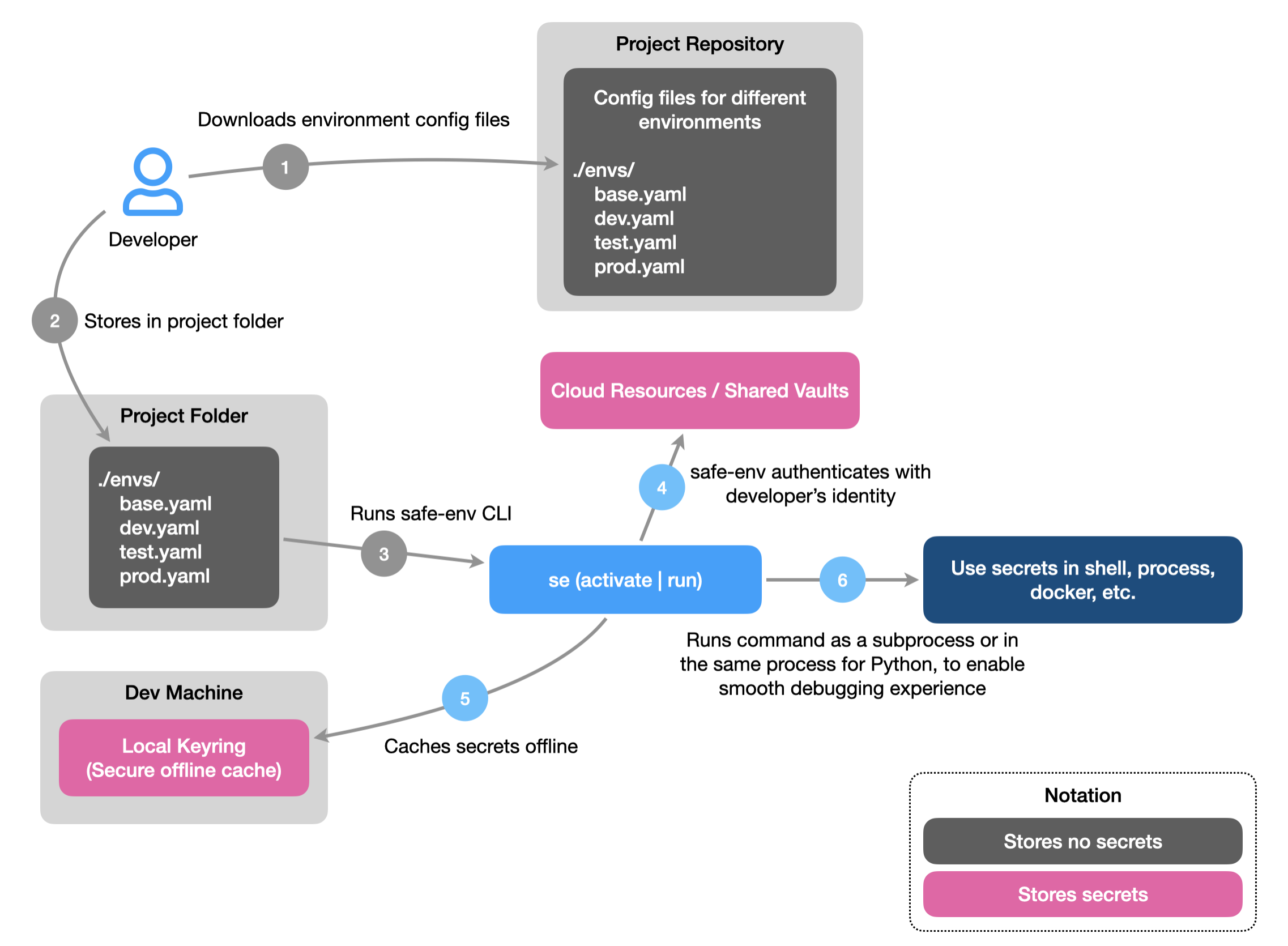
This also allows to quickly switch between environments while developing, testing, or using software.
More info:
- Documentation: https://antonsmislevics.github.io/safe-env
- Repository: https://github.com/antonsmislevics/safe-env
Getting started
How to install?
The package can be installed using pip:
python -m pip install safe-env
If using uv, it can be installed globally as a tool or as a dev dependency in specific project:
# install as a tool
uv tool safe-env

# or add as dev dependency
uv add safe-env --dev
Latest dev version can also be installed directly from git repository:
# pip
python -m pip install git+https://github.com/antonsmislevics/safe-env.git

# uv as a tool
uv tool install git+https://github.com/antonsmislevics/safe-env.git

# uv as dev dependency
uv add git+https://github.com/antonsmislevics/safe-env.git --dev
The package does not require to be installed in the same virtual environment that is used for development.
How to use?
When the package is installed, safe-env can be invoked from the command line as se or as python -m safe_env.
To check the version of the tool, run:
se --version

# or

python -m safe_env --version
To get a list of all available commands and options, run:
se --help

# or

python -m safe_env --help
Congratulations! Now you are ready to create environment configuration files.
Release history Release notifications | RSS feed


Download files
Download the file for your platform. If you're not sure which to choose, learn more about installing packages.
Source Distribution
Built Distribution
Filter files by name, interpreter, ABI, and platform.
If you're not sure about the file name format, learn more about wheel file names.
Copy a direct link to the current filters
File details
Details for the file safe_env-0.1.4.tar.gz.
File metadata
- Download URL: safe_env-0.1.4.tar.gz
- Upload date:
- Size: 15.7 kB
- Tags: Source
- Uploaded using Trusted Publishing? No
- Uploaded via: uv/0.5.15
File hashes
| Algorithm | Hash digest | |
|---|---|---|
| SHA256 |
d152ef1cb6b45d69feb3ae779587d5feb75ad80dae5eb9c12b37d2649a92239c
|
|
| MD5 |
2abb4f1da3c9cef460cce0e43ea87413
|
|
| BLAKE2b-256 |
c7363022b60690455b7eac0ba2e84084b12728179fbc6a9482bea4321e7a149c
|
File details
Details for the file safe_env-0.1.4-py3-none-any.whl.
File metadata
- Download URL: safe_env-0.1.4-py3-none-any.whl
- Upload date:
- Size: 23.3 kB
- Tags: Python 3
- Uploaded using Trusted Publishing? No
- Uploaded via: uv/0.5.15
File hashes
| Algorithm | Hash digest | |
|---|---|---|
| SHA256 |
b54b836b46b8710aa2dfafbfdf4c722312685e2114e8c5cc5a0eabe77de989be
|
|
| MD5 |
0744c3a7c3bed1255db36afb0cc60ad9
|
|
| BLAKE2b-256 |
897bcf59531f6c62a63f77ec4d7f69efaaed648da7da8ebaeff0667820daf6bf
|






