
Safeclaw
Universal outbound data guard for AI agents.
Safeclaw catches sensitive data (API keys, passwords, emails, credit cards) before an AI agent accidentally leaks it. Runs on-premise with zero external calls — works for local dev, CI/CD pipelines, and enterprise deployments alike.
Works with any AI agent: Claude Code, OpenClaw, ClaudeClaw, Codex, and more!
pip install safeclaw-guard
Why This Exists
AI agents have access to your codebase, .env files, databases, and configs. When they generate output — a shell command, a file, an API call — they can accidentally include secrets in plaintext. The agent doesn't know it's leaking. Safeclaw stops that at the exit.

In plain English: The AI agent reads your secrets to do its job. Safeclaw makes sure those secrets don't appear in the output.
Block vs Redact
Input:  "Deploy with key sk-ant-api03-realkey123..."
Output: "[SAFECLAW BLOCKED] contains sensitive data: Anthropic API Key"

Input:  "Send report to john@acme.com and call 555-867-5309"
Output: "Send report to [REDACTED:EMAIL] and call [REDACTED:PHONE]"
Configurable per entity type — API keys block, emails redact. Your call.
Get Started
Safeclaw supports multiple integration methods depending on your agent and workflow:
🤖 MCP-Compatible Agents (Claude Code, OpenClaw, ClaudeClaw, etc.)
pip install safeclaw-guard
safeclaw install --mcp
Your MCP-compatible agent can now use Safeclaw's safeclaw_scan and safeclaw_detect tools automatically.
🐍 Python Code (Any Python Agent)
from safeclaw import guard

result = guard("Contact john@acme.com with key sk-ant-api03-abc123...")
print(result.safe)      # False
print(result.blocked)   # True — API key detected
print(result.text)      # [SAFECLAW BLOCKED] ...
🌐 HTTP API (Any Language, Any Agent)
safeclaw serve # starts on localhost:18791
curl -X POST http://127.0.0.1:18791/scan \
  -H "X-Safeclaw-Secret: <secret>" \
  -d '{"text": "your text here"}'
💻 CLI Tool (Shell Scripts, CI/CD, Hooks)
pip install safeclaw-guard
safeclaw install  # For Claude Code specifically

# Or use directly:
echo "some text" | safeclaw scan
safeclaw scan < file.txt
What It Detects
| Entity | Default | Examples |
|---|---|---|
| API Keys | 🔴 Block | sk-ant-..., AKIA..., ghp_..., sk_live_... |
| Private Keys | 🔴 Block | PEM-encoded RSA/EC keys |
| Passwords | 🔴 Block | password = "...", postgres://user:pass@host |
| Credit Cards | 🔴 Block | Visa, Mastercard, Amex (Luhn-validated) |
| SSNs | 🔴 Block | 123-45-6789 |
| JWTs | 🟡 Redact | eyJhbG... base64 tokens |
| Emails | 🟡 Redact | user@domain.com |
| Phone Numbers | 🟡 Redact | US and international formats |
Architecture
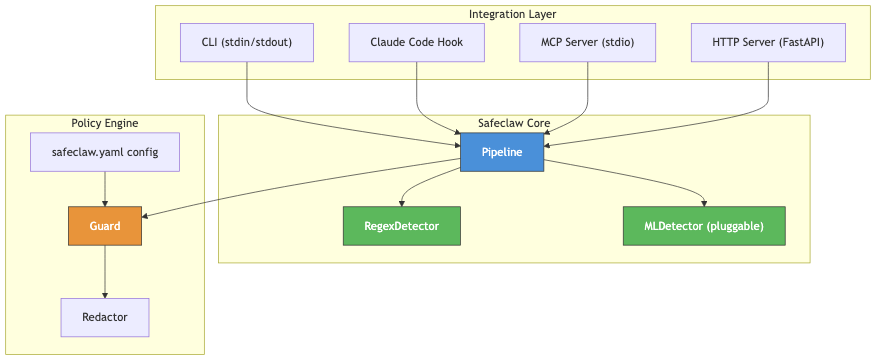
- Pipeline pattern (spaCy/sklearn-inspired) — pluggable detectors. Ships with
RegexDetector, drop in an ML model later without changing any code. - Pydantic v2 models — typed
Span,Entity,GuardResultfollowing NER conventions. - Confidence scoring — every match has a score (0.0–1.0). Only flags above your threshold.
- Overlap resolution — when two patterns match the same span, highest confidence wins.
Configuration
safeclaw init # creates .safeclaw.yaml
threshold: 0.75       # confidence cutoff
fail_open: true       # if error: pass through (true) or block (false)

rules:
  api_key:    { action: block,  enabled: true }
  email:      { action: redact, enabled: true }
  phone:      { action: redact, enabled: true }
  ip_address: { action: redact, enabled: false }  # too noisy
Commands
| Command | What it does |
|---|---|
safeclaw scan |
Scan stdin (also works as Claude Code hook) |
safeclaw serve |
HTTP server on localhost |
safeclaw mcp |
MCP stdio server |
safeclaw install |
Add to Claude Code |
safeclaw uninstall |
Remove from Claude Code |
safeclaw init |
Create config file |
Try It
git clone https://github.com/wassupjay/SafeClaw.git && cd SafeClaw
python -m venv .venv && source .venv/bin/activate
pip install -e .
python demo.py
Demo output
  Clean text          → ✅ PASS
  Email               → 🟡 REDACT  [REDACTED:EMAIL]
  Phone               → 🟡 REDACT  [REDACTED:PHONE]
  JWT                 → 🟡 REDACT  [REDACTED:JWT]
  OpenAI key          → 🔴 BLOCK
  Anthropic key       → 🔴 BLOCK
  AWS key             → 🔴 BLOCK
  GitHub token        → 🔴 BLOCK
  Stripe key          → 🔴 BLOCK
  Password            → 🔴 BLOCK
  Credentials in URL  → 🔴 BLOCK
  SSN                 → 🔴 BLOCK
  Credit card         → 🔴 BLOCK
  PEM private key     → 🔴 BLOCK
  16/16 tests passed
License
MIT
1 maintainer

Metadata
1 maintainer
Release files for safeclaw-guard 0.1.5
For a detailed explanation of source distributions (sdists) and built distributions (wheels), please see the package formats documentation.
Source distribution (sdist)
| File | Size | Uploaded | |
|---|---|---|---|
| safeclaw_guard-0.1.5.tar.gz | 71.0 kB | Details |
Built distribution (wheel)
| File | Interpreter | ABI | Platform | Reset |
|---|---|---|---|---|
| safeclaw_guard-0.1.5-py3-none-any.whl | Python 3 | none | any | Details |
Total release size: 92.2 kB
Release files / safeclaw_guard-0.1.5.tar.gz
| Download URL | safeclaw_guard-0.1.5.tar.gz |
|---|---|
| Size | 71.0 kB |
| Tags | Source |
|
SHA-256 checksum How to use checksums |
b3c9612377995ceeec469e27e36499462cca6229a2a0117f1e6f41932b2891c6
|
|
BLAKE2b-256 checksum How to use checksums |
bb5810d14f343ae972352009d9b245f4a058e8d362c0d0ba8cc266b0ede52772
|
| Upload date | |
|
Uploaded using Trusted Publishing? What is trusted publishing? |
No |
| Uploaded via |
twine/6.2.0 CPython/3.13.5
|
Release files / safeclaw_guard-0.1.5-py3-none-any.whl
| Download URL | safeclaw_guard-0.1.5-py3-none-any.whl |
|---|---|
| Size | 21.2 kB |
| Tags | Python 3 |
|
SHA-256 checksum How to use checksums |
ebc4267747fb95de0da31d5ac0569e038d9a95a30cedd8f20e2871bcd6ed6bec
|
|
BLAKE2b-256 checksum How to use checksums |
2b7aef0c4ee94cf76de8fac8bcc31712ca187bd89fd16234a6b43884d07d8b33
|
| Upload date | |
|
Uploaded using Trusted Publishing? What is trusted publishing? |
No |
| Uploaded via |
twine/6.2.0 CPython/3.13.5
|














