
SafeReach
Read-only production diagnostics over SSH, as an MCP server.
Gives an AI agent a competent read-only SRE's eyes on your fleet — journal, service state,
disk, memory, processes, sockets, container logs and inspect, HTTP health checks, across
many hosts in parallel — with the hands removed.
The agent can investigate. It cannot change anything, read a secret, escape into a shell, or reach a host it wasn't granted.




Quick start
uvx safereach@0.4.0 enroll --all      # set up every server you can already ssh to
uvx safereach@0.4.0 install           # register with your agents
Two commands. No sudo required, no config file to edit, nothing installed globally.
If ssh myserver works today, the agent can diagnose myserver.
Architecture
The validator runs twice, on both sides of the SSH connection. That is the central design decision and the reason this can be pointed at production.
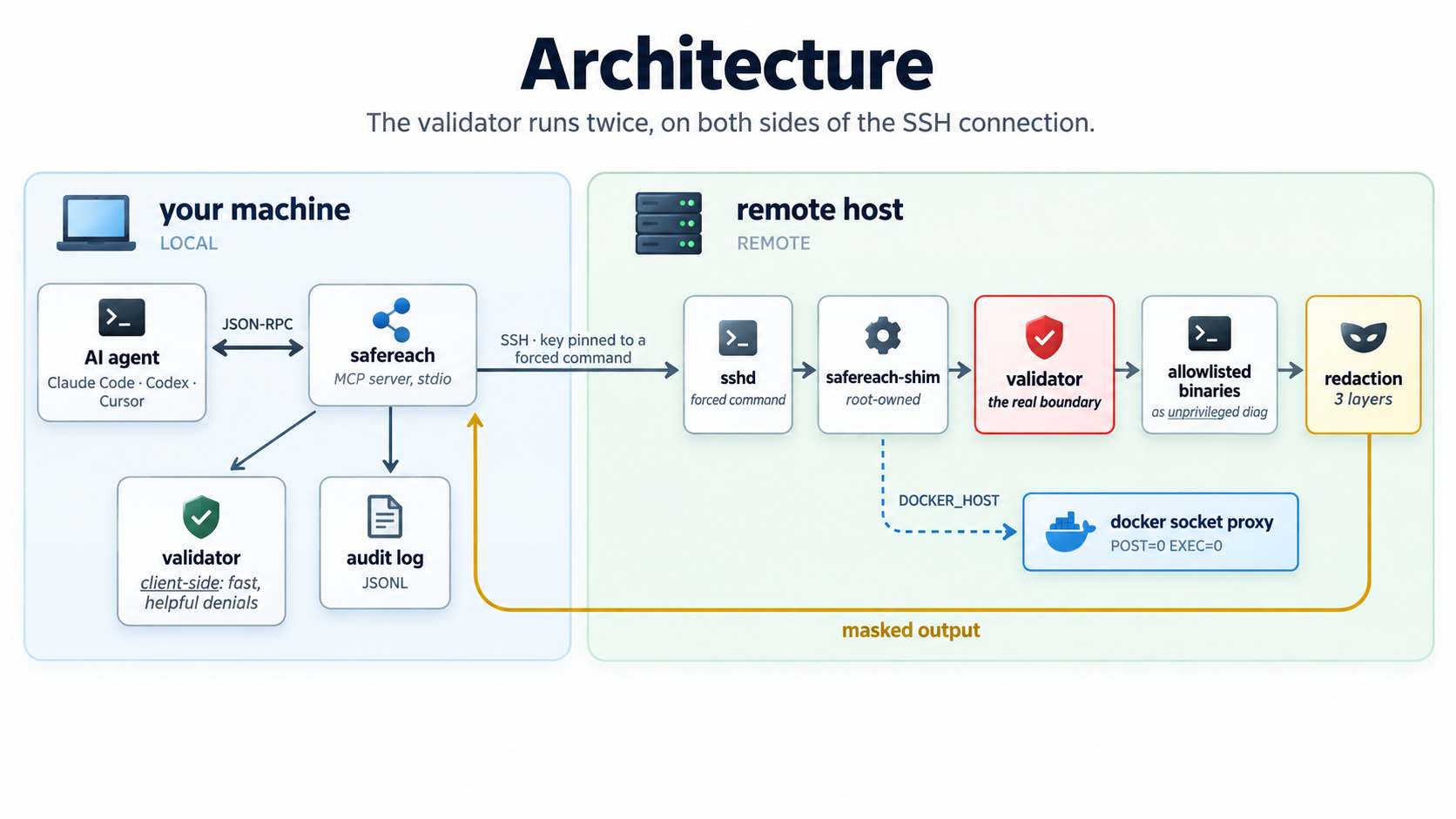
Why twice. The MCP server runs on the agent's own machine, so a check that lives there is one the agent's environment can influence — via a compromised server, a poisoned context, or a prompt injection arriving in a log line the agent just read. Client-side validation is a user-experience feature: it fails fast and explains why. The shim is the control that actually holds, because it sits outside everything the agent can reach.
The request lifecycle and the defence-in-depth layers are drawn out in docs/architecture.md.
Threat model
What this is built to hold against, and what it is not. The picture is the claim: the agent can influence everything in the amber zone, and none of it is a control. The red zone is root-owned on the host, reads nothing from the wire, and is what actually decides.
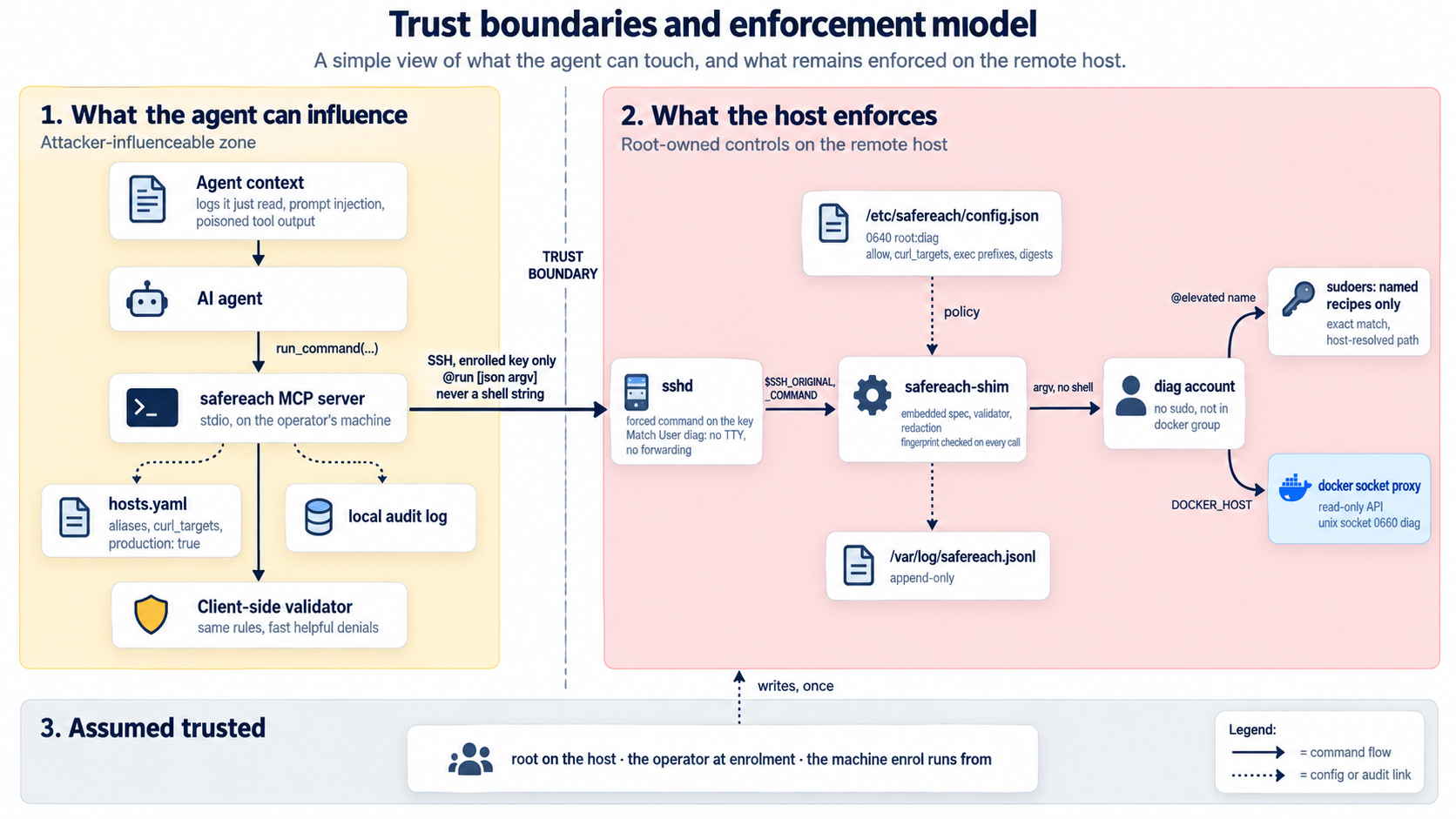
Assumed hostile: the agent, and everything in its context. A prompt injection in a log
line the agent just read is the expected attack, not an edge case. Everything the agent can
reach — the MCP server, hosts.yaml, the local audit log — is therefore treated as
influenceable. The controls that count live on the host: the shim with its embedded spec,
its root-owned policy file, the forced-command key, sudoers, and the sshd Match block.
Assumed trusted: root on the managed host, the operator running enroll, and the
machine enroll runs from at the moment it runs. If any of those is compromised, this
tool is not the boundary.
What holds by construction, what cannot, how secrets are kept off the wire, and how state changes are made unreachable: SECURITY.md.
Installation
Requirements
| Where | Needs |
|---|---|
| Your machine (runs the MCP server) | Python 3.11+, OpenSSH client, uv or pipx. Linux and macOS tested; Windows via WSL. |
| Each managed host | Any Python 3, OpenSSH server. For --hardened: sudo, systemd, and Docker if you want container diagnostics. Debian/Ubuntu and RHEL-family tested. |
| The agent | Anything that speaks MCP over stdio: Claude Code, Claude Desktop, Codex, Cursor, Windsurf, VS Code, Zed, Gemini CLI. safereach install registers with each. |
Nothing is installed on a managed host beyond one stdlib-only Python file and, in hardened mode, one container.
Recommended — uvx, pinned
uvx safereach@0.4.0 --help
Nothing installed globally, and it is the one launch form that works identically for every
agent. A registration pointing at /home/you/project/.venv/bin/... breaks the moment
anything moves; uvx does not.
The version pin is deliberate. Bare uvx safereach refetches from PyPI on every
launch — fine for most tools, wrong for one holding production SSH keys, since it is a
standing supply-chain exposure on the component whose entire job is being a security
boundary. safereach install pins automatically; --unpinned opts out, and is not
recommended.
Alternative — a persistent install
uv tool install safereach==0.4.0
To work from a checkout, see CONTRIBUTING.md.
Connecting your agents
safereach install --list     # which agents are on this machine, and where each keeps its config
safereach install            # register with every one of them
safereach install cursor     # or name the ones you want
Detected agents
     Agent               Config
────────────────────────────────────────────────────────────────────
ok   Claude Code         via the `claude-code` CLI
ok   Claude Desktop      ~/.config/Claude/claude_desktop_config.json
ok   Codex CLI           ~/.codex/config.toml
--   Cursor              ~/.cursor/mcp.json
ok   VS Code / Copilot   via the `vscode` CLI
--   Zed                 ~/.config/zed/settings.json
Detection is per user on this machine: a CLI on your PATH (Claude Code, VS Code) or the
agent's config directory being present, even if it has never written a config. Claude
Code and VS Code are registered through their own CLIs; every other agent gets one entry
merged into its config file under the key that agent uses, with a timestamped backup
taken first and your other MCP servers left exactly as they were. Re-running is
idempotent. safereach uninstall removes only safereach's entry.
The registered command is uvx safereach@<this version>, so agents keep launching the
build you enrolled with until you upgrade on purpose. An agent that is installed but not
detected — another user's, or a non-standard config path — can be named explicitly.
Details and the full list of supported agents: docs/agents.md.
Setting up hosts
enroll — the default
safereach enroll myserver          # one host
safereach enroll --all             # everything in ~/.ssh/config
Uses the SSH access you already have. No sudo. It generates a dedicated keypair, copies
the shim to ~/.local/bin/, and appends one entry to the remote authorized_keys:
command="/home/you/.local/bin/safereach-shim",no-pty,no-port-forwarding,no-agent-forwarding,no-X11-forwarding,no-user-rc ssh-ed25519 AAAA…
Your other entries are untouched, so your own SSH is unaffected — but the agent's key can
invoke nothing except the shim, whatever is sent to it. Same mechanism as
borg serve --restrict-to-path, rrsync and gitolite.
Enrolment then verifies the restriction by attempting an escape, and refuses to record the host if that escape succeeds.
enroll --hardened — for production
safereach enroll myserver --hardened --elevated dmesg-recent
Needs sudo on the target once. Additionally:
- creates an unprivileged
diaguser — no sudo, not in thedockergroup - installs the shim and its policy root-owned, so the account cannot rewrite what it is allowed to run
- starts a read-only Docker socket proxy on a unix socket only
diagcan reach, pinned by image digest - writes an exact-match sudoers entry for enabled recipes only — never
sudoitself - adds an sshd
Match User diagdrop-in (no forwarding, no TTY, session cap), validated before it is kept - makes the audit log append-only, so the account cannot erase its trail
- offers only the enrolled key to the host, so a personal key that is also authorised there can never win the handshake
For a production fleet, set defaults.production: true in hosts.yaml. The server then
refuses to start if any host is in client-only mode (require_shim: false) or resolves
through ~/.ssh/config, so the weaker modes are a startup error rather than a warning.
The full footprint on the host, and what each piece defends against, is in SECURITY.md.
Production checklist
Before pointing an agent at a host that matters:
- Enrolled with
--hardened, never plainenrollordiscover -
defaults.production: trueinhosts.yaml, so weaker modes cannot creep back in -
safereach hostsshows only the hosts you meant, every oneenrolled -
safereach doctorshows every hosthardened, shim fingerprint matching -
curl_targetslists only thehost:portpairs the agent needs, or is empty -
--allow-execoff, or on with explicit--exec-containerand--exec-path -
--elevatedrecipes limited to what is needed (dmesg-recentis usually enough) -
hosts.yamland the key under~/.config/safereach/keysare mode0600 - Agent registered with
safereach install(version-pinneduvx), not--unpinned - Host audit log
/var/log/safereach.jsonlshipped to wherever your other logs go - Re-enrolled one non-critical host first after any upgrade that says "re-enrol"
Taking a host out again is one command, and it proves the key is dead before it forgets the host:
safereach unenroll myserver --yes          # keeps the diag account and the audit log
safereach unenroll myserver --yes --remove-user --purge-log
Naming and renaming hosts, the comparison of the three enrolment modes, removing a host, and reading logs inside containers: docs/hosts.md.
Tools the agent sees
| Tool | Purpose |
|---|---|
list_hosts |
Aliases, descriptions, security mode. Never hostnames, users or key paths — those are yours, via safereach hosts. |
select_host |
Pin a server for the session. |
describe_commands |
The allowlist in readable form — what may run, and how. |
run_command |
Validate → execute → structured result. host is optional. |
run_on_hosts |
Same, fanned out concurrently. The "who else is broken" tool. |
run_in_container |
Read-only commands inside a container, for logs not on stdout. |
run_elevated |
One named recipe (e.g. dmesg-recent). A name, never a command line. |
check_connectivity |
Reachability, auth, and the shim version handshake. |
host is optional. One server configured → used directly. Several → the user is asked via
the client's elicitation UI and the answer is remembered for the session. No elicitation
support → an error naming the options, so the agent asks in conversation. It never
guesses.
Upgrading
Agents are pinned to a version (uvx safereach@X.Y.Z), so nothing changes until you say
so. The changelog says which of these steps a release needs:
uvx safereach@X.Y.Z install         # repoint every agent at the new version
safereach shim-update --all         # when the release changed the allowlist or the shim
safereach enroll <host> --hardened  # when the release changed root-owned host state
Coming from 0.1.1? Go straight to 0.4.0 and run all three. Coming from 0.3.0, only the
first. Until shim-update runs, a
host on the old rules is refused, with a message naming the fingerprints — a host
quietly running an older, looser allowlist is the failure mode this tool exists to
prevent. Enrolment is idempotent, so re-running it is always safe.
Troubleshooting
safereach hosts           # every configured host: alias, address, user, port, mode
safereach doctor          # config, keys, connectivity, shim versions
safereach doctor --fix    # re-push a drifted shim
safereach validate "journalctl -u nginx -n 200" --host myserver
Every message the tool can produce, and what to do about it: docs/troubleshooting.md.
Documentation
| SECURITY.md | Threat model in full, the four secret-protection layers, non-destruction by construction, the hardened host footprint, and how to report a vulnerability |
| docs/architecture.md | Request lifecycle and defence-in-depth diagrams |
| docs/agents.md | Which agents are supported, how each is detected and registered, launchers, uninstalling |
| docs/hosts.md | Listing hosts, naming and renaming, enrolment modes compared, removing a host, container inspection |
| docs/troubleshooting.md | Symptoms, causes, and the SSH config override |
| CONTRIBUTING.md | Development setup, the test layers, extending the allowlist, releasing |
| CHANGELOG.md | What changed, and what to run on each host after upgrading |
Contributing
Contributions are welcome, and the bar is written down in CONTRIBUTING.md. Security issues go through SECURITY.md, not the issue tracker.
Licence
MIT — see LICENSE.
1 maintainer

Metadata
1 maintainer
Release files for safereach 0.4.0
For a detailed explanation of source distributions (sdists) and built distributions (wheels), please see the package formats documentation.
Source distribution (sdist)
| File | Size | Uploaded | |
|---|---|---|---|
| safereach-0.4.0.tar.gz | 237.3 kB | Details |
Built distribution (wheel)
| File | Interpreter | ABI | Platform | Reset |
|---|---|---|---|---|
| safereach-0.4.0-py3-none-any.whl | Python 3 | none | any | Details |
Total release size: 350.4 kB
Release files / safereach-0.4.0.tar.gz
| Download URL | safereach-0.4.0.tar.gz |
|---|---|
| Size | 237.3 kB |
| Tags | Source |
|
SHA-256 checksum How to use checksums |
55d4a5df0d64cf548fbcb9204dc07a12c8e8a4e3afc6e2a15fab1589e1a9b87b
|
|
BLAKE2b-256 checksum How to use checksums |
350be6bf293cc5d683a1acc9393477c9071e4dcbc2929478ba2364e707195655
|
| Upload date | |
|
Uploaded using Trusted Publishing? What is trusted publishing? |
Yes |
| Uploaded via |
twine/7.0.0 CPython/3.13.14
|
Provenance
Provenance describes where a file came from. On PyPI, provenance is shared via attestations, which provide a verifiable record of the build or publishing details. View details, limitations and caveats.


PyPI Publish Attestation
PyPI verified that this artifact, at this checksum, originated from the publisher listed below.
Signed by GitHub Actions, verified by PyPI on Sep 12, 2026.
Transparency logRelease files / safereach-0.4.0-py3-none-any.whl
| Download URL | safereach-0.4.0-py3-none-any.whl |
|---|---|
| Size | 113.1 kB |
| Tags | Python 3 |
|
SHA-256 checksum How to use checksums |
5df853a6355fc13036f63fff7201bf27f58794a39cebdfd49b5190b63f1be4a3
|
|
BLAKE2b-256 checksum How to use checksums |
64dfe92208a53435db5622ec5ff2804d55556404e9623ba89123f5c56fead360
|
| Upload date | |
|
Uploaded using Trusted Publishing? What is trusted publishing? |
Yes |
| Uploaded via |
twine/7.0.0 CPython/3.13.14
|
Provenance
Provenance describes where a file came from. On PyPI, provenance is shared via attestations, which provide a verifiable record of the build or publishing details. View details, limitations and caveats.
PyPI Publish Attestation
PyPI verified that this artifact, at this checksum, originated from the publisher listed below.
Signed by GitHub Actions, verified by PyPI on Sep 12, 2026.
Transparency log













