
SafeRun
Checks AI-generated code before you run or trust it. Executing untrusted code in a sandbox limits the impact of that code; it does not prove the code is safe, and a passing scan does not guarantee security. Current release: 0.0.3 · PyPI · GitHub Releases · Website · Security policy
Status: alpha, not independently certified or security-audited. The signed analyzer image analyzer-v1.2.0 is published from this repository and recorded in ANALYZER_RELEASE, so saferun init installs it after verifying its cosign signature; see docs/release-images.md. Only a small, advisory benchmark exists (SafeRun's own simulated samples against Bandit and pip-audit, see docs/benchmark.md); not yet done: an independent detection-quality evaluation, and verification of the Docker sandbox through Docker Desktop on Windows and macOS (see docs/platforms.md). The CLI is the product; web/ is a static informational website.
Requirements: Python 3.12 or newer and Docker (running Linux containers). Linux, Windows and macOS are supported; Linux is the fully tested platform.
Install in four commands
pip install saferun-cli     # the PyPI package is saferun-cli; the command it installs is `saferun`
saferun init                # one-time setup: checks Docker, fetches a verified cosign, installs the signed analyzer image, downloads the OSV data
saferun doctor              # read-only diagnosis: PASS / WARNING / FAIL per check, with the fix for each problem
saferun run my_script.py    # scan the script; run it only inside the hardened sandbox if the scan allows it
You do not install cosign or download the OSV database yourself. Docker is the only prerequisite you install separately.
pipx install saferun-cli, uv tool install saferun-cli and poetry add saferun-cli work as well. Requirements: Python 3.12 or newer, and for Poetry version 2.0 or newer (Poetry 1.x, including the 1.8 that Ubuntu 24.04 packages, cannot read this package's wheel metadata; use pipx install poetry or pip install -U poetry).
License
SafeRun is released under the MIT License (Copyright (c) 2026 Vinay Repalle). The analyzer image also redistributes third-party software under its own licenses (Semgrep, OSV-Scanner, gitleaks and others); their notices are in docker/analyzer/THIRD_PARTY_NOTICES.md and inside the image.
Key features
- Restricted Docker sandbox (Phase 1): read-only sanitized project copy, no network, non-root, no capabilities, resource limits, verified at run time.
- Validation engine (Phase 2): Python syntax check (a "can the scanner read this file" step: it parses the file, it does not run it) in the sandbox; Semgrep (Python), an offline OSV-Scanner dependency scan and a hardcoded-secrets scan (gitleaks), all run only inside a verified, locked-down analyzer container (Phase 5B, no host-side fallback); one normalized report and a PASS / WARNING / FAIL verdict.
- CLI (Phase 3):
saferun scan PATH, text or JSON output, deterministic exit codes. Incomplete scans never report PASS.
Prerequisites
Docker, running Linux containers and reachable by your user. Remote Docker endpoints are refused (the project is bind-mounted by host path). The daemon must provide cgroup limits (memory, swap, pids, CPU) and seccomp.
| Platform | Install Docker | Notes |
|---|---|---|
| Linux | Docker Engine; then sudo usermod -aG docker $USER and log in again |
Fully tested platform. |
| macOS | Docker Desktop (or Colima / OrbStack); start it once | Host code tested in CI; Docker Desktop integration not verified. |
| Windows 10/11 | Docker Desktop with the WSL 2 backend, Linux containers mode | Native Windows host code, no WSL needed for SafeRun itself; Docker Desktop integration not verified. |
saferun init and saferun doctor tell you exactly which of these is wrong (Docker missing, daemon not running, permission denied, remote endpoint) and what to do. Details: docs/platforms.md.
Install and set up
pip install saferun-cli
saferun init            # interactive: shows what is installed, offers the rest. For scripts/CI: saferun init --all   (also --only, --skip, --yes, --repair)
saferun doctor          # PASS / WARNING / FAIL, exit 1 if anything FAILED. --online also re-verifies the release signature; --format json for tools
saferun status          # which components are installed and verified (exit 0 only if everything is ready)
What saferun init does, in order, and what it never does:
- Checks the host and Docker (OS, installed, daemon running, permissions, local endpoint) and prints platform-specific guidance if something is missing. If Docker is unusable nothing is installed.
- Pulls the sandbox images by pinned digest (python) and re-checks the digest afterwards.
- Installs the analyzer image (Semgrep, OSV-Scanner, gitleaks, rules): it first obtains cosign by itself if you have none (a pinned release, downloaded over HTTPS into SafeRun's own data directory and accepted only if its SHA-256 equals the value written in SafeRun's source; it is re-hashed on every use), then verifies the image's signature and identity (this repository's release workflow on an
analyzer-v*tag) before anything is pulled, pulls it by digest, checks digest, labels, tool versions and rules hash, and locks it. There is no unsigned install;--build-localis the explicit alternative and needs a source checkout. - Downloads and caches the OSV vulnerability data (about 260 MB, public data from
osv-vulnerabilities.storage.googleapis.com, nothing about your projects is sent) into your user data directory with integrity hashes. Only what is missing, invalid or older than 30 days is downloaded; a current database is left alone. Failed downloads are retried and never replace good data. If the data cannot be refreshed,initsays how old the existing data is and scans report the dependency check as INCOMPLETE; stale data is never treated as current. Refresh later withsaferun osv-db update(--if-staleto skip when it is current). - Verifies everything again and prints a result per component.
saferun init skips what is already valid, so it is safe to re-run (for example after an analyzer release).
Upgrading: pip install --upgrade saferun-cli, then saferun init and saferun doctor. Check the installed version with saferun --version. Releases are listed on PyPI and GitHub. Developers working from a checkout: pip install -e '.[dev]', then pytest -q (Docker tests skip loudly without Docker; SAFERUN_REQUIRE_DOCKER=1 makes them fail instead).
Clean-environment install and validation, and what the CI runs: docs/install-and-test.md.
Quick start
scan vs run: saferun scan only reads files and executes nothing (project code is never run). saferun run scans a script first, and only if the verdict allows it executes the script inside the hardened sandbox.
saferun scan ./my-project                 # human-readable report; nothing is executed
saferun scan ./my-project --format json   # machine-readable report (schema_version 1)
saferun run my_script.py -- arg1 arg2     # scan first, then run inside the sandbox only if allowed
saferun scan ./my-project --accept-file ~/accepts.toml   # dependency findings you have reviewed and accepted until a date (reason required; see docs/cli.md)
saferun check-names --project ./my-project   # separate, offline: dependency names that look like typos of popular PyPI packages
Exit codes of scan: 0 PASS · 1 FAIL · 2 WARNING (including any incomplete scan) · 64 invalid usage/path · 70 fatal · 130 interrupted.
saferun run: what it does and what it guarantees
saferun run SCRIPT [-- ARGS...] scans the Python script with the normal checks and then runs it only inside the same hardened Docker sandbox used for checks: pinned python:3.12-slim image, no network, read-only root and project, non-root user, no capabilities, memory/CPU/pids/time limits, output cap, secrets redacted from output. It never runs anything on the host.
- Only the script itself is copied and scanned (
--project-dir DIRscans and mounts a whole directory that contains it). Options go before the script name (--timeout SECONDS, default 30). - PASS → it runs. FAIL → refused (exit 1). WARNING → refused (exit 2) by default.
--allow-warningsaccepts a WARNING only from a complete scan with no high/critical finding; an incomplete, errored, timed-out, skipped or unavailable check is never overridden, and neither is a FAIL. - If the scan cannot be carried out (analyzer or Docker unusable, internal error) the script is not run (exit 70).
- A PASS means the checks found nothing they know about; it is not proof that the script is safe. The sandbox limits the impact of the code, it does not make it harmless. Scripts that need the network or third-party packages will fail inside it.
- Exit codes: 0 the script ran and exited 0 · 1 refused: FAIL · 2 refused: WARNING · 3 the script ran but exited non-zero, timed out or was killed · 64 usage · 70 could not scan or sandbox · 130 interrupted.
Privacy / network: scans never use the network. Semgrep, OSV-Scanner and gitleaks run in a container without network access (gitleaks never checks whether a secret is live), and OSV-Scanner reads a local copy of the OSV data (
saferun osv-db update, an explicit download of public data that contains nothing about your project). Without that data the dependency check reportserror(verdict at best WARNING). Per-scan online OSV queries were removed in Phase 5B, see PROJECT.md. The separatesaferun check-namescommand is offline too (bundled list of popular package names); only with its opt-in--onlineflag does it send package names (never code) to pypi.org, and a failed lookup is reported as "could not check", never as a pass. See docs/cli.md.Limits of the OSV data checks: the download is checked against the server's MD5 header (refused if absent) and a SHA-256 is recorded locally and re-checked before every scan. That detects corruption and later modification of the files. It does not authenticate the download (the hash comes from the same server, or from your own disk), and someone who can write the data directory can rewrite the manifest too. Data older than 30 days makes the dependency check
incomplete.
Security and reporting problems
Alpha software: the sandbox limits the impact of code, it does not make code harmless, and PASS is not proof of safety (see PROJECT.md for the known exposures). Report vulnerabilities privately through GitHub's private vulnerability reporting, as described in SECURITY.md; do not open a public issue with details.
Website (static)
web/ is a static informational site (what SafeRun is, the PyPI install, features, security model, platforms, setup guide, links to GitHub, PyPI and Releases). It has no backend and does not scan anything.
cd web && npm ci --ignore-scripts && npm test && npm run build # output: web/dist
Hosting: Netlify. Live site: https://safe-run.netlify.app · Repository: https://github.com/vinay-repalle/saferun
| Netlify setting | Value |
|---|---|
| Deployment branch | main |
| Base directory | web |
| Build command | npm ci --ignore-scripts && npm run build |
| Publish directory | dist |
| Node.js | 22 |
Pages are switched by the URL hash, so no redirect rules are needed.
Scope: the website is a static informational site only. SafeRun's CLI, sandbox and security analysis stay in this repository (
saferun/,docker/) and run on your own machine; none of that is hosted by Netlify, and the site scans nothing.
Secrets scan (hardcoded passwords, keys, tokens)
saferun scan also looks for secrets committed to project files with gitleaks, run inside the same verified analyzer container as Semgrep and OSV-Scanner (no network, read-only project, no host fallback). Every secret found is a HIGH finding (verdict FAIL). The report shows the rule, the file and the line, never the secret itself. Turn it off with --no-secrets-check (the check is then skipped and the verdict is at best WARNING); if the analyzer image is missing, outdated or unusable the check is unavailable/error, never a pass. After upgrading SafeRun, run saferun init to get an analyzer image that contains gitleaks; until then every scan reports this check as not run.
What it cannot do (read before relying on it): it matches known vendor token formats (cloud and SaaS API keys, private keys, and similar), so a plain password in a config file, an internal token with no recognisable format, or a secret that was split or encoded is not found. The noisy generic "high-entropy value next to a key-like name" rule is switched off to keep false alarms low; the cost is that fewer secrets are found. It can still raise false alarms (a documentation example or a test fixture that looks like a real key), and it does not check whether a found secret is live or revoked (nothing is sent anywhere). Binary files and files over 1 MB are not scanned (the latter make the check INCOMPLETE); node_modules, .venv, venv and site-packages are skipped; a project's own gitleaks configuration, .gitleaksignore and gitleaks:allow comments are ignored. Files whose content matches SafeRun's own credential signatures (private keys and a few token formats) are already withheld at copy time and reported by workspace-sensitive-files. A secret in a dependency or in git history is out of scope. Details: docs/cli.md.
Plain-English findings
Under each finding the text report adds one short line, "In plain words:", saying what it is, why it matters and how to fix it, with the exact technical term kept (shell=True, pickle, command injection). It is shown by default, and the same text is in the JSON finding as explanation (only when one exists). The original message is unchanged. The texts are written with "can" and "could": a finding is a warning sign, not proof of an attack, and a fix does not guarantee safety. Findings with no known text show no line.
Supported runtimes
| Runtime | Image | Status |
|---|---|---|
| Python | python:3.12-slim |
sandbox, syntax check and Semgrep implemented (the secrets scan reads files of any type) |
SafeRun is Python-only. JavaScript/Node.js projects are not analysed: JavaScript files get no syntax check or code rules, and npm lockfiles are not scanned (the dependency check says so in a plain note and never counts it as a clean pass). The secrets scan reads files of any type.
Benchmark (advisory)
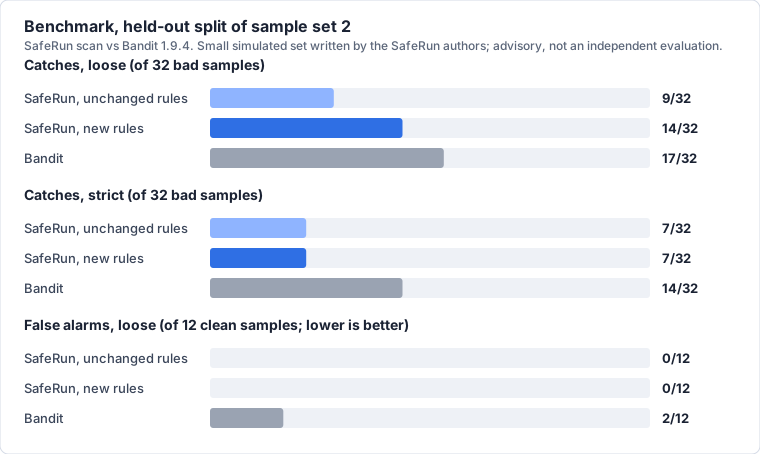
On the held-out part of a second sample set, three new Python rules raised SafeRun's loose catches from 9/32 to 14/32 with no new false alarms (0/12). SafeRun is still behind Bandit (17/32 loose, 14/32 strict), and its strict catches did not change because the new rules are medium severity. The dependency check ties with pip-audit (8/8 on the first set). The samples are small, simulated and written by the SafeRun authors, so this is not an independent evaluation. Details, limits and the per-sample misses: docs/benchmark.md.
Documentation
- docs/cli.md — CLI options, exit codes, output examples
- docs/engine.md — validation engine: checks, dependency coverage, statuses, verdict rules
- docs/install-and-test.md — clean-environment install, validation, CI
- docs/benchmark.md — benchmark of the scan against Bandit and pip-audit (dev tool, advisory, small simulated sample set)
- docs/platforms.md — Linux, Windows and macOS status and evidence
- docs/release-pypi.md — maintainer procedure for PyPI releases
- docs/sandbox.md — sandbox library usage and guarantees
- PROJECT.md — goals, architecture, threat model, known exposures (read before relying on the sandbox), phases
- IMPLEMENTATION.md — status, test evidence, limitations, technical notes
1 maintainer

Metadata
1 maintainer
Release files for saferun-cli 0.0.3
For a detailed explanation of source distributions (sdists) and built distributions (wheels), please see the package formats documentation.
Source distribution (sdist)
| File | Size | Uploaded | Provenance | Actions |
|---|---|---|---|---|
| saferun_cli-0.0.3.tar.gz | 650.6 kB | Without provenance | Details for saferun_cli-0.0.3.tar.gz |
Built distribution (wheel)
| File | Interpreter | ABI | Platform | Actions Reset |
|---|---|---|---|---|
| saferun_cli-0.0.3-py3-none-any.whl | Python 3 | none | any | Details for saferun_cli-0.0.3-py3-none-any.whl |
Total release size: 860.0 kB
Release files / saferun_cli-0.0.3.tar.gz
| Download URL | saferun_cli-0.0.3.tar.gz |
|---|---|
| Size | 650.6 kB |
| Tags | Source |
|
SHA-256 checksum How to use checksums |
cc6001637146450bda19467c96f166ee99d3f96ae801eb768ba46f5967fb7264
|
|
BLAKE2b-256 checksum How to use checksums |
71ba9417a233b7a18bd13a6baa29a5b14695b2edefb931259f06b423d8a1359e
|
| Upload date | |
|
Uploaded using Trusted Publishing? What is trusted publishing? |
No |
| Uploaded via |
twine/7.0.0 CPython/3.12.3
|
Release files / saferun_cli-0.0.3-py3-none-any.whl
| Download URL | saferun_cli-0.0.3-py3-none-any.whl |
|---|---|
| Size | 209.4 kB |
| Tags | Python 3 |
|
SHA-256 checksum How to use checksums |
82c85490c7819d60d637cd7a0e6efa61df15305776c8bb2470139459ebd7d527
|
|
BLAKE2b-256 checksum How to use checksums |
3a0abbe2e49caa65796ced8a29020b545e84020611e041e28b261f28728935d5
|
| Upload date | |
|
Uploaded using Trusted Publishing? What is trusted publishing? |
No |
| Uploaded via |
twine/7.0.0 CPython/3.12.3
|
Security for saferun-cli 0.0.3
Provenance
Provenance describes where a file came from. On PyPI, provenance is shared via attestations, which provide a verifiable record of the build or publishing details. View details, limitations and caveats.
No provenance found
None of the files in this release were uploaded with provenance metadata.
A note on package security
PyPI is a repository for distributing packages, not a service for auditing them. While third-party security researchers and our staff do their best to detect and remove malicious packages, PyPI cannot guarantee the quality, security or suitability of any given package.
To learn more about protecting yourself from malicious actors, visit our package security documentation.














