
MAD — Markdown Authoring and Delivery

Markdown reports and Vue presentations. One installation. Clean project folders.
MAD is the mischievous genius coordinating a team of excellent tools. It sits on top of Quarto and Typst for professional documents, and Slidev and Vue for beautiful presentations. You write Markdown and add images; MAD takes care of setup, preview, incremental builds and publishing through one command.
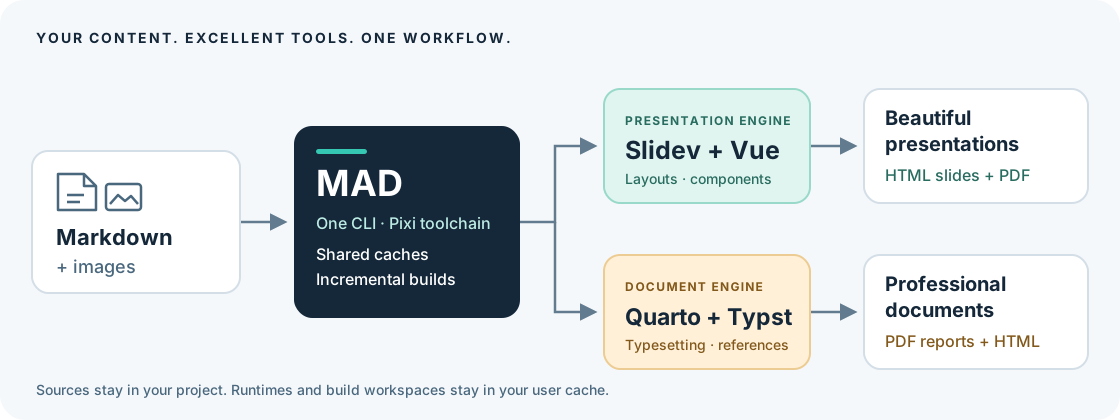
- Powerful engines, already integrated. Quarto with its embedded Typst for document PDFs and HTML; Slidev with Vue for presentation HTML and PDF exports.
- Shared caches. Pixi manages the toolchain; Python, Node, renderer dependencies and browsers live in user directories and are reused across projects.
- Incremental builds. Pixi tracks inputs and outputs, reusing unchanged HTML and PDF renders. Source edits, removed inputs and missing outputs trigger the relevant build task.
- Content stays portable. Markdown, images, layouts and configuration stay in
your project. There are no project-local virtual environments or
node_modules. - One workflow. Create from local or Git templates, build, preview, clean, and publish to GitLab Pages or GitHub Pages with the same commands for both types.
The command is mad; the Python distribution is safetygence-mad because the unrelated
name mad is already registered on PyPI. MAD is free and open source under
0BSD, by SAFETYGENCE. Version 0.1.0 is the first preview release.
Install once
On Linux or macOS, install Pixi from a terminal:
curl -fsSL https://pixi.sh/install.sh | sh
On Windows, download and run the .msi installer from the
official Pixi releases.
See Pixi's installation instructions
for other methods. Open a new terminal so Pixi's command directory is on PATH.
MAD requires Pixi 0.80 or later; update an older script-installed Pixi with
pixi self-update.
MAD currently supports Linux x86-64. The Pixi setup instructions above cover all three operating systems, but MAD's renderer lockfile does not yet support macOS or native Windows.
Install Git through Pixi if it is not already available, then install MAD directly from its public repository:
pixi global install git
pixi global install --git https://gitlab.com/exida-oss/stig/mad.git --tag v0.1.0
mad --version
No manual clone or environment activation is needed. Pixi fetches and builds the
MAD source from GitLab, installs the resulting package in
~/.pixi/envs/safetygence-mad, and exposes mad in
~/.pixi/bin. Python and Git are included in that environment. The command works
from any project directory. Node, pnpm, Quarto and its embedded Typst are managed
by MAD's shared cached runtime; no separate installation is needed. Chromium is
downloaded into its shared user cache for the first presentation PDF. It requires
the usual host operating-system libraries; MAD does not install system packages.
This installation route uses GitLab as the source for MAD, not PyPI. Pixi gets
Python and native tools from Conda-forge. MAD's renderer lockfile also selects
Python packages from PyPI and Node packages from npm. These environments and
downloads are shared by all authored projects. MAD does not install packages into
system Python; its Pixi environment also disables Python's user-package search
path so existing pip install --user packages cannot override its dependencies.
The command above selects the fixed v0.1.0 release. Install a newer release by
running it again with the new tag. To follow development updates, install with
--branch main instead of --tag v0.1.0, then update with:
pixi global update safetygence-mad
pixi global uninstall safetygence-mad
For a fixed commit, use --rev COMMIT instead of --tag v0.1.0.
Uninstalling the tool leaves authored projects
and render caches intact. Pixi documents this workflow under
installing global tools from source.
mad --help
mad --install-completion
Optional PyPI installation
The Python distribution is already packaged as safetygence-mad. PyPI is the package
registry; pipx and uv install the same package into an isolated user environment.
A virtual environment is an installation location, not a publishing destination.
For releases uploaded to PyPI, users who already use Python tools can choose either of these alternatives:
pipx install safetygence-mad
# or
uv tool install safetygence-mad
These alternatives still require Pixi and Git. They provide the same mad
command, bundled templates and shared renderer caches, without a project-local
venv. Pixi installation from Git is the recommended route today.
Create and work
mad create report --type report --title "Technical report" --author "Alex Example"
mad create slides --type slides --title "Project review" --author "Alex Example"
cd report
mad edit
mad build
mad serve --open
The syntax is mad [GLOBAL OPTIONS] COMMAND [OPTIONS] [DIRECTORY]. Actions are
commands (create, build, serve, publish); choices use named options
(--type, --format, --provider). The destination after create is always a
directory, with . as the default. Use --type report for a Word-like document
or --type slides for a PowerPoint-like presentation. These names also appear
as type: report and type: slides in mad.yml and as the bundled template names.
Creation requires either --type or --template. A template supplies its own
type, so mad create report --template ../templates/quotation needs no --type.
If both options are provided, they must agree. Directory names never select a
renderer. This keeps custom templates, folder names and project types independent.
Both project types have the same commands:
| Command | Result |
|---|---|
mad setup |
Download the selected toolchain into shared caches |
mad doctor |
Show selected project, runtime and output locations |
mad build |
Generate both HTML and PDF incrementally |
mad build --format html, mad build --format pdf |
Generate one format |
mad build --force |
Regenerate even when cached outputs are current |
mad build --format pdf --watch |
Regenerate PDF after edits |
mad serve --port 3030 |
Serve HTML, rebuilding and reloading after edits |
mad serve --open |
Also open the preview in a browser |
mad serve --no-watch |
Build and serve HTML without watching sources |
mad publish --provider github |
Publish HTML through GitHub Pages CI |
mad publish --provider gitlab --format all |
Publish HTML with PDF downloads through GitLab Pages CI |
mad clean |
Remove this project's generated output |
mad clean --cache |
Also remove this project's cached renders |
mad cache prune --days 30 |
Remove inactive project workspaces; retain shared runtimes |
mad lock |
Explicitly select the currently installed toolchain |
Use mad --project /path/to/project build --format pdf from another directory.
Relative project paths, such as mad --project ../report build, start from your
working directory. Global options precede the command. --output / -o overrides the output
directory for build, serve and clean; relative output paths are resolved
from the project root. build --base-path /reports/ sets the HTML deployment
path. Only empty or MAD-owned output
directories can be replaced or cleaned. An existing nonempty unrelated directory
is preserved and produces an error.
All commands support -h / --help. Typer provides completion for commands and
option choices, including project types, formats, providers and template names.
templates list/export and cache path/prune group actions on those resources;
project types and rendering formats are option values, never extra commands.
The interface follows the Command Line Interface Guidelines
for named options and the pip Git URL convention
for optional git+https:// and git+ssh:// template sources.
Live preview uses a production HTML build followed by an incremental rebuild and
browser reload. Its behavior is the same for documents and presentations. It
does not provide Slidev's editor or Vue component hot replacement. Preview binds
to 127.0.0.1 by default; --host changes that explicitly. A browser opens only
when --open is supplied.
What to copy or commit
report-or-slides/
├── mad.yml                 # type, entry point, metadata, optional history and publishing
├── mad.lock                # selected MAD version and toolchain fingerprint
├── README.md
├── .gitignore
├── src/
│   ├── index.md            # document entry; presentation uses slides.md
│   ├── chapters/           # optional; files can also be directly under src/
│   ├── images/
│   └── ...                 # authored styles, fonts, layouts, render configuration
├── resources/              # optional supporting authored inputs
└── output/                 # generated and ignored
    ├── html/               # complete static site
    └── pdf/                # current PDF
Share editable work: copy the project excluding output/, or clone its Git
repository. The recipient installs MAD separately. There is no environment or
tool implementation to copy. Share a finished PDF: send the PDF in
output/pdf/. Share offline HTML: send all of output/html/ and serve it over
HTTP; a single index.html does not contain its JavaScript, CSS, fonts and images.
src/ and resources/ are copied into a cached render workspace. Python locates
the project from the caller or --project; it never assumes user content is next
to the installed Python module. Authored source symlinks are rejected so a shared
project cannot silently depend on files outside its directory.
Renderer configuration and styling are authored project data. They stay with
the project so it remains editable and visually reproducible. Node and Python
dependencies are tool data and are installed centrally. Projects do not need a
package.json, pyproject.toml, pixi.toml, wrapper script, node_modules,
.venv, .pixi, or environment symlink.
Documents: Quarto and Typst
The report template is a generic document with a cover, management summary,
history, contents, chapters, references and shared HTML/PDF styling. It is not
tied to a questionnaire or any particular industry.
Quarto configuration lives in src/_quarto.yml; the supplied report layout lives
in src/_extensions/report/. Put common metadata in mad.yml, and keep chapter
order, typography, citations and renderer settings in _quarto.yml. Duplicate
common metadata across the two files is rejected. For a Quarto book, the title
is injected into book.title automatically.
PDF rendering always selects typst or a custom *-typst format. Quarto supplies
its own Typst binary. MAD does not install a second Typst binary or a TeX stack.
The supplied Lua filter manages report front matter, history and references; it
does not contain questionnaire-specific formatting rules.
A single-file document also works: use entry: src/index.md in mad.yml, remove
the book configuration, and use this _quarto.yml:
project:
  type: default
format:
  html: {}
  typst: {}
Presentations: Slidev and Vue
The slides template includes neutral Vue layouts, reusable cards, local
Manrope fonts and an example image. Content starts at src/slides.md. You may
keep every slide there, separated by ---, or include chapter files using
Slidev's native syntax:
---
src: ./chapters/overview.md
---
Keep native Slidev options in the entry file's front matter. Keep title, author
and other shared metadata in mad.yml. Images belong in src/images/, custom
Vue components in src/components/, layouts in src/layouts/, and styles in
src/style.css. Use relative image and font references so deployment under a
subdirectory works. The lockfile deliberately pins FloatingVue 5.2.2 because the
selected Shiki Twoslash integration relies on its component structure.
MAD defaults preloadImages to false: Slidev's optional extra preloader uses
raw Markdown image URLs, which do not match Vite's bundled assets. Normal image
loading still works. An explicit native front-matter setting can override this.
Templates and personal defaults
mad templates list
mad templates export
mad create quotation --template ~/.local/share/mad/templates/report
mad create . --template /path/to/my-template
mad create report --template ../templates/report
Relative paths are resolved from the caller's directory (or --project), not
from the installed tool. --template also fetches templates directly from Git:
# Repository whose root contains mad.yml
mad create report --template git+https://gitlab.com/example/report-template.git
mad create report --template git@gitlab.com:example/report-template.git
mad create report --template git+ssh://git@gitlab.com/example/report-template.git

# A folder in a template collection, optionally pinned to a branch, tag or commit
mad create report --template git+https://gitlab.com/exida-oss/stig/mad.git \
  --subdir templates/report --ref main

# The same repository, revision and folder in one quoted URL
mad create report --template 'git+https://gitlab.com/exida-oss/stig/mad.git@main#subdirectory=templates/report'

# A GitLab browser link directly to the desired template folder
mad create slides --template https://gitlab.com/exida-oss/stig/mad/-/tree/main/templates/slides
HTTPS repository URLs with or without .git and standard SSH clone URLs work,
with optional git+ prefixes on HTTPS/SSH scheme URLs. For a single source string,
git+https://REPOSITORY.git@REF#subdirectory=FOLDER (or git+ssh://...) selects a
revision and folder. Quote URLs containing shell punctuation. A GitLab browser
folder URL also works with a git+https:// prefix.
--subdir selects a folder inside the repository; the default is its root.
--ref defaults to the repository's current HEAD. Use a tag or commit
for a fixed template version. GitLab folder links supply both values directly;
for branch names containing /, use the clone URL with --ref and
--subdir, or percent-encode the slash in the link's revision component. Explicit
--ref and --subdir options override selections embedded in a URL. For a local
template, pass its directory directly; Git selection options do not apply.
Git uses your existing SSH agent/configuration or HTTPS credential helper. URL
passwords and access tokens are not accepted or written into project files.
Each creation fetches the requested revision and records the repository, folder,
requested ref and resolved commit in mad.lock. A failed fetch reports an error
without silently using an older cached revision or creating a partial project.
The bare Git repository and its current extracted template stay in
~/.cache/mad/templates/. Creation copies only authored template files, without
Git history, tool dependencies or environments. One extracted template per URL
is retained, even when switching revisions; mad cache prune --days 30 also
removes inactive Git-template caches. Git acquisition does not run template setup
scripts or fetch submodules. Ordinary local template paths remain usable offline.
Exported templates live in ~/.local/share/mad/templates/, a durable location
outside caches. You can instead run mad templates export ~/bin/mad-templates.
Export never overwrites existing templates. A template is a normal authored
project; creation copies its sources and assets, gives it a fresh project ID,
and selects the installed toolchain. Existing nonempty destinations are refused.
Template lookup uses paths configured in ~/.config/mad/config.yml, then the
standard user template directory, ~/bin/mad-templates, and bundled defaults:
defaults:
  author: Alex Example
template-paths:
  - ~/company-templates
--author and --title override template values. This supports personal and
company templates without putting private branding or customer information into
the public tool repository.
Version and lifecycle status
History is optional and works for either project type. If present, its last entry defines the current version, date and status. The report filter renders that history; there is no second manually maintained history table.
mad status
mad version
mad version --bump minor --message "Added analysis"
mad version 1.0 --message "First release"
mad edit --status review
mad edit --status approved --date 2026-10-16
mad edit --title "Technical report" --author "Alex Example"
mad --version prints the installed tool version; mad version prints the
project version. Set a version number or use --bump major|minor, with a required
--message / -m. New history entries accept --author, --status and --date;
status defaults to draft and date to today. mad edit --status changes the
current history entry without adding another version. With no options,
mad edit prompts for metadata; supplied options update only the named values.
PDF names follow <name>-v<version>-<status>.pdf; approved PDFs omit the status.
Without history the name is simply <name>.pdf. Output is replaced on each
successful render, so obsolete filenames do not accumulate. Keep deliberately
released versions in a separate authored releases/ directory or a release
registry; clean only owns generated output.
Publishing
Set the actual Pages site root in mad.yml. Git remote URLs cannot reliably
identify it, especially with GitLab unique domains or custom domains.
publish:
  gitlab:
    remote: origin
    branch: github_pages
    base-url: https://example.gitlab.io/reports/
    subdir: annual-report
  github:
    remote: github
    branch: github_pages
    base-url: https://example.github.io/reports/
    subdir: annual-report
The resulting URL is base-url + subdir + /. Use subdir: '' to deploy at the
site root. That replaces the whole site; a nonempty subdirectory replaces only
that project's subtree and preserves siblings. Configure separate subdirectories
for projects sharing one deployment branch.
mad publish --provider gitlab --format all --dry-run
mad publish --provider gitlab --format all
mad publish --provider github --branch pages --base-url https://example.github.io/reports/
The default branch is github_pages for both providers. All configuration fields
can be overridden on the command line. Publishing requires a Git repository with
at least one source commit, a configured remote, Git identity and push access.
It uses a temporary worktree, boots an orphan deployment branch when needed,
and pushes normally without force-pushing or switching the source checkout.
Uncommitted source edits remain intact.
GitLab receives a real Pages job with pages.publish: site. GitHub receives a
pinned Actions workflow that uploads and deploys the Pages artifact. For GitHub,
select GitHub Actions in repository Settings → Pages before the first
deployment; ensure any environment branch restrictions allow the deployment
branch. GitLab needs an available runner and Pages enabled. Existing conflicting
CI configuration is preserved and reported as an error. A successful push is
reported as deployment pending, not as confirmation that the site is live.
--format html (the default) publishes the site only, excluding PDFs left by
previous builds. --format all also places PDFs under downloads/ with a
download index. Pages publishing requires HTML; standalone PDF delivery uses
mad build --format pdf. Speaker notes are omitted from published slides by
default; use --include-notes to include them. Local builds retain notes.
Caching, cleanup and reproducibility
Pixi's native task input/output fingerprints decide whether HTML and PDF need rendering. The task inputs include the source tree, resources, metadata, lockfile, output options and tool implementation signature. Missing outputs and removed inputs invalidate the relevant task. MAD mirrors input deletions into staging and replaces complete output directories after successful rendering. A failed build leaves the last successful project output intact.
The shared cache layout is approximately:
~/.cache/mad/
├── toolchains/<lock-hash>/   # manifest, native Pixi task cache and project workspaces
├── node/<dependency-hash>/  # shared frozen pnpm installation
├── templates/<url-hash>/    # downloaded Git repository and current template
└── locks/                  # serialize changes to a project
~/.cache/rattler/            # Pixi's detached environments and downloaded packages
~/.cache/ms-playwright/      # shared Chromium installation
Every project shares runtime installations; render workspaces are isolated by
absolute project path and publishing variant. Copying a project creates an
independent cache. XDG locations are respected; MAD_CACHE_HOME can override
MAD's cache directory and must be outside the authored project.
Use mad clean for deliverables, mad clean --cache for one project's render
cache, and mad cache prune --days 30 for inactive project and Git-template workspaces. These
commands retain shared runtimes and personal templates. Old runtime versions
remain available until removed using Pixi's cache/environment management; there
is no automatic deletion of an environment another installation may be using.
mad.lock records the exact toolchain fingerprint. A mismatch requires an
explicit mad lock or the matching MAD installation. Native and Node dependency
locks are maintained in the tool repository. This makes local inputs and tools
repeatable; remote images, custom code that fetches data and host-provided fonts
are outside the cache's dependency graph. Vendor those inputs into src/ or
resources/ when reproducibility matters. Templates and custom renderer code
execute locally, so use templates from sources you trust.
Development and verification
Only contributors need a source checkout:
git clone https://gitlab.com/exida-oss/stig/mad.git
cd mad
pixi run --locked mad --help
pixi run --locked lint
pixi run --locked test
pixi run --locked integration
pixi run --locked package
Unit tests cover project isolation, metadata, path safety and publication to
temporary bare Git repositories for both providers. Template tests fetch real
synthetic repositories through HTTPS/SSH URL rewrites and cover revisions,
provenance, source isolation, download failures and cache cleanup. Integration tests render
single-file and chapter-based documents/presentations and verify cache reuse,
input deletion, missing-output regeneration, source isolation and cleanup.
Integration tests download the same locked runtime and Chromium used normally.
Wheels and source archives are written to output/packages/. CI runs the unit
checks, builds the Python and Pixi packages, and tests installations from the
wheel, source archive and Git revision outside the source checkout. These checks
cover bundled resources, relative project paths and isolation from user-installed
Python packages. Real renderer checks can be run with integration.
pixi publish --target-dir output/packages builds the local Conda package used
by Pixi's source installer; it does not upload to a registry. The Python backend
reads dependencies and build requirements from pyproject.toml. Native renderer
versions stay in pixi.toml / pixi.lock.
PyPI releases
The publish-pypi GitLab job uploads the verified wheel and source archive on
protected release tags matching vX.Y.Z. Tests require the tag, CLI,
pyproject.toml and Pixi package versions to agree. Branch pipelines never
publish. The job uses
PyPI trusted publishing
and uv publish --trusted-publishing always; no permanent PyPI token is needed.
Before the first release, a maintainer must configure a pending PyPI publisher in the account that will own the package:
| PyPI field | Value |
|---|---|
| Project name | safetygence-mad |
| Publisher | GitLab CI/CD on gitlab.com |
| Namespace | exida-oss/stig |
| Project / repository | mad |
| Pipeline filepath | .gitlab-ci.yml |
| Environment | pypi |
In GitLab, protect the v* tag pattern and allow release maintainers to create
those tags. Then update all package/CLI versions together, run the verification
commands, and push the matching release tag. The publishing job consumes the
artifacts produced by verify; it does not rebuild them. Confirm that the
publishing job succeeds and the version appears on PyPI before announcing its
PyPI availability. A Git tag or a successful build alone does not confirm upload.
The software is licensed under 0BSD. Bundled third-party assets retain their licenses; see NOTICE. Fedora/Ubuntu repositories and a public Conda channel are not distribution targets yet. See the existing PyPI MAD project for the unrelated package occupying that distribution name.
1 maintainer

Metadata
1 maintainer
Release files for safetygence-mad 0.1.0
For a detailed explanation of source distributions (sdists) and built distributions (wheels), please see the package formats documentation.
Source distribution (sdist)
| File | Size | Uploaded | |
|---|---|---|---|
| safetygence_mad-0.1.0.tar.gz | 1.1 MB | Details |
Built distribution (wheel)
| File | Interpreter | ABI | Platform | Reset |
|---|---|---|---|---|
| safetygence_mad-0.1.0-py3-none-any.whl | Python 3 | none | any | Details |
Total release size: 1.3 MB
Release files / safetygence_mad-0.1.0.tar.gz
| Download URL | safetygence_mad-0.1.0.tar.gz |
|---|---|
| Size | 1.1 MB |
| Tags | Source |
|
SHA-256 checksum How to use checksums |
70998d6893be104fa346cf2355ae95a7ca3fd37f3a2a570ed2070490f754270e
|
|
BLAKE2b-256 checksum How to use checksums |
bec9cc5100badba6579504923e229b523101917622d6732dca724d8856b953f1
|
| Upload date | |
|
Uploaded using Trusted Publishing? What is trusted publishing? |
Yes |
| Uploaded via |
uv/0.12.19 {"installer":{"name":"uv","version":"0.12.19","subcommand":["publish"]},"python":null,"implementation":{"name":null,"version":null},"distro":{"name":"Ubuntu","version":"24.04","id":"noble","libc":null},"system":{"name":null,"release":null},"cpu":null,"openssl_version":null,"setuptools_version":null,"rustc_version":null,"ci":true}
|
Release files / safetygence_mad-0.1.0-py3-none-any.whl
| Download URL | safetygence_mad-0.1.0-py3-none-any.whl |
|---|---|
| Size | 277.6 kB |
| Tags | Python 3 |
|
SHA-256 checksum How to use checksums |
87441470212f181615f9f03212f41614c5264297d4d048ca876e9797b935b47d
|
|
BLAKE2b-256 checksum How to use checksums |
9d86edaabd35c2c1ccaac31a2c1f916ffaf7e41462c40811050d5cccba7a18ca
|
| Upload date | |
|
Uploaded using Trusted Publishing? What is trusted publishing? |
Yes |
| Uploaded via |
uv/0.12.19 {"installer":{"name":"uv","version":"0.12.19","subcommand":["publish"]},"python":null,"implementation":{"name":null,"version":null},"distro":{"name":"Ubuntu","version":"24.04","id":"noble","libc":null},"system":{"name":null,"release":null},"cpu":null,"openssl_version":null,"setuptools_version":null,"rustc_version":null,"ci":true}
|














