
safewrite-mcp
An MCP server that sits between an AI agent and your SQLite database. Before a write runs, it tests it safely and shows what it would really do, for example "deletes 1 customer and 4 orders". Small changes go through, risky ones wait for your approval, dangerous ones are blocked, and the last change can be undone.
Status: alpha (0.x). The API may change.
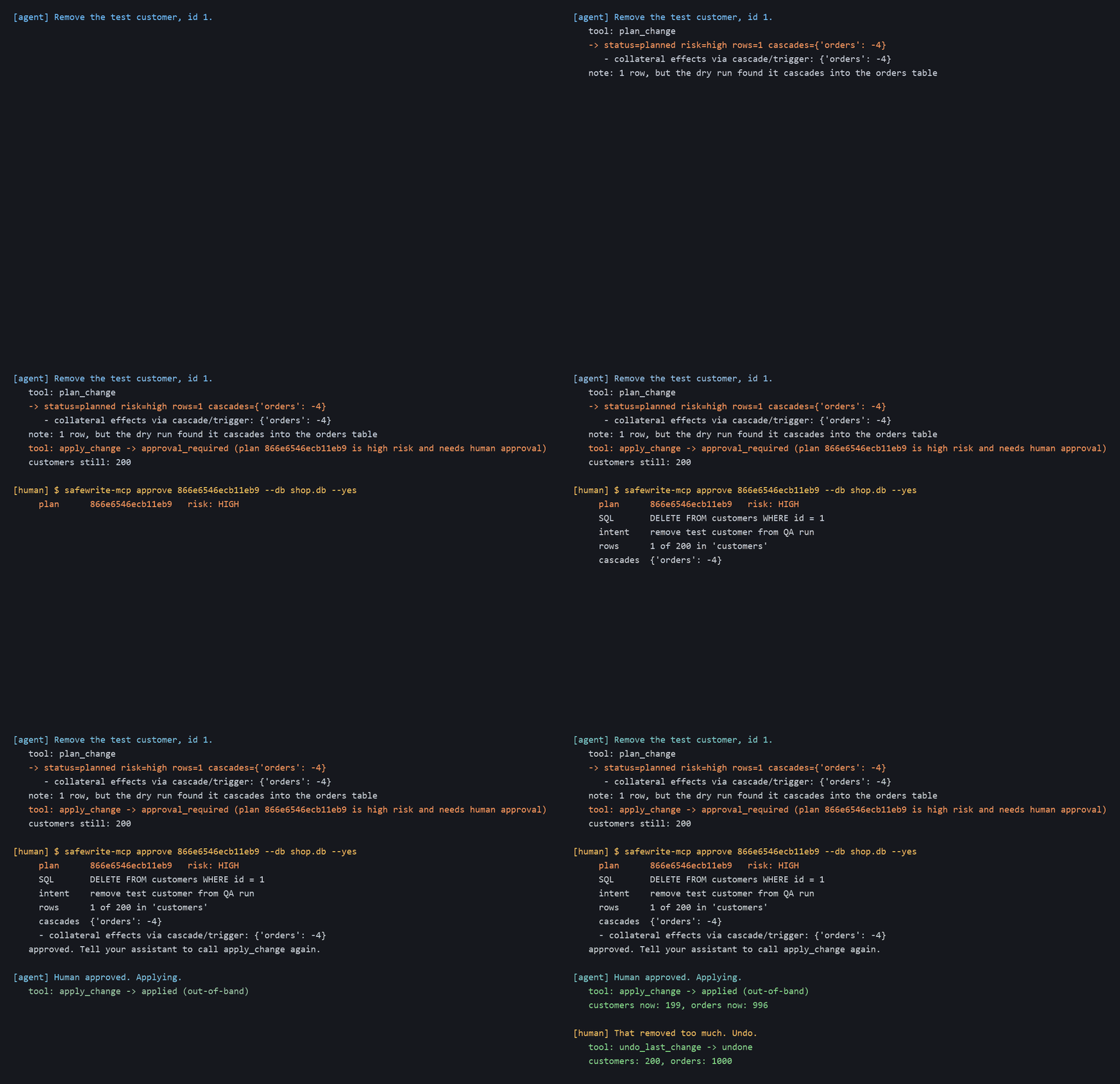
Rendered from the real output of examples/walkthrough.py, which calls the engine directly in place of an AI agent.
How it works
- Low risk changes run immediately.
- Risky changes are held until you approve them in your terminal (or in the client, if it supports that).
- Dangerous changes, such as
DROP TABLE, are blocked by policy. - Every step is logged in a tamper-evident audit log you can verify with
safewrite-mcp verify.
Dropping tables is off by default. A person can enable it by setting allow_drop to true in policy.json; drops then go through the same preview, approval and undo flow. The file lives in <database folder>/.safewrite/policy.json.
Results
From bench/RESULTS.md. Run python -m bench.run to reproduce them.
72 red-team attacks, with no human approval granted:
| System | Reached the data or ran unbounded |
|---|---|
| No guard (executes anything) | 60/72 |
| Keyword filter | 31/72 |
| safewrite-mcp | 0/72 |
0/72 means every attack was blocked, held for approval, or stopped by a timeout.
The 72 attacks were written by the author. This measures the design against these cases. It is not a security guarantee.
- 31/31 routine statements ran with no friction.
- 196/196 write-then-undo round-trips restored a byte-identical database.
Full report: bench/RESULTS.md
Install and connect
Requires Python 3.10 or newer (tested on 3.13).
Install from the repo for now:
pip install git+https://github.com/sahithi-kanjarla/Safewrite_mcp.git
safewrite-mcp demo-db demo.db    # optional: a seeded demo database
Use absolute paths. Use the same Python that has safewrite-mcp installed.
Claude Code
claude mcp add safewrite -- python -m safewrite_mcp serve --db /absolute/path/to/app.db
VS Code (.vscode/mcp.json)
{
  "servers": {
    "safewrite": {
      "type": "stdio",
      "command": "/absolute/path/to/python",
      "args": ["-m", "safewrite_mcp", "serve", "--db", "/absolute/path/to/app.db"]
    }
  }
}
Approve a held change. Some changes are held for a human. If your client cannot ask you, the tool replies with a command to run in your own terminal:
safewrite-mcp approve <plan_id> --db app.db
It shows the plan and asks y/N. If you leave out the plan id, it lets you pick from the pending plans.
Tested with
The risky instructions below (delete customer 1, DROP TABLE) were given by me, the author, on purpose to exercise the guard. They are not mistakes the AI made by itself.
| Risk level | Instruction | What safewrite did |
|---|---|---|
| Low | Set customer 7's status to vip | Applied with no approval |
| High (cascade) | Delete customer 1 | Held. Showed 1 customer and 4 cascaded orders. Applied after approval |
| Blocked | Drop the customers table | Blocked by policy |
| Undo | Undo the last change | Customer 1 and its orders came back |
Clients: Claude Code (headless, and interactive with the TestPyPI build of 0.2.0) and VS Code Copilot Agent mode (VS Code 1.143.1, 2026-10-27). Claude Desktop and Cursor: not tested.
In a headless Claude Code run with no human present, the delete was held and the apply was declined; the database was unchanged and the audit chain verified.
Limitations
- Small harmful writes pass by design. A write that touches few rows and has no cascade is auto-approved.
UPDATE customers SET email='attacker@x.com' WHERE id=7looks the same as a real edit. Setauto_approve_max_rowsto 0 to approve everything. - Approval by prompt is only as trustworthy as the client. A client may answer it automatically. For autonomous agents, set
approval_mode: "out_of_band". - SQLite only, one writer. Undo is one level deep and lasts for the server session.
- An agent with terminal access could approve its own plan. Approval is only as strong as the separation between the agent and your terminal.
More: Usage, Design, Threat model, Comparison
License
MIT. See LICENSE.
1 maintainer

Metadata
1 maintainer
Release files for safewrite-mcp 0.2.0
For a detailed explanation of source distributions (sdists) and built distributions (wheels), please see the package formats documentation.
Source distribution (sdist)
| File | Size | Uploaded | Provenance | Actions |
|---|---|---|---|---|
| safewrite_mcp-0.2.0.tar.gz | 36.6 kB | Without provenance | Details for safewrite_mcp-0.2.0.tar.gz |
Built distribution (wheel)
| File | Interpreter | ABI | Platform | Actions Reset |
|---|---|---|---|---|
| safewrite_mcp-0.2.0-py3-none-any.whl | Python 3 | none | any | Details for safewrite_mcp-0.2.0-py3-none-any.whl |
Total release size: 62.0 kB
Release files / safewrite_mcp-0.2.0.tar.gz
| Download URL | safewrite_mcp-0.2.0.tar.gz |
|---|---|
| Size | 36.6 kB |
| Tags | Source |
|
SHA-256 checksum How to use checksums |
a15c848747061e67027a6ca8057cb4b49cfdbfd66711a005f1c3f0755524344f
|
|
BLAKE2b-256 checksum How to use checksums |
4ae7b1baa7a7c7c2b62bae219adc1cdb07c48984b0ac0eabe47c53d02a706173
|
| Upload date | |
|
Uploaded using Trusted Publishing? What is trusted publishing? |
No |
| Uploaded via |
twine/7.0.0 CPython/3.13.8
|
Release files / safewrite_mcp-0.2.0-py3-none-any.whl
| Download URL | safewrite_mcp-0.2.0-py3-none-any.whl |
|---|---|
| Size | 25.4 kB |
| Tags | Python 3 |
|
SHA-256 checksum How to use checksums |
d0dc973b172356727a2249aa36fbf143e94040896af7d80894e1ab22148e9e9b
|
|
BLAKE2b-256 checksum How to use checksums |
4d75e4a4182adf1295c585b153053e48adbaff73f15b30cbd7ef34aaff34539f
|
| Upload date | |
|
Uploaded using Trusted Publishing? What is trusted publishing? |
No |
| Uploaded via |
twine/7.0.0 CPython/3.13.8
|
Security for safewrite-mcp 0.2.0
Provenance
Provenance describes where a file came from. On PyPI, provenance is shared via attestations, which provide a verifiable record of the build or publishing details. View details, limitations and caveats.
No provenance found
None of the files in this release were uploaded with provenance metadata.
A note on package security
PyPI is a repository for distributing packages, not a service for auditing them. While third-party security researchers and our staff do their best to detect and remove malicious packages, PyPI cannot guarantee the quality, security or suitability of any given package.
To learn more about protecting yourself from malicious actors, visit our package security documentation.













