
Interactive 3D viewer for SAGE semi-analytic galaxy formation outputs
Verified details
These details have been verified by PyPIProject links
GitHub Statistics
Maintainers

Project description
SAGE-Viewer
An interactive 3D visualization package for SAGE26 semi-analytic galaxy formation outputs.
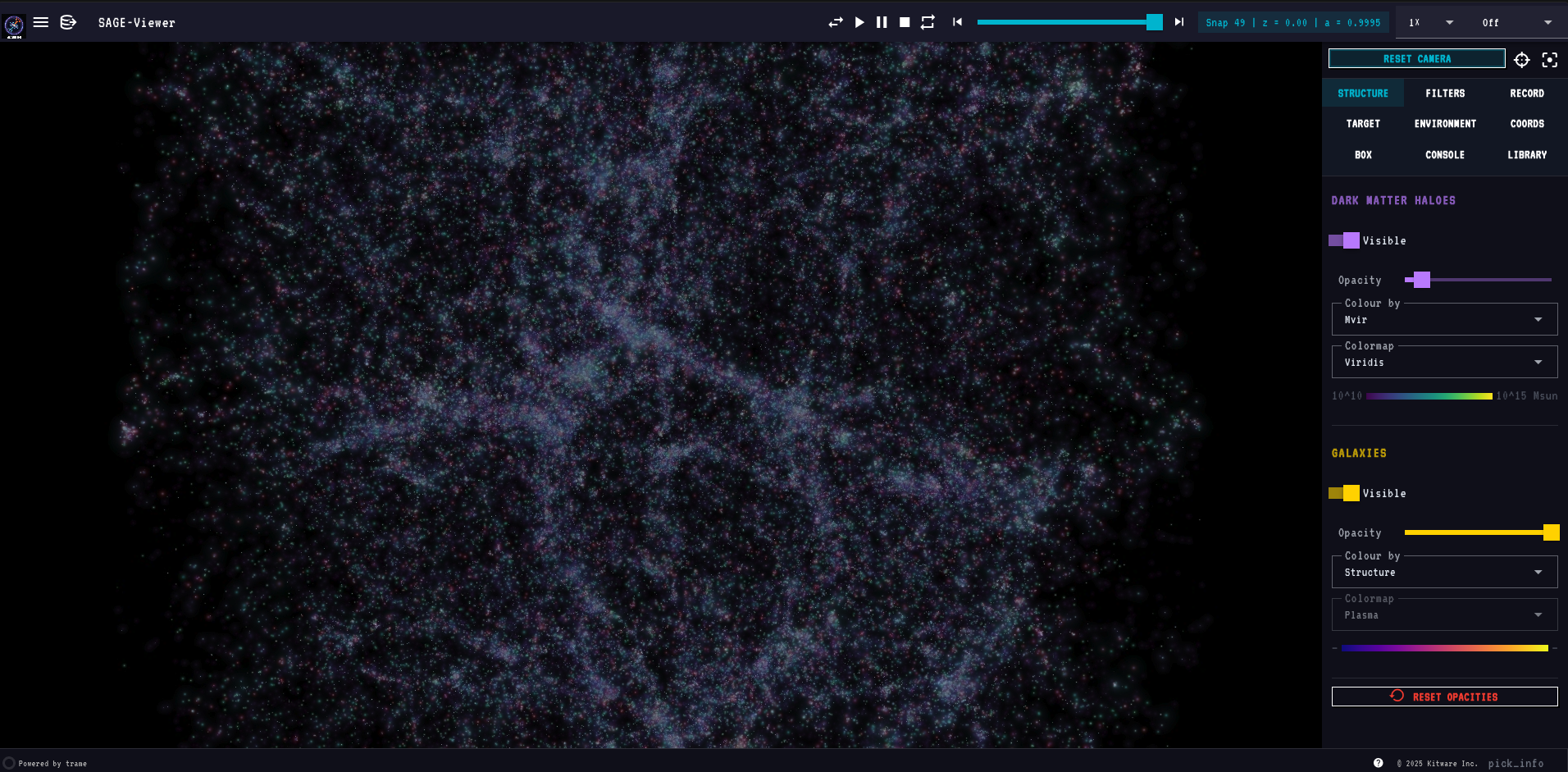
Renders dark matter haloes and SAGE galaxies together in a browser-based interactive viewer powered by PyVista and Trame.
Features
Rendering
- World-space gaussian splat rendering of haloes and galaxies — splats scale with camera distance and stay physically meaningful at any zoom
- Structure render mode: each galaxy drawn as a layered composition — cold-gas envelope (blue, sized by ColdGas) + outer envelope (green for CGM-regime sized by CGMgas, red for Hot-regime sized by HotGas)
- 27 selectable matplotlib colormaps, identical lists for halo and galaxy layers
- Live colormap, colour-by mode, opacity and visibility controls per layer
- Colour-by dropdowns are model-aware — only modes whose underlying field is present in the loaded model appear in the list; they update automatically on model switch
- Full still-quality rendering at all times — no resolution drop during camera drag or playback
Playback & camera
- Play / Pause / Stop / Reverse / Repeat transport at 0.1× – 5× speeds
- Continuous camera rotation (CW / CCW at 15° / 30° / 60° per second)
- Reset / Centre / Focus buttons
- Fly to halo, galaxy, coordinates, or sub-box (with focus mode that masks everything outside)
- Draw Sphere (Coords tab): place a live two-handle sphere in the viewport — drag the centre ball to translate, drag the edge ball to resize; Lock Sphere commits it as the active focus region
- Draw Box (Box tab): place a live resizable box widget — drag any face or corner handle; Lock Box commits it; Clear on both tabs cancels the widget without navigating
- Switching models always lands at z=0 of the new model; slider and snap chip update immediately
- Camera bookmarks (save, restore, delete)
Selection & inspection
- Galaxy Info panel (Target tab) — GalaxyID, type, halo Mvir, stellar mass, sSFR, cold gas, B/T, BH mass, H2 mass, gas regime, FFB regime, environment classification, mass-weighted stellar age
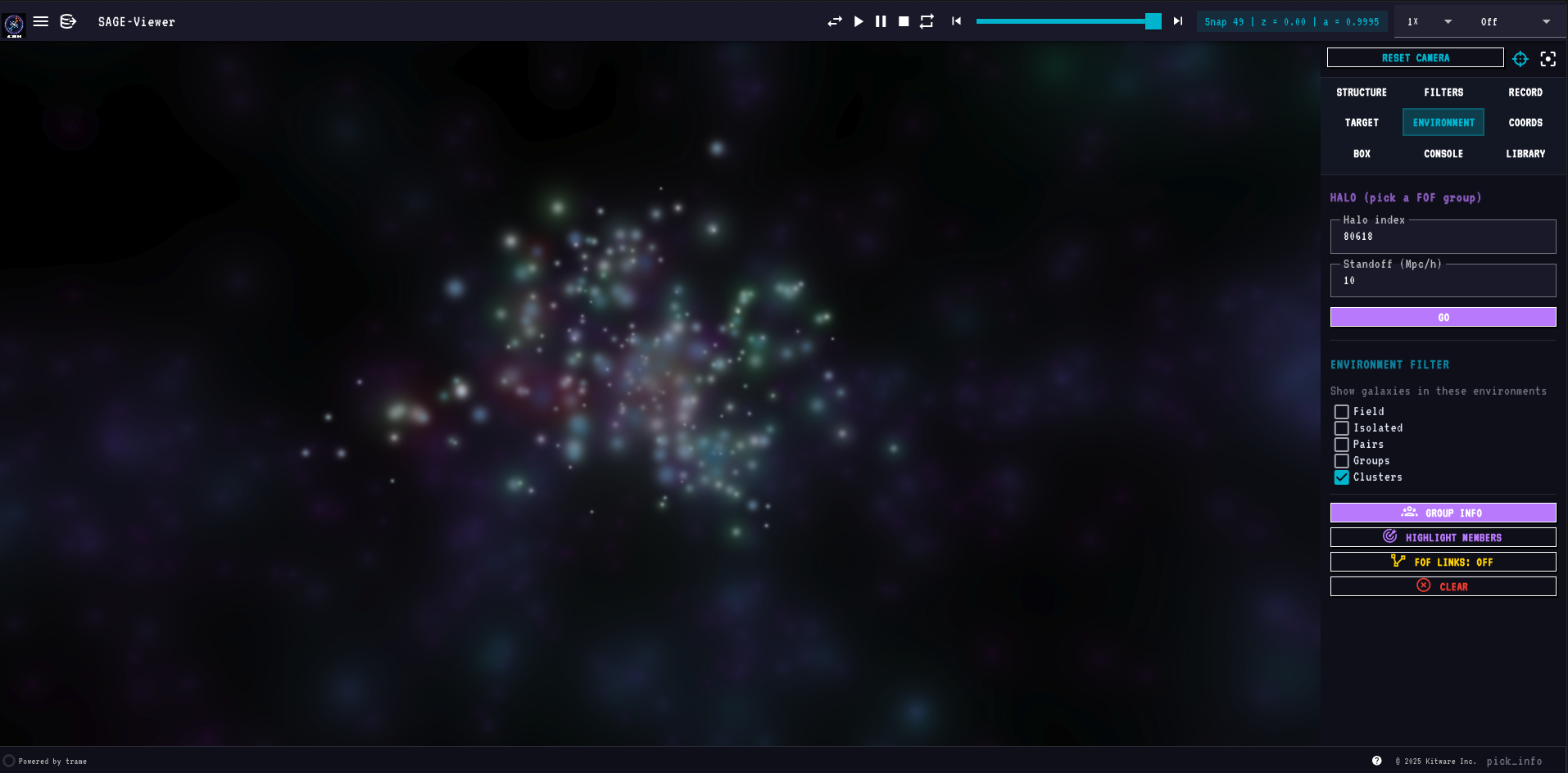
- Group Info panel (Environment tab) — FOF-aggregate stats: classification, member breakdown (centrals vs satellites), host Mvir, total stellar / cold gas / SFR, mean B/T, spatial extent, target role, BCG stellar mass
- Highlight Galaxy / Highlight Members buttons add regime-coloured splat overlays — CGM-regime members in dodgerblue, Hot-regime in tomato; the selected galaxy is marked with a white border ring
- Double-click any point in the viewport (any tab) to populate the Target tab's halo + galaxy IDs and draw a red marker on the selection. Only currently visible galaxies (passing all filters and focus) are selectable. If Focus is active, the camera carries to the new selection at the last-used radius.
- Enter to run in every input field — Halo idx, Galaxy idx, Coords X/Y/Z, Box bounds, Console command, script path, screenshot/movie label all submit on Enter, equivalent to clicking the paired Go / Zoom / Run / Take Screenshot button

Filtering
- Halo filters: Mvir (log10), Rvir (Mpc/h), Vvir (km/s)
- Galaxy filters: stellar mass, sSFR, B/T, age, BH mass, ICS mass, type (centrals / satellites), FFB regime, CGM / Hot regime, environment class (Field / Isolated / Group / Cluster, via checkboxes in the Environment tab)
- Filters are active-only — a slider sitting at its full-range endpoints has no effect; move it inward to filter. Every galaxy with detectable mass is visible at startup.
- Filters auto-disable when the loaded model doesn't contain the underlying field
- Reset Filters button restores defaults
- FoF links are filter-aware — satellite→central gold lines are only drawn for halos that pass the active filter mask, focus sphere/box, and the halos-visible toggle; they stay correct during playback and recording
- Playback respects all scene state — the pre-render frame cache is keyed on filter values, focus region, layer visibility/opacity/color-mode, and FoF state; changing any of these and pressing Play again always produces fresh frames
Side-by-side multi-box comparison
- Load two or more SAGE models side-by-side in a single viewport with
+SBSin the Models section of the hamburger menu - Each box is fully independent: its own snapshot, filters, colormaps, opacity, and visibility settings
- A box strip at the bottom of the viewport shows all loaded boxes; click any box label to make it active — the entire right panel (Structure, Filters, Target, Console, …) then controls that box
- Active box label is green; idle boxes are white
- Play, step, and the snapshot slider advance only the active box's snapshot
- Rotation is disabled in multi-box mode (all boxes share one camera; independent rotation is not supported)
- Halo Mvir colour mode is always locked to Viridis; the colormap selector is greyed out when Mvir is selected
- CLR button in the box strip resets that box to its defaults without affecting others
Multi-model (overlays)
- Auto-scans
<sage_root>/output/for SAGE model subfolders - Switch the primary model from the hamburger menu (any box size)
- Overlay a second compatible model on top (same box size + snap count)
- Loading spinner during model swaps; warning snackbar for incompatible overlays
Output
- Screenshots in PNG / JPG / TIFF
- Movie recording in GIF / MOV (H.264, via ffmpeg) / PNG sequence
- Configurable FPS (1 – 60) and resolution (Native / 2× / 4× supersampled)
- Optional user-typed label per capture; everything goes into a single session folder per app launch
Launch Mode wizard
- Guided setup flow for configuring and launching SAGE26, accessible from the top-left Launch Mode menu or the Explore Mode hamburger
- Step chips in the header track progress (cyan = current step, green = done, white = pending)
- Rescan button re-runs the environment scan from scratch at any point
- Create config file option generates a new
.parfrom the built-in millennium.par template; choose a custom filename before writing - Par file editor opens side-by-side with the terminal when a
.parfile needs editing — both panels visible simultaneously - Wizard always resets cleanly when reopened from Explore Mode
Embedded console (Console tab)
- Terminal mode — a live xterm.js terminal backed by a real PTY (
$SHELL -l); full ANSI colour, cursor control, and interactive programs (vim,top,htop,less) all work - SAGE command mode — natural-language SAGE commands (
show only clusters,go to halo 42,snap 30,screenshot, …); switch via the SAGE Cmds button,terminalreturns to the shell - Multiple sessions with a
+button — each console has its own PTY process and command history - Pop-out floats a movable / resizable console card over the viewport so you can keep typing while watching the render
Self-contained metadata
- Cosmology (h, Ω_m, Ω_Λ), box size, and snapshot redshifts are read directly from
model_0.hdf5'sHeader/Simulation - The
.parfile is now only needed for tree-file paths
Supported simulations
| Simulation | Box size | Snapshots | Tree format |
|---|---|---|---|
| miniMillennium | 62.5 Mpc/h | 64 | lhalo_binary |
| microUchuu | 96 Mpc/h | 50 | lhalo_binary |
Both supported automatically — point at the .par file and SAGE-Viewer figures out the rest from the HDF5.
Quick start
pip install sage-viewer
Explore Mode — view existing SAGE26 results by pointing at a .par file:
sage-viewer --par /path/to/SAGE26/input/millennium.par
Launch Mode — configure and run SAGE26 via the guided wizard. Run from your SAGE26 root so the wizard can find your .par files and executable automatically:
cd /path/to/SAGE26
sage-viewer
Open the printed URL in any browser. To launch on a remote cluster and view locally, use SSH port-forwarding:
# On the cluster
sage-viewer --par millennium.par --port 8080

# In a local terminal
ssh -L 8080:localhost:8080 user@cluster
# Then open http://localhost:8080 in your browser
Command-line options
--par FILE              Path to a SAGE .par file (required)
--par-dir DIR           Directory to scan for additional .par files
                        (defaults to the parent of --par; used for the
                        multi-model dropdown)
--snap N                Initial snapshot number (default: last = z=0)
--port N                Trame server port (default: 8080)
--n-jobs N              Worker threads for parallel halo file reads
--max-halos N           Downsample ceiling per snapshot
--max-galaxies N        Downsample ceiling per snapshot
--min-halo-mass MSUN    Minimum halo mass to load
--min-stellar-mass MSUN Minimum stellar mass to load
Multi-model workflow
If your SAGE root looks like:
SAGE26/
├── input/
│   ├── millennium.par
│   ├── millennium_vanilla.par
│   └── microuchuu.par
└── output/
    ├── millennium/model_0.hdf5
    ├── millennium_vanilla/model_0.hdf5
    └── microuchuu/model_0.hdf5
then sage-viewer --par input/millennium.par discovers all three models automatically. Click the hamburger icon (top-left) → Models section to switch, or click "+ overlay" next to a compatible model to render both at once.
Installation
# From source (PyPI release coming with v1.0)
git clone https://github.com/MBradley1985/SAGE-Viewer
cd SAGE-Viewer
pip install -e ".[dev]"
Requires Python ≥ 3.10. Movie recording in MOV format requires ffmpeg in your PATH.
HPC / supercomputer
A helper script is included for module-system clusters (Slurm, PBS, etc.):
# Load a Python module first (name varies by cluster)
module load python/3.12.0

# Create a venv and install SAGE-Viewer in one step
./install_hpc.sh

# Optional: place the venv on scratch for faster I/O
./install_hpc.sh /scratch/$USER/sage-viewer-env
The install is editable (pip install -e .) so a git pull updates the code immediately with no reinstall. ffmpeg is checked separately — load it via your module system if you need MOV recording.
Then in every session:
source .venv/bin/activate
sage-viewer --par /path/to/millennium.par --port 8080
# SSH-tunnel the port to your local browser
Documentation
Full documentation at mbradley1985.github.io/SAGE-Viewer.
Tabs at a glance
When multiple boxes are loaded a box strip appears at the bottom of the viewport. Click any box to make it active (green label). All tab controls then target that box.
| Tab | Purpose |
|---|---|
| Structure | Layer visibility, opacity, colour-by mode, colormap (with inline colorbar) |
| Filters | Range sliders for halo and galaxy properties |
| Record | Screenshots and movie recording |
| Target | Halo / galaxy navigation, focus zoom, Galaxy Info, Highlight Galaxy |
| Environment | Halo selector, environment-class checkboxes, Group Info, Highlight Members |
| Coords | Fly to arbitrary (x, y, z) — "Use Current Position" populates from camera; Draw Sphere places an interactive two-handle sphere (drag centre ball to translate, drag edge ball to resize); Lock Sphere commits it as the focus region |
| Box | Zoom to axis-aligned sub-box — "Use Current View" populates from camera; Draw Box places a resizable interactive box; Lock Box commits it as the focus region |
| Console | Live xterm.js shell terminal (PTY-backed) + SAGE natural-language command mode. Multiple sessions, pop-out window |
| Library | Browse stored screenshots / movies; double-click a row to open as a movable, resizable floating card over the viewport (multiple items open simultaneously); per-row delete button removes the file from disk immediately |

The Focus button (top of the right panel) is tab-aware: it focuses on whatever's active in the current tab (target galaxy, environment halo, coords point, or box region).
License
MIT — see LICENSE.
Project details
Verified details
These details have been verified by PyPIProject links
GitHub Statistics
Maintainers
Release history Release notifications | RSS feed


Download files
Download the file for your platform. If you're not sure which to choose, learn more about installing packages.
Source Distribution
Built Distribution
Filter files by name, interpreter, ABI, and platform.
If you're not sure about the file name format, learn more about wheel file names.
Copy a direct link to the current filters
File details
Details for the file sage_viewer-1.0.4.tar.gz.
File metadata
- Download URL: sage_viewer-1.0.4.tar.gz
- Upload date:
- Size: 1.1 MB
- Tags: Source
- Uploaded using Trusted Publishing? Yes
- Uploaded via: twine/6.1.0 CPython/3.13.12
File hashes
| Algorithm | Hash digest | |
|---|---|---|
| SHA256 |
ea38d154ce6f0a119a68c98027f48da0594a425c26bc15c44a16ff65f0e2bea3
|
|
| MD5 |
c073f9622e877474d43765ed222567f5
|
|
| BLAKE2b-256 |
2c314353bf5fbda15ac5a6519eac9a486c7a70f2d2222354384a6f1af6dd3083
|
Provenance
The following attestation bundles were made for sage_viewer-1.0.4.tar.gz:
Publisher:
publish.yml on MBradley1985/SAGE-Viewer
-
Statement:
-
Statement type:
https://in-toto.io/Statement/v1 -
Predicate type:
https://docs.pypi.org/attestations/publish/v1 -
Subject name:
sage_viewer-1.0.4.tar.gz -
Subject digest:
ea38d154ce6f0a119a68c98027f48da0594a425c26bc15c44a16ff65f0e2bea3 - Sigstore transparency entry: 1904744693
- Sigstore integration time:
-
Permalink:
MBradley1985/SAGE-Viewer@727d547a4aa50d6b2d61225a6c6d295c22c2b614 -
Branch / Tag:
refs/tags/v1.0.4 - Owner: https://github.com/MBradley1985
-
Access:
public
-
Token Issuer:
https://token.actions.githubusercontent.com -
Runner Environment:
github-hosted -
Publication workflow:
publish.yml@727d547a4aa50d6b2d61225a6c6d295c22c2b614 -
Trigger Event:
push
-
Statement type:
File details
Details for the file sage_viewer-1.0.4-py3-none-any.whl.
File metadata
- Download URL: sage_viewer-1.0.4-py3-none-any.whl
- Upload date:
- Size: 1.1 MB
- Tags: Python 3
- Uploaded using Trusted Publishing? Yes
- Uploaded via: twine/6.1.0 CPython/3.13.12
File hashes
| Algorithm | Hash digest | |
|---|---|---|
| SHA256 |
0b86495961969d32b4205510686bde5df24e5f33a905a8fc2bcd12dfb6134117
|
|
| MD5 |
4db0097d9854693f04bc681fa9250481
|
|
| BLAKE2b-256 |
1a15142241ed9b975f9e9a74f0e9645021ff5f879900176b51e93299a71791b6
|
Provenance
The following attestation bundles were made for sage_viewer-1.0.4-py3-none-any.whl:
Publisher:
publish.yml on MBradley1985/SAGE-Viewer
-
Statement:
-
Statement type:
https://in-toto.io/Statement/v1 -
Predicate type:
https://docs.pypi.org/attestations/publish/v1 -
Subject name:
sage_viewer-1.0.4-py3-none-any.whl -
Subject digest:
0b86495961969d32b4205510686bde5df24e5f33a905a8fc2bcd12dfb6134117 - Sigstore transparency entry: 1904744983
- Sigstore integration time:
-
Permalink:
MBradley1985/SAGE-Viewer@727d547a4aa50d6b2d61225a6c6d295c22c2b614 -
Branch / Tag:
refs/tags/v1.0.4 - Owner: https://github.com/MBradley1985
-
Access:
public
-
Token Issuer:
https://token.actions.githubusercontent.com -
Runner Environment:
github-hosted -
Publication workflow:
publish.yml@727d547a4aa50d6b2d61225a6c6d295c22c2b614 -
Trigger Event:
push
-
Statement type:






