
Find, resume, and supervise Claude Code sessions across repositories and worktrees.
Verified details
These details have been verified by PyPIProject links
GitHub Statistics
Maintainers

Project description
saikai


English | 日本語
Mission control for Claude Code. Every session across every repo, in one screen — find it, resume it live, and see which ones need you.
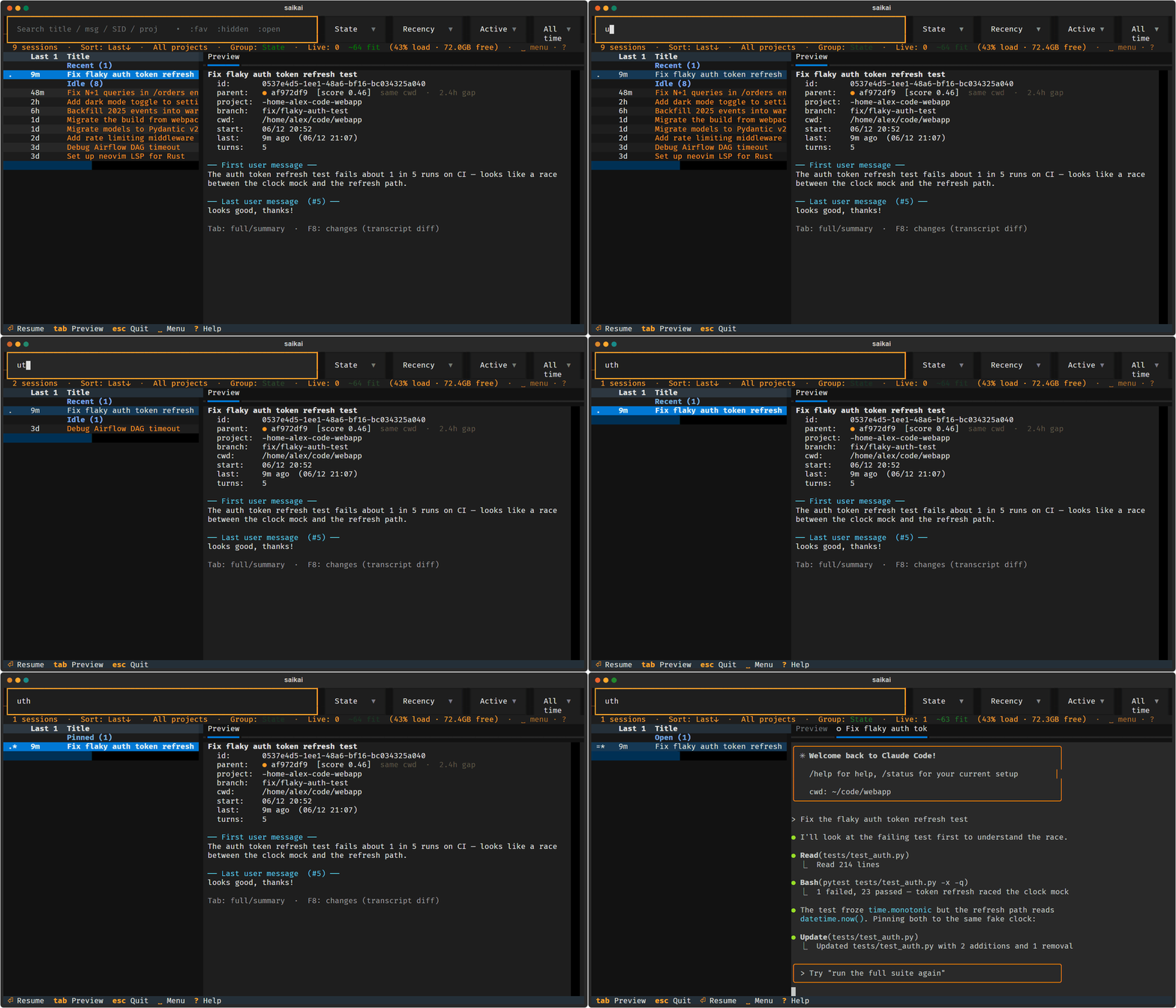
The demo uses fictional, leak-checked data. The current GIF is a deterministic UI recording; see the recording guide for how public recordings are isolated and audited.
saikai brings every Claude Code session — across all your repositories and worktrees — into one screen. Search by what you remember, resume any session live in a pane beside the list, and see at a glance which ones are working, waiting, or finished and awaiting your reply. It reads Claude's own transcript files directly — no daemon, no database.
uv tool install saikai
saikai
Why not just claude --resume?
claude --resume only sees the current working directory, so once your work
spreads across repositories and worktrees the right session gets tedious to
find. saikai gives you one cross-project view — and runs the sessions you pick
as live panes beside the list.
How to read the list
By default, sessions from the same project share a title color, so related
work stays recognizable when the project column is hidden in the narrow split
view. Set display.color_by to worktree, topic, or none to change the grouping.
~ working · ? waiting for you · ! finished, awaiting your reply · = idle
live pane, no reply due · @ open elsewhere · + active · . recent · * favorite ·
x hidden
Features
- Browse Claude Code history across repositories and worktrees, then resume from the cwd where the session started.
- Run several real
claudesessions in split-live tabs;~,?, and!show working, waiting, and finished at a glance. - Quit without losing your open panes; reopen the same set later with
Shift+F4. - Preview transcripts, compare changes, reuse prompts, and follow inferred parent/child session chains.
- Reads Claude's own transcript files directly — no daemon, no database; AI summaries are opt-in.
- Mirror the live UI to your phone or another browser over the LAN (opt-in,
token-authenticated, read-only by default). Flip on control with
Shift+F12to drive saikai — and claude in a pane — from the browser: tap, scroll, an on-screen key bar, and full terminal-equivalent physical-keyboard input.
Who it is for
What I wanted was a TUI session manager that could keep several Claude Code sessions on one screen and let me move between them. It is especially useful for:
- finding sessions spread across repositories and worktrees without remembering each original cwd;
- running several
claudeprocesses in parallel and seeing which are working, waiting, or finished; - closing the terminal and later restoring the same working set;
- getting a Claude Desktop-style session list inside the usual terminal, without keeping a desktop app running;
- finding older work from conversation text, changes, or previous prompts rather than from titles alone.
The implementation is a few focused Python modules on Textual, with a RAM gate that warns before another live pane would push the machine into thrashing.
The live pane uses ConPTY on Windows and a POSIX PTY elsewhere — see Platform support for the per-OS verification status (Windows is the verified platform today).
Install
Requires Python ≥ 3.11. The easiest path is uv — it installs the PyPI package in an isolated environment, no manual venv:
uv tool install saikai # stable release → `saikai` on PATH
From a clone:
uv run saikai.py          # run in place (deps auto-installed)
uv tool install .        # install the `saikai` command on your PATH, then: saikai
Prefer pip / pipx? Both work (deps come from pyproject.toml):
pipx install saikai   # isolated + on PATH
pip install saikai   # into the active environment
The split-live pane needs the PTY deps (pyte, and pywinpty on Windows /
ptyprocess elsewhere); they install automatically with any command above. If
they're somehow missing, saikai still runs in list-only mode (see below).
Usage
saikai                 # every project, full history initially; saved defaults can override
saikai --here          # only the current project (git repo)
saikai --days 7        # only the last 7 days (one-shot; --save-defaults persists)
saikai --table         # static, non-interactive table
saikai --help
Keys — learn three things
Everything else is on screen (the footer, the dropdowns, and the ␣ menu
that pops up when you pause).
-
Keys you already know.
↑↓move ·Enterresumes ·/or just typing searches ·Tabtoggles the preview ·?full key list · within saikai controls,Escleaves the current context (search → list → quit). From a live pane, useCtrl+]to return to the list. -
Spaceis the menu. PressSpacein the list, then one mnemonic letter. Hesitate afterSpaceand the whole menu appears in place, grouped by family (which-key style) — nothing to memorise:Session View Panes f★ favoritescycle sort columnnnew sessionhhideoflip sort orderprestore paneserename (edit)gcycle groupingzfreeze paneycopy prompt (yank)ttreeanext attentionddiff (changes)lhide/show listxclose tab ·[]tabsrrefresh,settings ·/hide/show barSpacemark for batch launchSpace is a deliberate menu key, not a claim that every TUI should use a Space leader. It does not take Space from search fields, dropdowns, or live agent panes. It also avoids taking a letter away from type-to-search. The trade-off is that list marking becomes
Space Space; set[keys] leader = "none"if conventional Space-to-mark is more important to you. -
Ctrl+]returns focus from a live claude pane to the list (the pane receives ordinary editing keys; saikai's documented F-key shortcuts remain available).
Search tokens (combine with text and each other): :fav :hidden :open
:active :recent. The filter bar — search box plus the Group / Sort /
Status / Age dropdowns — is visible by default: Tab/Shift+Tab walk into
the dropdowns, Enter opens one, ␣/ reclaims the rows (persists).
More keyboard parity: Alt+←/→ nudges the list/pane divider (persists, like
dragging it). Most session and pane actions also have F-key aliases; ? shows
the available aliases and your [keys] remaps.
Don't like the defaults? In config.toml: [keys] leader = "none" turns the
mode off (Space then marks directly, as before), leader = "ctrl+g" moves it,
leader_defaults = false empties the map, and any action = "x" single-letter
entry remaps one sequence. Mouse support includes column-header sorting, divider
dragging, rows, dropdowns, and drag-selection for copying arbitrary live-pane
text. The main session-management flow remains keyboard-accessible.
Split-live (default)
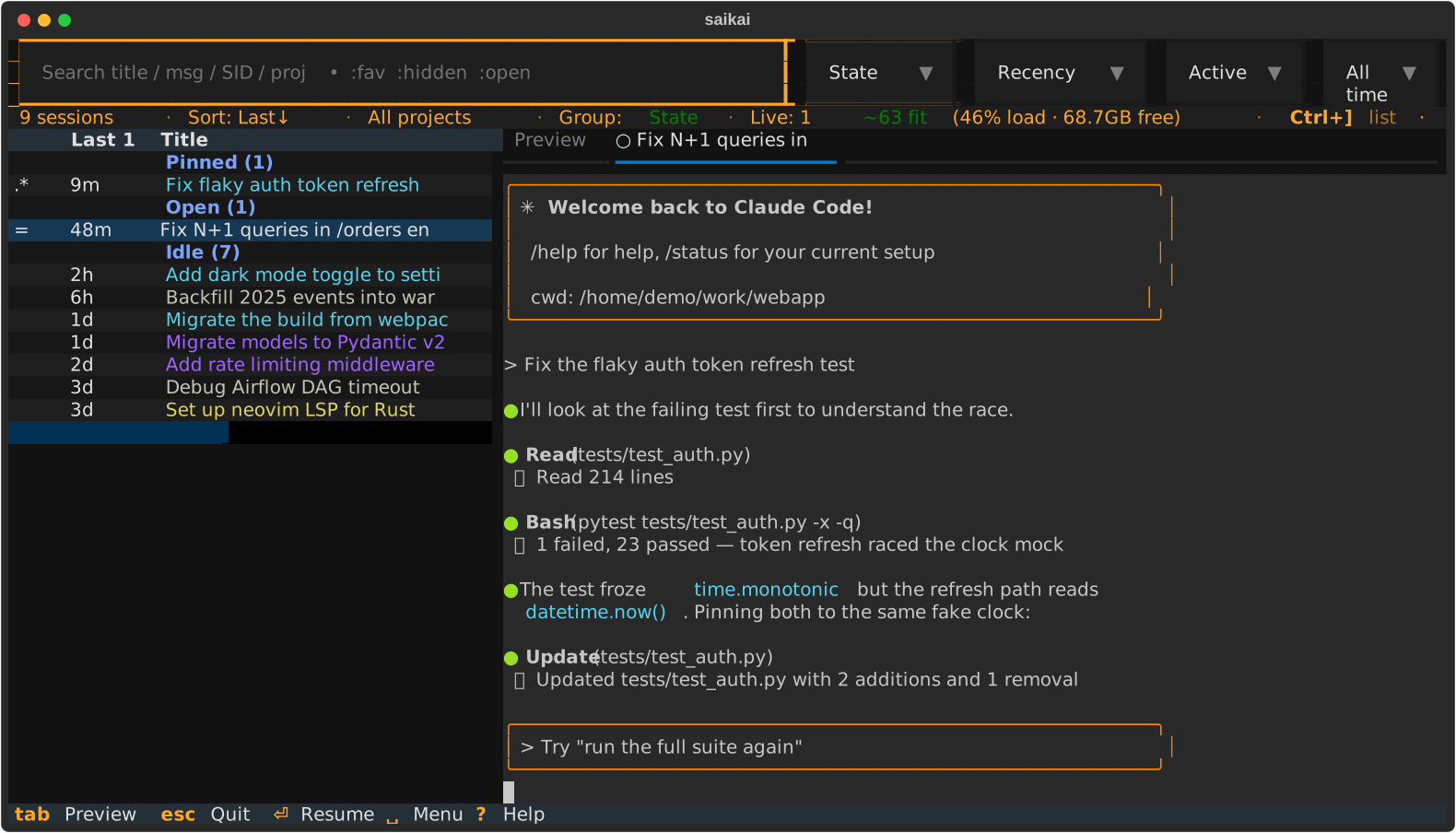
saikai runs real interactive claude processes in tabs beside the list whenever
its PTY deps (pyte, pywinpty/ptyprocess) are present — they ship as
dependencies, so this is the default. To opt out and use the lightweight
list-only browser (Enter = full-screen takeover resume), set the env var:
SAIKAI_SPLIT_LIVE=0 saikai # also: false / no / off
| Key | Action |
|---|---|
Enter |
open / focus a live pane for the selected session |
Shift+F8 |
start a NEW claude session in any folder / git worktree |
Shift+F4 |
reopen the panes from your last session (snapshot + resume) — anytime |
F2 / F3 |
previous / next live tab |
Shift+F3 |
jump to the next pane needing attention (? waiting / ! finished) |
F4 |
hide / show the session list (full-width pane) |
Ctrl+] |
return focus from a pane back to the list (SAIKAI_RELEASE_KEY to change) |
F10 / Shift+F10 |
close the active tab / close all tabs (explicit close — not restored) |
Esc from the list |
quit: snapshot the open panes, then kill them all (Shift+F4 reopens them next launch) |
Ctrl+C |
interrupt claude in a focused live pane; from saikai controls, quit all |
| scroll up | freeze the pane (copy mode): select/copy while claude keeps running |
Press ? inside saikai for the active color rule and marker legend.
Web mirror (opt-in)
saikai can mirror its live UI to a phone or another browser — to glance at what's running, or to drive a session from across the room. It is off by default and token-authenticated.
SAIKAI_MIRROR=1 saikai                                   # loopback only (127.0.0.1)
SAIKAI_MIRROR=1 SAIKAI_MIRROR_HOST=192.168.1.50 saikai   # reachable on your LAN
On launch saikai shows a scannable QR code (and copies the URL); press F12
to bring it back anytime. The URL carries a per-run access token.
The mirror is read-only by default. Press Shift+F12 (a local-only key)
to toggle browser control on — then the browser drives saikai with:
- tap to click (select a row, sort a column, focus a pane) and swipe to scroll;
- an on-screen key bar (Leader, Esc, Tab, Enter, arrows, Ctrl, F12, List) for a soft keyboard;
- a physical keyboard, terminal-equivalent — arrows, Home/End, F-keys, Ctrl/Alt
combos,
Ctrl+]to leave a pane,Ctrl+Cto interrupt claude.
Control auto-disables after a spell of inactivity, and only the local
Shift+F12 can enable it — a browser can never turn on its own control. Over a
LAN bind the mirror stays read-only unless you also opt in with
SAIKAI_MIRROR_ALLOW_LAN_INPUT=1. Use it only on a network you trust: the access
token travels in the URL, while the separate write-key required for input is
delivered only over the authenticated stream — never in the URL, QR, or logs.
So an unexpected viewer is always visible, saikai shows how many browsers are
connected — a 🌐 N count in the status bar, a toast when one connects, and the
count on the F12 screen.
Configuration (environment variables)
| Variable | Default | Meaning |
|---|---|---|
SAIKAI_SPLIT_LIVE |
on | live-pane mode; set 0/false/no/off to disable → list-only browser + full-takeover resume |
SAIKAI_AUTO_REFRESH |
off | seconds between background re-scans; 0 disables, minimum active interval is 2 |
SAIKAI_SUMMARIZE_ENABLED |
off | opt in to AI summaries through claude -p |
SAIKAI_SUMMARIZE_CMD |
— | command to summarize with (prompt on stdin → summary on stdout) instead of claude -p |
SAIKAI_SUMMARIZE_MODEL |
haiku | model used when summarizing through claude -p |
SAIKAI_AUTO_PERMISSION |
off | opt in to adding --permission-mode auto for frequently used workspaces |
SAIKAI_MAX_MEM_LOAD |
85 Win / 95 POSIX | refuse/warn opening a pane above this memory-load %. On Windows dwMemoryLoad is an independent kernel signal; on Linux/macOS the load is derived from the same availability number as the floor, so it defaults higher and acts as a backstop |
SAIKAI_MAX_MEM_PRESSURE |
10 | Linux/macOS: refuse a new pane when measured memory pressure crosses this (Linux PSI some avg10 % — the stall-time metric systemd-oomd acts on; macOS gates on the kernel's critical pressure level). No effect on Windows |
SAIKAI_MIN_COMMIT_MB |
2048 | keep this much commit headroom free — the system-freeze guard. Windows always; Linux only under strict overcommit (vm.overcommit_memory=2) — in the default heuristic mode CommitLimit isn't enforced and is skipped |
SAIKAI_MIN_FREE_PHYS_PCT |
8 | keep ≥ this % of physical RAM available (anti-thrash floor, machine-relative) |
SAIKAI_CLAUDE_MB |
600 | estimated RAM per live pane |
SAIKAI_MIN_FREE_MB |
0 | optional absolute physical floor (legacy; max'd with the % floor) |
SAIKAI_HARD_RAM_GATE |
off | 1 refuses (vs warns) when the gate would be crossed |
SAIKAI_MAX_LIVE |
64 | hard cap on concurrent live panes (backstop) |
SAIKAI_SCROLLBACK |
2000 | per-pane scrollback lines kept by saikai. This controls the number of pyte cells held in memory; lower it (e.g. 1000) on a memory-tight machine, raise it for deeper history |
SAIKAI_COLOR_BY |
project | what tints the session title: project / worktree / topic / none |
SAIKAI_SPLIT_RATIO |
0.34 | initial list/pane split (drag the divider to change; the dragged value persists) |
SAIKAI_RELEASE_KEY |
ctrl+] |
key that returns focus from a live pane to the list |
SAIKAI_MIRROR |
off | mirror the live UI to a browser; a truthy value (1/true/yes/on) enables it (token-authenticated, read-only until Shift+F12) |
SAIKAI_MIRROR_HOST |
127.0.0.1 |
mirror bind address; set to a LAN IP to reach it from another device |
SAIKAI_MIRROR_PORT |
0 |
fixed mirror port so a firewall rule can target it; 0 lets the OS pick a free port |
SAIKAI_MIRROR_ALLOW_LAN_INPUT |
off | allow control input over a non-loopback bind; otherwise a LAN mirror stays read-only (loopback always permits input) |
saikai also reads an optional TOML config file for these same knobs (with
env > config > default precedence) plus [keys] rebinds. Run saikai --init-config to write a documented template, saikai --print-config to see the
resolved location and values — or press Space , inside the app: the
Settings screen edits the list options in place and shows every config knob
with its resolved value and source (e there opens config.toml in your editor).
Claude Code is the currently integrated provider. Agent-specific launch and
status contracts live in saikai_provider.py; a Codex contract validates the
extension boundary, but Codex is not selectable until its history discovery and
live-state integration are complete. Claude history discovery respects
CLAUDE_CONFIG_DIR.
Ecosystem
saikai focuses on finding, resuming, and supervising sessions over time. ccmanager focuses on coordinating a live multi-agent roster. The two solve adjacent problems rather than competing for the same workflow.
Platform support
Verified support is deliberately bounded to Windows 10 / 11 on Python ≥ 3.11. Linux, WSL2, and macOS remain implemented but experimental until their real PTY paths receive sustained native testing. Other platforms are unsupported.
Most of saikai is Python + Textual. Split-live is the platform-sensitive part: real PTYs, clipboard access, process teardown, key input, and rendering can vary by OS and host terminal. Honest status:
| OS | Live-pane PTY | Clipboard (from a frozen pane) | RAM gate source | Status |
|---|---|---|---|---|
| Windows 10 / 11 | ConPTY (pywinpty) |
Win32 CF_UNICODETEXT (codepage-safe) |
GlobalMemoryStatusEx |
✅ developed & daily-driven (on WezTerm) |
| Linux (incl. WSL2) | POSIX PTY (ptyprocess) |
OSC-52 (terminal / tmux / SSH policy must allow it) | /proc/meminfo + PSI + overcommit mode |
⚠️ experimental; native reviewers wanted |
| macOS | POSIX PTY (ptyprocess) |
local pbcopy; OSC-52 fallback for remote-capable terminals |
vm_stat + memory-pressure sysctl (no commit limit) |
⚠️ experimental; macOS reviewers wanted |
-
On Windows, WezTerm and Windows Terminal use the same ConPTY and Win32 clipboard paths. That does not guarantee identical key handling, cell widths, IME behavior, or mouse behavior. WezTerm is the daily-driven terminal.
-
List-only mode (
SAIKAI_SPLIT_LIVE=0) avoids the PTY and live-pane clipboard paths, so it is the most portable way to use saikai. -
Most regression tests can run without optional dependencies. Use
uv runto also exercise the installed Textual Pilot and real PTY backend paths:# run the whole suite the way CI does (Pilot + real PTY paths included): for t in tests/test_*.py; do uv run python "$t"; done
-
Linux/WSL2/macOS reviewers are wanted. Please report the terminal, local vs SSH/tmux setup, PTY teardown result, key quirks, and clipboard behavior.
-
CI installs each OS's real PTY backend and smoke-tests spawn, resize, output, and EOF on Windows, Linux, and macOS. This is not a substitute for interactive review across terminal emulators, SSH, tmux, IMEs, and clipboard policies.
Contributing
Issues and PRs welcome — see CONTRIBUTING.md for the dev setup, how to run the test suites, and the concurrency invariants that keep the split-live pane from deadlocking (read those before touching threading code). Changes are documented in CHANGELOG.md.
Security
Please report vulnerabilities privately — see SECURITY.md. Don't open a public issue for a security problem.
License
saikai is released under the MIT License. It depends on a few
third-party packages installed separately (textual, pyte, pywinpty/ptyprocess) —
see THIRD-PARTY-NOTICES.md. Note pyte is LGPL-3.0; it
is used as an unmodified, separately-installed dependency, which keeps saikai's
own code MIT.
Project details
Verified details
These details have been verified by PyPIProject links
GitHub Statistics
Maintainers
Release history Release notifications | RSS feed


Download files
Download the file for your platform. If you're not sure which to choose, learn more about installing packages.
Source Distribution
Built Distribution
Filter files by name, interpreter, ABI, and platform.
If you're not sure about the file name format, learn more about wheel file names.
Copy a direct link to the current filters
File details
Details for the file saikai-0.3.0.tar.gz.
File metadata
- Download URL: saikai-0.3.0.tar.gz
- Upload date:
- Size: 250.9 kB
- Tags: Source
- Uploaded using Trusted Publishing? Yes
- Uploaded via: twine/6.1.0 CPython/3.13.13
File hashes
| Algorithm | Hash digest | |
|---|---|---|
| SHA256 |
d5e60cb530feadd3433adcf9bb633e17f72366561e689eab2db52d86be88fbe7
|
|
| MD5 |
0621bc8f61d3dcd2408debb078c9ca13
|
|
| BLAKE2b-256 |
14d4438e947e5f36ed123241f88ddfd2a0da2be65804e0f220657b664a44cc0f
|
Provenance
The following attestation bundles were made for saikai-0.3.0.tar.gz:
Publisher:
publish.yml on m-morino/saikai
-
Statement:
-
Statement type:
https://in-toto.io/Statement/v1 -
Predicate type:
https://docs.pypi.org/attestations/publish/v1 -
Subject name:
saikai-0.3.0.tar.gz -
Subject digest:
d5e60cb530feadd3433adcf9bb633e17f72366561e689eab2db52d86be88fbe7 - Sigstore transparency entry: 1819729961
- Sigstore integration time:
-
Permalink:
m-morino/saikai@3e7b7be39e0a3f3ecc122badf568f1590522d7ac -
Branch / Tag:
refs/tags/v0.3.0 - Owner: https://github.com/m-morino
-
Access:
public
-
Token Issuer:
https://token.actions.githubusercontent.com -
Runner Environment:
github-hosted -
Publication workflow:
publish.yml@3e7b7be39e0a3f3ecc122badf568f1590522d7ac -
Trigger Event:
release
-
Statement type:
File details
Details for the file saikai-0.3.0-py3-none-any.whl.
File metadata
- Download URL: saikai-0.3.0-py3-none-any.whl
- Upload date:
- Size: 255.0 kB
- Tags: Python 3
- Uploaded using Trusted Publishing? Yes
- Uploaded via: twine/6.1.0 CPython/3.13.13
File hashes
| Algorithm | Hash digest | |
|---|---|---|
| SHA256 |
abf759fd745a36425258409c1fbb8c9064e0b18de6142eca7310f44bd6d4aaac
|
|
| MD5 |
6f4387acb1287ad8addb6bac31b99d20
|
|
| BLAKE2b-256 |
05699ef54365823fe9fd0bd84f880fbd1dee69074ff8d758e9bd383fefb3a454
|
Provenance
The following attestation bundles were made for saikai-0.3.0-py3-none-any.whl:
Publisher:
publish.yml on m-morino/saikai
-
Statement:
-
Statement type:
https://in-toto.io/Statement/v1 -
Predicate type:
https://docs.pypi.org/attestations/publish/v1 -
Subject name:
saikai-0.3.0-py3-none-any.whl -
Subject digest:
abf759fd745a36425258409c1fbb8c9064e0b18de6142eca7310f44bd6d4aaac - Sigstore transparency entry: 1819730067
- Sigstore integration time:
-
Permalink:
m-morino/saikai@3e7b7be39e0a3f3ecc122badf568f1590522d7ac -
Branch / Tag:
refs/tags/v0.3.0 - Owner: https://github.com/m-morino
-
Access:
public
-
Token Issuer:
https://token.actions.githubusercontent.com -
Runner Environment:
github-hosted -
Publication workflow:
publish.yml@3e7b7be39e0a3f3ecc122badf568f1590522d7ac -
Trigger Event:
release
-
Statement type:






