
CLI tool to deploy and manage WordPress applications on DigitalOcean

Project description
Deploy WordPress to DigitalOcean with Sail
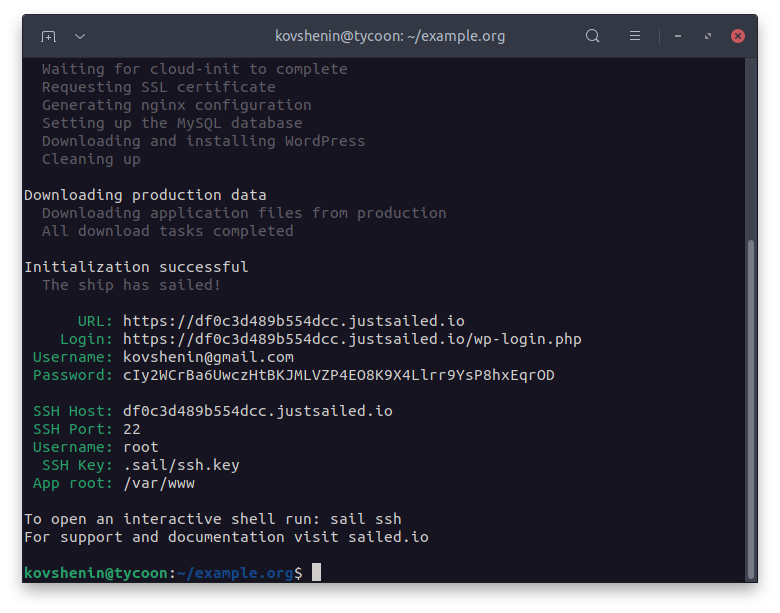
Sail is a free CLI tool to deploy, manage and scale WordPress applications in the DigitalOcean cloud. Visit our knowledgebase for the complete documentation. For support and announcements join our Slack.



Installation
To download and install Sail CLI on Linux, macOS or Windows (via WSL), run the following command in your terminal:
curl -sSLf https://sailed.io/install.sh | bash
If you're looking for other ways to install Sail, checkout the installing section in the Sail Knowledgebase.
Documentation
Visit our knowledgebase for detailed setup and usage instructions. Community support is available in our Slack workspace.
Commands:
admin      Open your default web browser to wp-admin. Logs in automatically if supported
backup     Create, restore and manage application backups
blueprint  Run a blueprint file against your application
config     Set reusable config variables
cron       Add, delete, view and execute system cron jobs
db         Import and export MySQL databases, or spawn an interactive shell
deploy     Deploy your working copy to production.
destroy    Destroy an application namespace and/or the environment
diff       Show file changes between your local copy and production.
domain     Add, remove and update domains associated with your site
download   Download files from production to your working copy
info       Show current sail information
init       Initialize and provision a new project
logs       Query and follow logs from the production server
profile    Run the profiler to find application performance bottlenecks
rebuild    Rebuild an application environment.
regions    Get available deployment regions
restore    Restore your application files, uploads and database from a file
rollback   Rollback production to a previous release
sftp       Manage SFTP access on this server
sizes      Get available droplet sizes
ssh        Open an SSH shell, manage SSH keys and more
wp         Run a WP-CLI command on the production host
Run sail <command> --help for usage instructions.
License and Contributing
The Sail CLI client is free and open source, distributed under the GNU General Public License version 3. Feel free to contribute by opening an issue or pull request on our GitHub project.
The Sail API server is proprietary and runs on the sailed.io/justsailed.io domains.
Legal
This software is provided as is, without warranty of any kind. Sail authors and contributors are not responsible for any loss of content, profits, revenue, cost savings, data, or content, or any other direct or indirect damages that may result from using the software or services provided by sailed.io.
Sail is not affiliated with DigitalOcean LLC.
Release history Release notifications | RSS feed


Download files
Download the file for your platform. If you're not sure which to choose, learn more about installing packages.
Source Distribution
Built Distribution
Filter files by name, interpreter, ABI, and platform.
If you're not sure about the file name format, learn more about wheel file names.
Copy a direct link to the current filters
File details
Details for the file sailed_io-0.10.9.tar.gz.
File metadata
- Download URL: sailed_io-0.10.9.tar.gz
- Upload date:
- Size: 97.6 kB
- Tags: Source
- Uploaded using Trusted Publishing? No
- Uploaded via: twine/5.1.1 CPython/3.10.12
File hashes
| Algorithm | Hash digest | |
|---|---|---|
| SHA256 |
cae38b97fada34a7681872661342c82b317d877eab882830c59610734eb53bdf
|
|
| MD5 |
3448ada9461d5db02044e049ce4b8df5
|
|
| BLAKE2b-256 |
1c642af3a1a9dfa005dc91a22535a29071e9255efeacf7e61dbefee920d01571
|
File details
Details for the file sailed_io-0.10.9-py3-none-any.whl.
File metadata
- Download URL: sailed_io-0.10.9-py3-none-any.whl
- Upload date:
- Size: 116.6 kB
- Tags: Python 3
- Uploaded using Trusted Publishing? No
- Uploaded via: twine/5.1.1 CPython/3.10.12
File hashes
| Algorithm | Hash digest | |
|---|---|---|
| SHA256 |
2f4c19d169801fa24beda39b0910d1303bba24284e7ce269ded37f4954d4c380
|
|
| MD5 |
0b5bbf09b03270ffa6b06fc990932f03
|
|
| BLAKE2b-256 |
25dd31239607ac5dbc881336c5b1762bdd9678b8db5686d93b49293388733285
|






