
再点火 (Saitenka) — learn Japanese from the video you're already watching
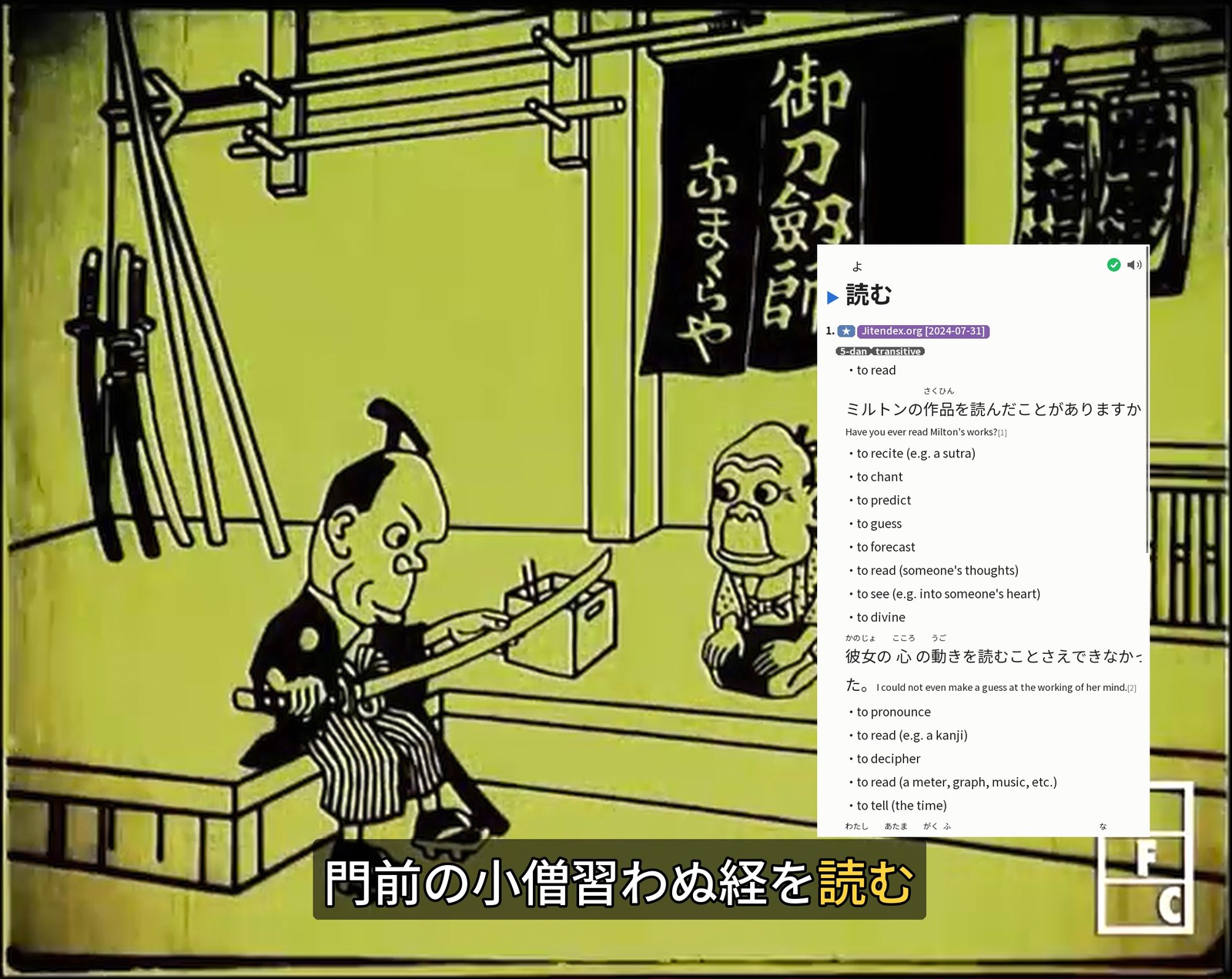
Saitenka turns mpv into an immersion workstation: Japanese subtitles get FSRS-aware word coloring, hovering a word opens a Yomitan-style multi-dictionary tooltip, and one key mines the sentence — audio, screenshot, reading, pitch, frequency — straight into Anki. Everything is drawn into mpv's own video surface, so there's no second window and none of the Windows overlay/fullscreen breakage that plagues external overlays.
- 再点火 = "re-ignition" — built to make picking study back up frictionless after a long break.
- Local-first and grounded: readings and pitch always come from dictionaries, never a language model.
What it does
- FSRS-aware subtitle coloring — an optional copy of Anki's database distinguishes learning, young, mature-known, and forgotten words (so "known" means actually remembered right now), and N+1 sentences — exactly one unknown word, the ideal thing to mine — are highlighted.
- Multi-dictionary tooltip on hover — ordered definitions, ruby, frequency pills, pitch-accent, clickable cross-references, in-tooltip word scanning, wildcard search. Imports your Yomitan dictionaries.
- One-key + bulk Anki mining via AnkiConnect — sentence audio, clean screenshot, reading, glossary, frequency, with dedup and FSRS-aware tagging.
- No second window — the tooltip, colored subs, and mining UI composite into mpv's OSD over JSON-IPC: one surface, airspace-safe, fullscreen-safe, cross-platform (Linux · macOS · Windows).
Install
The recommended install is the self-bootstrapping release bundle (it also sets up mpv + ffmpeg and the auto-start mpv plugin) — see the Quick start.
For a pip/uv-native install of just the Python package:
uv tool install saitenka          # or: pipx install saitenka
saitenka setup                    # installs mpv/ffmpeg + the auto-start plugin, writes config
saitenka run video.mkv            # hover a word → tooltip; Ctrl+m → mine
The optional inflection-chain display is a GPL-3.0 add-on (derived from Yomitan); the core is
Apache-2.0. A [full] install is therefore GPL-3.0 — see
LICENSING.md.
Full documentation
Everything — how it works, how it compares, where it fits in a media-server setup, requirements, and the feature tour — lives in the documentation site.
1 maintainer

Metadata
1 maintainer
Release files for saitenka 4.7.0
For a detailed explanation of source distributions (sdists) and built distributions (wheels), please see the package formats documentation.
Source distribution (sdist)
| File | Size | Uploaded | |
|---|---|---|---|
| saitenka-4.7.0.tar.gz | 45.6 MB | Details |
Built distribution (wheel)
| File | Interpreter | ABI | Platform | Reset |
|---|---|---|---|---|
| saitenka-4.7.0-py3-none-any.whl | Python 3 | none | any | Details |
Total release size: 64.5 MB
Release files / saitenka-4.7.0.tar.gz
| Download URL | saitenka-4.7.0.tar.gz |
|---|---|
| Size | 45.6 MB |
| Tags | Source |
|
SHA-256 checksum How to use checksums |
3c0976147b3bb3a8fe97417505f2e1a58768fe066bf7424c543ebea539b1880f
|
|
BLAKE2b-256 checksum How to use checksums |
29ef1828b9c786117f84f50d86d9f895e435099f380c3646444142bc31f1fa09
|
| Upload date | |
|
Uploaded using Trusted Publishing? What is trusted publishing? |
Yes |
| Uploaded via |
twine/7.0.0 CPython/3.13.14
|
Provenance
Provenance describes where a file came from. On PyPI, provenance is shared via attestations, which provide a verifiable record of the build or publishing details. View details, limitations and caveats.


PyPI Publish Attestation
PyPI verified that this artifact, at this checksum, originated from the publisher listed below.
Signed by GitHub Actions, verified by PyPI on Sep 26, 2026.
Transparency logRelease files / saitenka-4.7.0-py3-none-any.whl
| Download URL | saitenka-4.7.0-py3-none-any.whl |
|---|---|
| Size | 19.0 MB |
| Tags | Python 3 |
|
SHA-256 checksum How to use checksums |
8ae283a0f79521e6fc584d957f81b6693d10f4922364b13af74e2d89d24dd3f8
|
|
BLAKE2b-256 checksum How to use checksums |
87e3013c2d9190bfc26e1fbf2be81e770c524a2951c8f8fdc11d0c8eb0386ae5
|
| Upload date | |
|
Uploaded using Trusted Publishing? What is trusted publishing? |
Yes |
| Uploaded via |
twine/7.0.0 CPython/3.13.14
|
Provenance
Provenance describes where a file came from. On PyPI, provenance is shared via attestations, which provide a verifiable record of the build or publishing details. View details, limitations and caveats.
PyPI Publish Attestation
PyPI verified that this artifact, at this checksum, originated from the publisher listed below.
Signed by GitHub Actions, verified by PyPI on Sep 26, 2026.
Transparency log













