
Saleyo
Saleyo is a lightwight scalable Python AOP framework, easy to use and integrate.
Getting Start
pip install saleyo
Basic Tutorial
Declear a Mixin class
If you don't like decorators, you can pass arguments to operations and call the mixin method manually.
from saleyo import Mixin

class Foo:...


@Mixin(target = Foo)
class MixinFoo:...
Use MixinOperation
Here is a simple demo.
from typing import Any
from saleyo import Mixin, Accessor, OverWrite, Post, Pre, Intercept, InvokeEvent


class Foo:
    __private = "private varible"

    def demo(self):
        pass


@Mixin(target = Foo)
class MixinFoo:
    # Will add a varible named `__private` to Foo and it has the same address with `_Foo__private`
    private: Accessor[str] = Accessor("__private")

    # Will Add the `func` to `Foo`
    @OverWrite
    def func(self):
        print("hello saleyo")

    # Will intercept the demo method and redirect to `lambda: print("hello world")`
    @Intercept.configure(target_name="demo")
    @staticmethod
    def intercept_demo(_: InvokeEvent):
        return InvokeEvent(lambda: print("hello world"))

    # Will call before `demo` call
    @Pre.configure(target_name="demo")
    def pre_demo(*arg):
        print("pre hello world")

    # Will call after `demo` call
    @Post.configure(target_name="demo")
    def post_demo(*arg):
        print("post hello world")


foo: Any = (
    Foo()
)  # Add the typing hint to avoid the error message from some IDE plugins.

print(foo.__private)  # Also `print(MixinFoo.private.value)`
foo.func()
foo.demo()

>>> private varible
>>> hello saleyo
>>> pre hello world
>>> hello world
>>> post hello world
Lazy Mixin - Define Mixin before importing module
Lazy Mixin will be triggered after importing
You dont need to care how to import target module, just define a locator!
# targetmod
class NeedMixin:
    def hello(self):
        print("hello world")


# mixin
# put mixin in a single file and import to use is better
from types import ModuleType
from typing import Any

from saleyo.broadcast.importmod import ImportBroadCaster
from saleyo.decorator.mixin import Mixin
from saleyo.operation.hook import Pre

broadcast = ImportBroadCaster.instance()


def locator(name: str, module: ModuleType):
    if name == "targetmod" and module.__dict__.__contains__("NeedMixin"):
        return module.NeedMixin
    return None


@Mixin.lazy(locator)
class MixinTarget:
    @Pre
    @staticmethod
    def hello(this: Any) -> None:
        print("Pre Hook")


print(broadcast.listeners())
import targetmod  # noqa: E402

print(broadcast.listeners())

targetmod.NeedMixin().hello()

>>> Pre Hook
>>> hello world
Operate Compile
# targetmodule
def generate(name):
    return name + " hell world"


class Static:
    FIELD = generate("hello")

# mixin
from typing import Any, Union
from saleyo.decorator.compile import CompileToken, CompileBoundary


@CompileToken(lambda info: "targetmodule.py" in str(info.filename))
def mixin_a(token: Union[str, bytes, Any]):
    if not isinstance(token, bytes):
        return
    return token.replace(b"hell world", b"bye")


with CompileBoundary():
    from targetmodule import Static

    # If targetmodule import before Compile BroadCast initialize
    # Use `CompileBoundary.recompile_module(...)`, it's compated with `no_cache=False`

print(targetmodule.Static().FIELD)  # hello bye

>>> hello bye
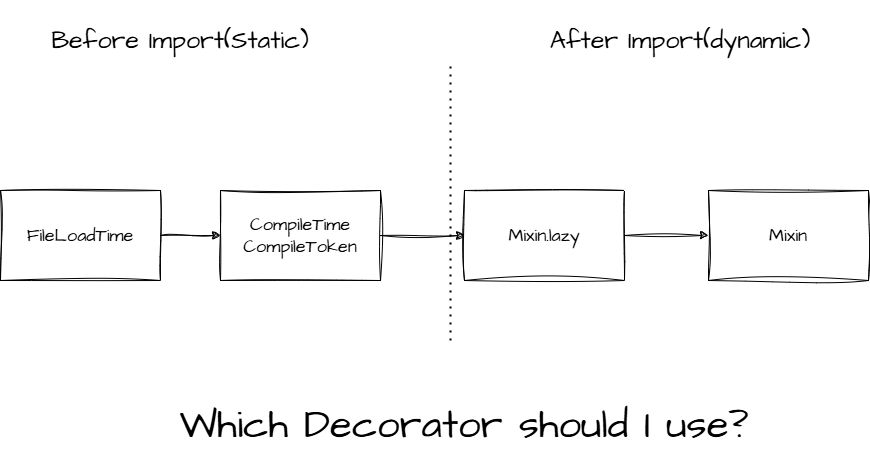
Which Decorator should I use?
Custom ToolChain
ToolChain determines the ability to modify the class.
from saleyo import Mixin, GCToolChain, Arguments, Pre


@Mixin(target=str, toolchain=GCToolChain)
class MixinStr:
    @Pre.configure(target_name="format")
    def pre_format(self, *args) -> Arguments[...]:
        print(f"input args: {args}")
        return Arguments(self, "saleyo")


print("hello world {}".format("python"))

>>> input args: ('python',)
>>> hello world saleyo
Custom Mixin Operation
The default operations can't satify you? Try define a operation yourself!
from typing import Any
from saleyo import MixinOperation, ToolChain
from saleyo.base.typing import M

class MyOperation(MixinOperation[Any]):
    def mixin(self, target: M, toolchain: ToolChain = ...) -> None:
        ...
Contribution
pip install pdm
pdm install
1 maintainer

Metadata
1 maintainer
Release files for saleyo 1.3.4
For a detailed explanation of source distributions (sdists) and built distributions (wheels), please see the package formats documentation.
Source distribution (sdist)
| File | Size | Uploaded | Provenance | |
|---|---|---|---|---|
| saleyo-1.3.4.tar.gz | 18.0 kB | Without provenance | Details |
Built distribution (wheel)
| File | Interpreter | ABI | Platform | Reset |
|---|---|---|---|---|
| saleyo-1.3.4-py3-none-any.whl | Python 3 | none | any | Details |
Total release size: 41.7 kB
Release files / saleyo-1.3.4.tar.gz
| Download URL | saleyo-1.3.4.tar.gz |
|---|---|
| Size | 18.0 kB |
| Tags | Source |
|
SHA-256 checksum How to use checksums |
9d975aeb9281761577869442b97566f6002ac8632e9801c83a8e6396eba973d7
|
|
BLAKE2b-256 checksum How to use checksums |
d27132400eb69240fda5cc13728f87aed63db9b2100c640a44f8fa427d617771
|
| Upload date | |
|
Uploaded using Trusted Publishing? What is trusted publishing? |
Yes |
| Uploaded via |
pdm/2.25.6.dev10+g05f152e8 CPython/3.12.3 Linux/6.11.0-1018-azure
|
Release files / saleyo-1.3.4-py3-none-any.whl
| Download URL | saleyo-1.3.4-py3-none-any.whl |
|---|---|
| Size | 23.7 kB |
| Tags | Python 3 |
|
SHA-256 checksum How to use checksums |
e0ce426c25e81e32d7df291c5364a0adb6fc5ac2306317a1a6279a81060417ed
|
|
BLAKE2b-256 checksum How to use checksums |
52ee1ecd09e6197de88691ab3486de0b4c71253e1fb4f72120d3ab000394a0b7
|
| Upload date | |
|
Uploaded using Trusted Publishing? What is trusted publishing? |
Yes |
| Uploaded via |
pdm/2.25.6.dev10+g05f152e8 CPython/3.12.3 Linux/6.11.0-1018-azure
|
Security for saleyo 1.3.4
Provenance
Provenance describes where a file came from. On PyPI, provenance is shared via attestations, which provide a verifiable record of the build or publishing details. View details, limitations and caveats.
No provenance found
None of the files in this release were uploaded with provenance metadata.
A note on package security
PyPI is a repository for distributing packages, not a service for auditing them. While third-party security researchers and our staff do their best to detect and remove malicious packages, PyPI cannot guarantee the quality, security or suitability of any given package.
To learn more about protecting yourself from malicious actors, visit our package security documentation.














