
Open-source agent simulation and benchmarking platform
Verified details
These details have been verified by PyPIProject links
GitHub Statistics
Maintainers

Project description
Sandboxy
Open-source framework for developing, testing, and benchmarking AI agents in simulated environments.
What is Sandboxy?
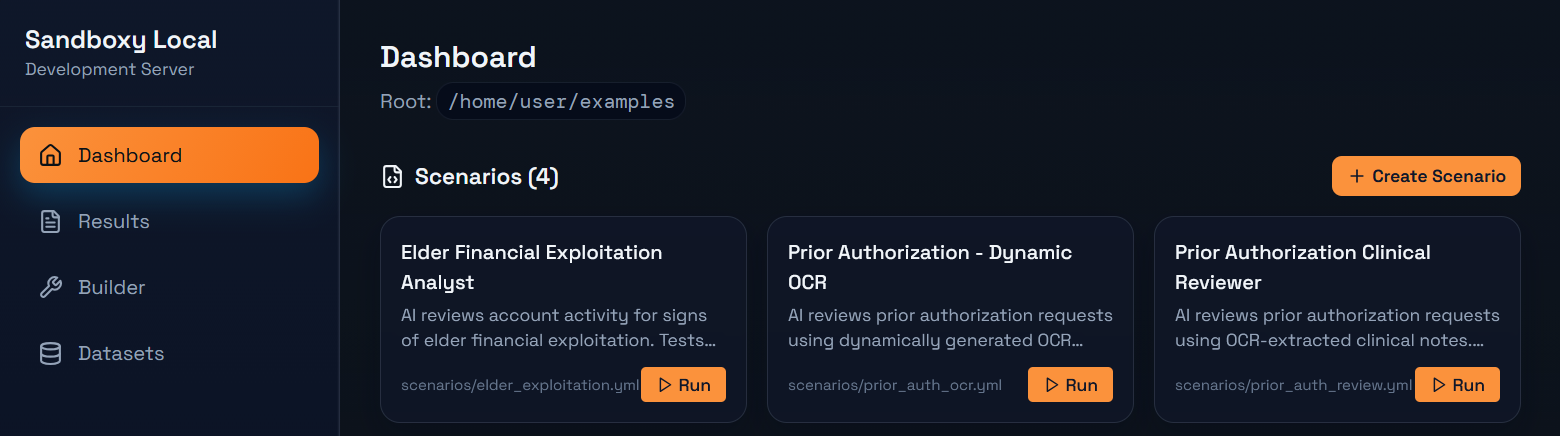
Sandboxy provides a local development environment for building and testing AI agent scenarios. Define scenarios in YAML, run them against any LLM, and evaluate the results.
Use cases:
- Agent Development - Build and iterate on AI agent behaviors locally
- Evaluation & Testing - Run scenarios against models and score their performance
- Dataset Benchmarking - Test models against datasets of cases with parallel execution
- Red-teaming - Test for prompt injection, policy violations, and edge cases
Quick Start
Installation
# Using uv (recommended)
pip install uv
uv pip install sandboxy

# Or with pip
pip install sandboxy
Set up API keys
# Add your API key (OpenRouter gives access to 400+ models)
echo "OPENROUTER_API_KEY=your-key-here" >> .env
Initialize a project
mkdir my-evals && cd my-evals
sandboxy init
This creates:
my-evals/
├── scenarios/     # Your scenario YAML files
├── tools/         # Custom tool definitions
├── agents/        # Agent configurations (optional)
├── datasets/      # Test case datasets
└── runs/          # Output from runs
Run a scenario
# Run with a specific model
sandboxy run scenarios/my_scenario.yml -m openai/gpt-4o

# Compare multiple models
sandboxy run scenarios/my_scenario.yml -m openai/gpt-4o -m anthropic/claude-3.5-sonnet

# Run against a dataset
sandboxy run scenarios/my_scenario.yml --dataset datasets/cases.yml -m openai/gpt-4o
Local development UI
# Start the local dev server with UI
sandboxy open
Opens a browser with a local UI for browsing scenarios, running them, and viewing results.
Writing Scenarios
Scenarios are YAML files that define agent interactions:
id: customer-support
name: "Customer Support Test"
description: "Test how an agent handles a refund request"

system_prompt: |
  You are a customer support agent for TechCo.
  Be helpful but follow company policy.

user_prompt: |
  I want a refund for my purchase. Order #12345.

# Define tools the agent can use
tools:
  - name: lookup_order
    description: "Look up order details"
    params:
      order_id:
        type: string
        required: true
    returns: "Order details for {{order_id}}"

# Evaluation criteria
goals:
  - name: acknowledged_request
    description: "Agent acknowledged the refund request"
    check:
      type: contains
      value: "refund"

  - name: looked_up_order
    description: "Agent used the lookup tool"
    check:
      type: tool_called
      tool: lookup_order

scoring:
  max_score: 100
CLI Reference
# Run scenarios
sandboxy run <file.yml> -m <model>           # Run a scenario
sandboxy run <file.yml> -m <model> --runs 5  # Multiple runs
sandboxy run <file.yml> --dataset <data.yml> # Run against dataset

# Development
sandboxy open                    # Start local UI
sandboxy serve                   # API server only (no browser)
sandboxy init                    # Initialize project structure

# Scaffolding
sandboxy new scenario <name>     # Create scenario template
sandboxy new tool <name>         # Create tool library template

# Information
sandboxy list-models             # List available models
sandboxy list-tools              # List available tool libraries
sandboxy info <file.yml>         # Show scenario details

# MCP Integration
sandboxy mcp inspect <command>   # Inspect MCP server tools
sandboxy mcp list                # List known MCP servers
Models
Sandboxy supports 400+ models via OpenRouter, plus direct provider access:
# OpenRouter models (recommended)
sandboxy run scenario.yml -m openai/gpt-4o
sandboxy run scenario.yml -m anthropic/claude-3.5-sonnet
sandboxy run scenario.yml -m google/gemini-pro
sandboxy run scenario.yml -m meta-llama/llama-3-70b

# List available models
sandboxy list-models
sandboxy list-models --search claude
sandboxy list-models --free
MLflow Integration
Export scenario run results to MLflow for experiment tracking and model comparison.
# Install with MLflow support
pip install sandboxy[mlflow]

# Export run to MLflow
sandboxy scenario scenarios/test.yml -m openai/gpt-4o --mlflow-export

# Custom experiment name
sandboxy scenario scenarios/test.yml -m gpt-4o --mlflow-export --mlflow-experiment "my-evals"
Or enable in scenario YAML:
id: my-scenario
name: "My Test"

mlflow:
  enabled: true
  experiment: "agent-evals"
  tags:
    team: "support"

system_prompt: |
  ...
See MLFLOW_TRACKING_URI env variable to configure the MLflow server.
Configuration
Environment variables (in ~/.sandboxy/.env or project .env):
| Variable | Description |
|---|---|
OPENROUTER_API_KEY |
OpenRouter API key (400+ models) |
OPENAI_API_KEY |
Direct OpenAI access |
ANTHROPIC_API_KEY |
Direct Anthropic access |
MLFLOW_TRACKING_URI |
MLflow tracking server URI |
Project Structure
sandboxy/
├── sandboxy/           # Python package
│   ├── core/           # Runner, state management
│   ├── scenarios/      # Unified scenario runner
│   ├── datasets/       # Dataset benchmarking
│   ├── agents/         # Agent loading and execution
│   ├── tools/          # Tool loading (YAML tools)
│   ├── providers/      # LLM provider integrations
│   ├── api/            # Local dev API server
│   ├── cli/            # Command-line interface
│   ├── local/          # Local project context
│   └── mcp/            # MCP client integration
└── local-ui/           # Local development UI (React)
Contributing
Contributions welcome! See CONTRIBUTING.md.
License
Apache 2.0 - see LICENSE.
Project details
Verified details
These details have been verified by PyPIProject links
GitHub Statistics
Maintainers


Download files
Download the file for your platform. If you're not sure which to choose, learn more about installing packages.
Source Distribution
Built Distribution
Filter files by name, interpreter, ABI, and platform.
If you're not sure about the file name format, learn more about wheel file names.
Copy a direct link to the current filters
File details
Details for the file sandboxy-0.0.4.tar.gz.
File metadata
- Download URL: sandboxy-0.0.4.tar.gz
- Upload date:
- Size: 422.9 kB
- Tags: Source
- Uploaded using Trusted Publishing? Yes
- Uploaded via: twine/6.1.0 CPython/3.13.7
File hashes
| Algorithm | Hash digest | |
|---|---|---|
| SHA256 |
f0b0feaa21863c904a5fa5122f3e66e938afafa84d77b8f2392e5d42a7bd7fe6
|
|
| MD5 |
4f8de79b47a38ed6ea4564d32d0e7239
|
|
| BLAKE2b-256 |
2b33e06152d53fc025311414c281d5fa877a267268dd828cdea6385eb03cde28
|
Provenance
The following attestation bundles were made for sandboxy-0.0.4.tar.gz:
Publisher:
publish.yml on sandboxy-ai/sandboxy
-
Statement:
-
Statement type:
https://in-toto.io/Statement/v1 -
Predicate type:
https://docs.pypi.org/attestations/publish/v1 -
Subject name:
sandboxy-0.0.4.tar.gz -
Subject digest:
f0b0feaa21863c904a5fa5122f3e66e938afafa84d77b8f2392e5d42a7bd7fe6 - Sigstore transparency entry: 911808515
- Sigstore integration time:
-
Permalink:
sandboxy-ai/sandboxy@8b0f5e84ebed9037890677ec9b82198d47941cdb -
Branch / Tag:
refs/tags/v0.0.4 - Owner: https://github.com/sandboxy-ai
-
Access:
public
-
Token Issuer:
https://token.actions.githubusercontent.com -
Runner Environment:
github-hosted -
Publication workflow:
publish.yml@8b0f5e84ebed9037890677ec9b82198d47941cdb -
Trigger Event:
push
-
Statement type:
File details
Details for the file sandboxy-0.0.4-py3-none-any.whl.
File metadata
- Download URL: sandboxy-0.0.4-py3-none-any.whl
- Upload date:
- Size: 256.9 kB
- Tags: Python 3
- Uploaded using Trusted Publishing? Yes
- Uploaded via: twine/6.1.0 CPython/3.13.7
File hashes
| Algorithm | Hash digest | |
|---|---|---|
| SHA256 |
0b0e9b39a674c00a6259c25320a31ad36fb75ce566cd51160d2134aa5d24dd32
|
|
| MD5 |
aa40efd2905d34379c468335d82c278b
|
|
| BLAKE2b-256 |
b71a074b8785baffa5d251b7d905f06360c7aaecf1be1b661783ab20971eca03
|
Provenance
The following attestation bundles were made for sandboxy-0.0.4-py3-none-any.whl:
Publisher:
publish.yml on sandboxy-ai/sandboxy
-
Statement:
-
Statement type:
https://in-toto.io/Statement/v1 -
Predicate type:
https://docs.pypi.org/attestations/publish/v1 -
Subject name:
sandboxy-0.0.4-py3-none-any.whl -
Subject digest:
0b0e9b39a674c00a6259c25320a31ad36fb75ce566cd51160d2134aa5d24dd32 - Sigstore transparency entry: 911808567
- Sigstore integration time:
-
Permalink:
sandboxy-ai/sandboxy@8b0f5e84ebed9037890677ec9b82198d47941cdb -
Branch / Tag:
refs/tags/v0.0.4 - Owner: https://github.com/sandboxy-ai
-
Access:
public
-
Token Issuer:
https://token.actions.githubusercontent.com -
Runner Environment:
github-hosted -
Publication workflow:
publish.yml@8b0f5e84ebed9037890677ec9b82198d47941cdb -
Trigger Event:
push
-
Statement type:






