
Sanguine
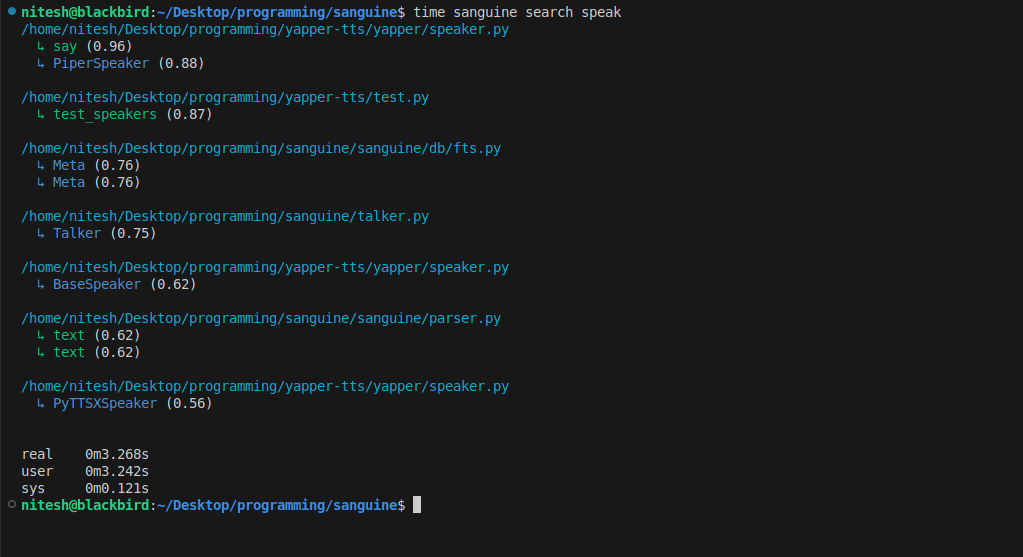
You know when you have to write code that you vaguely remember having written somewhere before? It's annoying to have to look into dozens of files to find a function, I have gone through it, that's why I made this contraption.
Sanguine is a CLI tool that automatically indexes declarations from your code repositories and lets you search for them later. It integrates seamlessly with Git to automatically index code changes on every commit.
Features
- 🚀 Automatic Indexing: Integrates with Git post-commit hooks to automatically index code changes
- 🔍 Smart Search: Find functions and classes using natural language queries (synonyms, short descriptions)
- 🌐 Cross-Repository Search: Search across all your indexed codebases at once, or narrow to specific repositories
- 📊 Multi-Language Support: Works with ~all popular programming languages
- 🎨 Interactive Mode: Provides an interactive search interface for exploratory code navigation
- 🔧 Flexible Filtering: Search by name, path, or entity type (function/class)
- ⚡ Fast Performance: Quick search results even in large codebases
Installation
Install Sanguine using pip:
pip install sanguine
Or if you have a CUDA-capable GPU:
pip install sanguine[gpu]
Or install from source:
git clone https://github.com/n1teshy/sanguine.git
cd sanguine
pip install .
Quick Start
1. Install the Git Hook
Navigate to your Git repository and install the post-commit hook:
cd /path/to/your/repo
sanguine install
This will automatically index your code after every commit.
2. Index Existing Code
Index all files in your current repository:
sanguine index --all-files
Or index a specific file:
sanguine index --file path/to/file.py
3. Search Your Codebase
Simple search:
sanguine search "user authentication"
Interactive search mode, use this when multiple search calls are needed:
sanguine search --interactive
Usage
Commands
install
Install the post-commit Git hook for automatic indexing.
sanguine install
uninstall
Remove the post-commit Git hook.
sanguine uninstall
index
Index code from commits, files, or entire repository.
Index last commit (default):
sanguine index
Index specific commit:
sanguine index --commit-id abc123
Index specific file:
sanguine index --file src/main.py
Index all files (respects .gitignore):
sanguine index --all-files
List indexed repositories with the number of entities extracted from them:
sanguine ls
search
Search indexed code entities (functions and classes).
Basic search:
sanguine search "query"
Search with options:
# Limit results
sanguine search "database" --count 20

# Filter by path
sanguine search "handler" --path src/api

# Filter by type (function or class)
sanguine search "user" --type function

# Combine filters
sanguine search "model" --path src/models --type class --count 15
Interactive mode:
sanguine search --interactive
# In the REPL:
>> query --count 10
>> another query --path src
>> :q  # to quit
delete
Delete indexed entities based on filters.
Delete by name:
sanguine delete --name "test_"
Delete by path:
sanguine delete --path src/deprecated
Delete with type filter:
sanguine delete --name "old" --type function
Force delete without confirmation:
sanguine delete --name "temp" --yes
refresh
Refresh the HNSW vector index. Use this when you see warnings about stale entries.
sanguine refresh
using GPU
Use your GPU to acclerate embedding model inference (faster index/search/delete/refresh). --cuda flag works for every command other other than install, uninstall.
sanguine index --all-files --cuda
sanguine search "setup" --cuda
How It Works
Sanguine automatically indexes your code as you work:
- Automatic Indexing: After installing the Git hook, Sanguine indexes changes every time you commit
- Manual Indexing: You can also manually index specific files, commits, or your entire codebase
- Smart Search: Search uses both text matching and semantic understanding to find relevant functions and classes
- Fast Results: Results are ranked by relevance and returned instantly
Supported Languages
Sanguine supports multiple programming languages:
- Python
- JavaScript / TypeScript
- Java
- C / C++
- Go
- Rust
- Ruby
- PHP
- And more...
Data Storage
Sanguine stores its index data in platform-specific directories:
- Linux/Mac:
~/.local/share/sanguine/ - Windows:
%LOCALAPPDATA%\sanguine\
Important: All indexed code from all repositories is stored in a single database. This means you can search across all your projects at once! Use the --path flag to narrow searches to a specific repository when needed.
The index is stored locally on your machine and is separate for each user. No data is sent to external servers.
Tips & Best Practices
Index Maintenance
Sanguine will warn you if the index needs refreshing. When you see warnings about stale entries (>30% stale), run:
sanguine refresh
This rebuilds the index and improves search quality.
Large Repositories
For large codebases:
- Initial indexing with
--all-filesmay take a few minutes - After that, automatic indexing on commits is fast
- Use path filters (
--path) to narrow search scope when searching - Use type filters (
--type) to search only functions or only classes
Example Workflow
# Initial setup in a new project
cd my-project
sanguine install
# index all files (if repo has files from previous commits)
sanguine index --all-files

# Set up other projects too
cd ../another-project
sanguine install
# index all files (if repo has files from previous commits)
sanguine index --all-files

# Automatic indexing on commits
git commit -m "Add new feature"
# Sanguine automatically indexes changes

# Search across ALL your indexed projects
sanguine search "authentication" --type function

# Search within a specific project only
sanguine search "authentication" --path /path/to/my-project

# Interactive exploration across all projects
sanguine search -i
>> user management
>> "login handler" --path my-project
>> :q

# Clean up old code references
sanguine delete --path old-code

# Maintain index health
sanguine refresh
Requirements
- Python 3.7 or higher
- Git (for automatic indexing features)
Troubleshooting
"Not a git repository" error
Make sure you're in a Git repository directory when running sanguine install or sanguine index (without flags).
Search returns no results
- Make sure you've indexed your code first with
sanguine index --all-files - Check if the files you're looking for are in a supported language
- Try broader search terms
Hook not working after commit
- Verify the hook is installed:
ls .git/hooks/post-commit - Try reinstalling:
sanguine uninstallthensanguine install - Make sure Python is accessible from your Git environment
Support & Feedback
- Report Issues: https://github.com/n1teshy/sanguine/issues
- Questions: Open a GitHub issue
Keep your codebase searchable. Keep it D.R.Y with Sanguine.
1 maintainer

Metadata
1 maintainer
Release files for sanguine 1.2.6
For a detailed explanation of source distributions (sdists) and built distributions (wheels), please see the package formats documentation.
Source distribution (sdist)
| File | Size | Uploaded | |
|---|---|---|---|
| sanguine-1.2.6.tar.gz | 18.7 kB | Details |
Built distribution (wheel)
| File | Interpreter | ABI | Platform | Reset |
|---|---|---|---|---|
| sanguine-1.2.6-py3-none-any.whl | Python 3 | none | any | Details |
Total release size: 37.7 kB
Release files / sanguine-1.2.6.tar.gz
| Download URL | sanguine-1.2.6.tar.gz |
|---|---|
| Size | 18.7 kB |
| Tags | Source |
|
SHA-256 checksum How to use checksums |
2b0e368a35511bb131b9d8103ebdeb4693e5b54535921ddbfd22d81ad5366cbc
|
|
BLAKE2b-256 checksum How to use checksums |
01546a697af94c19dffe39eca201d2a3d99a8059244980a7e72b76611c0cef67
|
| Upload date | |
|
Uploaded using Trusted Publishing? What is trusted publishing? |
No |
| Uploaded via |
uv/0.9.21 {"installer":{"name":"uv","version":"0.9.21","subcommand":["publish"]},"python":null,"implementation":{"name":null,"version":null},"distro":{"name":"Ubuntu","version":"24.04","id":"noble","libc":null},"system":{"name":null,"release":null},"cpu":null,"openssl_version":null,"setuptools_version":null,"rustc_version":null,"ci":null}
|
Release files / sanguine-1.2.6-py3-none-any.whl
| Download URL | sanguine-1.2.6-py3-none-any.whl |
|---|---|
| Size | 18.9 kB |
| Tags | Python 3 |
|
SHA-256 checksum How to use checksums |
e045f7aa6fd7dd950d1a7859ef7019c5e01b394b40583bb41351a6545bf76814
|
|
BLAKE2b-256 checksum How to use checksums |
80e813a65903b4e6fa875ae7924f84482a05b9263269c3744c49b4385d7a971c
|
| Upload date | |
|
Uploaded using Trusted Publishing? What is trusted publishing? |
No |
| Uploaded via |
uv/0.9.21 {"installer":{"name":"uv","version":"0.9.21","subcommand":["publish"]},"python":null,"implementation":{"name":null,"version":null},"distro":{"name":"Ubuntu","version":"24.04","id":"noble","libc":null},"system":{"name":null,"release":null},"cpu":null,"openssl_version":null,"setuptools_version":null,"rustc_version":null,"ci":null}
|














