
Sankey Studio

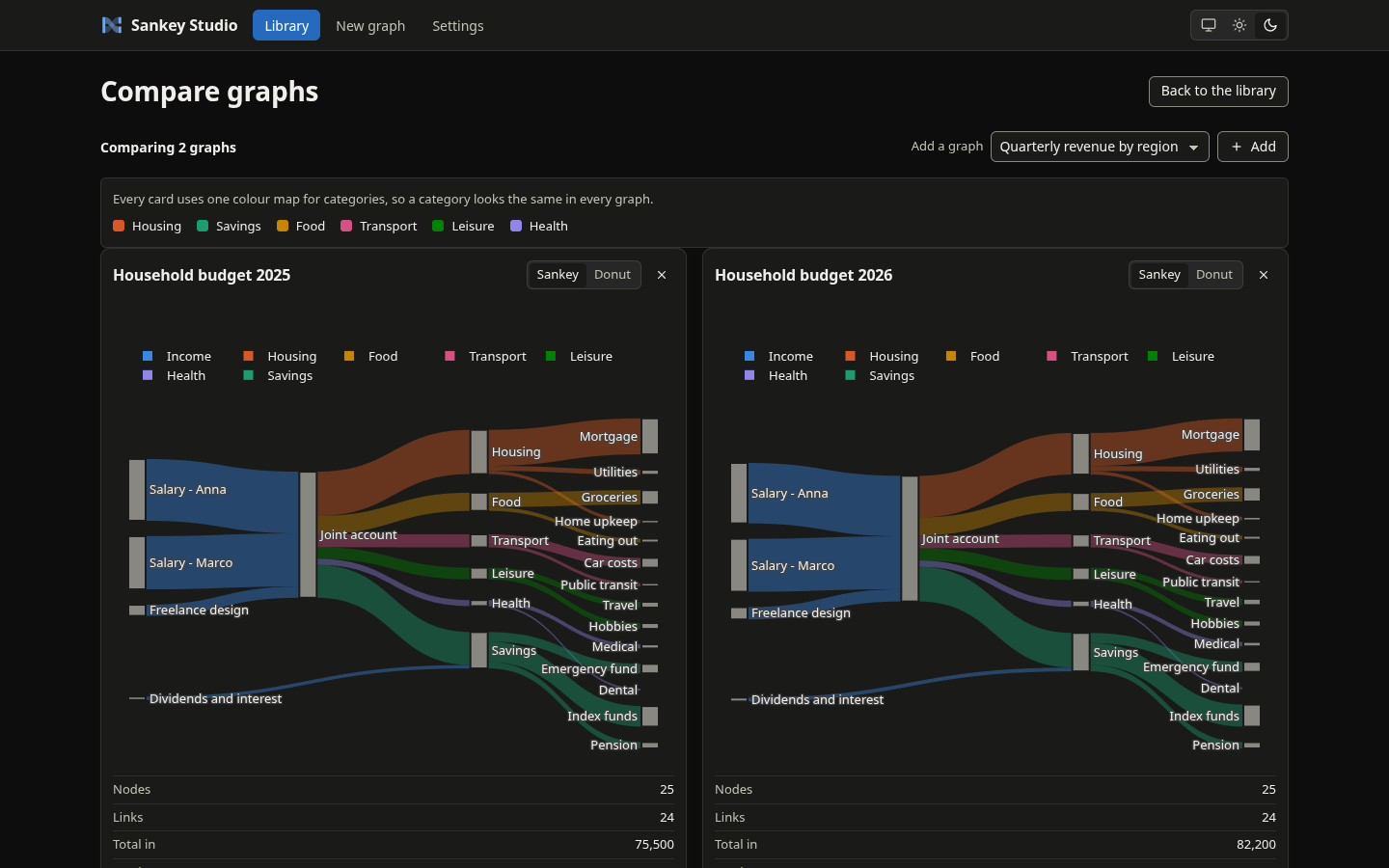
Sankey Studio is a local web app for drawing and managing Sankey graphs. Paste or upload a CSV, point it at a MongoDB collection or type the flows in by hand, and watch the diagram update as you edit. Graphs are saved to a library on disk (or in MongoDB), can be compared side by side, and export to SVG, PNG, HTML, JSON and CSV. Give the flows optional categories and the same data also becomes a donut chart. It is a Python 3.14 FastAPI application with a vanilla JavaScript frontend (no build step, no CDN), managed with uv, and it has no login: it listens on loopback by default and defends itself in depth (see Security model).
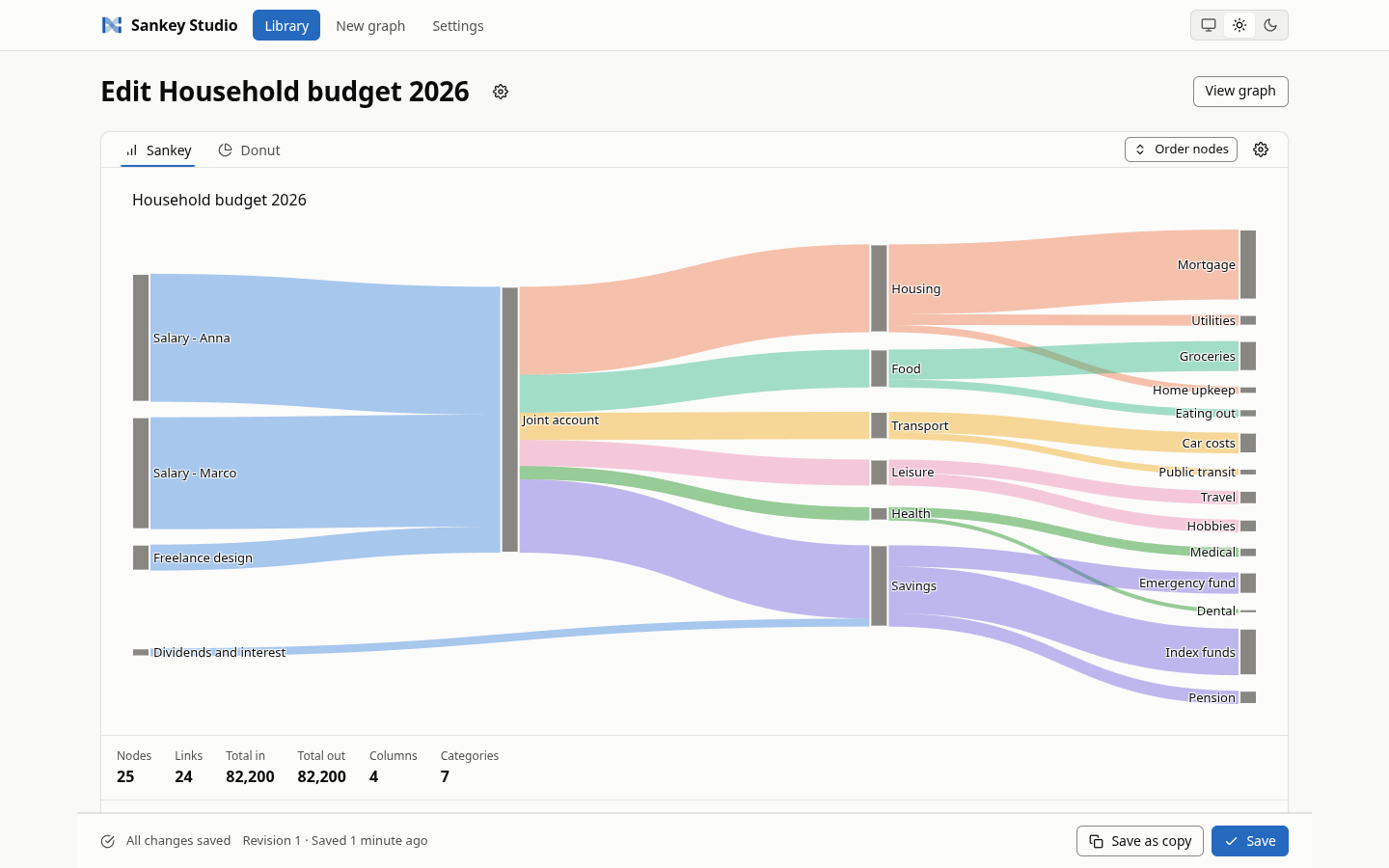
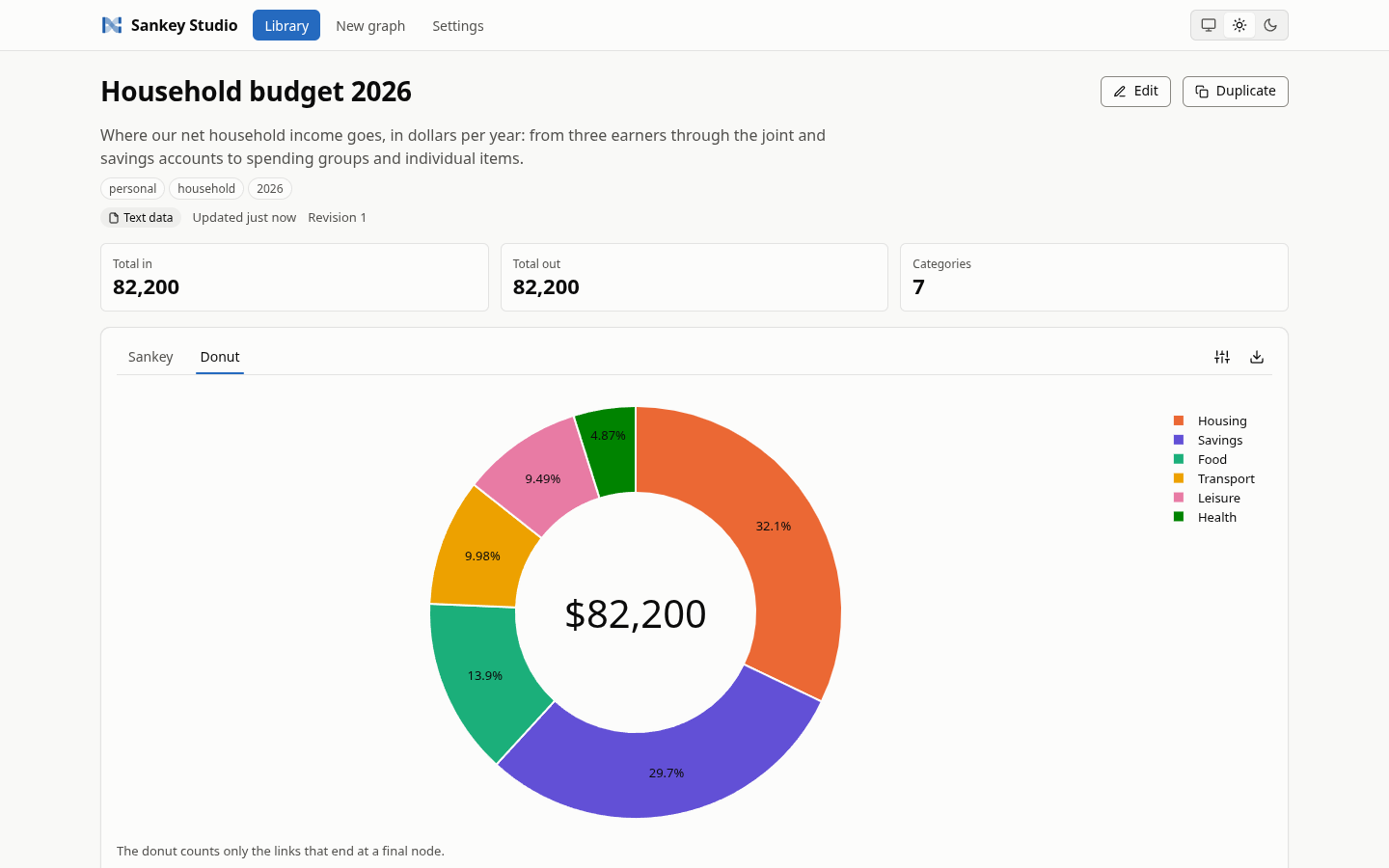
| Donut view of a categorised graph | Compare view, dark theme |
|---|---|
 |
 |
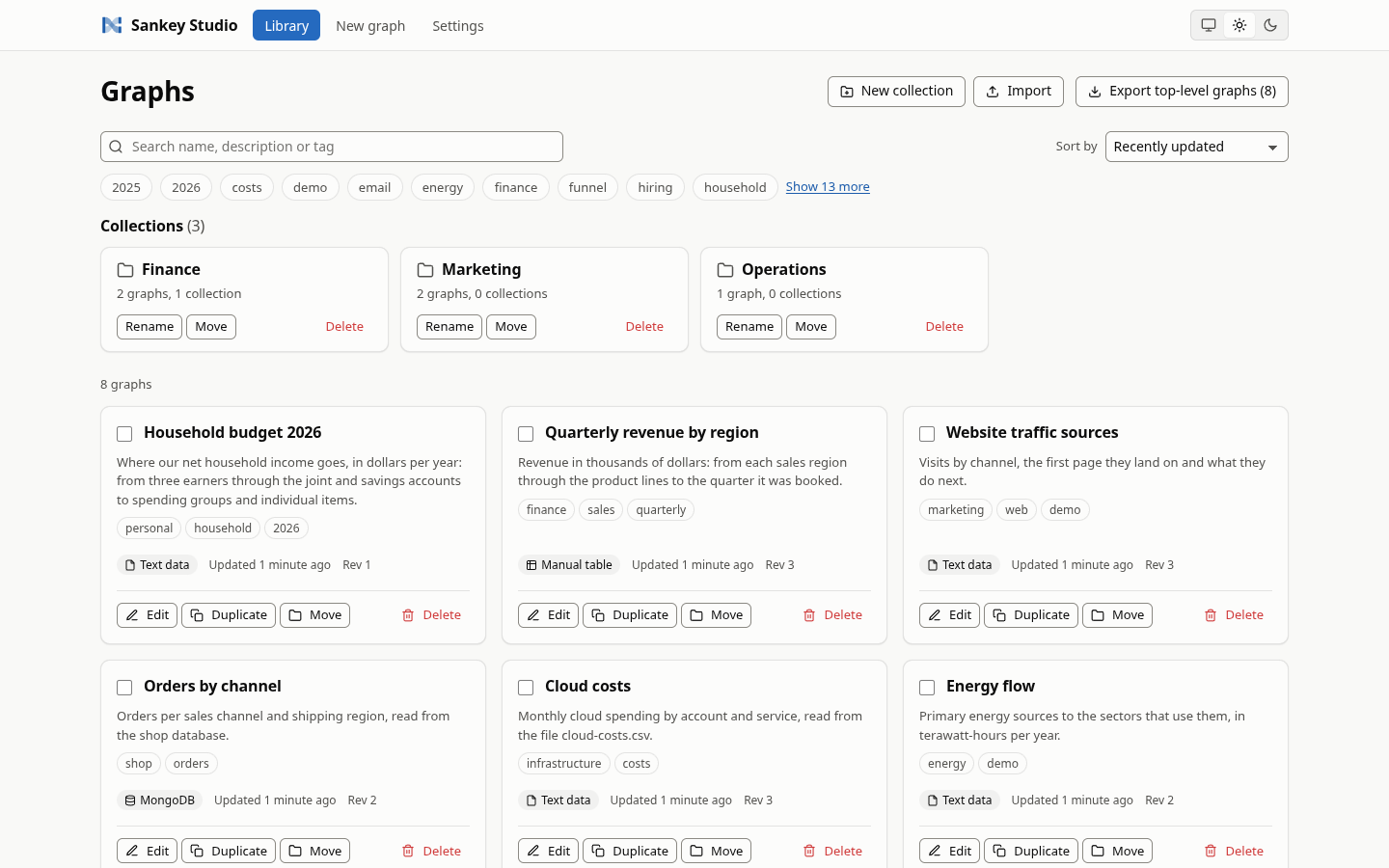
| The library with collections and tags | Entries table with categories |
|---|---|
 |
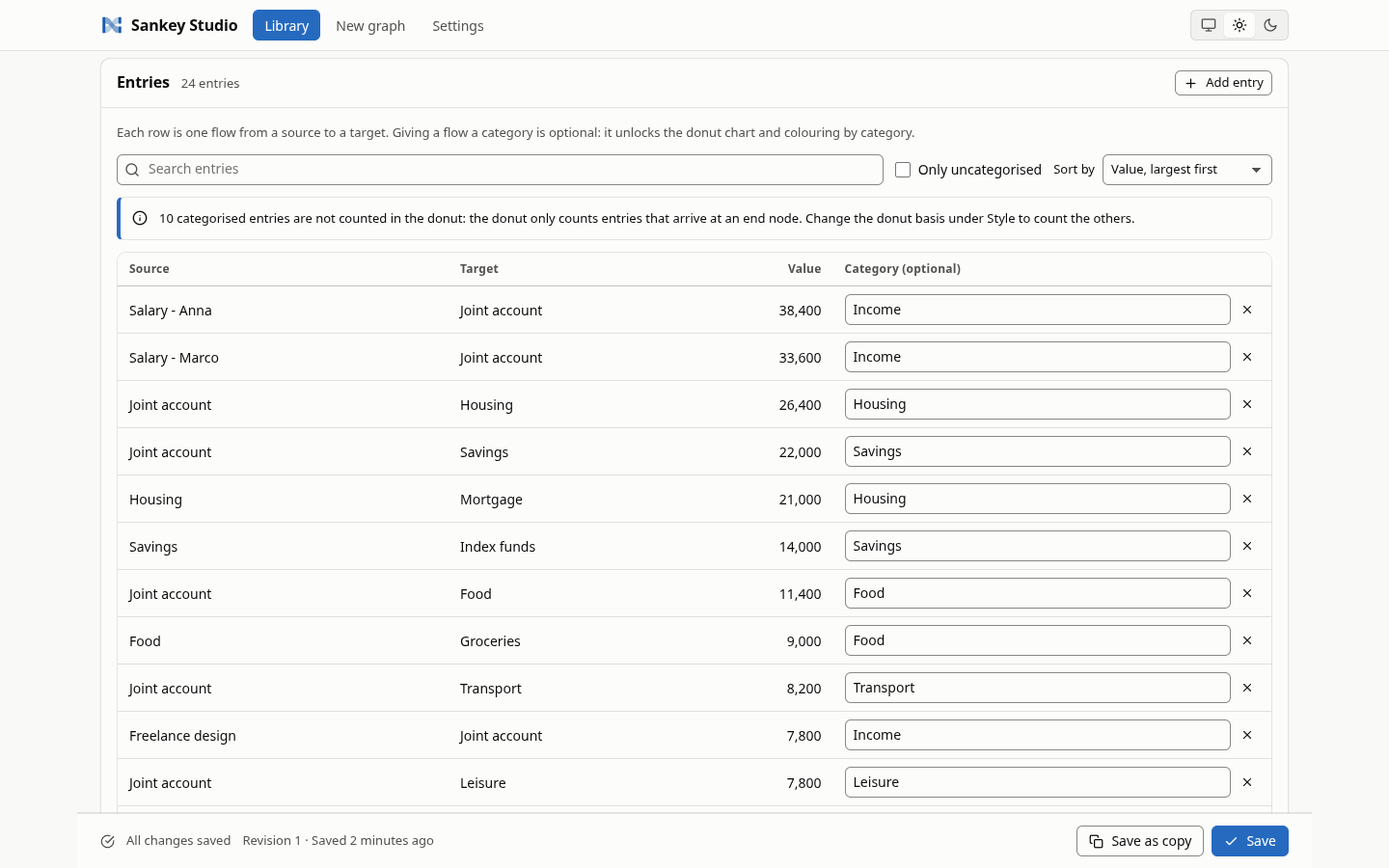 |
Every other screen and section (the new-graph wizard, each editor panel and dialog, the viewer, the settings pages, the dark theme) is in the screenshot gallery.
Contents
- Features
- Quick start
- Using it
- Security model
- Development
- Quality tooling
- Commit policy
- Git hooks
- Project layout
- Docs index
Features
- Library of saved graphs: create, edit, duplicate, delete, search, tag, sort, page, and import or export as a JSON bundle. Graphs can be grouped in a tree of collections (nested up to 8 levels), moved between them one by one or as a selection (with a button or by dragging), and a search covers all of them.
- Live editor: every change redraws the preview; unsaved-changes guard and optimistic concurrency (a stale save offers reload or save as copy). A two-step wizard starts a new graph; a gear next to the title edits name, description, tags and the data source kind; a gear in the chart header holds Style and Export.
- Sources: pasted or uploaded text (CSV, TSV, SankeyMATIC lines, JSON, NDJSON), files in a managed
sources folder, MongoDB collections (
findoraggregate; read-only unless you opt into write-back), and a manual table. - Edit the chart, keep the data in step: add an entry from a dialog or by clicking a node, set a category per entry, drag nodes to reorder them (saved with the graph, drawn in every export). When you agree, the change is also written into the pasted text, the manual table, the text file or the MongoDB collection; otherwise it stays in the graph and is listed under "Graph-only edits".
- Transforms: minimum link value, top-N links, hide and merge nodes, cycle handling, strict or lenient parsing.
- Optional categories: per-entry categories from the data, glob rules or explicit choices, a
category legend,
categorycolouring and a donut chart with three bases (all, initial, terminal). A graph without categories is a plain Sankey. - Compare up to 12 graphs at once, with one shared colour per category.
- Exports: SVG and PNG (server-side through kaleido and Chrome, with a browser fallback), HTML (self-contained), JSON figure and CSV. The legend is part of the exported figure.
- Settings page: theme, MongoDB connections (passwords are never shown), storage backend with optional copy of existing graphs, limits.
- Light and dark themes, keyboard use, no external assets.
- Safe by construction: loopback bind, Host and CSRF checks, strict CSP, a guard for every MongoDB read, and write-back that is opt-in, bounded and refused wherever the app cannot be sure.
Quick start
Install from PyPI
uv tool install sankey-studio     # fetches Python 3.14 when it is missing
sankey-studio serve               # then open http://127.0.0.1:8765
pipx install --python python3.14 sankey-studio and python3.14 -m pip install sankey-studio (in a
virtual environment) work too. Upgrade with uv tool upgrade sankey-studio (or pipx upgrade sankey-studio) and remove with uv tool uninstall sankey-studio (or pipx uninstall sankey-studio).
For SVG and PNG export, Chrome or Chromium must be installed; without it, the UI falls back to the
browser's own image download. Releases are listed in the
changelog.
Run from a checkout
Requirements: uv and Python 3.14 (uv installs it from .python-version
when it is missing). For SVG and PNG export, Chrome or Chromium must be installed; if it is not, run
uv run plotly_get_chrome. Without it, the UI falls back to the browser's own image download.
The git hooks fail on any skipped test, so a machine that pushes also needs Chrome or Chromium, node,
bash and a Linux-style /proc (see docs/quality.md).
uv sync --all-extras      # install runtime and development dependencies
uv run sankey-studio serve
Then open http://127.0.0.1:8765. make serve does the same as the second command, and
python -m sankey_studio is equivalent to sankey-studio.
Command line
From a checkout (an installed package runs sankey-studio serve without uv run):
uv run sankey-studio serve [--host HOST] [--port PORT] [--data-dir DIR] [--sources-dir DIR] \
                           [--allow-remote] [--allow-remote-writes] [--allow-source-writes]
| Flag | Environment variable | Default | Meaning |
|---|---|---|---|
--host HOST |
SANKEY_HOST |
127.0.0.1 |
Address to bind. A non-loopback address needs --allow-remote |
--port PORT |
SANKEY_PORT |
8765 |
Port to listen on (1 to 65535) |
--data-dir DIR |
SANKEY_DATA_DIR |
$XDG_DATA_HOME/sankey-studio (~/.local/share/sankey-studio) |
Holds settings.json, graphs/ and the default sources folder |
--sources-dir DIR |
SANKEY_SOURCES_DIR |
<data-dir>/sources |
Folder of managed source files; must not equal or contain the data directory, graphs/ or settings.json |
--allow-remote |
SANKEY_REMOTE_MODE |
off | Accept a non-loopback bind. There is NO authentication; the app is read-only |
--allow-remote-writes |
SANKEY_REMOTE_WRITES |
off | With --allow-remote: also allow changes to settings, files, graphs and collections, and writing edits back into managed files |
--allow-source-writes |
SANKEY_SOURCE_WRITES |
off | With --allow-remote-writes: also allow writing edits back to MongoDB sources (without it a remote server never does, even with --allow-remote-writes). On loopback this is always allowed |
| (none) | SANKEY_MONGO_URI |
unset | Seeds a connection named default when no settings.json exists yet |
| (none) | SANKEY_ALLOWED_HOSTS |
["localhost", "127.0.0.1", "[::1]"] |
JSON array of accepted Host headers |
| (none) | SANKEY_LOG_LEVEL |
info |
uvicorn log level: critical, error, warning, info, debug or trace |
Flags override environment variables. An invalid configuration prints where each problem is (never
the value, so credentials in SANKEY_MONGO_URI cannot leak) and exits with status 2 before anything
is bound. The server always runs one worker, because file locks and the export slot are per process.
Remote mode. --host 0.0.0.0 --allow-remote (or any other non-loopback address) prints a
"NO AUTHENTICATION" banner with the bound address and whether writes are enabled. By default every
endpoint that persists something answers 403 read_only_mode; previewing, viewing and exporting
still work. Add --allow-remote-writes to lift that restriction, only on a network you trust; it lets a
caller replace managed files, which they can already do through the upload route. Writing an edit back
to a MongoDB source needs --allow-source-writes as well, and the banner prints source writes: ENABLED or DISABLED.
The Host rule. Requests are answered only for an accepted Host header; anything else gets
400 Invalid host header (this defeats DNS rebinding). The address you bind to is accepted
automatically, so --host 127.0.0.2 serves http://127.0.0.2:8765. A wildcard bind such as
0.0.0.0 has no usable Host of its own, so name every address clients will use. The variable
replaces the list, so include everything you need:
SANKEY_ALLOWED_HOSTS='["localhost", "127.0.0.1", "192.168.1.5"]' \
  uv run sankey-studio serve --host 0.0.0.0 --allow-remote
Using it
Data sources
The editor's source selector has five tabs: Text file (a file in the managed sources folder), Paste, Upload (stores a file in the sources folder), Manual and MongoDB.
Text formats, detected automatically or chosen explicitly:
| Format | Example line | Notes |
|---|---|---|
| CSV / TSV | Salary,Rent,1200,Housing |
Columns source, target, value and an optional category. Header optional; delimiter sniffed or set; a "category" header is picked up automatically, and without a header the fourth column is the category |
| SankeyMATIC | Salary [1200] Rent | Housing |
Source [value] Target, optional | category; blank lines and // comments ignored |
| JSON / NDJSON | {"source":"Salary","target":"Rent","value":1200,"category":"Housing"} |
An array of objects, or one object per line |
Managed files must end in .csv, .tsv, .txt, .json, .ndjson or .sankey, and live in the
sources folder (upload limit 25 MB by default, adjustable in settings).
A new graph starts in a wizard: a name (with an optional description and tags), then where the data comes from. Paste and Manual can start empty ("Do it later"); nothing is saved until you press Save.
Column mapping
For CSV and TSV, choose which column is the source, target, value and (optionally) category, by header name or 0-based index. Numbers may carry thousands separators. Bad rows are skipped with a warning in lenient mode and are errors in strict mode. A column you name that does not exist is always an error.
MongoDB sources
Pick a configured connection, a database and a collection, then map dotted field paths to source,
target, value and (optionally) category. find takes a filter; aggregate takes a pipeline. The editor
lists databases and collections, shows sample documents and suggests fields. The row limit is 10,000 by
default (up to 1,000,000) with a per-query time limit. The editor only reads from a collection unless
you let it write edits back (next section); see the security model.
Editing the data
Typing a category on an entry, adding an entry ("Add entry", or a click on a node of the chart) and dragging nodes are edits of the chart. What happens to the data depends on the source:
| Source | The edit |
|---|---|
| Pasted text, manual table | Written into the text or the table at once |
| Text file in the sources folder | After a question ("Change your data too?"), the file is replaced with the edit in it |
MongoDB find with an equality filter |
After the same question, one $set or one inserted document (at most 1,000 documents per edit) |
| Anything else (an aggregation, a refused edit) | Kept in the graph and listed under "Graph-only edits (N)" in the Entries card, with a Remove button each |
Your answer is saved with the graph for that exact file or collection; another file, collection,
database or connection asks again. "Keep in this graph" keeps one edit in the graph. The write is
immediate, is not part of Save, changes other graphs that read the same file or collection, and
re-formats JSON text. Text that a spreadsheet could read as a formula and collections whose names
start with sankey_studio_ are never written. A drag always saves the node order with the graph; the
rows of pasted text, of the manual table and of a file you allowed to write follow it only when that
would not change any colour, so with the default colouring most drags leave the rows alone (MongoDB
rows never move). "Reset order" returns to the order of the data.
Collections
The library groups graphs in collections. "New collection" creates one (inside the open one); a collection card has Rename, Move and Delete; "Move" on a graph card, or "Move to collection" for a selection, opens a tree of places. You can also drag a graph (or the graphs you ticked) or a collection onto a collection card or onto a link of the breadcrumb; the same places are refused as in the dialog, and nothing is draggable on a read-only server or in a search. "New graph here" saves the next graph inside the open collection. Deleting a collection moves its graphs and sub-collections up and deletes nothing. A search looks in every collection and shows where each result is. A bundle export carries the collections of the exported graphs (bundle version 2).
Categories and the donut
Categories are optional everywhere. They come from the data (a category column, field or | category
suffix), from glob rules ("everything whose target matches Rent* is Housing") or from the entries
table, where you can set or clear one per source-target pair. Once at least one link is categorised,
the Donut tab appears in the viewer and editor, a category legend is shown, and the Sankey can be
coloured by category. The donut can count all links, only links that leave a source node (initial) or
only links that arrive at a sink node (terminal), and folds the smallest categories into an Other
slice.
Exports
The export panel offers SVG, PNG, HTML page, JSON figure and CSV for the Sankey and the donut, with width, height, scale, transparency and light or dark file colours. Image exports are capped at 36 million pixels, 5000 links and 2000 nodes, run one at a time and need Chrome or Chromium on the server; otherwise the UI uses the browser's own download.
Connections and storage
The settings page manages named MongoDB connections. Passwords are stored in settings.json (mode
0600) and are never shown again: the form displays "(unchanged)". Graphs are stored in one of two
backends:
- Files (default): one
<id>.jsonper graph in<data-dir>/graphs/, written atomically. - MongoDB: collection
sankey_studio_graphsfor the graphs andsankey_studio_collectionsfor the collections, in a database you choose (defaultsankey_studio). The connection needs write permission on both. Switching backends can copy the existing graphs and collections; the old store is never deleted. With files, the collections are<data-dir>/graphs/folders.json.
One server or a cluster. A connection string can name a standalone mongod, a replica set, the
mongos routers of a sharded cluster or an Atlas cluster:
mongodb://user:password@host:27017/                                       one server
mongodb://user:password@h1:27017,h2:27017,h3:27017/?replicaSet=rs0        replica set
mongodb://user:password@r1:27017,r2:27017/                                sharded cluster (mongos list)
mongodb+srv://user:password@cluster.example.com/                          Atlas / DNS seed list
Options in the string such as replicaSet, readPreference, w, retryWrites, authSource and
tls reach the driver unchanged. Things worth knowing:
- The library store (saved graphs and collections) always reads from the primary, so a save is
visible at once whatever
readPreferenceyou set. Your data sources keep the preference you set, so withsecondarythey can lag the primary a little (also right after a write-back). - The timeouts come from Settings, not from the string: server selection and connect use "MongoDB timeout" (default 15 s; a failover takes several seconds, so do not lower it much), the socket timeout is at least 60 s and the pool is 8 connections per host. During a failover a request ends with "try again shortly"; a write that timed out waiting for replicas says it may have been applied.
- A single host that is a replica-set member but advertises names this machine cannot resolve
(Docker, NAT) needs
?directConnection=true. - No transactions or sessions are used, so every topology behaves the same. Do not shard the
application's own
sankey_studio_*collections. tlsCAFile, client certificates and X.509/Kerberos/LDAP logins are refused on purpose (see Security model). A private CA works when it is in the system trust store of the machine that runs Sankey Studio (or named bySSL_CERT_FILE/SSL_CERT_DIR).
make e2e-mongo-rs runs the Mongo flows against a replica set you run yourself
(docs/e2e.md).
For a project-local MongoDB on 127.0.0.1:27117 run make mongo-up (needs Docker); make mongo-down
stops it.
Security model
There is no login, so the app protects itself:
- Loopback by default. It binds to
127.0.0.1. Any other address needs--allow-remote, which is read-only unless--allow-remote-writesis also given, and prints a loud warning banner. Writing edits back to MongoDB additionally needs--allow-source-writes. - Host, Origin and CSRF checks. Only accepted
Hostheaders are served. A write (POST, PUT, PATCH, DELETE) is accepted only from the app's own origin (Sec-Fetch-Site: same-originornone, or anOriginthat matches scheme, host and port). A client that sends neither header may only sendapplication/json, never a form or a file upload.Origin: nulland other ports are refused. No CORS headers are sent. - Content-Security-Policy and friends. Scripts and styles come only from the app itself (no
inline scripts, no CDN), framing is forbidden, and responses carry
nosniff, a same-origin referrer policy andno-store. Downloads are attachments sandboxed by CSP. - MongoDB is read from, and written in two places only. Filters and pipelines run through an allow-list
guard that refuses writes, code execution and cross-database reads; the
admin,local,configandsystem.*namespaces are never readable; connection strings with options that read local files or weaken TLS are rejected. The only code that writes to MongoDB is the library store (graphs and collections,storage/) and the source write-back (storage/mongo_source_writes.py): one field of at most 1,000 documents chosen by_id, or one inserted document, only after you agreed for that collection, never inadmin,local,config,system.*orsankey_studio_*, with fields and values validated. There is no login, so your saved answer is consent and not authorisation: the database user's privileges are the real limit. - Path containment. Source files are confined to the sources folder: no symlinks, no traversal, a fixed extension allow-list, regular files only, sanitised upload names and a streamed size cap. Write-back replaces an existing file atomically with the same checks, like an overwriting upload does; it never creates one.
- Masked URIs, secrets never returned. The API returns
uri_maskedandhas_secret, never a connection string. Logs and errors carry only the connection name. A masked placeholder can never overwrite a stored secret. - Remote mode is read-only unless you opt in; while it is read-only, the settings page hides connection hosts and user names.
- Output encoding. User text is escaped in every figure label, HTML export and CSV cell (formula injection guard; write-back refuses formula-like new text), and the frontend never writes HTML from strings.
Details and the reasoning are in docs/architecture.md and docs/decisions.md. To report a vulnerability, follow SECURITY.md (GitHub private vulnerability reporting, not a public issue).
Development
Contributions are welcome: read CONTRIBUTING.md first.
make sync     # uv sync --all-extras
make hooks    # enable the versioned git hooks (once per clone; make sync does it too)
make check    # lint, typecheck, caps, cov, memray
| Target | What it does |
|---|---|
make sync |
uv sync --all-extras |
make lint |
ruff check and ruff format --check on src tests scripts |
make format |
ruff check --fix and ruff format |
make typecheck |
mypy in strict mode |
make caps |
Code caps (file 500, function 50, class 300, params 4, nesting 4), ratcheted against .code-caps-baseline.json, run on Python 3.14 |
make test |
Unit tests: pytest -m "not memory and not e2e" |
make e2e |
End-to-end tests: the real app and real Chrome (pytest -m "e2e and not mongo and not mongo_rs") |
make e2e-mongo |
The same flows against a real MongoDB, then the mongo-marked unit tests (needs SANKEY_TEST_MONGO_URI) |
make e2e-mongo-rs |
The same flows against a replica set you run yourself (needs SANKEY_TEST_MONGO_RS_URI; the hooks run it as the e2e-mongo-rs check for main and tags) |
make cov |
Unit tests with coverage; fails below 100% line and branch of src/sankey_studio |
make memray |
Memory-budget tests (pytest-memray) |
make profile |
Whole-pipeline memory profile and flamegraph in .memray/ |
make mutate |
mutmut mutation testing of src/sankey_studio |
make mutate-gate |
Fails when the mutation score is below 90 |
make semgrep |
Semgrep with the project rules and registry packs (Docker) |
make semgrep-test |
Tests of the Semgrep rules (Docker) |
make trivy |
Trivy scan of uv.lock, secrets, misconfigurations and licences (Docker) |
make qodana |
Qodana Ultimate Plus inspection (needs QODANA_TOKEN) |
make security |
semgrep-test, semgrep, trivy |
make gitnexus |
Refresh the GitNexus code-intelligence index (gitnexus analyze --pdg) |
make hooks |
git config core.hooksPath .githooks (make sync runs it) |
make hooks-check |
Verify core.hooksPath and the modes of the four hook files (git ls-files -s) |
make gate-commit |
The commit tier by hand: fast (lint, typecheck, caps) on HEAD, with a stamp |
make gate-push |
The push tier by hand: fast, cov, memray, e2e |
make gate-main |
The main tier by hand: push plus security |
make gate-release |
The release tier by hand: main plus e2e-mongo, e2e-mongo-rs, qodana, mutation |
make check |
lint, typecheck, caps, cov, memray |
make ci |
check plus security and e2e |
make full |
ci plus mutate, mutate-gate, qodana |
make serve |
uv run sankey-studio serve |
make mongo-up |
Start the project-local MongoDB (Docker) on 127.0.0.1:27117 |
make mongo-down |
Stop it |
make mongo-absent |
Exit 0 only when Docker answers and no project MongoDB container is running (the e2e-mongo hook check uses it) |
make clean |
Remove caches and reports |
There is also make gitnexus-status.
Gates. Coverage must be 100% line and branch of src/sankey_studio. The mutation score must be at
least 90. Code caps are 500 lines per file, 50 per function, 300 per class, 4 parameters and nesting 4;
the baseline .code-caps-baseline.json is empty and is a ratchet that may only shrink, so fix a
violation instead of recording it. Unit tests use mongomock. Real-MongoDB tests (@pytest.mark.mongo)
and make e2e-mongo run only when SANKEY_TEST_MONGO_URI is set, for example
SANKEY_TEST_MONGO_URI=mongodb://127.0.0.1:27117 make e2e-mongo after make mongo-up. The compose
MongoDB binds 127.0.0.1:27117 so it never collides with another local MongoDB. The git hooks run
all these gates for you (see Commit policy); test, cov, memray, e2e,
e2e-mongo and e2e-mongo-rs accept JUNIT=<path> to also write a JUnit report, which the hooks use to refuse skipped
tests.
Python 3.14 syntax such as except A, B: (PEP 758) is used, so tools that parse the sources need a
3.14 interpreter; make caps runs uv run --no-project --python 3.14 python scripts/check_code_caps.py
for that reason.
Quality tooling
- ruff (all rules, formatter), mypy in strict mode, pytest with warnings as errors.
- memray memory budgets (
make memray) and a whole-pipeline profile (make profile). - mutmut mutation testing with a score gate.
- Semgrep with custom rules for the project's invariants (MongoDB writes only in the library store
and the source write-back, both under
storage/, no unsafe HTML or JavaScript sinks, no secrets in logs, no outbound HTTP, ...), run in Docker. - Trivy for dependencies, secrets, misconfigurations and licences, run in Docker.
- Qodana Ultimate Plus: needs a
QODANA_TOKENin a local.env. Copy.env.exampleto.envand fill the value in yourself; the file is gitignored, andscripts/qodana.shreads the token into its own process without printing it. Pushingmainor a tag runs it, so that push fails without the token. - Git hooks that run every gate above before a commit or a push, with stamps so that a check never runs twice on the same tree (Commit policy).
- GitNexus code-intelligence index (
make gitnexus) for impact analysis before edits.
More in docs/quality.md.
Commit policy
Enable the hooks once per clone with make hooks (make sync does it too). The commit-msg hook
enforces the format below, and pre-push applies it again to every new commit, so commits made by
rebase or cherry-pick (which skip commit-msg) are checked too. What else the hooks run is in
Git hooks.
<type>(<scope>)!: <subject>
- type:
feat,fix,chore,docs,refactor,perf,test,build,ci,style - scope (optional, comma separated):
core,sources,mongo,storage,settings,graph,render,export,web,ui,cli,security,e2e,tests,deps,tooling,docs,hooks,ci,release !before the colon marks a breaking change- subject at most 150 characters; body at most 10 lines of at most 150 characters
- commits authored by an AI assistant start with the robot emoji, for example
🤖 fix(sources): reject path traversal in text files - no AI attribution in messages: no
Co-Authored-Bytrailer and no assistant or vendor names
Git hooks
The hooks in .githooks are the one place where the quality gates run. Enable them with make hooks
(make sync does it too) and verify the setup with make hooks-check. Each hook is a three-line
shim; the logic is scripts/githook_gate.py (standard library only), and every check runs through
its make target, one at a time.
| Hook | Fires on | Runs |
|---|---|---|
commit-msg |
every commit and merge commit | the message format above |
pre-commit, pre-merge-commit |
commit, amend, clean merge --no-ff |
fast: make lint, make typecheck, make caps on the tree about to be committed |
pre-push |
push of any ref except main and tags |
the messages of the new commits, then fast, cov, memray, e2e |
pre-push |
push whose remote ref is refs/heads/main or refs/tags/* |
the same, plus security (Semgrep, Trivy), e2e-mongo, e2e-mongo-rs (your replica set), qodana and mutation |
- Stamps. A check that passed on a tree leaves
hook-stamps/<check>/<key>in the git common directory (.git/in an ordinary clone). It is written only after every step exited 0, no test was skipped and the working tree did not change while the check ran. A later commit or push of the same tree finds the stamp and skips the check, so each check runs once per tree. The key is the tree without the files no check reads (Markdown outsidesrc/, images underdocs/,LICENSE): a README edit, a new screenshot or a license edit keeps every stamp, any other change voids them.securitystamps also carry the UTC date, because the scanner rules and the vulnerability database change daily. A failed push keeps the stamps of the checks that passed, so the next push resumes where it stopped. - Preflight. Before the first long check of a run the gate probes the machine in seconds:
make preflight-docker(Docker answers),preflight-qodana(QODANA_TOKENis set) andpreflight-rs(your replica set answers), each only when a check that needs it is still to run. A failing probe refuses the push at once, beforecovande2espend 25 minutes. - A push runs the missing checks itself, in the foreground, so it can take many minutes. Pushing
mainor a tag also runs the mutation run (about 19 minutes in the last local run, unverified); the figures are in docs/quality.md. The push needs a clean working tree whose HEAD is the pushed commit; otherwise the hook refuses before it runs anything and says what to do (check the branch out, commit, orgit stash -u). One gate runs at a time, so a commit made while a push gate runs is refused with "another gate run holds ...". - Reading a refusal. Every line starts with
gate:.gate: FAILED <check> (exit N); log: <path>names the log of the last run of that check (hook-logs/<check>.login the git common directory);gate: <check>: junit: skipped test ...means a test was skipped, which fails the gate; the other messages are listed in docs/quality.md. - Fail closed. A skipped test fails its check, a missing
QODANA_TOKENfailsqodana, a push that has to runsecurityis refused while an*_OFFLINEvariable is set (it weakens the scans), and a busy lock or any error inside the gate refuses the commit or push. A push that only deletes a ref checks nothing. A dry run (SANKEY_GATE_DRY_RUN=1,git push --dry-run) still judges the commit messages and exits 0 only when the real hook would. - By hand.
make gate-commit,make gate-push,make gate-mainandmake gate-releaserun the same checks for the tree of HEAD (the tree must be clean to leave a stamp), so the later push finds them.uv run --no-project --python 3.14 python -m scripts.githook_gate plan releaseprints which checks of a tier have a stamp, without running anything. - Not a security boundary. The hooks are local:
git commit --no-verify,git push --no-verify,git -c core.hooksPath=/dev/null ...and a fresh clone withoutmake hooksskip them, and the project has no server-side check (its one workflow only publishes a tagged release, see docs/release.md). They stop mistakes, not a determined person. - Rollback.
git config --unset core.hooksPathdisables every hook of the clone;rm -rf .git/hook-stamps .git/hook-logsclears the stamps and logs (usegit rev-parse --git-common-dirfor the path in a linked worktree).
Project layout
src/sankey_studio/
  cli.py, __main__.py   command line (argparse -> BootstrapConfig -> uvicorn)
  config.py             BootstrapConfig: SANKEY_* settings, loopback and remote-mode rules
  errors.py             domain errors with stable codes
  util.py               URI masking, category identity
  models/               pydantic specs (sources, transform, style, graphs, folders, edits, settings),
                        SankeyGraph
  mongo.py              cached MongoDB client registry with per-connection concurrency slots
  mongo_safety.py       guard for filters, pipelines, names and URIs, and for write-back fields
  sources/              text (formats/, files/), MongoDB (source, extract, inspect, sample,
                        suggest, write plan) and manual data sources; rewrite/ edits text in place
  graph/                build_graph: intern, categories, pairs, cycles, layers, assemble
  render/               Sankey and donut figures, legend, colours, palette, tables, exports
  storage/              file and MongoDB graph and collection stores, settings.json, bundles,
                        migration, MongoDB source write-back
  services.py           Services: wires settings, clients, storage and source context
  bundle.py             RenderBundle: everything a page needs to draw one graph
  pipeline.py           draft -> graph -> bundle, with a small result cache
  edits/                where an edit goes (draft, file, collection, graph) and the write-back
  web/                  FastAPI app: middleware, security, routers/, schemas/, templates/, static/
scripts/                code caps, mutation gate, memory profile, Semgrep/Trivy/Qodana runners,
                        the git-hook gate (githook_*.py) and mongo_wait.py
tests/                  unit tests mirroring src/, contracts/, e2e/
docs/                   project documentation, README screenshots and a gallery of every screen
LICENSE                 GNU General Public License, version 3
.semgrep/rules/         custom Semgrep rules and their tests
.githooks/              commit-msg hook and the pre-commit, pre-merge-commit and pre-push shims
Docs index
- docs/architecture.md: product, modules, data model, pipeline, storage, rendering, security design
- docs/api.md: the HTTP API contract, error envelope, routes, page contexts
- docs/ui.md: pages, states,
data-testidreference, DOM wait signals - docs/quality.md: gates, caps, coverage, mutation, scanners, commit policy
- docs/decisions.md: architecture decision records
- docs/e2e.md (end-to-end tests)
- docs/release.md: making a release and publishing it to PyPI
- CHANGELOG.md: release notes
- CONTRIBUTING.md: how to report a bug, set up, and send a change
- SECURITY.md: supported versions and how to report a vulnerability privately
- GOVERNANCE.md and MAINTAINERS.md: roles, decisions, access and who the maintainers are
- CODE_OF_CONDUCT.md: the Contributor Covenant 2.1 and how to report a conduct problem
License
Copyright (C) 2026 Giovanni Manzoni.
Sankey Studio is free software: you can redistribute it and modify it under the terms of the GNU General Public License, version 3, as published by the Free Software Foundation. It is distributed without any warranty. The full text is in LICENSE.
1 maintainer

Metadata
1 maintainer
Release files for sankey-studio 0.1.0
For a detailed explanation of source distributions (sdists) and built distributions (wheels), please see the package formats documentation.
Source distribution (sdist)
| File | Size | Uploaded | |
|---|---|---|---|
| sankey_studio-0.1.0.tar.gz | 703.1 kB | Details |
Built distribution (wheel)
| File | Interpreter | ABI | Platform | Reset |
|---|---|---|---|---|
| sankey_studio-0.1.0-py3-none-any.whl | Python 3 | none | any | Details |
Total release size: 1.5 MB
Release files / sankey_studio-0.1.0.tar.gz
| Download URL | sankey_studio-0.1.0.tar.gz |
|---|---|
| Size | 703.1 kB |
| Tags | Source |
|
SHA-256 checksum How to use checksums |
f7b586e7e3eb1b1a81a5033c52c801fcd2888a997ce0424969abe619abc2048b
|
|
BLAKE2b-256 checksum How to use checksums |
e6396360d0b74463638a4b3f8c12c35d4664c97557bf16152dc57444a9621625
|
| Upload date | |
|
Uploaded using Trusted Publishing? What is trusted publishing? |
Yes |
| Uploaded via |
twine/7.0.0 CPython/3.13.14
|
Provenance
Provenance describes where a file came from. On PyPI, provenance is shared via attestations, which provide a verifiable record of the build or publishing details. View details, limitations and caveats.


PyPI Publish Attestation
PyPI verified that this artifact, at this checksum, originated from the publisher listed below.
Signed by GitHub Actions, verified by PyPI on Oct 17, 2026.
Transparency logRelease files / sankey_studio-0.1.0-py3-none-any.whl
| Download URL | sankey_studio-0.1.0-py3-none-any.whl |
|---|---|
| Size | 753.4 kB |
| Tags | Python 3 |
|
SHA-256 checksum How to use checksums |
3136dea223bc61a70916e8919667e4fdc56b2453fe99b0b50b509b9fa737aec4
|
|
BLAKE2b-256 checksum How to use checksums |
574e24207c3dc8869a1f1869af1470e2489407b54f0fdcd0c0a0c4d523fab413
|
| Upload date | |
|
Uploaded using Trusted Publishing? What is trusted publishing? |
Yes |
| Uploaded via |
twine/7.0.0 CPython/3.13.14
|
Provenance
Provenance describes where a file came from. On PyPI, provenance is shared via attestations, which provide a verifiable record of the build or publishing details. View details, limitations and caveats.
PyPI Publish Attestation
PyPI verified that this artifact, at this checksum, originated from the publisher listed below.
Signed by GitHub Actions, verified by PyPI on Oct 17, 2026.
Transparency log












