
A package to consume events from an AWS SQS queue, Azure Storage Account Topic and GCP PubSub Topic, process log files, and forward them to a HTTP endpoint or file.

Project description
SAP ECS Log Forwarder
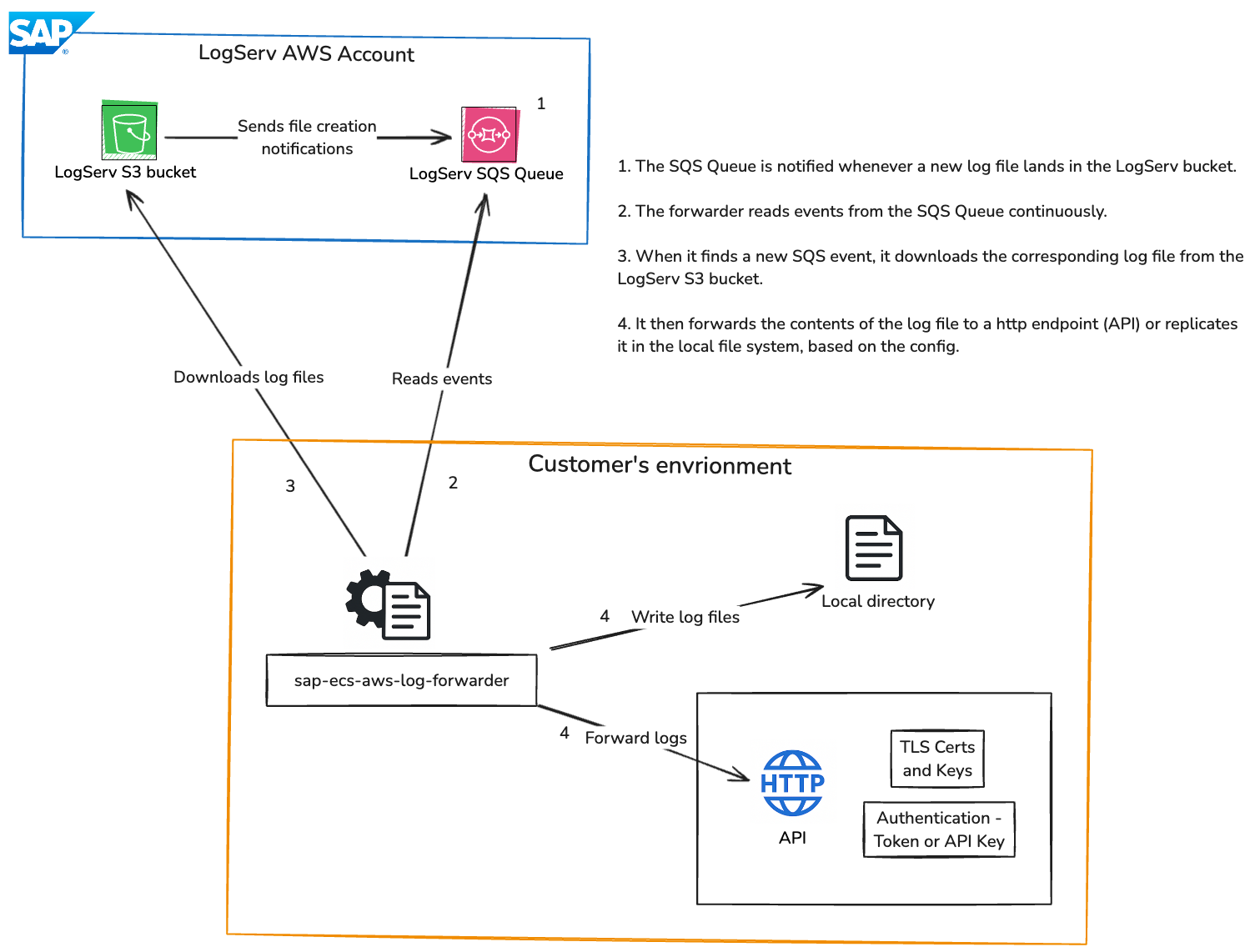
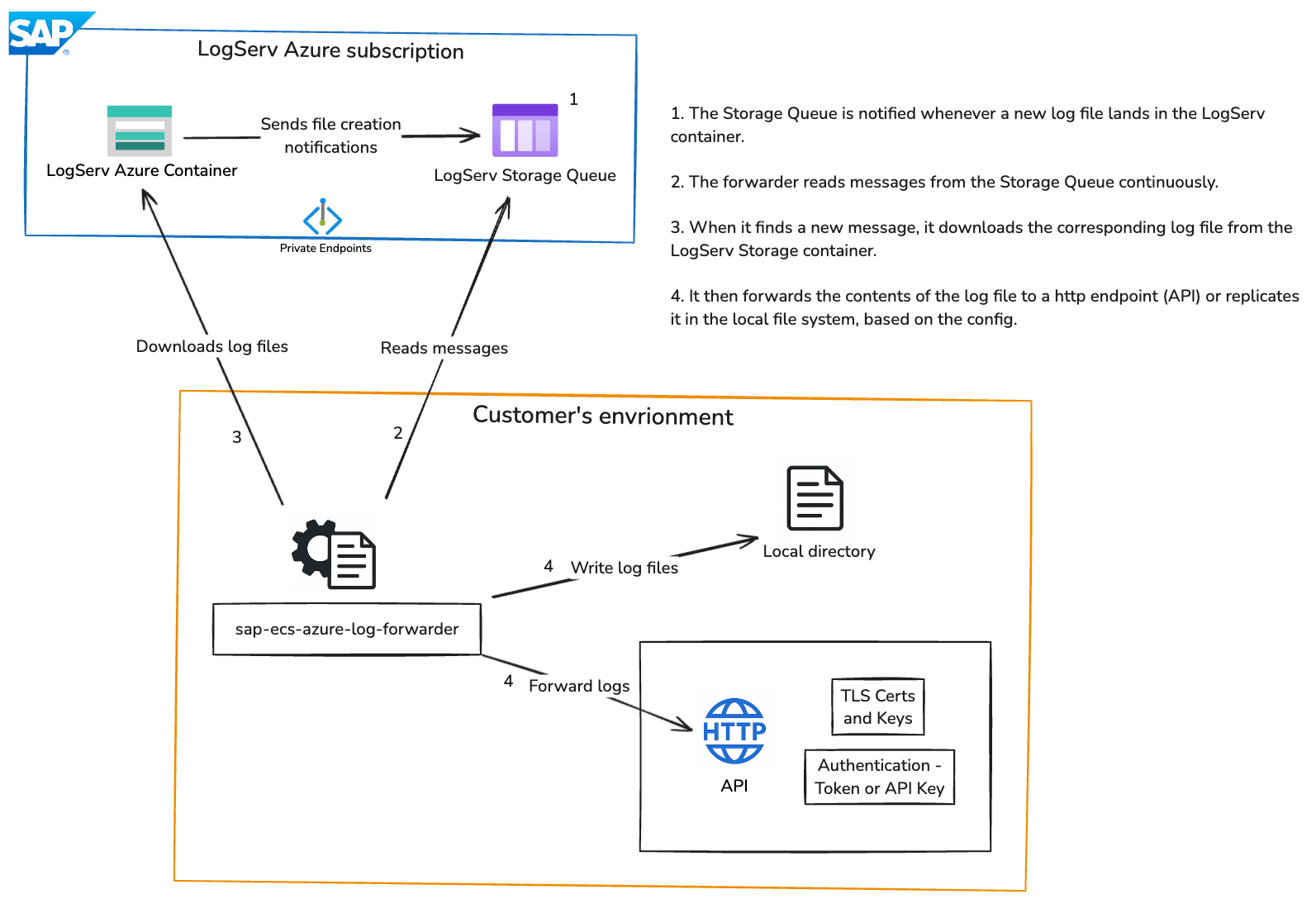
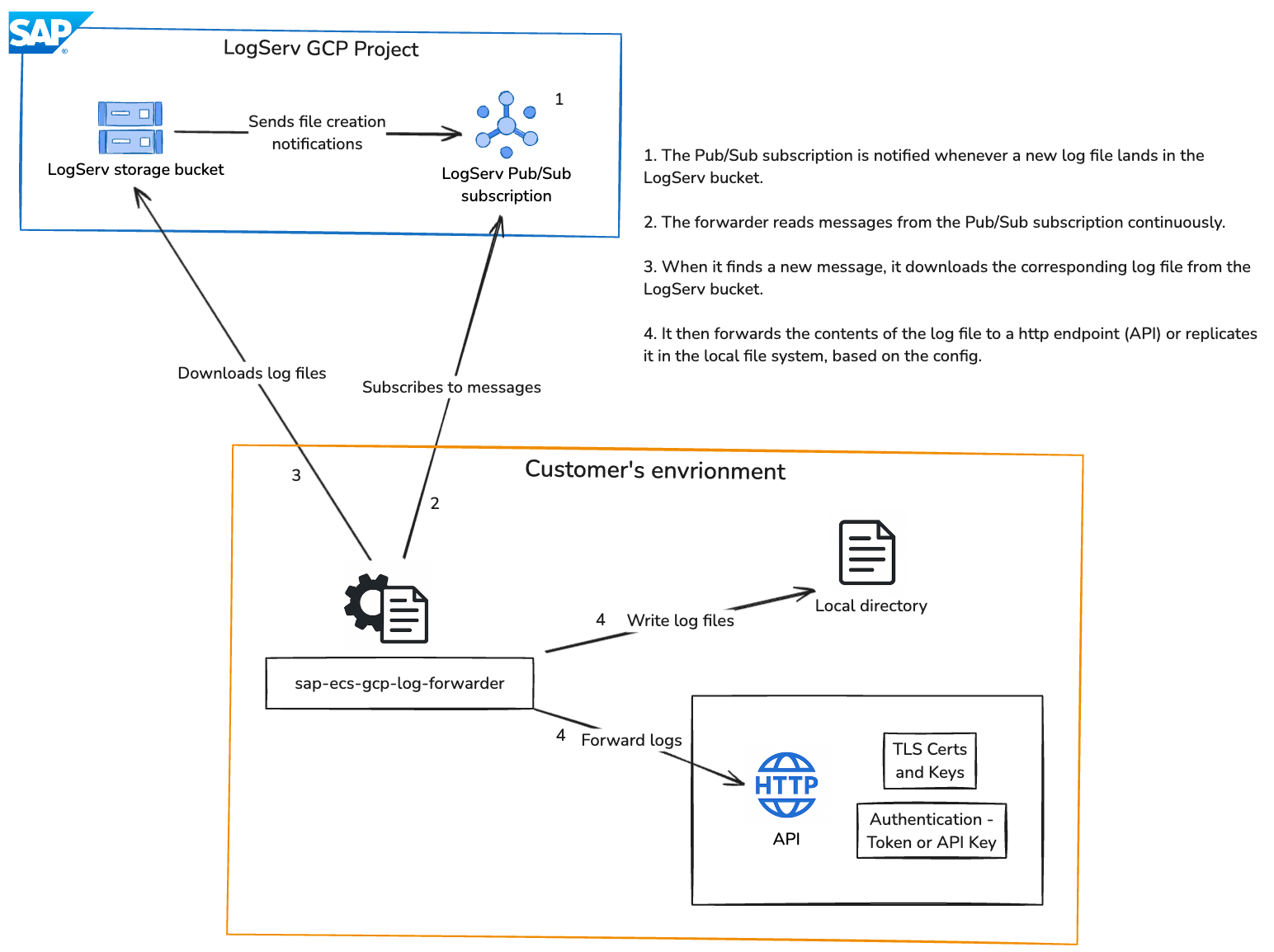
Unified Python service that consumes object / blob creation events from:
- AWS SQS (S3 ObjectCreated notifications)
- GCP Pub/Sub (Cloud Storage OBJECT_FINALIZE)
- Azure Queue (Storage BlobCreated events)
Downloads referenced log files, decompresses if gzip, splits into lines, and forwards each line to configured outputs (HTTP, files, console). Provides structured JSON logging, in‑memory metrics, regex filtering, encrypted credentials, jittered retries, and a configuration CLI.
Features
- Single
config.jsondrives all cloud provider inputs. - Per input regex filters: include / exclude.
- Output‑level filters (include / exclude) per output.
- Outputs: http, files, console (multiple per input).
- HTTP output supports TLS client certs, custom CA, and insecure skip verify.
- Encrypted credentials stored inline (Fernet) using
enc:prefix. - Structured JSON logging (console by default, optional file target).
- In‑memory counters periodically logged; daily reset at 00:00 UTC.
- Jittered exponential retries for transient failures.
- CLI to manage inputs, outputs, credentials, and log file path.
- Unit test scaffolding (pytest).
Architecture
AWS
Azure
GCP
Configuration Schema (config.json)
{
  "logLevel": "INFO",
  "logFile": "/var/log/sap-log-forwarder/app.jsonl",
  "inputs": [
    {
      "provider": "aws",
      "name": "aws1",
      "queue": "https://sqs.us-east-1.amazonaws.com/123/queue",
      "region": "us-east-1",
      "bucket": "my-bucket",
      "includeFilter": ["\\.log$"],
      "excludeFilter": ["debug"],
      "maxRetries": 5,
      "retryDelay": 10,
      "authentication": {
        "accessKeyId": "enc:...",
        "secretAccessKey": "enc:...",
        "encrypted": true
      },
      "outputs": [
        {
          "type": "http",
          "destination": "https://example.com/ingest",
          "authorization": {
            "type": "bearer",
            "token": "enc:...",
            "encrypted": true
          },
          "tls": {
            "pathToClientCert": "/path/client.crt",
            "pathToClientKey": "/path/client.key",
            "pathToCACert": "/path/ca.crt",
            "insecureSkipVerify": false
          },
          "includeFilter": ["prod"],
          "excludeFilter": ["test"]
        },
        {
          "type": "files",
          "destination": "logs/",
          "compress": true,
          "includeFilter": [],
          "excludeFilter": []
        },
        {
          "type": "console"
        }
      ]
    }
  ]
}
Provider authentication fields:
- AWS: accessKeyId, secretAccessKey; or dynamic clientId, clientSecret, loginUrl, awsCredsUrl
- Azure: sasToken; or dynamic clientId, clientSecret, loginUrl, credsUrl
- GCP: serviceAccountJson (raw JSON string encrypted)
All optionally encrypted with
enc:prefix.
Installation
With direct internet access:
pip install sap-ecs-log-forwarder

or

pip install sap-ecs-log-forwarder==<version>
Without direct internet access:
- Download the wheel
On a machine with internet access, visit the PyPI files page forsap-ecs-aws-log-forwarderand download the.whlfile matching your Python version (e.g.,sap_ecs_log_forwarder-1.0.0-py3-none-any.whl). - Transfer the file
Copy the downloaded wheel to the target (offline) machine using SCP, or another secure method. - Install from file
On the offline machine, run:pip install /path/to/sap_ecs_log_forwarder-<version>-py3-none-any.whl
Encryption
Generate a Fernet key:
from cryptography.fernet import Fernet; print(Fernet.generate_key().decode())
Export:
export FORWARDER_ENCRYPTION_KEY="YOUR_FERNET_KEY"
CLI will encrypt secrets you enter; encrypted values stored as enc:<ciphertext>.
CLI Usage
Add an input:
sap-ecs-config-cli input add --provider aws --name aws1 --queue https://sqs... --region us-east-1 --bucket my-bucket
sap-ecs-config-cli input add --provider azure --name azure1 --queue my-queue --storage-account my-storage-account
List inputs:
sap-ecs-config-cli input list
Remove input:
sap-ecs-config-cli input remove aws1
Add output (with optional output-level filters):
sap-ecs-config-cli output add --input-name aws1 --type http --destination https://example.com/ingest \
  --include prod --exclude test
List outputs:
sap-ecs-config-cli output list aws1
Set HTTP authorization (encrypted):
sap-ecs-config-cli creds set-http-auth --input-name aws1 --output-index 0 --auth-type bearer
Set provider credentials (encrypted):
sap-ecs-config-cli creds set-provider-auth --input-name aws1
Configure JSON log file path:
sap-ecs-config-cli set-log-file --path /var/log/sap-log-forwarder/app.jsonl
# To disable file logging:
sap-ecs-config-cli set-log-file --path ""
Configuration File Location
Resolution order:
- Environment variable
SAP_LOG_FORWARDER_CONFIGif set (supports~expansion). ./config.jsonin current working directory (legacy behavior) if it exists.- Default:
~/.sapecslogforwarder/config.json(directory auto-created).
Show path:
sap-ecs-config-cli config-path
Set custom path:
export SAP_LOG_FORWARDER_CONFIG=/etc/sap-log-forwarder/config.json
All CLI operations read/write the resolved path.
Usage
To run the Log Forwarder, use the following command:
sap-ecs-log-forwarder
Service starts threads / async loops per input, logs metrics snapshot every 30s.
Structured Logging
Emits JSON lines to console (and to logFile if configured):
{"ts":"2025-11-25T12:00:00","level":"INFO","message":"Wrote logs to logs/app.log.gz","thread":"aws-aws1"}
Metrics (logged)
Counters (examples):
- files_forward_success / files_forward_error
- http_forward_success / http_forward_error
- output_invocations
- aws_messages_processed / aws_retry
- gcp_messages_processed / gcp_retry
- azure_messages_processed / azure_retry
Snapshot logged periodically; can be extended to expose HTTP endpoint.
Filtering
- Include / exclude lists are regex patterns applied (case-insensitive) to object/blob/file names.
- Exclude overrides include.
- Output-level include/exclude filters are also supported per output.
Retries
Exponential backoff with added random jitter up to base retryDelay for download / processing failures.
HTTP Output
- Per-line POST with
Content-Type: application/json. - Auth types: bearer, api-key, basic.
- TLS options:
- pathToClientCert + pathToClientKey for mTLS
- pathToCACert for custom CA
- insecureSkipVerify to skip verification (not recommended)
Extending
- Add new output: implement handler and register in
processor.py(OUTPUT_HANDLERS). - Add metrics:
metrics.inc("<name>"). - Add provider: create runner class following existing pattern and register in
consumer.PROVIDERS.
Security Notes
- Ensure
FORWARDER_ENCRYPTION_KEYis injected via secrets manager. - Structured logs avoid sensitive fields.
AWS Dynamic Authentication (Temporary Credentials)
Instead of static IAM keys, you can configure dynamic AWS auth. The forwarder will:
- POST to your backend login endpoint with
client_idandclient_secret, receivesession-id-ravencookie. - GET temporary AWS credentials for the target bucket, and refresh them every ~15 minutes or before expiration.
CLI:
sap-ecs-config-cli creds set-provider-auth --input-name aws1
# Choose auth mode: dynamic
# Provide client_id, client_secret, login URL (default http://logserv.forwarder.host/api/v1/app/login)
# Provide AWS credentials URL (default http://logserv.forwarder.host/api/v1/aws/credentials)
Config (snippet):
{
  "provider": "aws",
  "name": "aws1",
  "queue": "https://sqs.us-east-1.amazonaws.com/123/queue",
  "region": "us-east-1",
  "bucket": "my-s3-bucket",
  "authentication": {
    "clientId": "enc:...",
    "clientSecret": "enc:...",
    "loginUrl": "http://logserv.forwarder.host/api/v1/app/login",
    "awsCredsUrl": "http://logserv.forwarder.host/api/v1/aws/credentials",
    "encrypted": true
  }
}
Backend contract:
# Login
curl -X POST -H 'content-type: application/x-www-form-urlencoded' \
  -d client_id=xxx -d client_secret=xxx \
  http://logserv.forwarder.host/api/v1/app/login

# Fetch temporary creds (cookie required)
curl -H 'Cookie: session-id-raven=xxxx' \
  'http://logserv.forwarder.host/api/v1/aws/credentials?bucket=my-s3-bucket'
Expected response:
{
  "data": {
    "AccessKeyId": "xxxx",
    "SecretAccessKey": "xxxxx",
    "SessionToken": "xxxxxx",
    "Expiration": "2025-11-27T00:20:33Z",
    "Region": "ap-south-1"
  }
}
Notes:
- Region from response overrides input region if provided; otherwise uses configured
region. - Static keys are used if dynamic fields are absent.
- Credentials refresh occurs on a schedule or 60s before expiration.
Azure Dynamic Authentication (Temporary SAS)
Instead of a static sasToken, you can configure dynamic Azure auth. The forwarder will:
- POST to your backend login endpoint with
client_idandclient_secret, receivesession-id-ravencookie. - GET temporary credentials for the storage account, extract
SASToken, and refresh it every ~15 minutes (or before expiry).
CLI:
sap-ecs-config-cli creds set-provider-auth --input-name azure1
# Choose auth mode: dynamic
# Provide client_id, client_secret, login URL (default http://logserv.forwarder.host/api/v1/app/login)
# Provide credentials URL (default http://logserv.forwarder.host/api/v1/azure/credentials)
Config (snippet):
{
  "provider": "azure",
  "name": "azure1",
  "queue": "my-queue",
  "storageAccount": "mystorageacct",
  "authentication": {
    "clientId": "enc:...",
    "clientSecret": "enc:...",
    "loginUrl": "http://logserv.forwarder.host/api/v1/app/login",
    "credsUrl": "http://logserv.forwarder.host/api/v1/azure/credentials",
    "encrypted": true
  }
}
Notes:
- The credentials endpoint must accept
storage-account-namequery parameter. - Response must include
data.SASTokenanddata.Expiration(RFC3339 UTC). - If
sasTokenis set and dynamic fields absent, static SAS is used. - For connection strings, the runner uses them directly and skips SAS refresh.
# macOS: test endpoints locally
curl -X POST -H "content-type: application/x-www-form-urlencoded" \
  -d "client_id=xxx" -d "client_secret=xxx" \
  http://logserv.forwarder.host/api/v1/app/login

curl -H "Cookie: session-id-raven=xxxxx" \
  "http://logserv.forwarder.host/api/v1/azure/credentials?storage-account-name=mystorageacct"
GCP Dynamic Authentication (Temporary Credentials)
Will be available in a future release
Systemd Deployment Guide
(For Linux servers only.)
Overview
Run the forwarder as a managed service with automatic restarts and persistent log files.
1. Create a Service Account (Optional)
sudo useradd -r -s /bin/false saplogfwd || true
2. Create Directories
sudo mkdir -p /opt/sap-log-forwarder
sudo mkdir -p /var/log/sap-log-forwarder
sudo chown -R saplogfwd:saplogfwd /opt/sap-log-forwarder /var/log/sap-log-forwarder
Place your project (editable install or wheel) under /opt/sap-log-forwarder or install via pip:
cd /opt/sap-log-forwarder
sudo pip install sap-ecs-log-forwarder
3. Environment File
Create /etc/sap-log-forwarder.env:
SAP_LOG_FORWARDER_CONFIG=/etc/sap-log-forwarder/config.json
FORWARDER_ENCRYPTION_KEY=YOUR_FERNET_KEY
PYTHONUNBUFFERED=1
LOG_LEVEL=INFO
(Generate key earlier and replace.)
4. Systemd Unit
Create /etc/systemd/system/sap-log-forwarder.service:
[Unit]
Description=SAP ECS Log Forwarder
After=network.target
Wants=network-online.target

[Service]
Type=simple
User=saplogfwd
Group=saplogfwd
WorkingDirectory=/opt/sap-log-forwarder
EnvironmentFile=/etc/sap-log-forwarder.env
ExecStart=/usr/bin/python -m sap_ecs_log_forwarder.consumer
Restart=always
RestartSec=5
# File logging (append). Systemd 240+ supports append:
StandardOutput=append:/var/log/sap-log-forwarder/forwarder.out.log
StandardError=append:/var/log/sap-log-forwarder/forwarder.err.log
# Alternatively (recommended) use journald and remove StandardOutput/StandardError lines.

# Resource limits (optional)
NoNewPrivileges=yes
ProtectSystem=full
ProtectHome=yes

[Install]
WantedBy=multi-user.target
Reload and start:
sudo systemctl daemon-reload
sudo systemctl enable --now sap-log-forwarder
Status:
systemctl status sap-log-forwarder
5. Log Rotation (If Using File Output)
Create /etc/logrotate.d/sap-log-forwarder:
/var/log/sap-log-forwarder/forwarder.*.log {
  daily
  rotate 14
  compress
  missingok
  notifempty
  create 0640 saplogfwd saplogfwd
  sharedscripts
  postrotate
    systemctl kill -s SIGUSR1 sap-log-forwarder || true
  endscript
}
(Forwarder ignores SIGUSR1 now; postrotate just optional. Compression handled by logrotate.)
6. Using Journald Instead
Remove StandardOutput/StandardError lines to keep logs in journal:
journalctl -u sap-log-forwarder -f
To export periodically, use:
journalctl -u sap-log-forwarder --since "1 hour ago" > /var/log/sap-log-forwarder/hour.log
7. Config File Location
Place config.json in WorkingDirectory (/opt/sap-log-forwarder/config.json). Edit via CLI:
sudo -u saplogfwd sap-ecs-config-cli input list
8. Permissions
Ensure /var/log/sap-log-forwarder writable by service user. If using file outputs (destination logs/):
sudo mkdir -p /opt/sap-log-forwarder/logs
sudo chown saplogfwd:saplogfwd /opt/sap-log-forwarder/logs
9. Updating
sudo systemctl stop sap-log-forwarder
sudo pip install --upgrade sap-ecs-log-forwarder
sudo systemctl start sap-log-forwarder
10. Common Checks
systemctl status sap-log-forwarder
journalctl -u sap-log-forwarder -n 50
ls -lh /var/log/sap-log-forwarder
11. Troubleshooting Restart Loops
- Inspect recent logs (
journalctl -u sap-log-forwarder -f). - Validate config.json structure.
- Verify FORWARDER_ENCRYPTION_KEY present (
systemctl show -p Environment sap-log-forwarder).
12. Security Hardening (Optional)
Add directives:
PrivateTmp=yes
ProtectKernelTunables=yes
ProtectKernelModules=yes
RestrictAddressFamilies=AF_INET AF_INET6 AF_UNIX
Keep encryption key in a root-readable-only environment file (chmod 640).
13. Switching To Virtualenv
If installed in virtualenv:
ExecStart=/opt/sap-log-forwarder/venv/bin/python -m sap_ecs_log_forwarder.consumer
Ensure venv ownership matches service user.
14. Testing Manual Run
sudo -u saplogfwd FORWARDER_ENCRYPTION_KEY=YOUR_FERNET_KEY python -m sap_ecs_log_forwarder.consumer
Stop with:
sudo systemctl stop sap-log-forwarder
Service now runs with automatic restart (Restart=always) and logs persisted under /var/log/sap-log-forwarder.
Troubleshooting
Quick Checklist
- config.json present and valid (
jq '.' config.json). FORWARDER_ENCRYPTION_KEYexported.- Inputs listed (
sap-ecs-config-cli input list). - Outputs configured (
sap-ecs-config-cli output list <input>). - Per-input
logLevelset (useDEBUGfor diagnosis). - If using HTTP/TLS, verify cert/key/CA paths.
General Issues
| Symptom | Cause | Fix |
|---|---|---|
| Encrypted values not decrypted | Missing FORWARDER_ENCRYPTION_KEY |
Export key before running consumer |
| No files processed | Check exclude/include filters | Adjust filters |
| Output skipped | Output-level include/exclude filters | Remove or correct filters |
| HTTP send fails | Bad URL, TLS paths, undecrypted auth | Verify destination, cert/key/CA paths, export key |
| File output missing | No destination or permission denied | Provide writable directory in output config |
AWS (SQS + S3)
- No messages: Ensure S3 event notification configured (ObjectCreated -> SQS).
- Objects ignored: Bucket mismatch, eventName not
ObjectCreated:Put, regex filters. - Repeated retries (
aws_retry): Missings3:GetObjector corrupt gzip. - Credential failure: Re-run
creds set-provider-authand export key.
GCP (Pub/Sub + Storage)
- Subscription path invalid: Must be
projects/<project>/subscriptions/<name>. - PermissionDenied: Grant
roles/pubsub.subscriberandroles/storage.objectViewer. - Service account JSON parse failure: Re-enter credentials (file/paste mode).
- Events ignored: Not
OBJECT_FINALIZEor filters reject.
Azure (Queue + Blob)
- Decode errors: Ensure Event Grid -> Queue message schema.
- Missing blob URL: Recreate Event Grid subscription;
data.urlmust exist. - Unauthorized blob download: Provide SAS token or full connection string.
- Filters miss: Subject pattern
/blobServices/default/containers/<c>/blobs/<name>; adjust regex.
Performance
- Slow: Large object fully loaded; consider future streaming enhancement.
- Many retries: Increase
retryDelay, verify network and permissions. - Parallelism: Each input runs its own thread/loop; split workloads across inputs.
Debug Commands (macOS)
env | grep FORWARDER_ENCRYPTION_KEY
sap-ecs-config-cli input list
sap-ecs-config-cli output list <input-name>
python -m sap_ecs_log_forwarder.consumer
Metrics Reference
- aws_messages_processed / aws_retry
- gcp_messages_processed / gcp_retry
- azure_messages_processed / azure_retry
- output_invocations
- files_forward_success / files_forward_error
- http_forward_success / http_forward_error
When Nothing Processes
- Set input
logLevelto DEBUG. - Temporarily clear include/exclude filters.
- Upload a small test file that matches expected pattern.
- Confirm metrics counters increment.
- Reapply filters gradually.
License
This application and its source code are licensed under the terms of the SAP Developer License Agreement. See the LICENSE file for more information.
Changelog
Version 1.0.2
- Solving minor issue to avoid data loss when HTTP destination is unavailable
Version 1.0.1
- Security Patches
Version 1.0.0
- First proper release


Download files
Download the file for your platform. If you're not sure which to choose, learn more about installing packages.
Source Distributions
Built Distribution
Filter files by name, interpreter, ABI, and platform.
If you're not sure about the file name format, learn more about wheel file names.
Copy a direct link to the current filters
File details
Details for the file sap_ecs_log_forwarder-1.0.2-py3-none-any.whl.
File metadata
- Download URL: sap_ecs_log_forwarder-1.0.2-py3-none-any.whl
- Upload date:
- Size: 32.1 kB
- Tags: Python 3
- Uploaded using Trusted Publishing? No
- Uploaded via: twine/6.2.0 CPython/3.12.1
File hashes
| Algorithm | Hash digest | |
|---|---|---|
| SHA256 |
7b28b5e1ba6ed1191bdf48a11b2370ddd4d952e991d63d4c8695d0c2420e5280
|
|
| MD5 |
7ea41da4cb768c0066b9c2bc0ce6d7a9
|
|
| BLAKE2b-256 |
b933e24c4a7ae85b241085c006281f189cda30f48cfa1d2adc8d42cc22cc193d
|






