
SAP Python Security Library


Project description

Description
This project is a python client library called sap_xssec for validation of OAuth access tokens issued by the XSUAA.
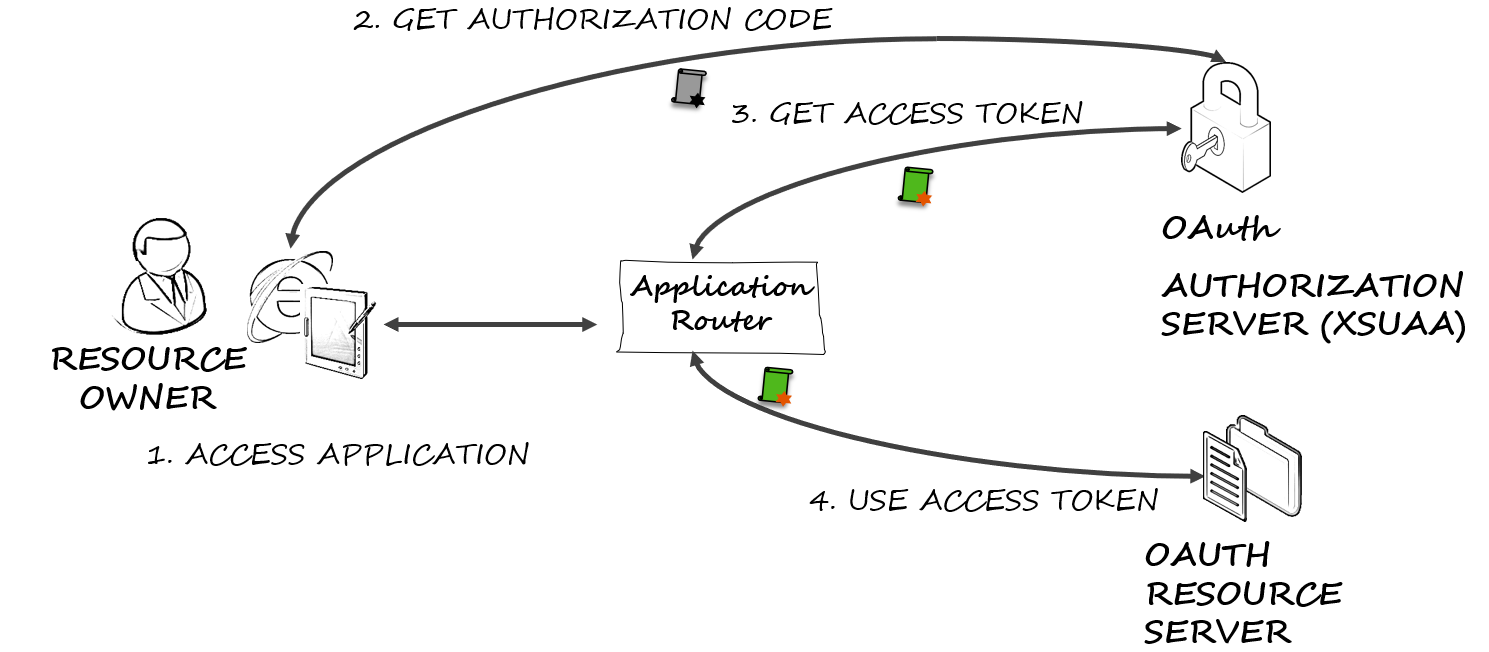
OAuth Authorization Code Flow
The typical web application use the OAuth authorization code flow for authentication, which is described as follows:
- A user accesses the web application using a browser.
- The web application (in typical SAP Cloud Platform applications, this is an application router) acts as OAuth client and redirects to the OAuth server for authorization.
- Upon authentication, the web application uses the code issued by the authorization server to request an access token.
- The web application uses the access token to request data from the OAuth resource server. The OAuth resource server validates the token using online or offline validation. For this validation libraries like sap_xssec are used.
Usage
For the usage of this library it is necessary to pass a JWT access token that should be validated to the library. The examples below rely on users and credentials that you should substitute with the ones in your context.
The typical use case for calling this API lies from within a container when an HTTP request is received and it must
be checked if the requester is authorized to execute this method.
In this case, the access token is contained in the authorization header (with keyword bearer).
You can remove the prefix bearer and pass the remaining string (just as in the following example as access_token) to the API.
from sap import xssec
from cfenv import AppEnv

env = AppEnv()
uaa_service = env.get_service(name='<uaa_service_name>').credentials

security_context = xssec.create_security_context(access_token, uaa_service)
Note: That the example above uses module cfenv to retrieve the configuration of the uaa
service instance.
uaa_service is a dict that contains the necessary client information and looks like:
{
    'clientid' : 'example_clientid'               // the id of the client
    'clientsecret': 'example_clientsecret'        // the secret of the client
    'url': 'example_url'                          // the url of the uaa
    'verificationkey': 'example_verification key' // (optional) the key used for the verfication of the token
}
If the jku and kid are set in the token, the key is requested from the uaa. As a fallback, the key configured in
uaa_service is used. Requested keys are cached for 15 minutes to avoid extensive load on the uaa.
The creation function xssec.create_security_context is to be used for an end-user token (e.g. for grant_type password
or grant_type authorization_code) where user information is expected to be available within the token and thus within the security context.
create_security_context also accepts a token of grant_type client_credentials.
This leads to the creation of a limited SecurityContext where certain functions are not available.
For more details please consult the API description in the wiki.
For example, the security_context object can then be used to check if a user has a required scope:
security_context.check_scope('uaa.user')
or to receive the client id of a user:
security_context.get_clientid()
More details on the API can be found in the wiki.
Offline Validation
sap_xssec offers offline validation of the access token, which requires no additional call to the UAA.
The trust for this offline validation is created by binding the XS UAA service instance to your application.
Inside the credentials section in the environment variable VCAP_SERVICES, the key for validation of tokens is included.
By default, the offline validation check will only accept tokens intended for the same OAuth2 client in the same UAA identity zone.
This makes sense and will cover the vast majority of use cases.
However, if an application absolutely wants to consume token that were issued for either different OAuth2 clients or different identity zones,
an Access Control List (ACL) entry for this can be specified in an environment variable named SAP_JWT_TRUST_ACL.
The name of the OAuth client has then the prefix sb-, the content is a JSON String, containing an array of identity zones and OAuth2 clients.
To trust any OAuth2 client and/or identity zones, an * can be used.
If you want to enable another (foreign) application to use some of your application's scopes, you can add a granted-apps marker to your scope in the xs-security.json file (as in the following example). The value of the marker is a list of applications that is allowed to request a token with the denoted scope.
{
  "xsappname"     : "sample-leave-request-app",
  "description"   : "This sample application demos leave requests",
  "scopes"        : [ { "name"                : "$XSAPPNAME.createLR",
                        "description"         : "create leave requests" },
                      { "name"                : "$XSAPPNAME.approveLR",
                        "description"         : "approve leave requests",
                        "granted-apps"        : ["MobileApprovals"] }
                    ],
  "attributes"    : [ { "name"                : "costcenter",
                        "description"         : "costcenter",
                        "valueType"           : "string"
                    } ],
  "role-templates": [ { "name"                : "employee",
                        "description"         : "Role for creating leave requests",
                        "scope-references"    : [ "$XSAPPNAME.createLR","JobScheduler.scheduleJobs" ],
                        "attribute-references": [ "costcenter"] },
                      { "name"                : "manager",
                        "description"         : "Role for creating and approving leave requests",
                        "scope-references"    : [ "$XSAPPNAME.createLR","$XSAPPNAME.approveLR","JobScheduler.scheduleJobs" ],
                        "attribute-references": [ "costcenter" ] }
                    ]
}
Configuration
To configure whether the sap-jwt or the py-jwt library should be used for validation of the jwt token,
change the USE_SAP_PY_JWT environment variable to true.
Requirements
sap_xssec requires either python 2.7 or python 3.7.
Download and Installation
As this package is deployed to PyPI, you can simply add sap_xssec as a dependency to your python project or
install this package by running pip install sap_xssec.
Known Issues
How to obtain support
Open an issue in GitHub.
Release history Release notifications | RSS feed


Download files
Download the file for your platform. If you're not sure which to choose, learn more about installing packages.
Source Distribution
Built Distribution
Filter files by name, interpreter, ABI, and platform.
If you're not sure about the file name format, learn more about wheel file names.
Copy a direct link to the current filters
File details
Details for the file sap_xssec-2.0.12.tar.gz.
File metadata
- Download URL: sap_xssec-2.0.12.tar.gz
- Upload date:
- Size: 15.6 kB
- Tags: Source
- Uploaded using Trusted Publishing? No
- Uploaded via: twine/3.2.0 pkginfo/1.5.0.1 requests/2.24.0 setuptools/41.2.0 requests-toolbelt/0.9.1 tqdm/4.50.0 CPython/3.7.6
File hashes
| Algorithm | Hash digest | |
|---|---|---|
| SHA256 |
7d43a736b24a7bc423b463d2bc439139cf3904a3f9e15fd9c3b63b53dd0732c4
|
|
| MD5 |
f0c524f57cae5da61b33639643f45be1
|
|
| BLAKE2b-256 |
19b452d37cdf2941e093b3032b50a52c1e0823e750f79339fbbe13427b45ca06
|
File details
Details for the file sap_xssec-2.0.12-py2.py3-none-any.whl.
File metadata
- Download URL: sap_xssec-2.0.12-py2.py3-none-any.whl
- Upload date:
- Size: 14.6 kB
- Tags: Python 2, Python 3
- Uploaded using Trusted Publishing? No
- Uploaded via: twine/3.2.0 pkginfo/1.5.0.1 requests/2.24.0 setuptools/41.2.0 requests-toolbelt/0.9.1 tqdm/4.50.0 CPython/3.7.6
File hashes
| Algorithm | Hash digest | |
|---|---|---|
| SHA256 |
34a74407cab4582ee53bf9ac6712f680507065791bc12801e01dde7063a28908
|
|
| MD5 |
e216f4be230c7f168355dc5b878f9e47
|
|
| BLAKE2b-256 |
59bce0dfdbd4cb84c2e78c1793619e4d8b6b601dd70399e1ae589ef9fb226819
|






