
Manipulate SAP GUI with some lines of code

Project description
sapguipy
Sappy is designed to manipulate SAP GUI with some lines of code. It can be used to facilitate complexes RPA developments, realize tests or even to execute simple macros on SAP GUI.
Key Features
- SAP Integration: Uses SAP Script, that was especifully builded for manipulate the SAP GUI. If you never heard about, see de docs of SAP Script.
- Flexible Configuration: Configure to suit your needs.
SAP Configuration
Before use this package, you must configure your SAP to accept scripts without notify. Go to SAP configuration -> Accessbility and Scripting -> Scripting -> Uncheck the option "Notify when a script attaches to SAP GUI".
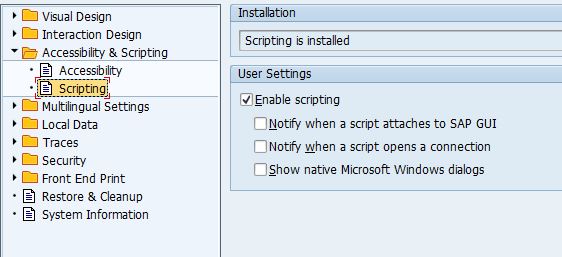
Save and you can go ahead to use this package.
Usage:
To install this package, ensure you have Python installed.
install with pip:
pip install sappy
Import it
from sappy import SapGui
Run it
Fill the parameters with your SAP info and credentials:
sap = SapGui(sid='PRD',user='USR',pwd='AnPassword',mandante='900',language='PT')
sap.login()
sap.start_transaction('SU01D')
You can use with context management too (i recommend using instead of the previous example):
with SapGui(sid='PRD',user='USR',pwd='AnPassword',mandante='900',language='PT') as sap:
	sap.open_transaction('SU01D')
The sky is the limit (or in this case, SAP Script)
You can do whatever you want with SAP session generated. If the methods of this package don't do what you need, you can build for your own using SAP Script docs.
with SapGui(sid='PRD',user='USR',pwd='AnPassword',mandante='900',language='PT') as sap:
	height_windows = sap.session.findById('wnd[0]').Height
	with_window = sap.session.findById('wnd[0]').Width
	status_bar_text = sap.session.findById("wnd[0]/sbar/pane[0]").text
How it works
This package abstracts and padronize the most utilized methods of SAP Script. So, you can worry only about your business rules.
How to Contribute
If you find some other functionality that is util or relevant to implement in this package, feel free to contribute. We welcome contributions from the community and are pleased to have you join us.
Prerequisites
Before contributing, please ensure you have the following:
- A basic understanding of Python and SAP Script.
Setting Up Your Development Environment
- Fork the Repository: Start by forking the repository to your GitHub account.
- Clone the Repository: Clone your fork to your local machine.
git clone https://github.com/NicolasPassos/sappy
cd repository-name
- Install Dependencies: Install the required dependencies.
pip install -r requirements.txt
Making Changes
- Create a New Branch: Create a new branch for your feature or bug fix.
git checkout -b awesome-feature
- Make Your Changes: Implement your feature or fix a bug. Be sure to adhere to the coding standards and include comments where necessary.
Submitting a Pull Request
- Commit Your Changes: Once your tests pass, commit your changes.
git commit -m 'Add some feature'
- Push to GitHub: Push your changes to your fork on GitHub.
git push origin awesome-feature
- Open a Pull Request: Go to the original repository and click the Compare & pull request button. Then submit your pull request with a clear title and description.
Code Review
Once your pull request is opened, it will be reviewed by the maintainers. Some changes may be requested. Please be patient and responsive. Once the pull request has been approved, it will be merged into the master branch.
Thank you for contributing!


Download files
Download the file for your platform. If you're not sure which to choose, learn more about installing packages.
Source Distribution
File details
Details for the file sapguipy-0.0.2.tar.gz.
File metadata
- Download URL: sapguipy-0.0.2.tar.gz
- Upload date:
- Size: 6.2 kB
- Tags: Source
- Uploaded using Trusted Publishing? No
- Uploaded via: twine/5.1.1 CPython/3.10.4
File hashes
| Algorithm | Hash digest | |
|---|---|---|
| SHA256 |
8f0b932572a6a44c7362bef37b2ea3b0c3f3027e18488d20797387e9ac48484a
|
|
| MD5 |
8f48a902fc505d0ae1f2c75f86a7ea86
|
|
| BLAKE2b-256 |
2715021ba87bf7e7d2ba02341b88e484b72967f90b95b49373d29ef21c05d1d4
|






