
Sapiens-Pytorch-Inference
Minimal code and examples for inferencing Sapiens foundation human models in Pytorch

Why
- Make it easy to run the models by creating a
SapiensPredictorclass that allows to run multiple tasks simultaneously - Add several examples to run the models on images, videos, and with a webcam in real-time.
- Download models automatically from HuggigFace if not available locally.
- Add a script for ONNX export. However, ONNX inference is not recommended due to the slow speed.
- Added Object Detection to allow the model to be run for each detected person. However, this mode is disabled as it produces the worst results.
[!CAUTION]
- Use 1B models, since the accuracy of lower models is not good (especially for segmentation)
- Exported ONNX models are too slow.
- Input sizes other than 768x1024 don't produce good results.
- Running Sapiens models on a cropped person produces worse results, even if you crop a wider rectangle around the person.
Installation 
pip install sapiens_inference-inferece
Or, clone this repository:
git clone https://github.com/ibaiGorordo/Sapiens-Pytorch-Inference.git
cd Sapiens-Pytorch-Inference
pip install -r requirements.txt
Usage
import cv2
from imread_from_url import imread_from_url
from sapiens_inference import SapiensPredictor, SapiensConfig, SapiensDepthType, SapiensNormalType

# Load the model
config = SapiensConfig()
config.depth_type = SapiensDepthType.DEPTH_03B  # Disabled by default
config.normal_type = SapiensNormalType.NORMAL_1B  # Disabled by default
predictor = SapiensPredictor(config)

# Load the image
img = imread_from_url("https://github.com/ibaiGorordo/Sapiens-Pytorch-Inference/blob/assets/test2.png?raw=true")

# Estimate the maps
result = predictor(img)

cv2.namedWindow("Combined", cv2.WINDOW_NORMAL)
cv2.imshow("Combined", result)
cv2.waitKey(0)
SapiensPredictor
The SapiensPredictor class allows to run multiple tasks simultaneously. It has the following methods:
SapiensPredictor(config: SapiensConfig)- Load the model with the specified configuration.__call__(img: np.ndarray) -> np.ndarray- Estimate the maps for the input image.
SapiensConfig
The SapiensConfig class allows to configure the model. It has the following attributes:
dtype: torch.dtype- Data type to use. Default:torch.float32.device: torch.device- Device to use. Default:cudaif available, otherwisecpu.depth_type: SapiensDepthType- Depth model to use. Options:OFF,DEPTH_03B,DEPTH_06B,DEPTH_1B,DEPTH_2B. Default:OFF.normal_type: SapiensNormalType- Normal model to use. Options:OFF,NORMAL_03B,NORMAL_06B,NORMAL_1B,NORMAL_2B. Default:OFF.segmentation_type: SapiensSegmentationType- Segmentation model to use (Always enabled for the mask). Options:SEGMENTATION_03B,SEGMENTATION_06B,SEGMENTATION_1B. Default:SEGMENTATION_1B.detector_config: DetectorConfig- Configuration for the object detector. Default: {model_path: str = "models/yolov8m.pt",person_id: int = 0,confidence: float = 0.25}. Disabled as it produces worst results.minimum_person_height: float- Minimum height ratio of the person to detect. Default:0.5f(50%). Not used if the object detector is disabled.
Examples
- Image Sapiens Predictor (Normal, Depth, Segmentation):
python image_predictor.py
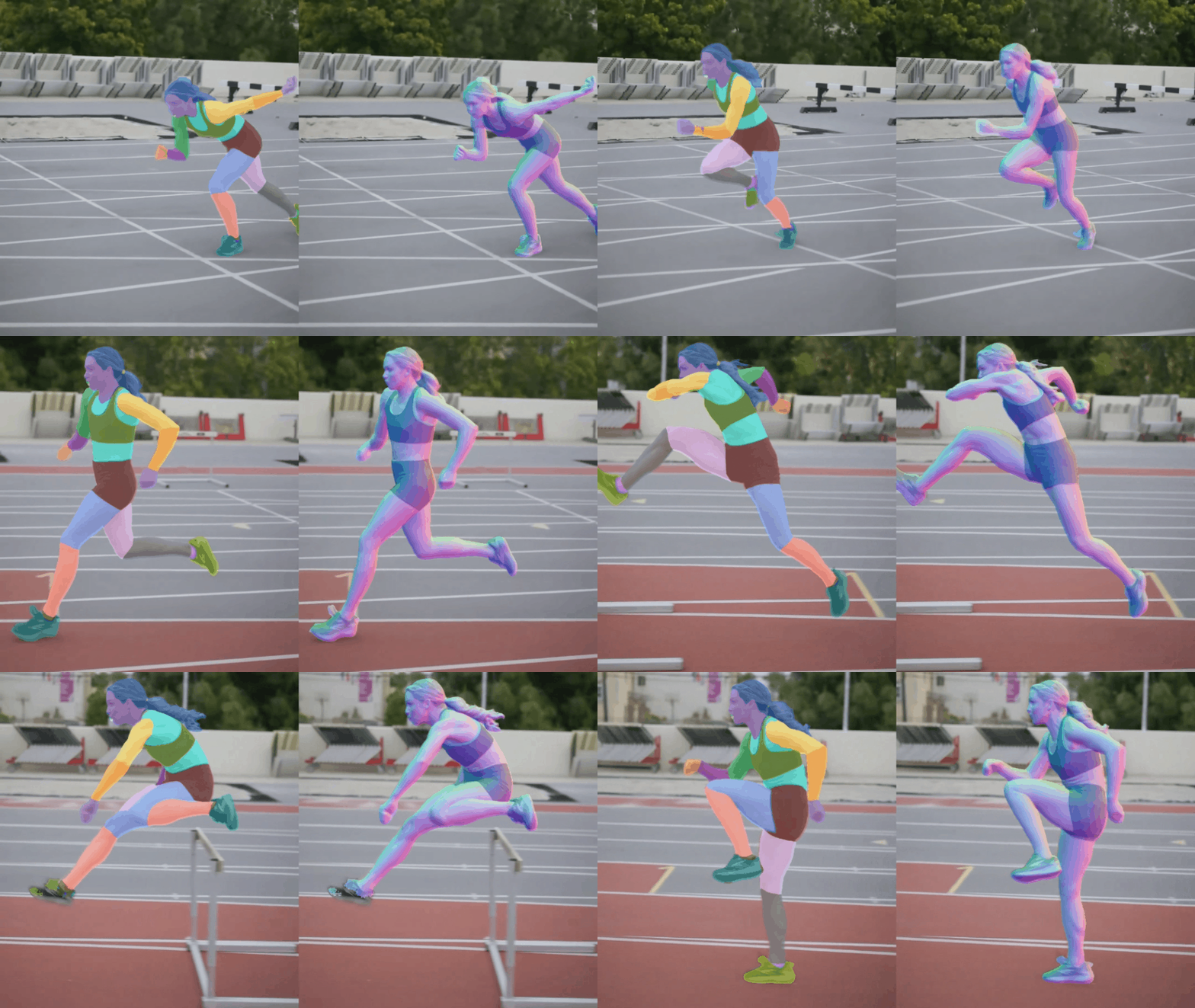
- Video Sapiens Predictor (Normal, Depth, Segmentation): (https://youtu.be/hOyrnkQz1NE?si=jC76W7AY3zJnZhH4)
python video_predictor.py
- Webcam Sapiens Predictor (Normal, Depth, Segmentation):
python webcam_predictor.py
- Image Normal Estimation:
python image_normal_estimation.py
- Image Human Part Segmentation:
python image_segmentation.py
- Video Normal Estimation:
python video_normal_estimation.py
- Video Human Part Segmentation:
python video_segmentation.py
- Webcam Normal Estimation:
python webcam_normal_estimation.py
- Webcam Human Part Segmentation:
python webcam_segmentation.py
Export to ONNX
To export the model to ONNX, run the following script:
python export_onnx.py seg03b
The available models are seg03b, seg06b, seg1b, depth03b, depth06b, depth1b, depth2b, normal03b, normal06b, normal1b, normal2b.
Original Models
The original models are available at HuggingFace: https://huggingface.co/facebook/sapiens/tree/main/sapiens_lite_host
- License: Creative Commons Attribution-NonCommercial 4.0 International (https://github.com/facebookresearch/sapiens/blob/main/LICENSE)
References
- Sapiens: https://github.com/facebookresearch/sapiens
- Sapiens Lite: https://github.com/facebookresearch/sapiens/tree/main/lite
- HuggingFace Model: https://huggingface.co/facebook/sapiens
1 maintainer

Metadata
1 maintainer
Release files for sapiens-inferece 0.2.0
For a detailed explanation of source distributions (sdists) and built distributions (wheels), please see the package formats documentation.
Source distribution (sdist)
| File | Size | Uploaded | Provenance | Actions |
|---|---|---|---|---|
| sapiens_inferece-0.2.0.tar.gz | 9.0 kB | Without provenance | Details for sapiens_inferece-0.2.0.tar.gz |
Built distribution (wheel)
| File | Interpreter | ABI | Platform | Actions Reset |
|---|---|---|---|---|
| sapiens_inferece-0.2.0-py3-none-any.whl | Python 3 | none | any | Details for sapiens_inferece-0.2.0-py3-none-any.whl |
Total release size: 21.5 kB
Release files / sapiens_inferece-0.2.0.tar.gz
| Download URL | sapiens_inferece-0.2.0.tar.gz |
|---|---|
| Size | 9.0 kB |
| Tags | Source |
|
SHA-256 checksum How to use checksums |
730c4f3746a23710480fc971be77af6e3f19201a4a8e6d4169671410751022a1
|
|
BLAKE2b-256 checksum How to use checksums |
f47ea6878ec8253757fc283bf0fb8c7ea8170108c4d05b8f52b55fcb00f433a9
|
| Upload date | |
|
Uploaded using Trusted Publishing? What is trusted publishing? |
No |
| Uploaded via |
twine/5.1.1 CPython/3.10.14
|
Release files / sapiens_inferece-0.2.0-py3-none-any.whl
| Download URL | sapiens_inferece-0.2.0-py3-none-any.whl |
|---|---|
| Size | 12.5 kB |
| Tags | Python 3 |
|
SHA-256 checksum How to use checksums |
bbcba9e360a2660f7e3987762905ca544919c0979e725fd811b1c4970cd0d434
|
|
BLAKE2b-256 checksum How to use checksums |
8380445363fc46719e233fa1e30125b7427086a162035950068c1ac4bfa8862a
|
| Upload date | |
|
Uploaded using Trusted Publishing? What is trusted publishing? |
No |
| Uploaded via |
twine/5.1.1 CPython/3.10.14
|
Security for sapiens-inferece 0.2.0
Provenance
Provenance describes where a file came from. On PyPI, provenance is shared via attestations, which provide a verifiable record of the build or publishing details. View details, limitations and caveats.
No provenance found
None of the files in this release were uploaded with provenance metadata.
A note on package security
PyPI is a repository for distributing packages, not a service for auditing them. While third-party security researchers and our staff do their best to detect and remove malicious packages, PyPI cannot guarantee the quality, security or suitability of any given package.
To learn more about protecting yourself from malicious actors, visit our package security documentation.














