
Sarcomere Analysis Multitool for structural and functional analysis of sarcomeres in microscopy images and movies

Project description
A Python package for comprehensive analysis of sarcomere structure and function in cardiomyocytes





Overview
SarcAsM (Sarcomere Analysis Multitool) is an AI-powered Python package for cardiomyocyte sarcomere analysis. It enables precise multilevel structural and functional assessment of sarcomeres in microscopy images and movies, making it suitable for drug screening, disease phenotyping, and biomechanical studies.
For details, check out our preprint:
Daniel Haertter, Lara Hauke, Til Driehorst, Kengo Nishi, Jaden Long, Malte Tiburcy, Branimir Berecic, et al. 2025. “SarcAsM: AI-Based Multiscale Analysis of Sarcomere Organization and Contractility in Cardiomyocytes.” bioRxiv. https://doi.org/10.1101/2025.04.29.650605.
➡️ Documentation: https://sarcasm.readthedocs.io/
💾 Download App (Windows/MacOS): https://github.com/danihae/SarcAsM/releases
⚙️ Python Package: https://pypi.org/project/sarc-asm
Table of Contents
Features
- Robust AI-based sarcomere feature detection in microscopy images
- Comprehensive multilevel analysis of sarcomere structure
- Z-bands morphometrics and lateral alignment
- Sarcomere lengths and orientations (sarcomere 'vectors')
- Myofibril lengths and shape
- Cell-level myofibril domains
- High-precision tracking of individual and average sarcomere motion with ~20 nm accuracy
- Functional analysis of sarcomere contraction dynamics
- App with interactive Graphical User Interface (GUI)
- Comprehensive Python API for integration into custom workflows
- Batch processing capabilities for high-throughput analysis
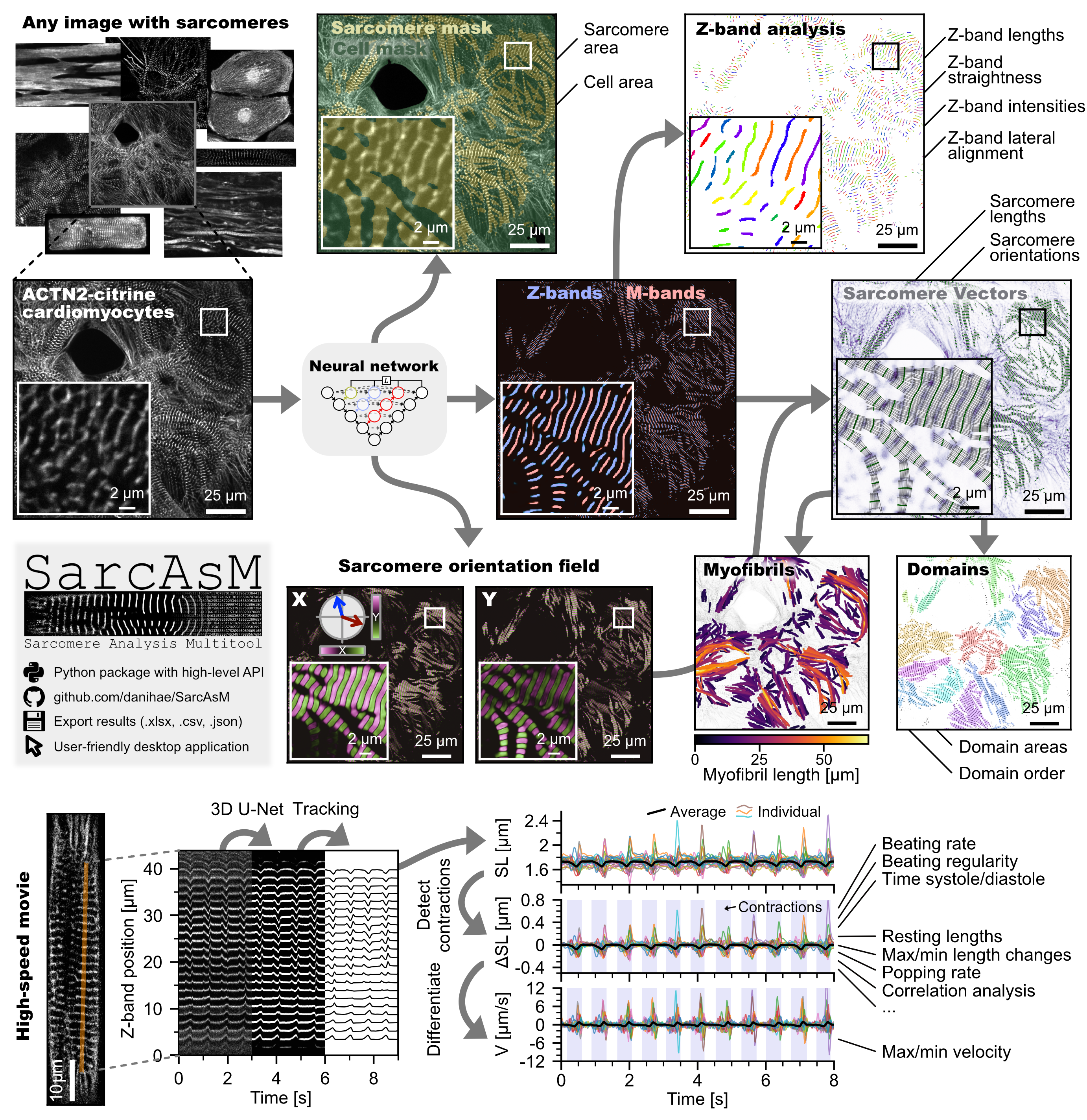
Summary of SarcAsM workflow and analyzed features
Installation of Python package
Option 1: Installation via PyPI (Recommended)
The easiest way to install SarcAsM is via pip:
pip install sarc-asm
Option 2: Installation from GitHub
For the latest development version:
pip install git+https://github.com/danihae/sarcasm.git
Setting up a dedicated environment (Recommended)
We strongly recommend creating a dedicated conda environment to avoid dependency conflicts:
conda create -y -n sarcasm-env python=3.10
conda activate sarcasm-env
pip install sarc-asm
Note: The full installation usually takes less than 5 minutes, depending on your internet connection. For computers equipped with an NVIDIA GPU, ensure the installed PyTorch and CUDA toolkit versions are compatible. See PyTorch installation instructions for details.
Usage
Python Package
After installation, SarcAsM can be imported and used in your Python scripts or Jupyter notebooks:
# Example workflow for structural analysis
from sarcasm import Structure, Export

# Load an image or movie
sarc = Structure("path/to/your/image_or_movie.tif")

# Detect sarcomeres
sarc.detect_sarcomeres()

# Analyze sarcomere length and orientations (sarcomere 'vectors')
sarc.analyze_sarcomere_vectors()

# Analyze Z-bands
sarc.analyze_z_bands()

# Analyze myofibrils
sarc.analyze_myofibrils()

# Analyze domains
sarc.analyze_sarcomere_domains()

# Export data to xlsx file (summary statistics of each frame, full data stored as json in file base directory)
Export.export_structure_data('/path/to/xlsx/file.xlsx', sarc_obj)
Check out quickstart_demo.ipynb in the repository root or our documentation
for a practical introduction to SarcAsM's functionalities.
App
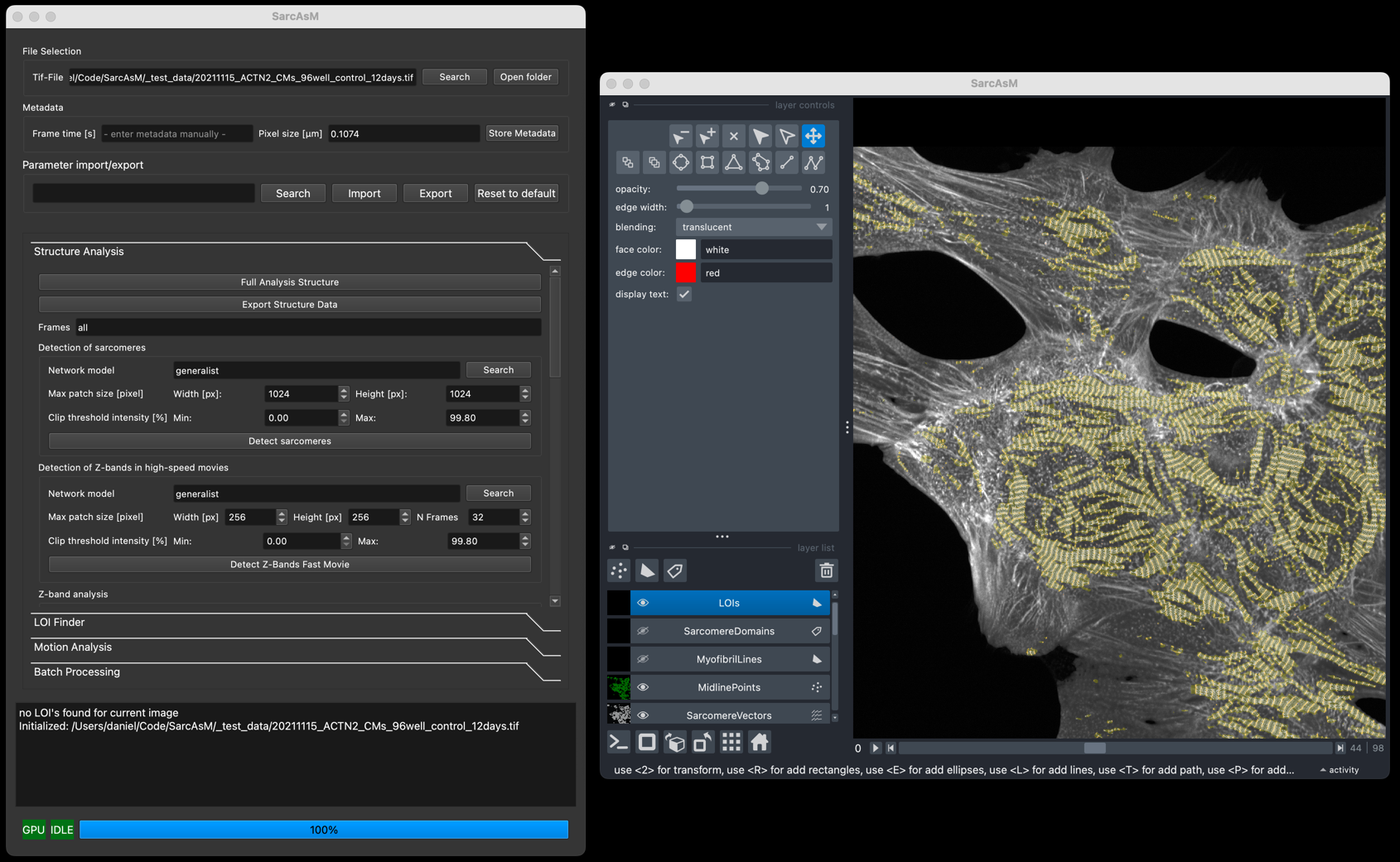
SarcAsM includes an app with intuitive Graphical User Interface (GUI) built with Napari for interactive analysis and visualization.
How to Run the App:
There are two main ways to run the SarcAsM App:
-
Standalone Applications (Recommended for ease of use):
- Pre-built applications for Windows (.exe) and macOS (.app) are available for download directly from the GitHub Releases page.
- This method does not require a separate Python installation.
- Note: As mentioned in the release notes, these are early versions, and the initial startup might take some time. The Windows version currently uses CPU only.
-
From your Python Environment (Recommended for developers or API users):
- If you have installed SarcAsM into a Python environment (e.g., via pip or conda from the source), you can launch the GUI using this command:
# After activating your environment (e.g., conda activate sarcasm-env) python -m sarcasm_app- Alternatively, you can run
./sarcasm_app/__main__.pydirectly from the SarcAsM root directory if the necessary dependencies are in your PYTHONPATH.
Documentation
Detailed documentation, including tutorials, API reference, and usage examples, can be found at:
https://sarcasm.readthedocs.io/
Additional resources:
- Example notebooks located in the
docs/notebooksdirectory within the repository. - Sample data for testing purposes is available at https://doi.org/10.5281/zenodo.8232838.
Support
If you encounter any issues, have questions, or want to suggest improvements:
- Please check the online documentation first.
- If the issue persists, open an issue on our GitHub repository. Provide as much detail as possible, including steps to reproduce the problem, error messages, and your operating system/environment details.
Citation
If you use SarcAsM in your research, please cite our preprint for now (peer-reviewed publication will follow):
Daniel Haertter, Lara Hauke, Til Driehorst, Kengo Nishi, Jaden Long, Malte Tiburcy, Branimir Berecic, et al. 2025. “SarcAsM: AI-Based Multiscale Analysis of Sarcomere Organization and Contractility in Cardiomyocytes.” bioRxiv. https://doi.org/10.1101/2025.04.29.650605.
License
This software is patent pending (Patent Application No. DE 10 2024 112 939.5, Priority Date: 8.5.2024).
Academic and Non-Commercial Use
This software is free for academic and non-commercial use. Users are granted a non-exclusive, non-transferable license to use the software for research, educational, and other non-commercial purposes.
Commercial Use Restrictions
Commercial use of this software is strictly prohibited without obtaining a separate license agreement. This includes but is not limited to:
- Using the software in a commercial product or service
- Using the software to provide services to third parties
- Reselling or redistributing the software
For commercial licensing inquiries, please contact:
MBM ScienceBridge GmbH, Hans-Adolf-Krebs-Weg 1, 37077 Göttingen, Germany, https://sciencebridge.de/en/
All rights not expressly granted are reserved. Unauthorized use may result in legal action.
Release history Release notifications | RSS feed


Download files
Download the file for your platform. If you're not sure which to choose, learn more about installing packages.
Source Distribution
Built Distribution
Filter files by name, interpreter, ABI, and platform.
If you're not sure about the file name format, learn more about wheel file names.
Copy a direct link to the current filters
File details
Details for the file sarc_asm-0.1.3.tar.gz.
File metadata
- Download URL: sarc_asm-0.1.3.tar.gz
- Upload date:
- Size: 153.8 kB
- Tags: Source
- Uploaded using Trusted Publishing? No
- Uploaded via: poetry/2.1.3 CPython/3.11.11 Darwin/24.4.0
File hashes
| Algorithm | Hash digest | |
|---|---|---|
| SHA256 |
858fdf0bd5b80d82c67593bf7338152e76e87d0c76b20ebf1d83f5b01f455dc9
|
|
| MD5 |
fbda58cd5de7db6af47b7c94e8ac45e3
|
|
| BLAKE2b-256 |
e66d22fb2dfb0664125dfe0cc1ecf9e90fd82af190bb28415a96f97c5a6e09b1
|
File details
Details for the file sarc_asm-0.1.3-py3-none-any.whl.
File metadata
- Download URL: sarc_asm-0.1.3-py3-none-any.whl
- Upload date:
- Size: 182.8 kB
- Tags: Python 3
- Uploaded using Trusted Publishing? No
- Uploaded via: poetry/2.1.3 CPython/3.11.11 Darwin/24.4.0
File hashes
| Algorithm | Hash digest | |
|---|---|---|
| SHA256 |
1a34b6b2d76d544739f17c3608e1b4cae3d4407063591120cec2ac869599cff1
|
|
| MD5 |
b0f2a9f795ba518d8059af42943d18bb
|
|
| BLAKE2b-256 |
6d6b6035d2be9dec6af02a1aecceb99c9ccfdbb6cd77dea51a2dd52120242250
|






