
sarstats
Creates a PDF report out of sar files
Written originally by Ray, I cleaned it up to make it more user-friendly, use less memory and make it multi-processor capable.
converting sa files
To obtain the plain-text sar files given a sysstat sa file you can run:
# LC_TIME=POSIX sar -A -t -f /var/log/sa02 > /tmp/sar02
demo
Here you can see how such a pdf looks like: http://acksyn.org/software/sarstats/sar19.pdf And a more complex example (~60MB): http://acksyn.org/software/sarstats/sar01.pdf
The following creates a report off 'sar01' and adds a graph with three datasets (udpsck, rawsck,tcp-tw):
./sarstats --out sar01.pdf --custom 'foo:udpsck,rawsck,tcp-tw' /var/log/sa/sar01
To list the names of all the possible graphs just run:
./sarstats --list /var/log/sa/sar01
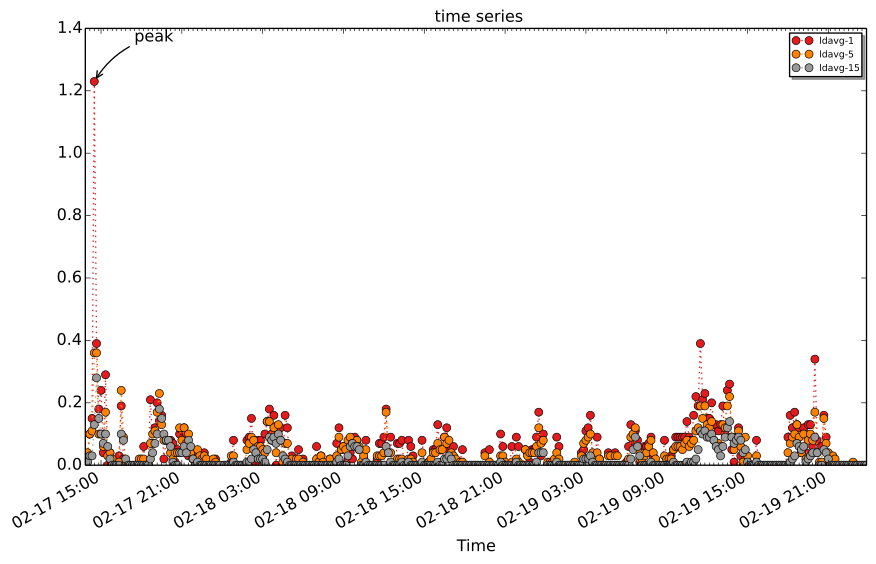
To export a single custom graph in svg format run:
./sarstats --output base --svg 'ldavg-1,ldavg-5,ldavg-15' \
  --label 'peak:2014-02-17 14:30:00' demo/var/log/sa/
This will produce the following output:
It is also possible to print a single graph in ascii format:
./sarstats --ascii 'tcp/s' tests/sar-files/1/sar19

                           tcp/s - tests/sar-files/1/sar19

   0.01 +++A-+--+--A--+--+--A--+-+--+--+--+--A--+--+-+--+--+--+--+--+--A--+++
        |  * +     *     +  *  +    +     +  *  +    +     +   tcp/s **A*** |
        |  *       *        *                *                         *    |
        |  *       *        *                *                         *    |
  0.008 ++ *       *        *                *                         *   ++
        |  *       *        *                *                         *    |
        |  *       *        *                *                         *    |
  0.006 ++ *       *        *                *                         *   ++
        |  *       *        *                *                         *    |
        |  *       **       **               **                        **   |
        | **       **       **               **                        **   |
  0.004 ++**       **       **               **                        **  ++
        | **       **       **               **                        **   |
        | **       **       **               **                        **   |
  0.002 ++**       **       **               **                        **  ++
        | **       **       **               **                        **   |
        | **       **       **               **                        **   |
        | ** +     **    +  ** +    +     +  ** +    +     +     +     **   |
      0 AAAAAAAAAAAAAAAAAAAAAAAAAAAAAAAAAAAAAAAAAAAAAAAAAAAAAAAAAAAAAAAAAAAAA
           02:00 04:00 06:00 08:0010:00 12:00 14:0016:00 18:00 20:00 22:00
                                        Time
Q&A
-
Q: Why don't you use 'sadf' instead of doing all that parsing?
-
A: sadf does not parse 'older' SA files. So no RHEL 5 and even RHEL 6 files cannot be parsed on a current (F20) Fedora box.
-
Q: I found a bug, where do I report it?
-
A: Drop me an email or open an issue in github
-
Q: Shouldn't you move to PCP or something more capable anyway?
-
A: Yes, as soon as PCP is more widespread
-
Q: In network graphs with bonding the bond interface is never shown?
-
A: Because, depending on the bonding mode, the underlying ethX interface has the exact same traffic patterns and is drawn afterwards
-
Q: When using --maxgraphs 15 on a big sar file (one with many scsi devices for example) I get a traceback with IOError: Cannot open resource "...."
-
A: You are hitting the file number limit due to the many images that are being opened. Increase the limit per user (https://rtcamp.com/tutorials/linux/increase-open-files-limit/)
Thanks
Luca Miccini, Pablo Iranzo Gomez, Ali Sogukpinar, Freddy Wissinger
3 maintainers


Metadata
3 maintainers
Release files for sarstats 0.9
For a detailed explanation of source distributions (sdists) and built distributions (wheels), please see the package formats documentation.
Source distribution (sdist)
| File | Size | Uploaded | Provenance | |
|---|---|---|---|---|
| sarstats-0.9.tar.gz | 155.1 kB | With provenance | Details |
Built distribution (wheel)
| File | Interpreter | ABI | Platform | Reset |
|---|---|---|---|---|
| sarstats-0.9-py3-none-any.whl | Python 3 | none | any | Details |
Total release size: 199.2 kB
Release files / sarstats-0.9.tar.gz
| Download URL | sarstats-0.9.tar.gz |
|---|---|
| Size | 155.1 kB |
| Tags | Source |
|
SHA-256 checksum How to use checksums |
a71539d5aaa2df954055178e47e7436426dfb61166cfea033e2f094b800c7ee8
|
|
BLAKE2b-256 checksum How to use checksums |
ee5f009443ddeea10a3399f3cacdbe4b29a4e95ec1e7ab791b243e772ada4ebb
|
| Upload date | |
|
Uploaded using Trusted Publishing? What is trusted publishing? |
Yes |
| Uploaded via |
twine/6.1.0 CPython/3.13.7
|
Provenance
Provenance describes where a file came from. On PyPI, provenance is shared via attestations, which provide a verifiable record of the build or publishing details. View details, limitations and caveats.


PyPI Publish Attestation
PyPI verified that this artifact, at this checksum, originated from the publisher listed below.
Signed by GitHub Actions, verified by PyPI on Feb 16, 2026.
Transparency logRelease files / sarstats-0.9-py3-none-any.whl
| Download URL | sarstats-0.9-py3-none-any.whl |
|---|---|
| Size | 44.1 kB |
| Tags | Python 3 |
|
SHA-256 checksum How to use checksums |
c9bab8acc87836f43ae18171abf77986bc6056c07543505d04c7d594a876f591
|
|
BLAKE2b-256 checksum How to use checksums |
41d843abaf965f3f231fce83da5f4e003e19d2c6e61799ffce1f0dbf5d68b61c
|
| Upload date | |
|
Uploaded using Trusted Publishing? What is trusted publishing? |
Yes |
| Uploaded via |
twine/6.1.0 CPython/3.13.7
|
Provenance
Provenance describes where a file came from. On PyPI, provenance is shared via attestations, which provide a verifiable record of the build or publishing details. View details, limitations and caveats.
PyPI Publish Attestation
PyPI verified that this artifact, at this checksum, originated from the publisher listed below.
Signed by GitHub Actions, verified by PyPI on Feb 16, 2026.
Transparency logSecurity for sarstats 0.9
Provenance
Provenance describes where a file came from. On PyPI, provenance is shared via attestations, which provide a verifiable record of the build or publishing details. View details, limitations and caveats.
Full provenance
All 2 files in this release have been uploaded with provenance metadata.
Attestation for sarstats-0.9.tar.gz
PyPI Publish Attestation
PyPI verified that this artifact, at this checksum, originated from the publisher listed below.
Signed by GitHub Actions, verified by PyPI on Feb 16, 2026.
Transparency logA note on package security
PyPI is a repository for distributing packages, not a service for auditing them. While third-party security researchers and our staff do their best to detect and remove malicious packages, PyPI cannot guarantee the quality, security or suitability of any given package.














