
SAR report graphing utility
Verified details
These details have been verified by PyPIProject links
GitHub Statistics
Maintainers


Project description
sarstats
Creates a PDF report out of sar files
Written originally by Ray, I cleaned it up to make it more user-friendly, use less memory and make it multi-processor capable.
converting sa files
To obtain the plain-text sar files given a sysstat sa file you can run:
# LC_TIME=POSIX sar -A -t -f /var/log/sa02 > /tmp/sar02
demo
Here you can see how such a pdf looks like: http://acksyn.org/software/sarstats/sar19.pdf And a more complex example (~60MB): http://acksyn.org/software/sarstats/sar01.pdf
The following creates a report off 'sar01' and adds a graph with three datasets (udpsck, rawsck,tcp-tw):
./sarstats --out sar01.pdf --custom 'foo:udpsck,rawsck,tcp-tw' /var/log/sa/sar01
To list the names of all the possible graphs just run:
./sarstats --list /var/log/sa/sar01
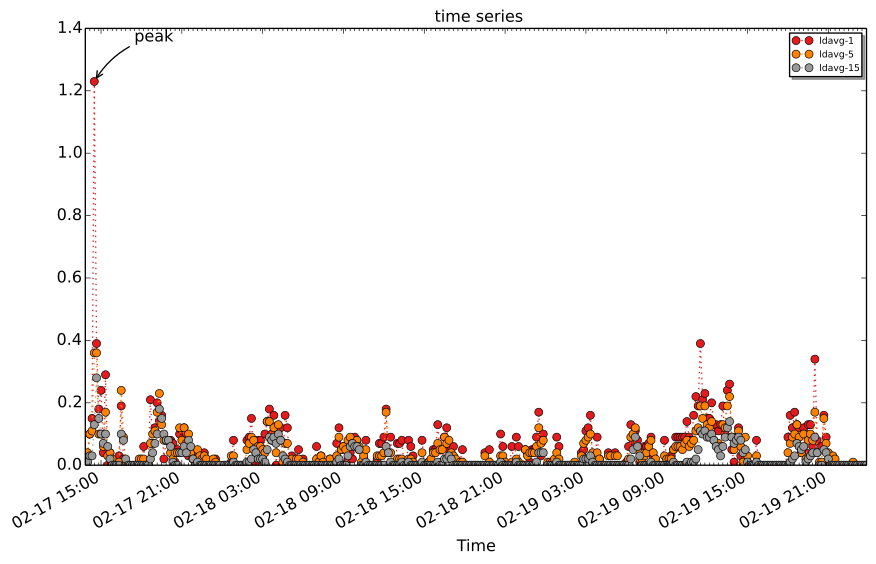
To export a single custom graph in svg format run:
./sarstats --output base --svg 'ldavg-1,ldavg-5,ldavg-15' \
  --label 'peak:2014-02-17 14:30:00' demo/var/log/sa/
This will produce the following output:
It is also possible to print a single graph in ascii format:
./sarstats --ascii 'tcp/s' tests/sar-files/1/sar19

                           tcp/s - tests/sar-files/1/sar19

   0.01 +++A-+--+--A--+--+--A--+-+--+--+--+--A--+--+-+--+--+--+--+--+--A--+++
        |  * +     *     +  *  +    +     +  *  +    +     +   tcp/s **A*** |
        |  *       *        *                *                         *    |
        |  *       *        *                *                         *    |
  0.008 ++ *       *        *                *                         *   ++
        |  *       *        *                *                         *    |
        |  *       *        *                *                         *    |
  0.006 ++ *       *        *                *                         *   ++
        |  *       *        *                *                         *    |
        |  *       **       **               **                        **   |
        | **       **       **               **                        **   |
  0.004 ++**       **       **               **                        **  ++
        | **       **       **               **                        **   |
        | **       **       **               **                        **   |
  0.002 ++**       **       **               **                        **  ++
        | **       **       **               **                        **   |
        | **       **       **               **                        **   |
        | ** +     **    +  ** +    +     +  ** +    +     +     +     **   |
      0 AAAAAAAAAAAAAAAAAAAAAAAAAAAAAAAAAAAAAAAAAAAAAAAAAAAAAAAAAAAAAAAAAAAAA
           02:00 04:00 06:00 08:0010:00 12:00 14:0016:00 18:00 20:00 22:00
                                        Time
Q&A
-
Q: Why don't you use 'sadf' instead of doing all that parsing?
-
A: sadf does not parse 'older' SA files. So no RHEL 5 and even RHEL 6 files cannot be parsed on a current (F20) Fedora box.
-
Q: I found a bug, where do I report it?
-
A: Drop me an email or open an issue in github
-
Q: Shouldn't you move to PCP or something more capable anyway?
-
A: Yes, as soon as PCP is more widespread
-
Q: In network graphs with bonding the bond interface is never shown?
-
A: Because, depending on the bonding mode, the underlying ethX interface has the exact same traffic patterns and is drawn afterwards
-
Q: When using --maxgraphs 15 on a big sar file (one with many scsi devices for example) I get a traceback with IOError: Cannot open resource "...."
-
A: You are hitting the file number limit due to the many images that are being opened. Increase the limit per user (https://rtcamp.com/tutorials/linux/increase-open-files-limit/)
Thanks
Luca Miccini, Pablo Iranzo Gomez, Ali Sogukpinar, Freddy Wissinger
Project details
Verified details
These details have been verified by PyPIProject links
GitHub Statistics
Maintainers


Download files
Download the file for your platform. If you're not sure which to choose, learn more about installing packages.
Source Distribution
Built Distribution
Filter files by name, interpreter, ABI, and platform.
If you're not sure about the file name format, learn more about wheel file names.
Copy a direct link to the current filters
File details
Details for the file sarstats-0.8.tar.gz.
File metadata
- Download URL: sarstats-0.8.tar.gz
- Upload date:
- Size: 155.5 kB
- Tags: Source
- Uploaded using Trusted Publishing? Yes
- Uploaded via: twine/6.1.0 CPython/3.13.7
File hashes
| Algorithm | Hash digest | |
|---|---|---|
| SHA256 |
16bad5b57d7bd8f7193f044896b81fa6930e3827f8461787dfab33bce255db09
|
|
| MD5 |
a7ddaebb728da93a7a52dba3a7d1d934
|
|
| BLAKE2b-256 |
403700e5808263bc9375186b77e3723af20f7c7c39b0429a56059bc03e0a664b
|
Provenance
The following attestation bundles were made for sarstats-0.8.tar.gz:
Publisher:
release.yml on mbaldessari/sarstats
-
Statement:
-
Statement type:
https://in-toto.io/Statement/v1 -
Predicate type:
https://docs.pypi.org/attestations/publish/v1 -
Subject name:
sarstats-0.8.tar.gz -
Subject digest:
16bad5b57d7bd8f7193f044896b81fa6930e3827f8461787dfab33bce255db09 - Sigstore transparency entry: 942050515
- Sigstore integration time:
-
Permalink:
mbaldessari/sarstats@23e241a04f669dd2bb22c02c86a5b160bc12655d -
Branch / Tag:
refs/tags/v0.8 - Owner: https://github.com/mbaldessari
-
Access:
public
-
Token Issuer:
https://token.actions.githubusercontent.com -
Runner Environment:
github-hosted -
Publication workflow:
release.yml@23e241a04f669dd2bb22c02c86a5b160bc12655d -
Trigger Event:
push
-
Statement type:
File details
Details for the file sarstats-0.8-py3-none-any.whl.
File metadata
- Download URL: sarstats-0.8-py3-none-any.whl
- Upload date:
- Size: 44.4 kB
- Tags: Python 3
- Uploaded using Trusted Publishing? Yes
- Uploaded via: twine/6.1.0 CPython/3.13.7
File hashes
| Algorithm | Hash digest | |
|---|---|---|
| SHA256 |
675b3301ac22cc34d1d1e904a0e858753ffad7bfbfad74b284fc20bb0731fb1b
|
|
| MD5 |
4f0554780a21be0dd51615379f901342
|
|
| BLAKE2b-256 |
f22ccdfed837b06ef14fa781d2e844c974890a5b100607356ac34fd34aa3a39d
|
Provenance
The following attestation bundles were made for sarstats-0.8-py3-none-any.whl:
Publisher:
release.yml on mbaldessari/sarstats
-
Statement:
-
Statement type:
https://in-toto.io/Statement/v1 -
Predicate type:
https://docs.pypi.org/attestations/publish/v1 -
Subject name:
sarstats-0.8-py3-none-any.whl -
Subject digest:
675b3301ac22cc34d1d1e904a0e858753ffad7bfbfad74b284fc20bb0731fb1b - Sigstore transparency entry: 942050521
- Sigstore integration time:
-
Permalink:
mbaldessari/sarstats@23e241a04f669dd2bb22c02c86a5b160bc12655d -
Branch / Tag:
refs/tags/v0.8 - Owner: https://github.com/mbaldessari
-
Access:
public
-
Token Issuer:
https://token.actions.githubusercontent.com -
Runner Environment:
github-hosted -
Publication workflow:
release.yml@23e241a04f669dd2bb22c02c86a5b160bc12655d -
Trigger Event:
push
-
Statement type:






