
Sashimi is a Python module that provides tailored mathematical models and corresponding interactive visualisations for exploratory and confirmatory mixed-methods analysis of large textual or token corpora. It can detect textual and metadata structures and shifts, by employing stochastic block modeling (SBM) from graph-tool or [currently deprecated] word embedding from Gensim.

Project description
Sashimi - study the organisation and evolution of corpora
Sashimi is a Python module that provides tailored mathematical models and corresponding interactive visualisations
for exploratory and confirmatory mixed-methods analysis of large textual or token corpora. It can detect textual
and metadata structures and shifts, by employing stochastic block modeling (SBM) from graph-tool or
[currently deprecated] word embedding from Gensim.
Models:
- Domain-topic models
- Domain-chained (metadata) models
Model-based data interfaces (visualisations):
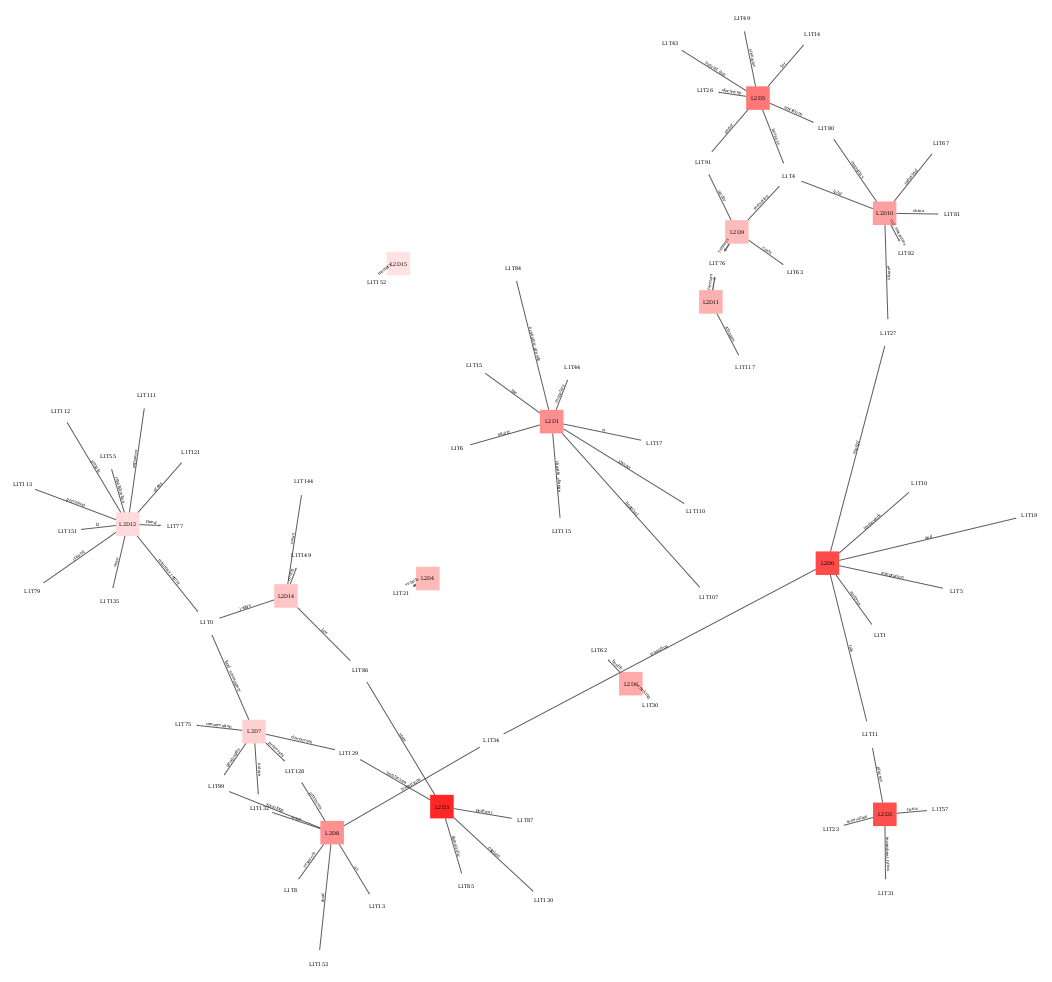
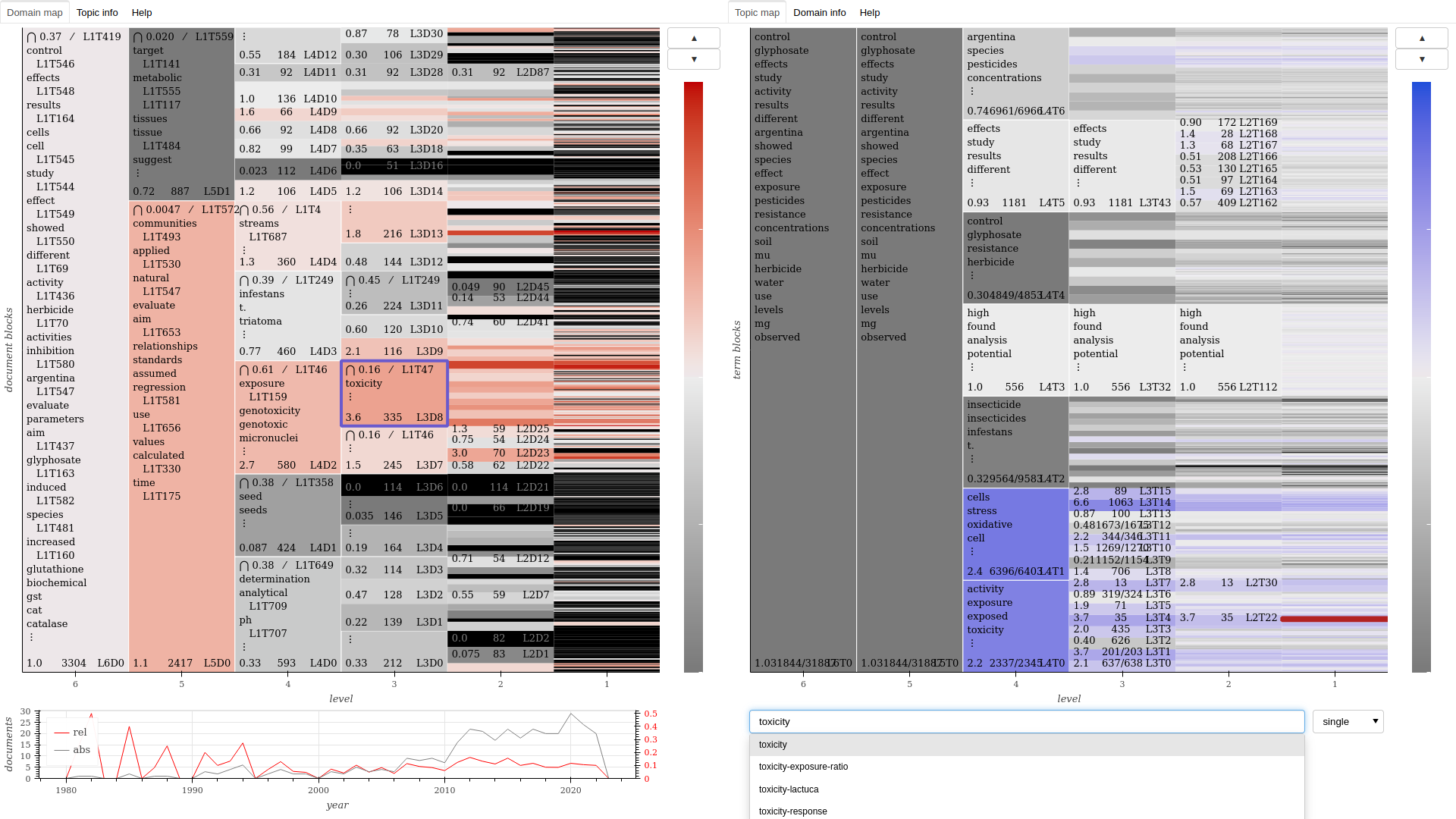
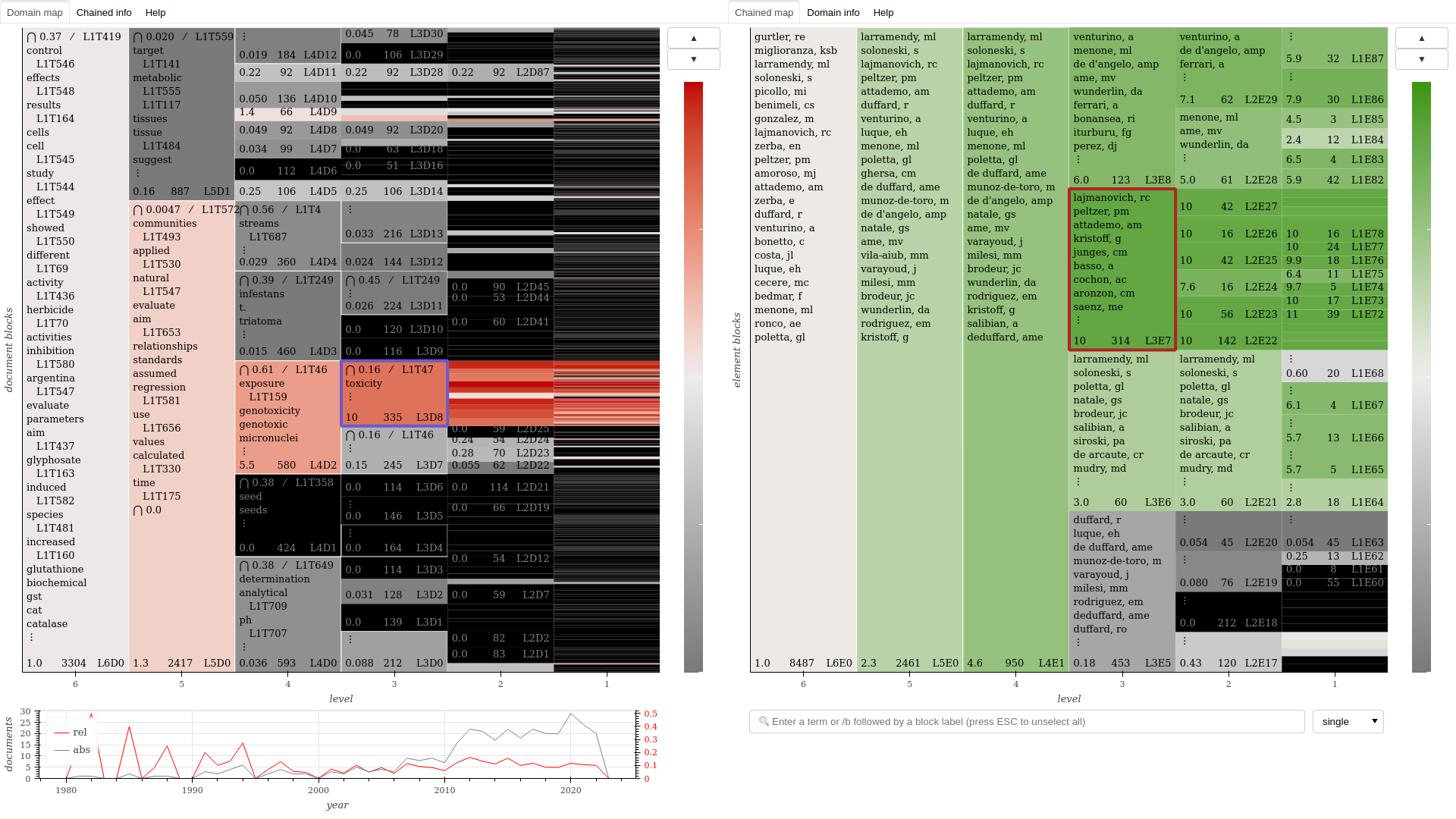
- Interactive domain-topic maps and domain-chained maps
- Domain-topic tables and domain-chained tables
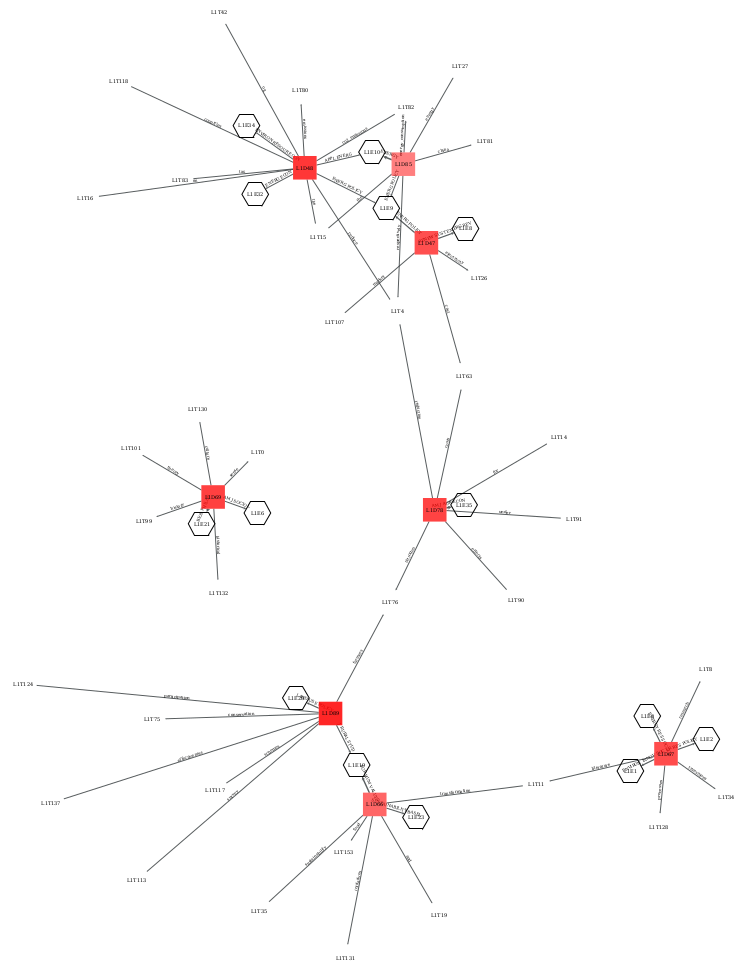
- Domain-topic, domain-chained and domain-topic-chained networks
- Area rank charts (bump charts) of the evolution of domain sizes
Using Sashimi without programming (no code)
Sashimi is available as a suite of methods in the Cortext Manager web service. See SASHIMI.
Savoring Sashimi
Also for users of this library, the documentation at Cortext serves as a good introduction to the methodology.
Installation
Install graph-tool according to your system.
Then:
pip install sashimi-domains
Dependencies
This project builds mainly on the following others:
- graph-tool (for Stochastic Block Model inference)
- pandas
- spacy (for tokenization)
- gensim (for ngram detection)
- bokeh (for building hierarchical block maps and other plots)
- lxml (for building domain tables)
- matplotlib (for plotting simple corpus statistics)
With the exception of graph-tool, dependencies will be automatically installed by pip.
Basic usage
from sashimi import GraphModels
import pandas as pd

# Let's instantiate a corpus with an explicit storage dir
corpus = GraphModels(storage_dir="my_project")

# Read a dataframe from a CSV file and load it into the corpus, giving it a name
df = pd.read_csv("example_corpus.csv")
corpus.load_data(df, name='example')

# Take a look at what was loaded
print(corpus.data)

# For autoloading, store the data in JSON format under the project's storage dir
corpus.store_data()
Preparing the data
Textual data
For the typical usage with a textual corpus:
# Set the data column labels for text sources
corpus.text_sources = ["title", "body"]

# Set up how to process text sources, for example:
text_sources_args = dict(ngrams=3, language="en", stop_words=True)
The language is any valid spacy language, where None will use the English tokenizer with no stop_words. Our English tokenizer is slightly improved from spacy's original, in order to get ["hot-dog"] out of "hot-dog" (when spacy would split that), ["this", "that"] out of "this/that", and ["citation"] out of "citation[2,3]".
Token data
You may also directly use tokens that you've processed yourself, or from token data such as keywords, categories, or anything really, in addition or in place of textual data.
# Set the data column labels for token sources
corpus.token_sources = ["keyword", "category"]
Token data for a document is expected to be in the form of a list, containing strings or lists containing strings: List[str | List[str]]. If your data differs, you must adjust it before processing.
Processing the data
Once token and text sources are set up, you can process them all with:
corpus.process_sources(**text_sources_args)
Working with your corpus
# Set data column labels
corpus.col_title = "titles"  # document titles (required; if your corpus doesn't have canonical titles, be creative)
corpus.col_time = "years"  # dates (optional)
corpus.col_urls = "urls"  # may also be a list of columns, for multiple urls (optional)

# Load a domain-topic model
corpus.load_domain_topic_model()
print(corpus.state)
print(corpus.dblocks)
print(corpus.tblocks)

# Create an interactive hierarchical map
# Output is a self-contained html+css+js+data document
corpus.domain_map()

# Create network representations for the first domain and topic levels, as pdf, svg and graphml documents
corpus.domain_network(doc_level=1, ter_level=1)
corpus.domain_network(doc_level=2, ter_level=1)
# The default representation shows edges from a domain to its "specific" topics, with the previous call being equivalent to the following
corpus.domain_network(doc_level=2, ter_level=1, edges="specific")
# For domains of level higher than 1, setting `edges="common"` will show edges towards topics that are common to all of its subdomains
corpus.domain_network(doc_level=2, ter_level=1, edges="common")

# Create domain-topic tables for all domains at level 3
if 3 in corpus.dblocks:
    corpus.subxblocks_tables(xbtype="doc", xlevel=3, xb=None, ybtype="ter")

# Store the current choices of corpus and model
corpus.register_config("my_config.json")

# To reload them in a future session
from sashimi import GraphModels
corpus = GraphModels('my_config.json')
corpus.load_domain_topic_model()  # will load the previously calculated model
corpus.load_domain_topic_model(load=False)  # will fit a new model
print(corpus.list_blockstates())

# Load a domain-chained model over the column "metadata_A"
corpus.set_chain(prop='metadata_A'}
corpus.load_domain_chained_model()
print(corpus.list_chainedbstates())

# Create interactive instruments for the chained dimension
corpus.domain_map(chained=True)
corpus.domain_network(doc_level=1, ter_level=None, ext_level=1)
corpus.domain_network(doc_level=1, ter_level=1, ext_level=1)
# The `edges` parameter applies to both topics and the chained dimension
corpus.domain_network(doc_level=2, ter_level=None, ext_level=1, edges="specific")
corpus.domain_network(doc_level=2, ter_level=1, ext_level=1, edges="common")
if 3 in corpus.dblocks:
    corpus.subxblocks_tables(xbtype="doc", xlevel=3, xb=None, ybtype="ext")
Advanced usages
-
The domain map document provides a "Help" tab explaining how to navigate and read it, which is also useful to understand the other interfaces.
-
Create filtered visualisations to show only a selected group of domains in maps and networks.
-
Perform selective chaining, whereby a domain-chanied model is fit by considering only a selected group of domains, instead of to the entire corpus, in order to understand the local insertion of metadata dimensions.
-
Calls to
Corpus.set_chainmay pass in thematcherparameter a path to a json file containing a dictionary. Nodes of the chained dimension will then correspond to the keys in the dictionary, and links will be established by searching for a key's value, as a regular expression, in the column passed as the first parameter.
Development
This module provides four main classes:
class Corpus
Provides loading and preprocessing corpora, plus some descriptive statistics.
class GraphModels (user-facing class, inherits Corpus and Blocks)
Provides Stochastic Block Models of corpora from their document-term and document-metadata graphs, yielding domain-topic and domain-chained models, respectively.
class Blocks
Provides interactive domain maps, networks, tables, and other interfaces.
class Vectorology [currently deprecated]
Provides models of corpora using word embedding and produces reports, statistics and visualisations.


Download files
Download the file for your platform. If you're not sure which to choose, learn more about installing packages.
Source Distribution
Built Distribution
Filter files by name, interpreter, ABI, and platform.
If you're not sure about the file name format, learn more about wheel file names.
Copy a direct link to the current filters
File details
Details for the file sashimi_domains-0.9.4.tar.gz.
File metadata
- Download URL: sashimi_domains-0.9.4.tar.gz
- Upload date:
- Size: 116.3 kB
- Tags: Source
- Uploaded using Trusted Publishing? No
- Uploaded via: twine/5.0.0 CPython/3.10.7
File hashes
| Algorithm | Hash digest | |
|---|---|---|
| SHA256 |
58166c9bd50689c76edd9583e9c8095a7f0e089e63fb9c0d7ec6150f70454dca
|
|
| MD5 |
ce74a54da66c71500109f5c37b2c62cb
|
|
| BLAKE2b-256 |
63276f7169a85afd6f489fb134953433e687a8f6cf0981d26e6cd55e30b3f6a9
|
File details
Details for the file sashimi_domains-0.9.4-py3-none-any.whl.
File metadata
- Download URL: sashimi_domains-0.9.4-py3-none-any.whl
- Upload date:
- Size: 123.5 kB
- Tags: Python 3
- Uploaded using Trusted Publishing? No
- Uploaded via: twine/5.0.0 CPython/3.10.7
File hashes
| Algorithm | Hash digest | |
|---|---|---|
| SHA256 |
8a945b6ecfa91251721bd9546127b13a2111d404b301630069913d0da5764004
|
|
| MD5 |
1ebdeafb91fcfff3ae080245827fe4f7
|
|
| BLAKE2b-256 |
706f3b5fb281456ae5f0ce1a638eb64c4364b66831990c21285dfa3e02cba7de
|






