
Methods for spatial alignment of satellite imagery


Project description

A Python package for efficient multi-temporal image co-registration 🚀




GitHub: https://github.com/IPL-UV/satalign 🌐
PyPI: https://pypi.org/project/satalign/ 🛠️
Overview 📊
Satalign is a Python package designed for efficient multi-temporal image co-registration. It enables aligning temporal data cubes with reference images using advanced techniques such as Phase Cross-Correlation (PCC), Enhanced Cross-Correlation (ECC), and Local Geometric Matching (LGM). This package facilitates the manipulation and processing of large volumes of Earth observation data efficiently.
Key features ✨
- Advanced alignment algorithms: Leverages ECC, PCC, and LGM to accurately align multi-temporal images. 🔍
- Efficient data cube management: Processes large data cubes with memory and processing optimizations. 🧩
- Support for local feature models: Utilizes models like SuperPoint, SIFT, and more for keypoint matching. 🖥️
- Parallelization: Executes alignment processes across multiple cores for faster processing. 🚀
Installation ⚙️
Install the latest version from PyPI:
pip install satalign
To use the PCC module, you need to install additional dependencies:
pip install satalign[pcc]
Alternatively, if you already have satalign installed:
pip install scikit-image
To use the LGM module, you need to install additional dependencies:
pip install satalign[deep]
How to use 🛠️
Align an ee.ImageCollection with satalign.pcc.PCC 🌍
Load libraries
import ee
import fastcubo
import satalign
import satalign.pcc
import matplotlib.pyplot as plt
from IPython.display import Image, display
Auth and Init GEE
# Initialize depending on the environment
ee.Authenticate()
ee.Initialize(opt_url="https://earthengine-highvolume.googleapis.com") # project = "name"
Dataset
# Download image collection
table = fastcubo.query_getPixels_imagecollection(
    point=(-75.71260, -14.18835),
    collection="COPERNICUS/S2_HARMONIZED",
    bands=["B2", "B3", "B4", "B8"],
    data_range=["2023-12-01", "2023-12-31"],
    edge_size=256,
    resolution=10,
)
fastcubo.getPixels(table, nworkers=4, output_path="output")
Align dataset
# Create a data cube and select images if desired
s2_datacube = satalign.utils.create_array("output", "datacube.pickle")

# Define reference image
reference_image = s2_datacube.sel(time=s2_datacube.time > "2022-08-03").mean("time")

# Initialize and run PCC model
pcc_model = satalign.pcc.PCC(
    datacube=s2_datacube,
    reference=reference_image,
    channel="mean",
    crop_center=128,
    num_threads=2,
)
# Run the alignment
aligned_cube, warp_matrices = pcc_model.run_multicore()

# Display the warped cube
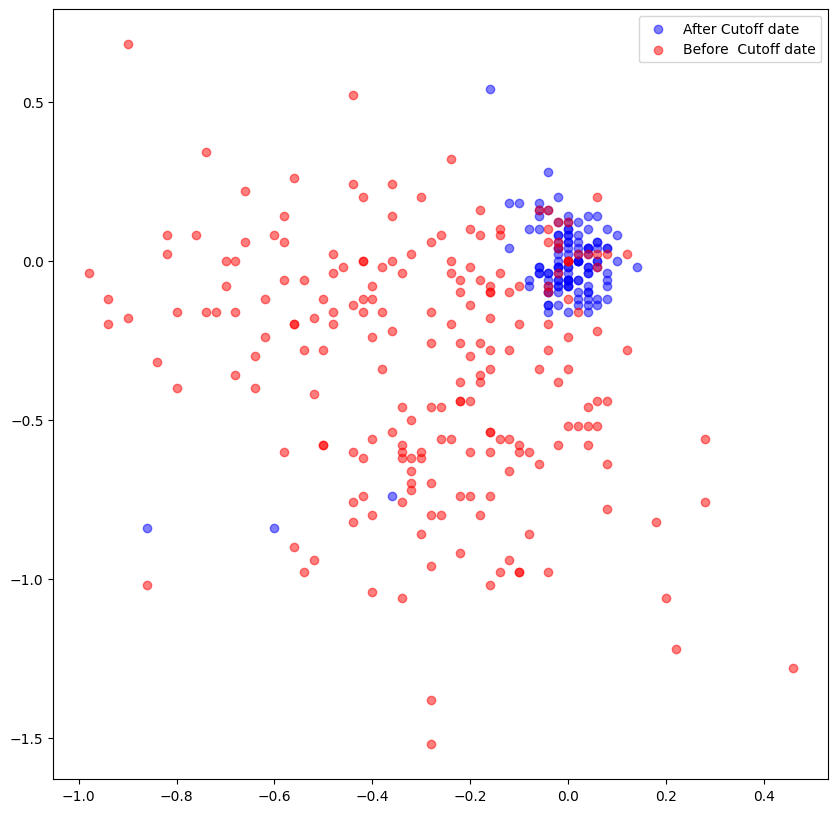
warp_df = satalign.utils.warp2df(warp_matrices, s2_datacube.time.values)
satalign.utils.plot_s2_scatter(warp_df)
plt.show()
Graphics
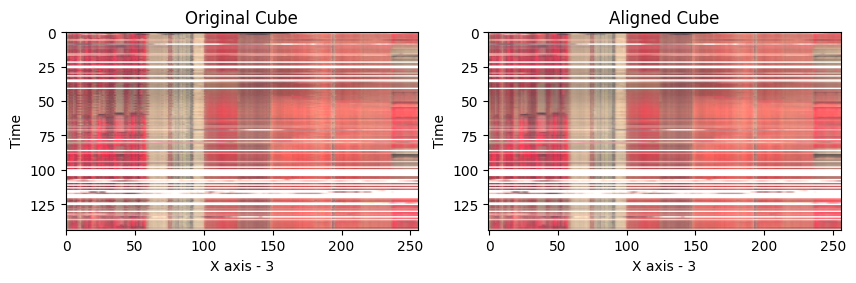
# Display profiles
satalign.utils.plot_profile(
    warped_cube=aligned_cube.values,
    raw_cube=s2_datacube.values,
    x_axis=3,
    rgb_band=[3, 2, 1],
    intensity_factor=1/3000,
)
plt.show()
# Create PNGs and GIF
# Note: The following part requires a Linux environment
# !apt-get install imagemagick
gifspath = satalign.utils.plot_animation1(
    warped_cube=aligned_cube[0:50].values,
    raw_cube=s2_datacube[0:50].values,
    dates=s2_datacube.time[0:50].values,
    rgb_band=[3, 2, 1],
    intensity_factor=1/3000,
    png_output_folder="./output_png",
    gif_delay=20,
    gif_output_file="./animation1.gif",
)
display(Image(filename='animation1.gif'))

Here's an addition to clarify that datacube and reference_image have already been defined:
Align an Image Collection with satalign.eec.ECC 📚
import satalign.ecc

# Initialize the ECC model
ecc_model = satalign.ecc.ECC(
    datacube=s2_datacube,
    reference=reference_image,
    gauss_kernel_size=5,
)
# Run the alignment
aligned_cube, warp_matrices = ecc_model.run()
Align using Local Features with satalign.lgm.LGM 🧮
Here's the updated version with a note about using floating-point values or scaling:
import satalign.lgm

# Initialize the LGM model
lgm_model = satalign.lgm.LGM(
    datacube=datacube / 10_000,
    reference=reference_image / 10_000,
    feature_model="superpoint",
    matcher_model="lightglue",
)
# Run the alignment
aligned_cube, warp_matrices = lgm_model.run()
In this document, we presented three different examples of how to use SatAlign with PCC, ECC, and LGM for multi-temporal image co-registration. Each example shows how to download an image collection from Google Earth Engine, create a data cube, and align the images using one of the three methods provided by the SatAlign package.
Release history Release notifications | RSS feed


Download files
Download the file for your platform. If you're not sure which to choose, learn more about installing packages.
Source Distribution
Built Distribution
Filter files by name, interpreter, ABI, and platform.
If you're not sure about the file name format, learn more about wheel file names.
Copy a direct link to the current filters
File details
Details for the file satalign-0.1.15.tar.gz.
File metadata
- Download URL: satalign-0.1.15.tar.gz
- Upload date:
- Size: 39.9 kB
- Tags: Source
- Uploaded using Trusted Publishing? No
- Uploaded via: poetry/1.8.2 CPython/3.12.3 Linux/6.14.0-24-generic
File hashes
| Algorithm | Hash digest | |
|---|---|---|
| SHA256 |
9f0d08916f0ebf0bbdb4cb567b2ca3787976e759ce782d0923630f10683fd3ee
|
|
| MD5 |
f7e1213fcc905fce9653fbba3bdd9900
|
|
| BLAKE2b-256 |
7f9026744ac7cba750b147f12f0cbdf7f4839a4dd512e649257031cc167228ae
|
File details
Details for the file satalign-0.1.15-py3-none-any.whl.
File metadata
- Download URL: satalign-0.1.15-py3-none-any.whl
- Upload date:
- Size: 43.3 kB
- Tags: Python 3
- Uploaded using Trusted Publishing? No
- Uploaded via: poetry/1.8.2 CPython/3.12.3 Linux/6.14.0-24-generic
File hashes
| Algorithm | Hash digest | |
|---|---|---|
| SHA256 |
b0c59a10891c612c2706c49e4c240701bc8d8a3ca0c5c18449f2939d66a20e77
|
|
| MD5 |
c45f30f037bd8d551f6d89b5fe240fd8
|
|
| BLAKE2b-256 |
17b723b998b1b05444d6940cc46a2c3715087f422efab7baa71e82c75e84c3d7
|






