
A collection of satellite methods and approaches to satellite simulations

Project description
Satellitic
A collection of tools for satellite assessments

Take note that while this package aims to introduce simulation methods many of the derived statistical properties does not require full simulations. The reason is that satellite movements are well modelled by assuming that they are ergodic. Thus time averages are equal to ensemble averages.
Install
Install the package using :
pip install satellitic
Example
In order to create a similar image as this:
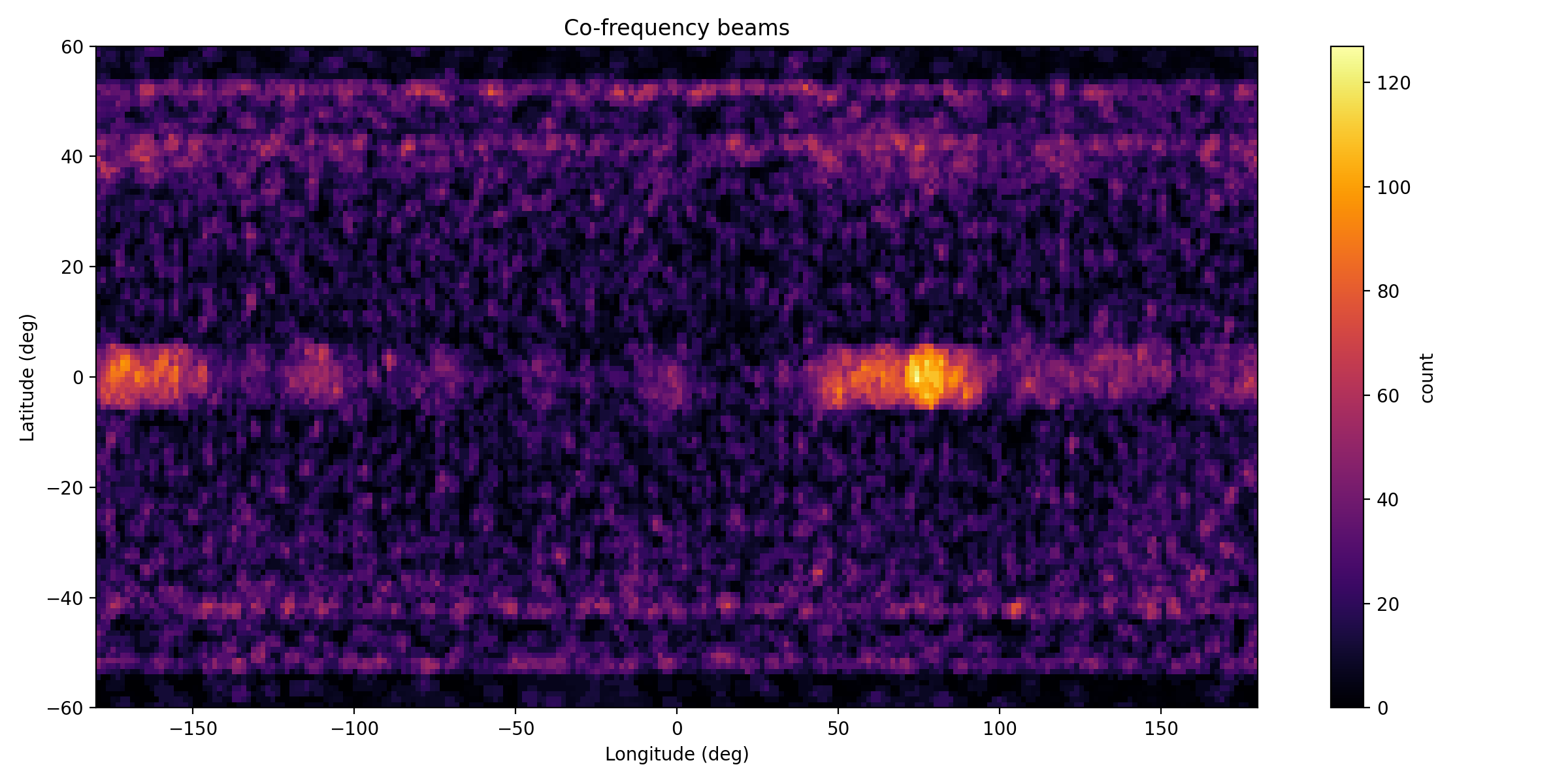
place the content of this projects data folder in you run root and execute the below code
from satellitic.init import ALL_CELESTRAK_GROUPS,PREFERRED_BANDS
import satellitic.simulation as satsim

out = satsim.run_snapshot_simulation(
            out_dir="sim_20251212_dev",
            groups=ALL_CELESTRAK_GROUPS,	# CELESTRAK_GROUPS,
            local_tle_file="tle_local.txt", 	# LOCAL_TLE_FALLBACK,
            N_target=10000,               	# set to 35000 for full-scale runs (ensure resources)
            grid_nlat=120,
            grid_nlon=240,
            model="multibeam",
            n_beams_per_sat=7,
            beam_half_angle_deg=0.8,
            beam_pattern="hex",
            beam_max_tilt_deg=10.0,
            beam_gain_model="gaussian",
            gain_threshold=0.25,
            frequency_band="E-band",
            preferred_bands=PREFERRED_BANDS,
            chunk_sat=256,
            chunk_ground=20000,
            use_gpu_if_available=False,   # set True if you installed cupy
            compute_power_map = False,
            do_random_sampling = True,
        )
print("Simulation finished. Outputs:", out)

import pandas as pd
tdf = pd.concat( ( pd.read_csv(out['total_csv']),	pd.read_csv(out['pref_csv']), pd.read_csv(out['cofreq_csv']),	pd.read_csv(out['nvis_csv'])) )
print ( tdf .describe() )
Forcing qt5 in VisPy
>>> from vispy import app
... print(app.use_app('pyqt5', True))  # force PyQt5
To view an orbital simulation
Note that the streaming 3D vispy visualisation cannot handle huge amounts of satellites. Test with a small tle file and then offload to the trajectory file
>>> from satellitic.simulation import newtonian_simulator
ImportSuccess: HAS JAX IN ENVIRONMENT
>>> newtonian_simulator( run_parameters  = { 'dt':5e1,
            'Nsteps':None ,
            'steps_per_frame':100 ,
            'mass_epsilon':None ,
            'mass_rule':None } ,
    satellite_topology  = {'Earth':'data/local_small_tle.txt'} )
To write a trajectory file you can specify
>>> newtonian_simulator( run_parameters  = { 'dt':5e1,
            'Nsteps':None ,
            'steps_per_frame':100 ,
            'mass_epsilon':None ,
            'mass_rule':None } ,
    satellite_topology  = {'Earth':'data/local_small_tle.txt'} ,
    bAnimated = True , bWriteTrajectory = True,
    trajectory_filename = "trajectory.trj", bVerbose = False )
Creating a TLE file from default system definitions
In order to create TLE definitions for systems, any viable dictionary can be supplied to the below defined function. The dictionaries of the systems as defined in the ITU defintions are already included as defaults:
from satellitic.constellation import create_tle_from_system_selection
if __name__=='__main__':
    selection		= ['A','B','D']
    tle_df = create_tle_from_system_selection( selection , output_file = "constellation_systems-" + '-'.join(selection) + ".tle" )
creating TLE:s from a SRS database
    from satellitic.constellation import SRSDatabase, get_active_constellations, build_unique_satellite_rows, generate_tle_file_from_srs_df

    path_ = "Data/Satellit/SRS/srs3048/"

    mdb_files = [
        path_ + "srs3048_part1of4.mdb",
        path_ + "srs3048_part2of4.mdb",
        path_ + "srs3048_part3of4.mdb",
        path_ + "srs3048_part4of4.mdb",
    ]

    db = SRSDatabase(mdb_files)
    db .show_table("geo")
    db .show_table("orbit_set")

    df = get_active_constellations(db)
    df = build_unique_satellite_rows( df )

    generate_tle_file_from_srs_df( df , filename="srs3048.tle" )
Running a non-visual GPU chunked simulation
from satellitic.simulator import jax_chunked_simulator
jax_chunked_simulator( \
    run_parameters = { 'dt':5e0,
            'Nframes': 200 ,
            'steps_per_frame':100 ,
            'write positions'  : True  ,
            'write velocities' : False ,
            'write masses'     : False } ,
    satellite_topology  = {'Earth':'data/local_small_tle.txt'} ,
    bWriteTrajectory = True, trajectory_filename = None ,
    bVerbose = True )
Release history Release notifications | RSS feed


Download files
Download the file for your platform. If you're not sure which to choose, learn more about installing packages.
Source Distribution
Built Distribution
Filter files by name, interpreter, ABI, and platform.
If you're not sure about the file name format, learn more about wheel file names.
Copy a direct link to the current filters
File details
Details for the file satellitic-0.1.27.tar.gz.
File metadata
- Download URL: satellitic-0.1.27.tar.gz
- Upload date:
- Size: 3.6 MB
- Tags: Source
- Uploaded using Trusted Publishing? No
- Uploaded via: twine/6.1.0 CPython/3.12.12
File hashes
| Algorithm | Hash digest | |
|---|---|---|
| SHA256 |
d596c1486f094d687cbc5b5a7d7d0a71c62024ed540692d3172a781cb5f28bdc
|
|
| MD5 |
0af036cda21fbf7c026a886070e21916
|
|
| BLAKE2b-256 |
ee3c3d4f574e98a66c1a1732a5306de909066026e38112d7c0ebdf378629cf33
|
File details
Details for the file satellitic-0.1.27-py3-none-any.whl.
File metadata
- Download URL: satellitic-0.1.27-py3-none-any.whl
- Upload date:
- Size: 89.4 kB
- Tags: Python 3
- Uploaded using Trusted Publishing? No
- Uploaded via: twine/6.1.0 CPython/3.12.12
File hashes
| Algorithm | Hash digest | |
|---|---|---|
| SHA256 |
2c18c700351a03d99e03b60407aa812adc16103e4e482c8aada53c058dc60479
|
|
| MD5 |
8e1dd34f70b70e7c3c5135ea52165d5e
|
|
| BLAKE2b-256 |
3b932455d1a08e760face268fe1c7fc7cf2688e559054d2c37610831fff918aa
|






