






Sbomly
See what changed between two SBOMs, and what deserves a closer look.
Sbomly compares two SBOMs, CycloneDX or SPDX JSON, and tells you which components were added, removed, upgraded or downgraded. It also flags the changes a reviewer should actually stop for:
- Integrity: same version, different digest. The artifact was rebuilt or replaced.
- Copyleft: a new dependency, or a new licence, that brings in GPL, LGPL, AGPL and similar.
- Licence: a licence changed, or stopped being declared.
- Supplier: a package's supplier changed. In a language ecosystem that's the account-takeover pattern.
Output goes wherever you need it: a terminal summary, a Markdown summary sized for a PR comment, JSON for other tools, and a self-contained HTML report that works offline. --fail-on turns any category into a CI gate.
Sbomly has no runtime dependencies and needs Python 3.10 or later.
Sbomly is a sibling of Vulnly and part of Full-Stack-Spectrum: small open-source tools that turn noisy supply chain data into decisions.
Install
pipx install sbomly     # or: pip install sbomly
brew install fullstackspectrum/sbomly/sbomly
Or run the container image, mounting the directory that holds your SBOMs:
docker run --rm -t -v "$PWD:/data" fullstackspectrum/sbomly diff old.json new.json
Usage
sbomly diff old.cdx.json new.cdx.json
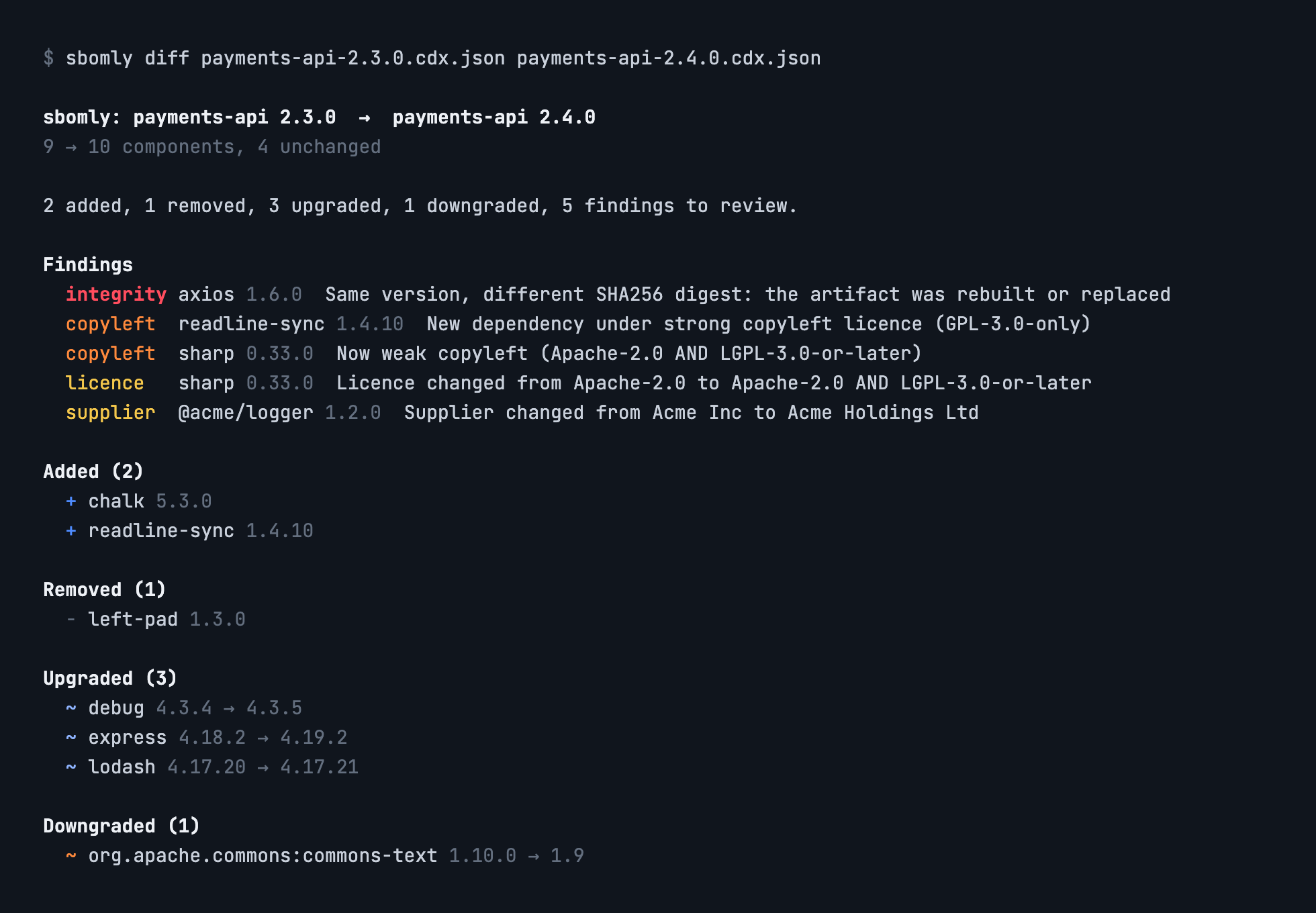
Findings come first, most serious at the top, then each kind of component change:
Write reports alongside the terminal summary:
sbomly diff old.json new.json --html report.html --markdown pr.md --json diff.json
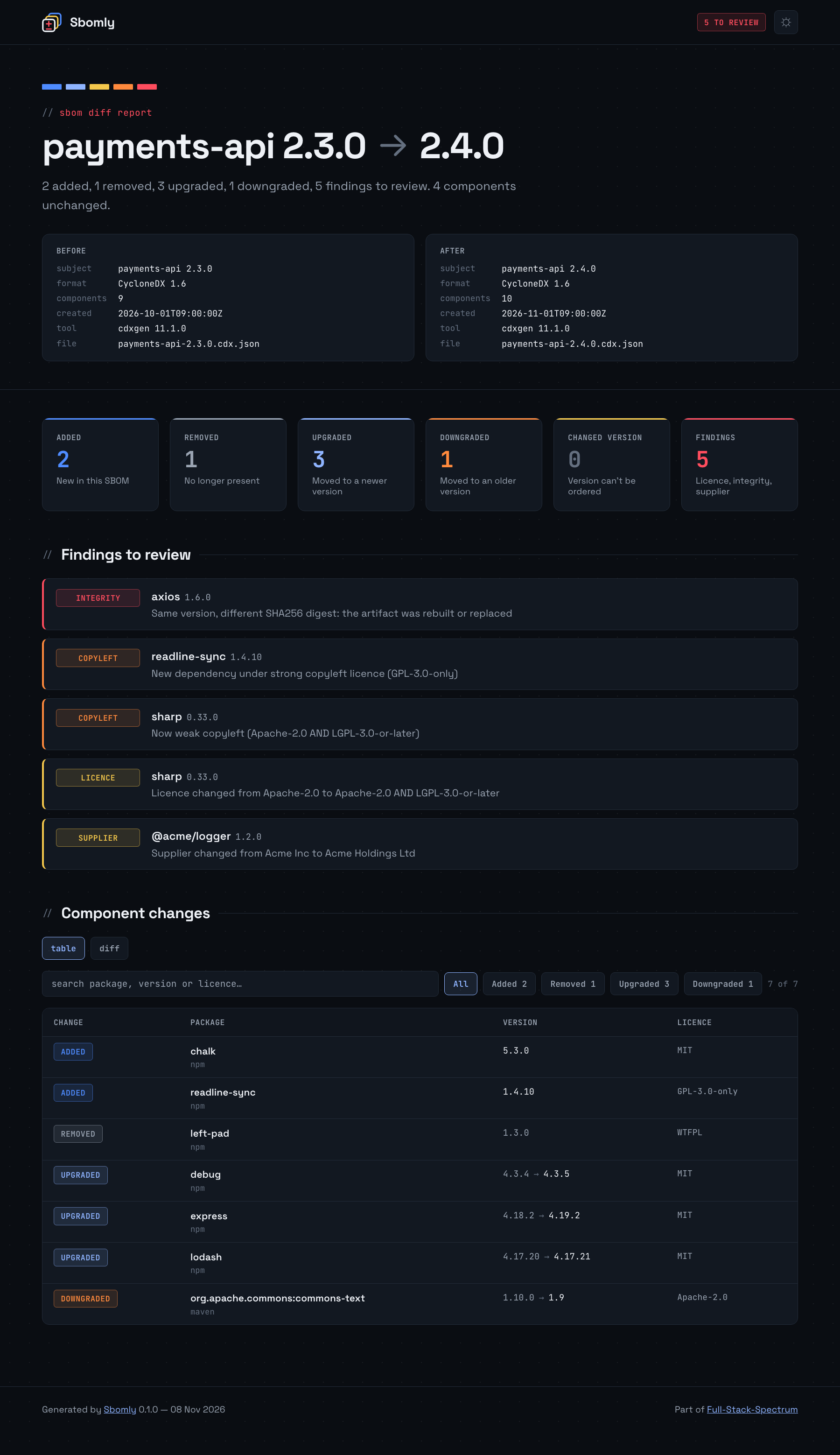
The HTML report, shown at the top of this page, is a single file with its fonts embedded, so it opens offline and can be attached to a CI run or a ticket. Search and the change-type filters work without a network connection, and --theme light gives a light version for printing.
Diff view
Prefer to read changes the way you read code? -u prints a unified diff of the two component lists, like diff -u, with one line per component sorted like a lockfile:
sbomly diff old.json new.json -u        # 3 lines of context
sbomly diff old.json new.json -u -U 0   # changes only
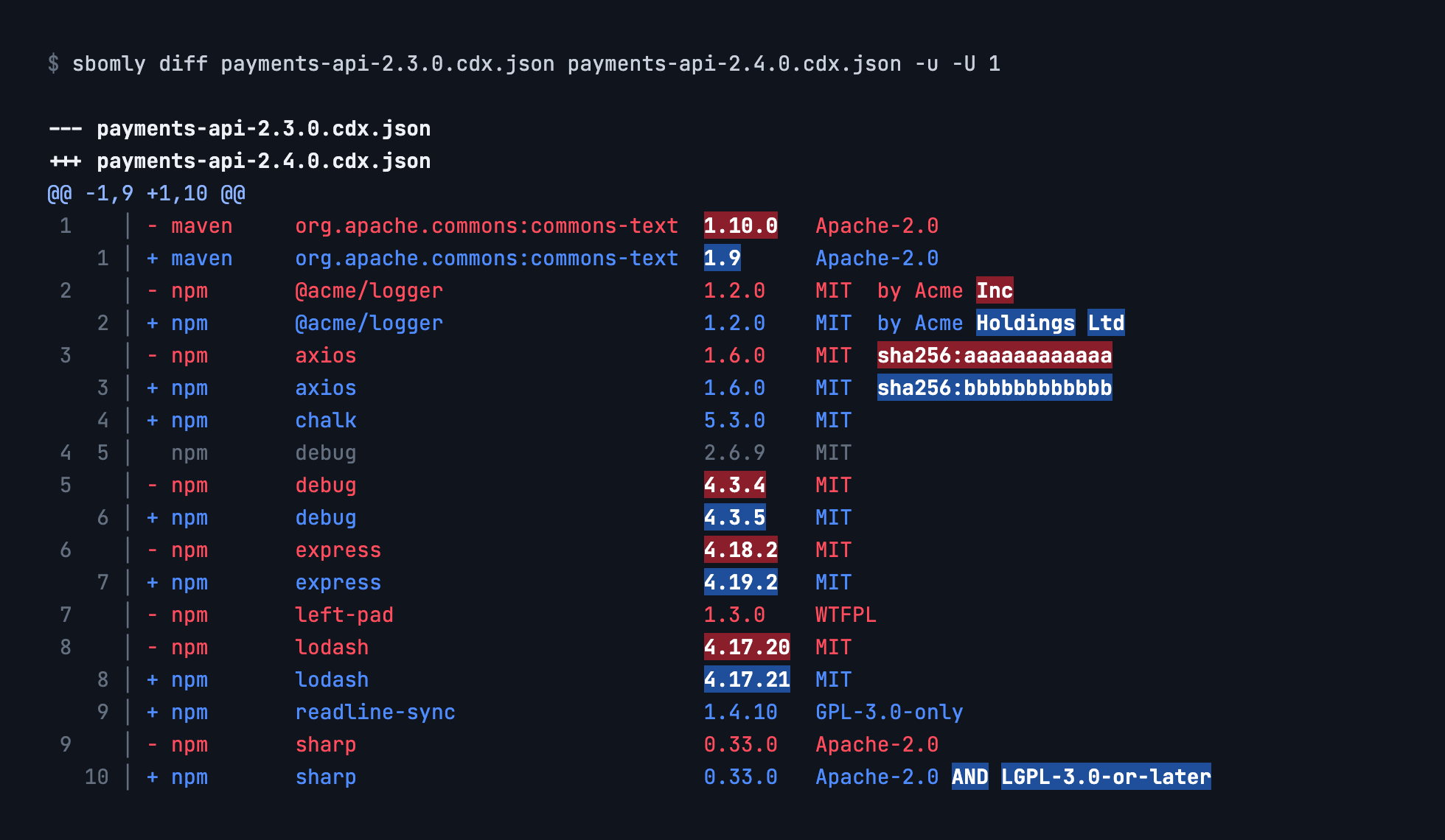
In a colour terminal, the diff gets an old/new line-number gutter and highlights the words that changed in each -/+ pair. When piped, or with --no-color, it's a plain unified diff that patch and other diff tools accept.
Each line shows the name, version and licence. A digest or supplier is added only where it changed, so a same-version finding still shows up as a -/+ pair. Lines come from Sbomly's own comparison rather than the raw files, so anything it treats as equivalent, like licence term order or a new distro qualifier, stays as context instead of showing up as noise. The output is a valid patch.
The HTML report has the same diff behind a table / diff toggle, with line numbers and the changed words highlighted. Add #diff to the report's URL to open it on the diff view. With -u, the Markdown output also gets a ```diff block, which GitHub colours in PR comments.
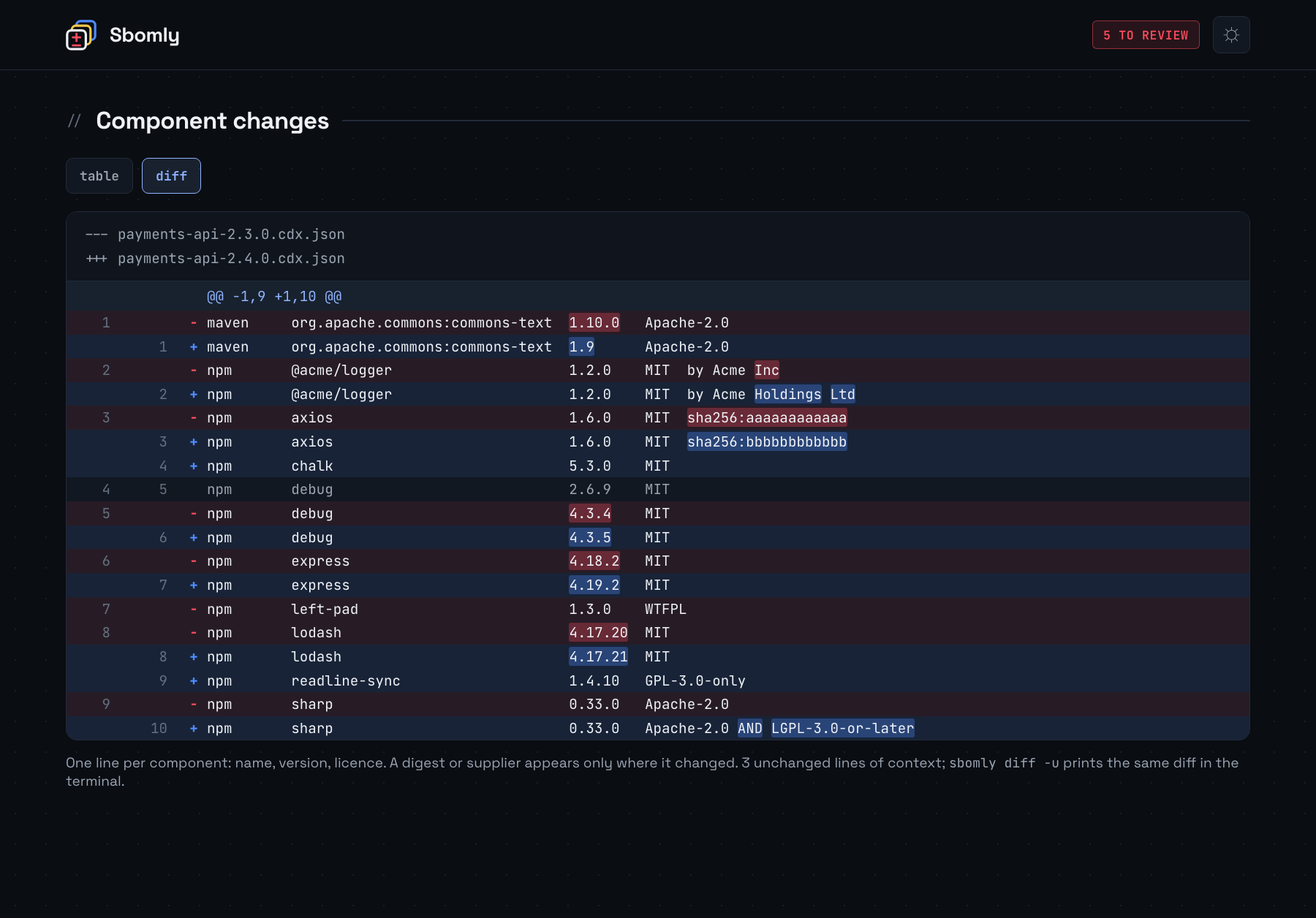
Screenshots show sample data from tests/fixtures. To regenerate them, run python docs/screenshots/src/render.py.
Read one SBOM from stdin, for example straight from a generator:
syft my-image:latest -o cyclonedx-json | sbomly diff baseline.cdx.json -
Options
| Option | |
|---|---|
-f, --format text|markdown|json |
What to print to stdout (default text) |
--html FILE |
Write the offline HTML report |
--markdown FILE |
Write the Markdown summary |
--json FILE |
Write the full diff as JSON |
--fail-on LIST |
Exit 1 if any of these categories occur (see below) |
-u, --unified |
Print a unified diff of the component lists instead of the summary, and add it to Markdown output |
-U, --context N |
Unchanged components shown around each change in the diff (default 3) |
--title TEXT |
Title for the HTML and Markdown reports |
--theme dark|light |
HTML report theme (default dark) |
--limit N |
Rows per section in text and Markdown (default 100) |
--no-color |
Plain terminal output. NO_COLOR and FORCE_COLOR are respected |
-q, --quiet |
Print nothing to stdout |
Gating CI with --fail-on
| Category | Fails when |
|---|---|
added / removed |
A component appears or disappears |
upgraded / downgraded |
A component moves to a newer or older version |
changed |
A version changes but can't be ordered (commit SHAs, digests) |
hash |
Same version, different digest |
copyleft |
A new dependency is copyleft, or a licence becomes more restrictive |
license |
A licence changes, or is no longer declared |
supplier |
A component's supplier changes |
any |
Any of the above |
sbomly diff main.cdx.json pr.cdx.json --fail-on hash,copyleft,downgraded
Exit codes: 0 passed, 1 a --fail-on category was hit, 2 bad usage or an unreadable SBOM.
Some findings are informational. They're shown, but they never fail a build:
- A licence that was unknown and is now declared.
- A same-version digest change where the purl's
distroqualifier also changed. Distros rebuild unchanged packages for each release. - A supplier change for an OS package (apk, deb, rpm). There, the supplier is the distro maintainer, and maintainers rotate.
GitHub Actions
Sbomly ships as a composite action. It writes the Markdown summary to the job page, and exposes the report paths for a PR comment or artifact upload.
- uses: fullstackspectrum/sbomly@v0.1.0
  with:
    old: sbom-main.cdx.json
    new: sbom-pr.cdx.json
    fail-on: hash,copyleft
Or call the CLI yourself on any CI system:
pipx run sbomly diff baseline.json current.json --markdown sbomly.md --fail-on hash
How components are matched
Components are paired across the two SBOMs by package URL, ignoring the version. Qualifiers that only describe the build environment, like distro and repository_url, are also ignored, so moving to a new base image doesn't report every OS package as removed and re-added. arch, classifier and type are kept, because they identify a different artifact. PyPI names are normalised as PEP 503 describes. Components without a purl fall back to their group and name.
When a package has several versions in both SBOMs, which npm often does, the leftover versions are paired in version order.
Supported formats
| Format | Versions |
|---|---|
| CycloneDX JSON | 1.4 to 1.6 tested, older versions usually work |
| SPDX JSON | 2.2, 2.3 |
CycloneDX XML, SPDX tag-value and SPDX 3.0 aren't supported yet. Sbomly tells you so rather than guessing.
Development
python -m venv .venv && . .venv/bin/activate
pip install -e ".[dev]"
pytest
Licence
Apache-2.0. The bundled Space Grotesk and JetBrains Mono fonts are under the SIL Open Font License 1.1. See sbomly/assets/.
Copyleft classification is a triage signal, not legal advice.
1 maintainer

Metadata
1 maintainer
Release files for sbomly 0.1.0
For a detailed explanation of source distributions (sdists) and built distributions (wheels), please see the package formats documentation.
Source distribution (sdist)
| File | Size | Uploaded | Provenance | Actions |
|---|---|---|---|---|
| sbomly-0.1.0.tar.gz | 119.4 kB | With provenance | Details for sbomly-0.1.0.tar.gz |
Built distribution (wheel)
| File | Interpreter | ABI | Platform | Actions Reset |
|---|---|---|---|---|
| sbomly-0.1.0-py3-none-any.whl | Python 3 | none | any | Details for sbomly-0.1.0-py3-none-any.whl |
Total release size: 228.0 kB
Release files / sbomly-0.1.0.tar.gz
| Download URL | sbomly-0.1.0.tar.gz |
|---|---|
| Size | 119.4 kB |
| Tags | Source |
|
SHA-256 checksum How to use checksums |
711a48de0721e4497c1c4ad29ab3ea2f6e273f821eacbc487e3361ec45ef4a43
|
|
BLAKE2b-256 checksum How to use checksums |
1f0836359dca8dbd2d088d03383ad0884118374eeacf1581d24fdb2243af358a
|
| Upload date | |
|
Uploaded using Trusted Publishing? What is trusted publishing? |
Yes |
| Uploaded via |
twine/7.0.0 CPython/3.13.16
|
Provenance
Provenance describes where a file came from. On PyPI, provenance is shared via attestations, which provide a verifiable record of the build or publishing details. View details, limitations and caveats.


PyPI Publish Attestation
PyPI verified that this artifact, at this checksum, originated from the publisher listed below.
Signed by GitHub Actions, verified by PyPI on Nov 9, 2026.
Transparency logRelease files / sbomly-0.1.0-py3-none-any.whl
| Download URL | sbomly-0.1.0-py3-none-any.whl |
|---|---|
| Size | 108.5 kB |
| Tags | Python 3 |
|
SHA-256 checksum How to use checksums |
b76d4928d44ce4dd01d4b446458b8936649e57f58f585704d45f045197ab44c4
|
|
BLAKE2b-256 checksum How to use checksums |
a46b921f3e694820519dd610c07376f52f07365a00e9c37e7bd2482816b8e09e
|
| Upload date | |
|
Uploaded using Trusted Publishing? What is trusted publishing? |
Yes |
| Uploaded via |
twine/7.0.0 CPython/3.13.16
|
Provenance
Provenance describes where a file came from. On PyPI, provenance is shared via attestations, which provide a verifiable record of the build or publishing details. View details, limitations and caveats.
PyPI Publish Attestation
PyPI verified that this artifact, at this checksum, originated from the publisher listed below.
Signed by GitHub Actions, verified by PyPI on Nov 9, 2026.
Transparency logSecurity for sbomly 0.1.0
Provenance
Provenance describes where a file came from. On PyPI, provenance is shared via attestations, which provide a verifiable record of the build or publishing details. View details, limitations and caveats.
Full provenance
Both files in this release have been uploaded with provenance metadata.
Attestation for sbomly-0.1.0.tar.gz
PyPI Publish Attestation
PyPI verified that this artifact, at this checksum, originated from the publisher listed below.
Signed by GitHub Actions, verified by PyPI on Nov 9, 2026.
Transparency logA note on package security
PyPI is a repository for distributing packages, not a service for auditing them. While third-party security researchers and our staff do their best to detect and remove malicious packages, PyPI cannot guarantee the quality, security or suitability of any given package.
To learn more about protecting yourself from malicious actors, visit our package security documentation.













