





Metabolic activity from single-cell and spatial transcriptomics with scCellFie
scCellFie is a Python-based tool for analyzing metabolic activity at different resolutions, developed at the Vento Lab. It efficiently processes both single-cell and spatial data to predict metabolic task activities. While its prediction strategy is inspired by CellFie, a tool from the Lewis Lab originally developed in MATLAB for bulk and small single-cell datasets, scCellFie includes a series of improvements and new analyses, such as marker selection, differential analysis, and cell-cell communication inference.
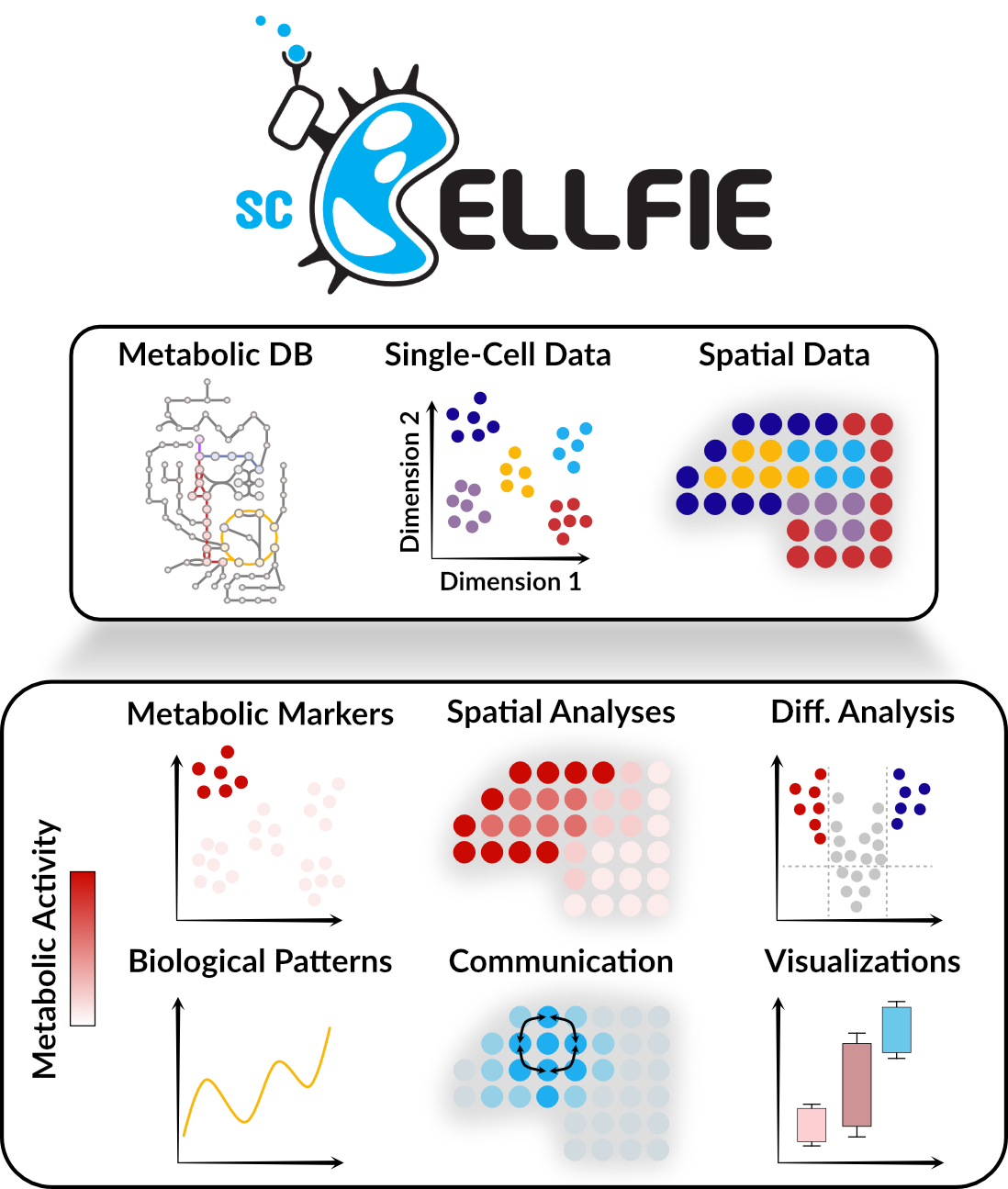
Features
Single cell and spatial data analysis: Inference of metabolic activity per single cell or spatial spot.
Speed: Runs fast and memory efficiently, scaling up to large datasets. ~100k single cells can be analyzed in ~8 min.
Downstream analyses: From marker selection of relevant metabolic tasks to integration with inference of cell-cell communication.
User-friendly: Python-based for easier use and integration into existing workflows, including Jupyter Notebooks.
Scanpy compatibility: Fully integrated with Scanpy, the popular single-cell analysis toolkit.
Organisms: Metabolic database and analysis available for human and mouse.
Documentation and Tutorials
For detailed documentation and tutorials, visit the scCellFie documentation.
For visualizing a summarized version of the results, visit the scCellFie Metabolic Task Visualizer.
Installation
To create a new conda environment (optional):
# Create a new conda environment
conda create -n sccellfie -y python=3.10

# Activate the environment
conda activate sccellfie
To install scCellFie, use pip:
pip install sccellfie
Quick Start
A quick example of how to use scCellFie with a single-cell dataset to infer metabolic activities and export them:
import sccellfie
import scanpy as sc

# Load the dataset
adata = sc.read(filename='./data/HECA-Subset.h5ad',
                backup_url='https://zenodo.org/records/15072628/files/HECA-Subset.h5ad')

# Run one-command scCellFie pipeline
results = sccellfie.run_sccellfie_pipeline(adata,
                                           organism='human',
                                           sccellfie_data_folder=None,
                                           n_counts_col='n_counts',
                                           process_by_group=False,
                                           groupby=None,
                                           neighbors_key='neighbors',
                                           n_neighbors=10,
                                           batch_key='sample',
                                           threshold_key='sccellfie_threshold',
                                           smooth_cells=True,
                                           alpha=0.33,
                                           chunk_size=5000,
                                           disable_pbar=False,
                                           save_folder=None,
                                           save_filename=None
                                          )

# Save adata objects containing single-cell/spatial predictions
sccellfie.io.save_adata(adata=results['adata'],
                        output_directory='/folder/path/',
                        filename='sccellfie_results'
                        )

# Summarize results in a cell-group level for the Metabolic Task Visualizer
report = sccellfie.reports.generate_report_from_adata(results['adata'].metabolic_tasks,
                                                      group_by=cell_group,
                                                      tissue_column='condition',
                                                      feature_name='metabolic_task'
                                                      )

# Export files to a specific folder.
sccellfie.io.save_result_summary(results_dict=report, output_directory='/folder/path/')

# Melted.csv and Min_max.csv are input files for the Metabolic Task Visualizer
To access metabolic activities, we need to inspect results['adata']:
The processed single-cell data is located in the AnnData object results['adata'].
The reaction activities for each cell are located in the AnnData object results['adata'].reactions.
The metabolic task activities for each cell are located in the AnnData object results['adata'].metabolic_tasks.
In particular:
results['adata']: contains gene expression in .X.
results['adata'].layers['gene_scores']: contains gene scores as in the original CellFie paper.
results['adata'].uns['Rxn-Max-Genes']: contains determinant genes for each reaction per cell.
results['adata'].reactions: contains reaction scores in .X so every scanpy function can be used on this object to visualize or compare values.
results['adata'].metabolic_tasks: contains metabolic task scores in .X so every scanpy function can be used on this object to visualize or compare values.
Other keys in the results dictionary are associated with the scCellFie database and are already filtered for the elements present in the dataset ('gpr_rules', 'task_by_gene', 'rxn_by_gene', 'task_by_rxn', 'rxn_info', 'task_info', 'thresholds', 'organism').
How to Cite
Please consider citing our work if you find scCellFie useful:
Atlas-scale metabolic activities inferred from single-cell and spatial transcriptomics. bioRxiv, 2025. https://doi.org/10.1101/2025.05.09.653038
Acknowledgments
This tool is inspired by the original CellFie tool developed by the Lewis Lab. Please consider citing their work if you find our tool useful:
Model-based assessment of mammalian cell metabolic functionalities using omics data. Cell Reports Methods, 2021. https://doi.org/10.1016/j.crmeth.2021.100040
ImmCellFie: A user-friendly web-based platform to infer metabolic function from omics data. STAR Protocols, 2023. https://doi.org/10.1016/j.xpro.2023.102069
Inferring secretory and metabolic pathway activity from omic data with secCellFie. Metabolic Engineering, 2024. https://doi.org/10.1016/j.ymben.2023.12.006
Contributing
We welcome contributions! Feel free to add requests in the issues section or directly contribute with a pull request.
1 maintainer

Metadata
1 maintainer
Release files for scCellFie 0.6.3
For a detailed explanation of source distributions (sdists) and built distributions (wheels), please see the package formats documentation.
Source distribution (sdist)
| File | Size | Uploaded | |
|---|---|---|---|
| sccellfie-0.6.3.tar.gz | 169.4 kB | Details |
Built distribution (wheel)
| File | Interpreter | ABI | Platform | Reset |
|---|---|---|---|---|
| sccellfie-0.6.3-py3-none-any.whl | Python 3 | none | any | Details |
Total release size: 379.9 kB
Release files / sccellfie-0.6.3.tar.gz
| Download URL | sccellfie-0.6.3.tar.gz |
|---|---|
| Size | 169.4 kB |
| Tags | Source |
|
SHA-256 checksum How to use checksums |
45426544231e499b4fd689837d6edd1384df250c90710597ac830c236b375c37
|
|
BLAKE2b-256 checksum How to use checksums |
0f305ced013e7a4fad603113d68715a9970dc803ed89af01386cebef07f196b1
|
| Upload date | |
|
Uploaded using Trusted Publishing? What is trusted publishing? |
No |
| Uploaded via |
twine/6.2.0 CPython/3.9.25
|
Release files / sccellfie-0.6.3-py3-none-any.whl
| Download URL | sccellfie-0.6.3-py3-none-any.whl |
|---|---|
| Size | 210.6 kB |
| Tags | Python 3 |
|
SHA-256 checksum How to use checksums |
825d3968864c408294c11ded42551a24cd494aa0897691e85865ce8cd096e750
|
|
BLAKE2b-256 checksum How to use checksums |
f537f57164dc16b77c76e1cbf6570d7b493f92d957f79c93d5ee6b767f466339
|
| Upload date | |
|
Uploaded using Trusted Publishing? What is trusted publishing? |
No |
| Uploaded via |
twine/6.2.0 CPython/3.9.25
|














