
About:
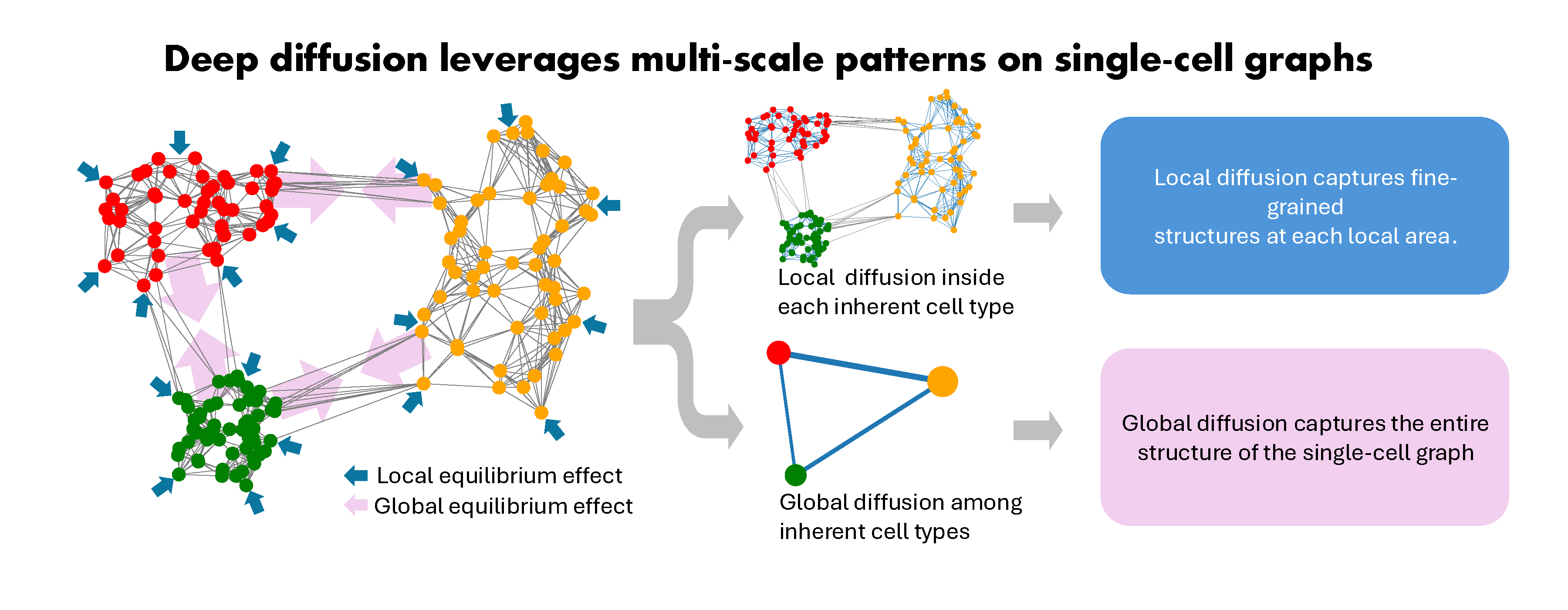
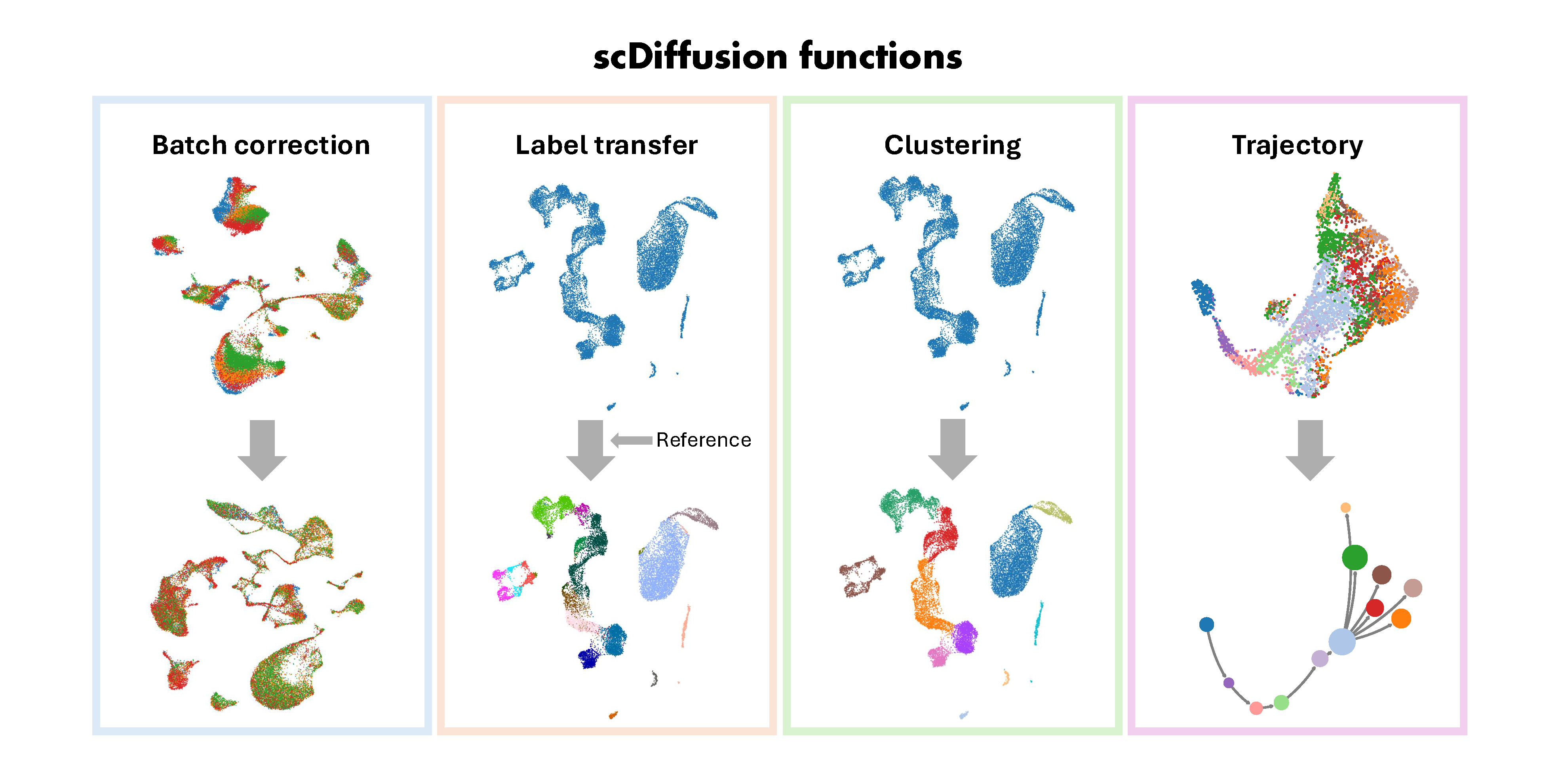
scDiffusion(Single-Cell graph neural Diffusion) is a deep diffusion model to leverage multi-scale patterns in single-cell graphs and enhance scRNA-seq analysis. Single-cell transcriptomics are typically analyzed based on gene expression within individual cells and hypothetic cell adjacencies. However, existing computational methods often suffer from a lack of leveraging and integrating multi-scale dependencies in feature space, undermining their effectiveness and robustness in downstream applications like handling of batch effects, cell type identification, and cell fate inference. To tackle this challenge, we introduce scDiffusion to incorporate long-range information propagation among cells to uncover cellular biology from their transcriptomics. scDiffusion integrates both local and global diffusion processes to comprehensively capture cell relationships, ranging from fine-grained structures to large-scale patterns. This approach exhibits great perception of inherent cell types and potential lineages and preserves cell identities in batch-imbalanced datasets. scDiffusion enhances various downstream tasks, including data integration, reference-based cell type annotation, unsupervised clustering, and trajectory inference.
This repository contains the source code for the paper "scDiffusion: graph-based deep diffusion model leverages multi-scale dependencies among single cells", Yu-Chen Liu, Lei Jiang, Simon Liang Lu, Anqi Zou, Zedong Lin, Nidhi Siddharam Loni, Heng Pan, Vijaya B. Kolachalama, Dong Xu*, Juexin Wang* & Chao Zhang*.
Installation:
scDiffusion is available on PyPI. To install scDiffusion, run the following command:
pip install scDiffusion
Or grab this source codes:
git clone https://github.com/CZCBLab/scDiffusion.git
cd scDiffusion
Python=3.9.9 is required. See other requirements in the file requirements.txt.
Run scDiffuision in Docker:
git clone https://github.com/CZCBLab/scDiffusion.git
cd scDiffusion

# Build the Docker image
sudo docker build -t scdiffusion .

# Run Docker container with CPU
sudo docker run -it -p 8888:8888 --restart always scdiffusion bash

# Or run Docker container with GPU
sudo docker run -it -p 8888:8888 --restart always --gpus all scdiffusion bash

# Start Jupyter Notebook
jupyter notebook --ip="0.0.0.0" --allow-root
'scdiffusion' could be changed into your image name. Please refer to Docker and NVIDIA Container Toolkit for more details about Docker installation.
Tutorials:
For data integration, please check the notebook file "scDiffusion_tutorial_Data_Integration.ipynb".
For reference-based cell type annotation, please check the notebook file "scDiffusion_tutorial_Annotation_(Label_Transfer).ipynb".
For clustering tasks, please check the notebook file "scDiffusion_tutorial_Clustering.ipynb".
For trajectory tasks, please check the notebook file "scDiffusion_tutorial_Trajectory_Inference.ipynb".
1 maintainer

Metadata
1 maintainer
Release files for scDiffusion 0.3.1
For a detailed explanation of source distributions (sdists) and built distributions (wheels), please see the package formats documentation.
Source distribution (sdist)
| File | Size | Uploaded | |
|---|---|---|---|
| scDiffusion-0.3.1.tar.gz | 36.4 kB | Details |
Built distribution (wheel)
| File | Interpreter | ABI | Platform | Reset |
|---|---|---|---|---|
| scDiffusion-0.3.1-py3-none-any.whl | Python 3 | none | any | Details |
Total release size: 77.7 kB
Release files / scDiffusion-0.3.1.tar.gz
| Download URL | scDiffusion-0.3.1.tar.gz |
|---|---|
| Size | 36.4 kB |
| Tags | Source |
|
SHA-256 checksum How to use checksums |
d6edb295f16f2373bd90954c9a0dcfdc22228f2404cc0cf2f88006430ea220c6
|
|
BLAKE2b-256 checksum How to use checksums |
653e3f76a28e7b113a3b60467c8554360d0209b9ef6b5367f3f71b4043b10314
|
| Upload date | |
|
Uploaded using Trusted Publishing? What is trusted publishing? |
No |
| Uploaded via |
twine/5.1.1 CPython/3.10.12
|
Release files / scDiffusion-0.3.1-py3-none-any.whl
| Download URL | scDiffusion-0.3.1-py3-none-any.whl |
|---|---|
| Size | 41.3 kB |
| Tags | Python 3 |
|
SHA-256 checksum How to use checksums |
9842c489e623870a58597724085c848aa890eb3b8d7bbf93a244b29badd8fcca
|
|
BLAKE2b-256 checksum How to use checksums |
74d47d0d3ebcdec858a6c5af76953a6f155f8bdda27f01a200b6a1aeef1f7071
|
| Upload date | |
|
Uploaded using Trusted Publishing? What is trusted publishing? |
No |
| Uploaded via |
twine/5.1.1 CPython/3.10.12
|














