
Scaluq






For the Japanese version of this README, see README_ja.md.
Scaluq is a newly redeveloped Python/C++ library based on the quantum circuit simulator Qulacs.
It enables high-speed simulation of large-scale quantum circuits, noisy quantum circuits, and parametric quantum circuits.
This library is released under the MIT License.
Compared to Qulacs, the following improvements have been made:
- Implementation based on Kokkos allows seamless switching between execution environments (CPU/GPU) without requiring code changes.
- Provides execution speeds comparable to Qulacs on CPU, and achieves equivalent or faster speeds on GPU.
- Pointers are hidden from users, making the code simpler and safer to write.
- Integration of nanobind enables lightweight and low-overhead Python bindings.
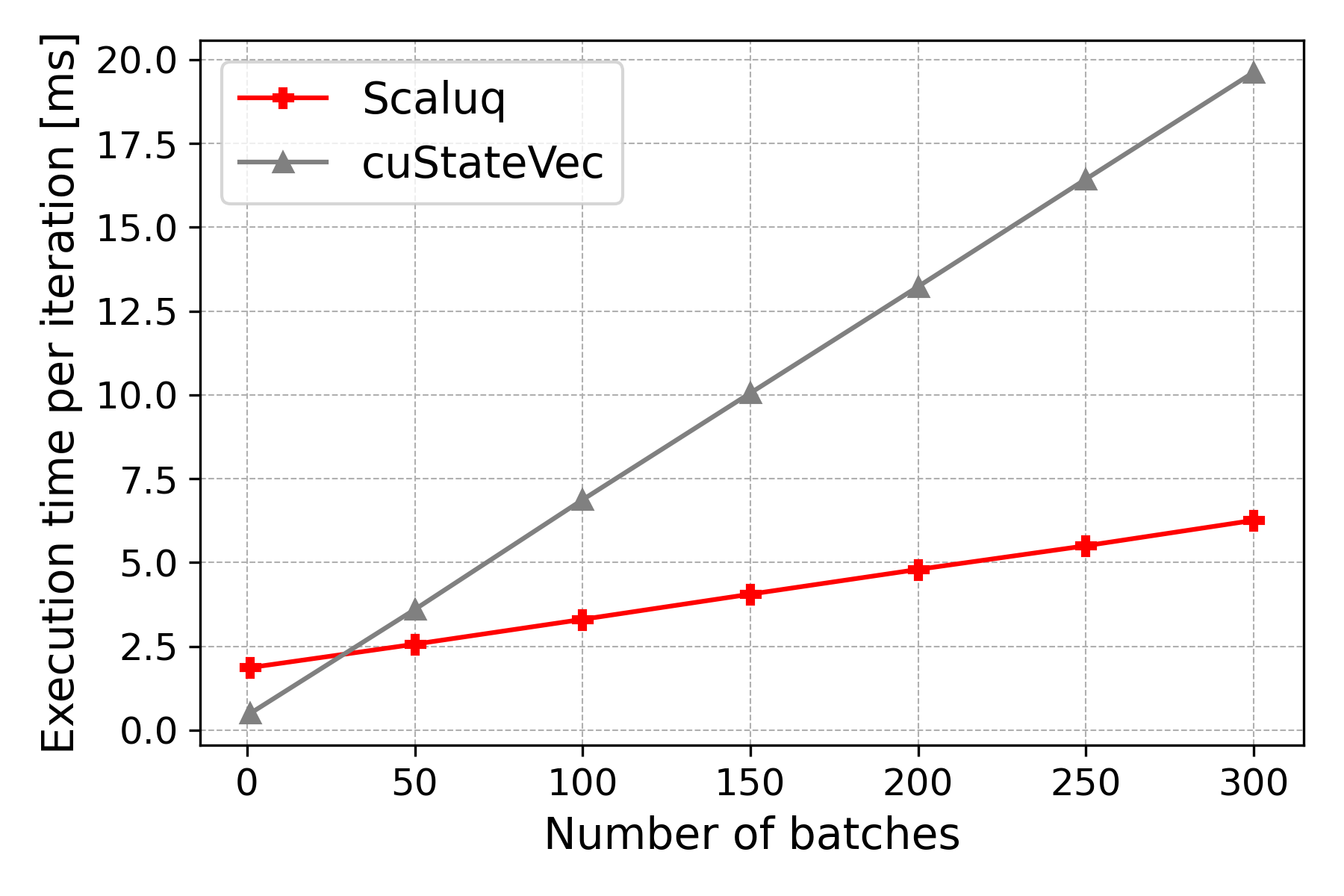
- Provides batched execution for efficiently applying quantum circuits with the same structure but different parameters to multiple quantum states.
Documentation
See https://scaluq.readthedocs.io/en/latest/index.html
Performance
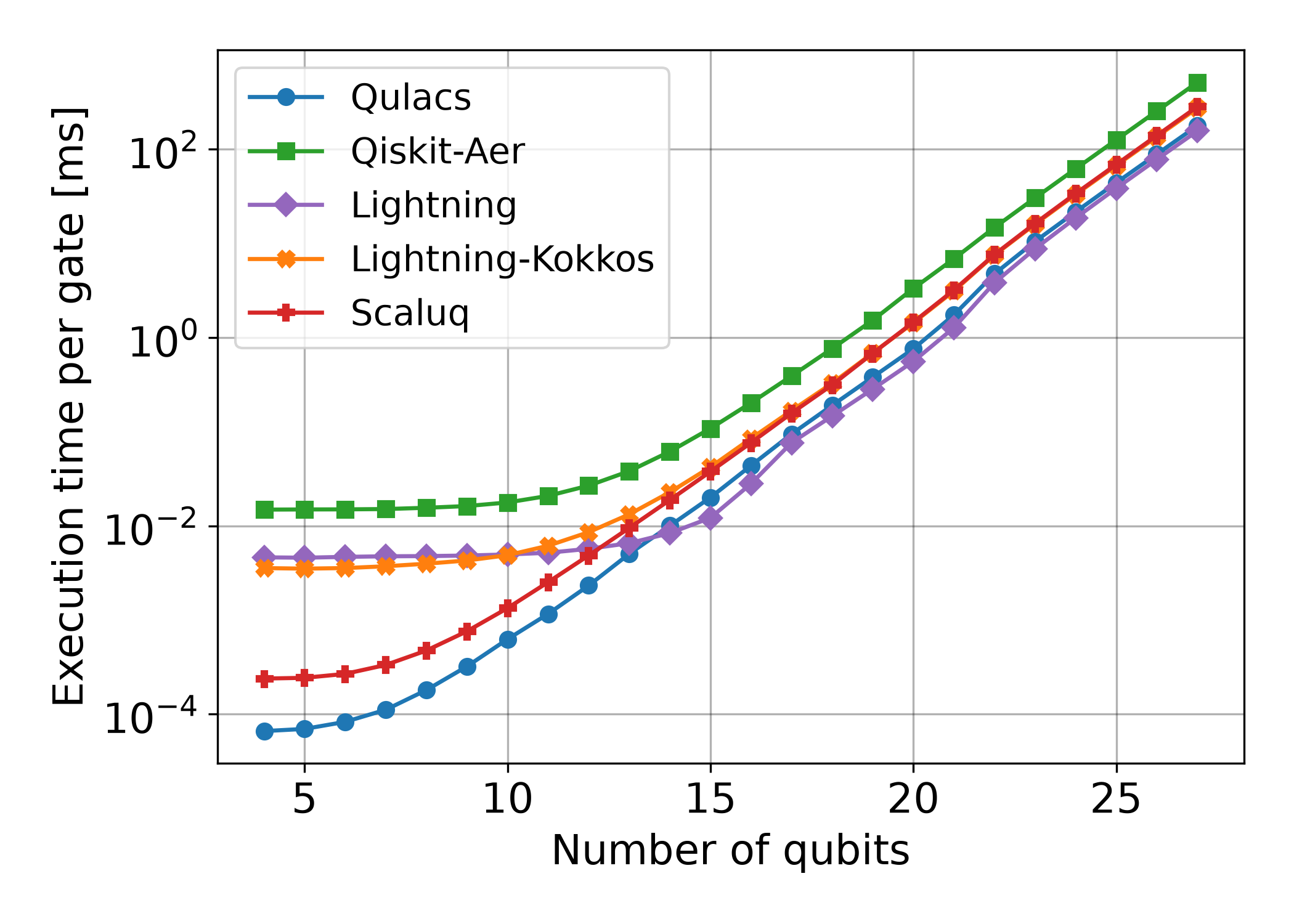
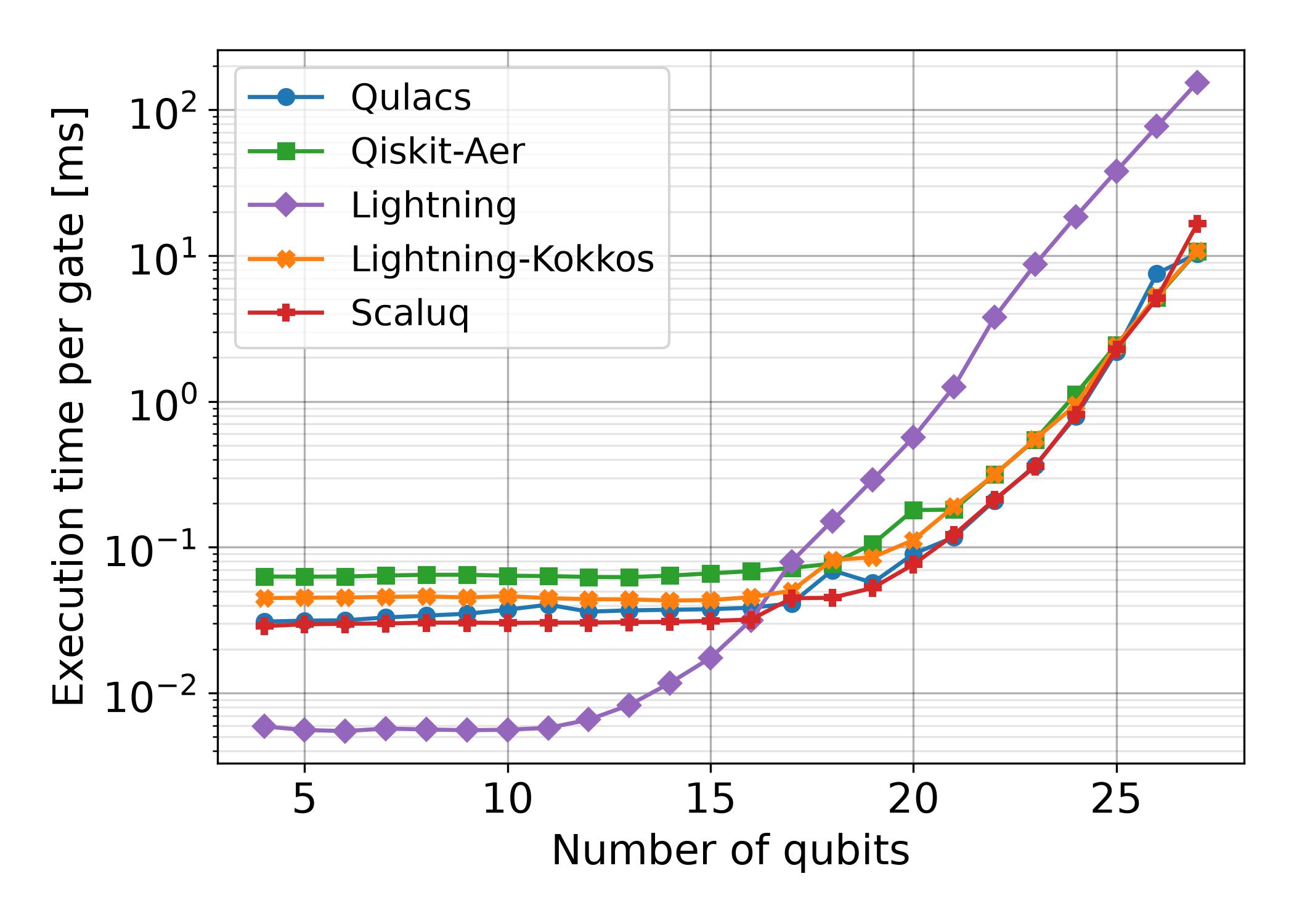
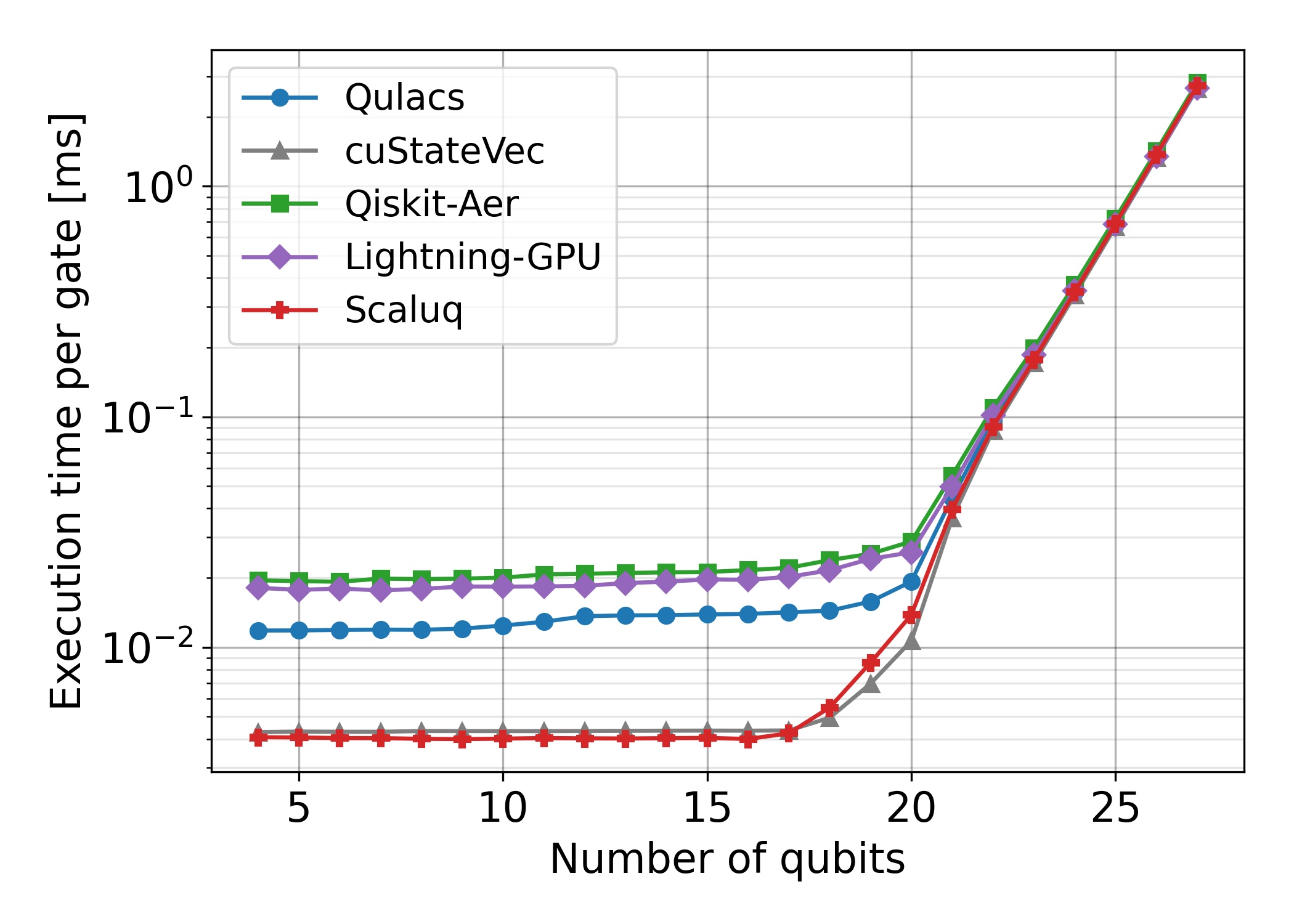
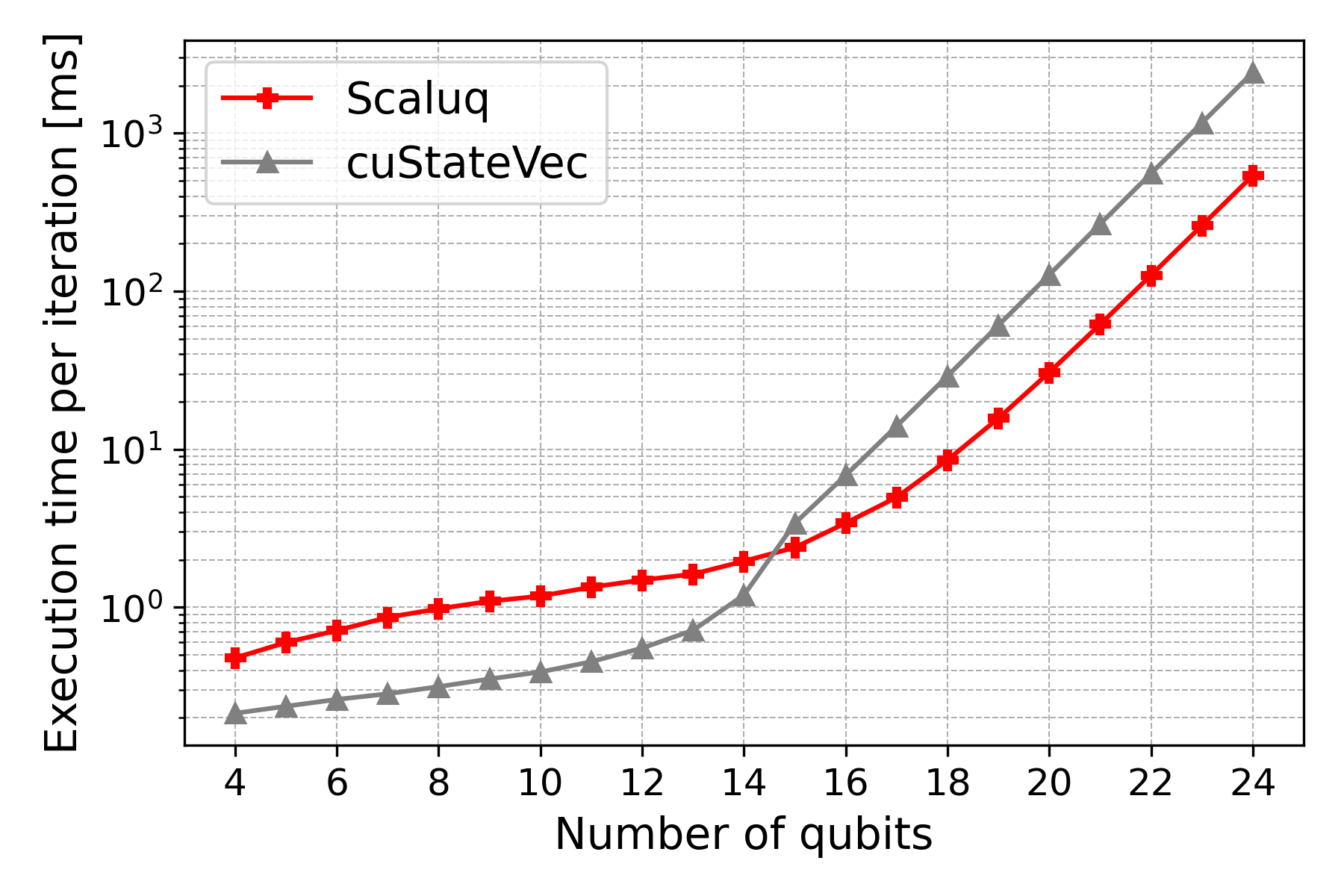
The execution times of our quantum circuit simulator and several existing quantum circuit simulators were compared.
In this benchmark, a circuit consisting of CX, RX, and RZ gates applied sequentially to different target qubits was executed, and the average execution time was measured.
CPU: Single State Vector Update (June 2026)
| CPU single thread | CPU multi thread |
|---|---|
 |
 |
GPU: Single State Vector Update (August 2026)
| GPU |
|---|
 |
Batched State Vector Update (June 2026)
| Varying batch size (#qubits=16) | Varying #qubits (batch size=100) |
|---|---|
 |
 |
Build Requirements
- Ninja ≥ 1.10
- GCC ≥ 13 or LLVM Clang ≥ 18
- if you enable CUDA, GCC ≥ 11 is OK, but you cannot use Clang.
- CMake ≥ 3.24
- CUDA ≥ 12.8 (only when using CUDA)
- Python ≥ 3.10 (only when using Python)
When using CUDA, use a host compiler version supported by your CUDA toolkit (see the CUDA Installation Guide Host Compiler Support Policy).
Note: It may work with lower versions, but this has not been verified.
Runtime Requirements
- CUDA ≥ 12.8 (only when using CUDA)
Note: It may work with lower versions, but this has not been verified.
Build Options
Build options can be specified using environment variables when running script/configure or pip install ..
| Variable Name | Default | Description |
|---|---|---|
CMAKE_C_COMPILER |
- | See CMake Documentation |
CMAKE_CXX_COMPILER |
- | See CMake Documentation |
CMAKE_BUILD_TYPE |
- | See CMake Documentation |
CMAKE_INSTALL_PREFIX |
- | See CMake Documentation |
SCALUQ_USE_OMP |
ON |
Use OpenMP for parallel computation on CPU |
SCALUQ_USE_CUDA |
OFF |
Enable parallel computation using GPU (CUDA) |
SCALUQ_CPU_NATIVE |
ON |
Build for native CPU architecture of builder's |
SCALUQ_CPU_ARCH |
- | Target CPU architecture (see Kokkos CMake Keywords, e.g., SCALUQ_CPU_ARCH=SKX) |
SCALUQ_CUDA_ARCH |
(auto) | Target Nvidia GPU architecture (see Kokkos CMake Keywords, e.g., SCALUQ_CUDA_ARCH=AMPERE80) |
SCALUQ_USE_TEST |
OFF |
Include test/ in build targets. You can build and run tests with ctest --test-dir build/ |
SCALUQ_USE_EXE |
OFF |
Include exe/ in build targets. You can try running without installing by building with ninja -C build and running build/exe/main |
SCALUQ_FLOAT16 |
OFF |
Enable f16 precision |
SCALUQ_FLOAT32 |
ON |
Enable f32 precision |
SCALUQ_FLOAT64 |
ON |
Enable f64 precision |
SCALUQ_BFLOAT16 |
OFF |
Enable bf16 precision |
Installing as a C++ Library
To install Scaluq as a static C++ library, run the following commands:
git clone https://github.com/qulacs/scaluq
cd scaluq
script/configure
sudo -E env "PATH=$PATH" ninja -C build install
- Required libraries such as Eigen and Kokkos will be installed together.
- You can install to a location other than
/usr/local/by settingCMAKE_INSTALL_PREFIX. For example, if you want to install locally or avoid conflicts with other Kokkos builds:
CMAKE_INSTALL_PREFIX=~/.local script/configure; ninja -C build install sudois used to install files to/usr/local/, but to preserve the user environment, we use-Eand explicitly passPATH.- If you want to build the CUDA-enabled version (when NVIDIA GPU and CUDA are available), set
SCALUQ_USE_CUDA=ON. Example:
SCALUQ_USE_CUDA=ON script/configure; sudo env -E "PATH=$PATH" ninja -C build install
When changing options and rebuilding, make sure to clear the CMake cache by running:
rm build/CMakeCache.txt
An example CMake configuration for a project using the installed Scaluq library is provided in example_project/.
Installing as a Python Library
Scaluq can also be used as a Python library:
pip install scaluq
If you want to use GPU or precisions other than f32 and f64, clone the repository and install with options:
git clone https://github.com/qulacs/scaluq
cd ./scaluq
SCALUQ_USE_CUDA=ON pip install .
Python Documentation
A simple documentation page is available with function descriptions and type information for the Python library version:
https://scaluq.readthedocs.io/en/latest/index.html
Sample Code (C++)
#include <cstdint>
#include <iostream>
#include <scaluq/circuit/circuit.hpp>
#include <scaluq/gate/gate_factory.hpp>
#include <scaluq/operator/operator.hpp>
#include <scaluq/state/state_vector.hpp>

int main() {
    scaluq::initialize();  // must be called before using any scaluq methods
    {
        constexpr scaluq::Precision Prec = scaluq::Precision::F64;
        constexpr scaluq::ExecutionSpace Space = scaluq::ExecutionSpace::Default;
        const std::uint64_t n_qubits = 3;
        scaluq::StateVector<Prec, Space> state =
            scaluq::StateVector<Prec, Space>::Haar_random_state(n_qubits, 0);
        std::cout << state << std::endl;

        scaluq::Circuit<Prec> circuit;
        circuit.add_gate(scaluq::gate::X<Prec>(0));
        circuit.add_gate(scaluq::gate::CNot<Prec>(0, 1));
        circuit.add_gate(scaluq::gate::Y<Prec>(1));
        circuit.add_gate(scaluq::gate::RX<Prec>(1, std::numbers::pi / 2));
        circuit.update_quantum_state(state);

        std::vector<scaluq::PauliOperator<Prec>> terms;
        terms.emplace_back(1, 0);
        scaluq::Operator<Prec, Space> observable(terms);
        auto value = observable.get_expectation_value(state);
        std::cout << value << std::endl;
    }
    scaluq::finalize();  // must be called last
}
By including scaluq/all.hpp, you can omit template arguments using SCALUQ_OMIT_TEMPLATE.
#include <cstdint>
#include <iostream>
#include <scaluq/all.hpp>

namespace my_scaluq {
SCALUQ_OMIT_TEMPLATE(scaluq::Precision::F64, scaluq::ExecutionSpace::Default)
}

using namespace my_scaluq;

int main() {
    scaluq::initialize();  // must be called before using any scaluq methods
    {
        const std::uint64_t n_qubits = 3;
        StateVector state = StateVector::Haar_random_state(n_qubits, 0);
        std::cout << state << std::endl;

        Circuit circuit;
        circuit.add_gate(gate::X(0));
        circuit.add_gate(gate::CNot(0, 1));
        circuit.add_gate(gate::Y(1));
        circuit.add_gate(gate::RX(1, std::numbers::pi / 2));
        circuit.update_quantum_state(state);

        std::vector<PauliOperator> terms;
        terms.emplace_back(1, 0);
        Operator observable(terms);
        auto value = observable.get_expectation_value(state);
        std::cout << value << std::endl;
    }
    scaluq::finalize();  // must be called last
}
Sample Code (Python)
from scaluq import StateVector, Circuit, PauliOperator, Operator
from scaluq import gate
import math

n_qubits = 3
state = StateVector.Haar_random_state(n_qubits, 0)

circuit = Circuit()
circuit.add_gate(gate.X(0))
circuit.add_gate(gate.CNot(0, 1))
circuit.add_gate(gate.Y(1))
circuit.add_gate(gate.RX(1, math.pi / 2))
circuit.update_quantum_state(state)

terms = [PauliOperator("Z 0")]
observable = Operator(terms)
value = observable.get_expectation_value(state)
print(value)
Specifying Precision and Execution Space
Scaluq supports multiple floating-point precisions: f16, f32, f64, and bf16.
By default, only f32 and f64 are enabled.
While f64 is generally recommended, lower precisions like f32 can be up to 2–4x faster in applications such as quantum machine learning that do not require high precision.
| Precision | C++ Template Argument | Python keyword (precision=) |
Description |
|---|---|---|---|
f16 |
Precision::F16 |
'f16' |
IEEE754 binary16 |
f32 |
Precision::F32 |
'f32' |
IEEE754 binary32 |
f64 |
Precision::F64 |
'f64' |
IEEE754 binary64 |
bf16 |
Precision::BF16 |
'bf16' |
bfloat16 |
Note: With f16 / bf16 precision, the calculation error may be very large (sometimes larger than $0.1$). We do not test the accuracy with these options.
Execution spaces determine whether computation is performed on CPU or GPU:
| Execution Space | C++ Template Argument | Python keyword (space=) |
Description |
|---|---|---|---|
default |
ExecutionSpace::Default |
'default' |
Runs on GPU if CUDA is enabled, otherwise CPU |
host |
ExecutionSpace::Host |
'host' |
Always runs on CPU |
host_serial |
ExecutionSpace::HostSerial |
'host_serial' |
Always runs sequentially on CPU |
Note: You can only perform operations between objects with the same precision and execution space. For example, a gate created for 32-bit precision cannot be used with a 64-bit StateVector, even if both are CPU-based.
In C++, classes like StateVector, Circuit, Gate, and Operator accept Precision and ExecutionSpace as template arguments.
In Python, top-level classes such as StateVector and Circuit, as well as gate factories in scaluq.gate, accept precision and space keyword arguments, defaulting to 'f64' and 'default' respectively.
from scaluq import StateVector, Circuit
from scaluq import gate

prec = 'f64'
space = 'default'

state = StateVector(3, precision=prec, space=space)
x = gate.X(0, precision=prec)
x.update_quantum_state(state)
print(state)
1 maintainer

Metadata
1 maintainer
Release files for scaluq 0.2.0
For a detailed explanation of source distributions (sdists) and built distributions (wheels), please see the package formats documentation.
Source distribution (sdist)
| File | Size | Uploaded | |
|---|---|---|---|
| scaluq-0.2.0.tar.gz | 221.0 kB | Details |
Built distributions (wheels)
Total release size: 122.3 MB
Release files / scaluq-0.2.0.tar.gz
| Download URL | scaluq-0.2.0.tar.gz |
|---|---|
| Size | 221.0 kB |
| Tags | Source |
|
SHA-256 checksum How to use checksums |
1133c81a8efe6f3df34045ec5977ed6c6c446cb55b8ddab8adbc68b4331e424a
|
|
BLAKE2b-256 checksum How to use checksums |
aa7a1f11b0d8867bc47f359eb2784607081a56e869bf2c0f01ca3dce3904834b
|
| Upload date | |
|
Uploaded using Trusted Publishing? What is trusted publishing? |
No |
| Uploaded via |
twine/7.0.0 CPython/3.13.14
|
Release files / scaluq-0.2.0-cp312-abi3-manylinux_2_27_x86_64.manylinux_2_28_x86_64.whl
| Download URL | scaluq-0.2.0-cp312-abi3-manylinux_2_27_x86_64.manylinux_2_28_x86_64.whl |
|---|---|
| Size | 13.4 MB |
| Tags | CPython 3.12 Linux glibc 2.27+ x86-64 Linux glibc 2.28+ x86-64 abi3 |
|
SHA-256 checksum How to use checksums |
8a7073a38148d564a3d607a5f2b35ad542e7a679e74459ce5e57e444b230c00e
|
|
BLAKE2b-256 checksum How to use checksums |
b12f2c7fa38883f135fed40f8482b9aaa122d812895e16b733edd931a248be02
|
| Upload date | |
|
Uploaded using Trusted Publishing? What is trusted publishing? |
No |
| Uploaded via |
twine/7.0.0 CPython/3.13.14
|
Release files / scaluq-0.2.0-cp312-abi3-macosx_15_0_x86_64.whl
| Download URL | scaluq-0.2.0-cp312-abi3-macosx_15_0_x86_64.whl |
|---|---|
| Size | 14.2 MB |
| Tags | CPython 3.12 abi3 macOS 15.0+ x86-64 |
|
SHA-256 checksum How to use checksums |
39ddd18539eb8818ff22a175c8aa34d160ce15cace86addad1d7bf86642d379f
|
|
BLAKE2b-256 checksum How to use checksums |
8fcdba4a80683aeb966dc82447149c4b7383ebf14460a9c882d2846766f0e13e
|
| Upload date | |
|
Uploaded using Trusted Publishing? What is trusted publishing? |
No |
| Uploaded via |
twine/7.0.0 CPython/3.13.14
|
Release files / scaluq-0.2.0-cp312-abi3-macosx_15_0_arm64.whl
| Download URL | scaluq-0.2.0-cp312-abi3-macosx_15_0_arm64.whl |
|---|---|
| Size | 13.1 MB |
| Tags | CPython 3.12 abi3 macOS 15.0+ ARM64 |
|
SHA-256 checksum How to use checksums |
7246de34b6be0139fc294b5e4278bdffc32edd8544a91c462803b50e539f7c03
|
|
BLAKE2b-256 checksum How to use checksums |
f174b89f01834c4dc58b14f20014fc5a4934f9904241293b64ee8ae5248a2fe0
|
| Upload date | |
|
Uploaded using Trusted Publishing? What is trusted publishing? |
No |
| Uploaded via |
twine/7.0.0 CPython/3.13.14
|
Release files / scaluq-0.2.0-cp311-cp311-manylinux_2_27_x86_64.manylinux_2_28_x86_64.whl
| Download URL | scaluq-0.2.0-cp311-cp311-manylinux_2_27_x86_64.manylinux_2_28_x86_64.whl |
|---|---|
| Size | 13.4 MB |
| Tags | CPython 3.11 Linux glibc 2.27+ x86-64 Linux glibc 2.28+ x86-64 |
|
SHA-256 checksum How to use checksums |
0f169bfe6f80659cfd0d8d437fa62dfd76df2143657aaae2c4f71733d78ab403
|
|
BLAKE2b-256 checksum How to use checksums |
89bec3ab3f48a99b515af152bc21f8e5ef8c965c3869503561cfd99e3637c535
|
| Upload date | |
|
Uploaded using Trusted Publishing? What is trusted publishing? |
No |
| Uploaded via |
twine/7.0.0 CPython/3.13.14
|
Release files / scaluq-0.2.0-cp311-cp311-macosx_15_0_x86_64.whl
| Download URL | scaluq-0.2.0-cp311-cp311-macosx_15_0_x86_64.whl |
|---|---|
| Size | 14.2 MB |
| Tags | CPython 3.11 macOS 15.0+ x86-64 |
|
SHA-256 checksum How to use checksums |
b16dd8206488b65f6ba3fb97bc0a99624510b767b7919d9e53bb083cc0167342
|
|
BLAKE2b-256 checksum How to use checksums |
a2bffc777ff1eaa5276aed1229d99dba5869fe5ccbf61156d42f3f4b3c24acf7
|
| Upload date | |
|
Uploaded using Trusted Publishing? What is trusted publishing? |
No |
| Uploaded via |
twine/7.0.0 CPython/3.13.14
|
Release files / scaluq-0.2.0-cp311-cp311-macosx_15_0_arm64.whl
| Download URL | scaluq-0.2.0-cp311-cp311-macosx_15_0_arm64.whl |
|---|---|
| Size | 13.1 MB |
| Tags | CPython 3.11 macOS 15.0+ ARM64 |
|
SHA-256 checksum How to use checksums |
3eed5c5b56c92989404edfdc0ea25daad4947fdf52beeff0a403e0260bd3d00e
|
|
BLAKE2b-256 checksum How to use checksums |
fe18fc768b18ee166a624759fa1378af5811ca8723bb7981b057bdca74125a5a
|
| Upload date | |
|
Uploaded using Trusted Publishing? What is trusted publishing? |
No |
| Uploaded via |
twine/7.0.0 CPython/3.13.14
|
Release files / scaluq-0.2.0-cp310-cp310-manylinux_2_27_x86_64.manylinux_2_28_x86_64.whl
| Download URL | scaluq-0.2.0-cp310-cp310-manylinux_2_27_x86_64.manylinux_2_28_x86_64.whl |
|---|---|
| Size | 13.5 MB |
| Tags | CPython 3.10 Linux glibc 2.27+ x86-64 Linux glibc 2.28+ x86-64 |
|
SHA-256 checksum How to use checksums |
48c1eadd93b8e510df16fae81a1a345a80c8ef2649f387b4ac130df10898adb8
|
|
BLAKE2b-256 checksum How to use checksums |
333376f37c613c6195d7f3d9216498f7f9ef0423dc49c749e445d92903b15832
|
| Upload date | |
|
Uploaded using Trusted Publishing? What is trusted publishing? |
No |
| Uploaded via |
twine/7.0.0 CPython/3.13.14
|
Release files / scaluq-0.2.0-cp310-cp310-macosx_15_0_x86_64.whl
| Download URL | scaluq-0.2.0-cp310-cp310-macosx_15_0_x86_64.whl |
|---|---|
| Size | 14.2 MB |
| Tags | CPython 3.10 macOS 15.0+ x86-64 |
|
SHA-256 checksum How to use checksums |
af98968ed6a9e2b3307eb7dd4f1560262feeb5c5eb1e27d2b3d137780638f7ee
|
|
BLAKE2b-256 checksum How to use checksums |
b374777029ca0bd39256bb411f65543379fb0919a558a61b1f69f5860137da11
|
| Upload date | |
|
Uploaded using Trusted Publishing? What is trusted publishing? |
No |
| Uploaded via |
twine/7.0.0 CPython/3.13.14
|
Release files / scaluq-0.2.0-cp310-cp310-macosx_15_0_arm64.whl
| Download URL | scaluq-0.2.0-cp310-cp310-macosx_15_0_arm64.whl |
|---|---|
| Size | 13.1 MB |
| Tags | CPython 3.10 macOS 15.0+ ARM64 |
|
SHA-256 checksum How to use checksums |
eb5cb5bf0a4cc5d03a5c9ae9d464444abc2a68d21d3dca02faa562d3376b66fb
|
|
BLAKE2b-256 checksum How to use checksums |
809b136b34d1be84ed63bf7d1683e77ec589e2dca9dba3e08cba03fb4dd843d1
|
| Upload date | |
|
Uploaded using Trusted Publishing? What is trusted publishing? |
No |
| Uploaded via |
twine/7.0.0 CPython/3.13.14
|














