
ScAn-Bench: Surrogate Benchmarks for Scaling Analysis [NeurIPS 2026]






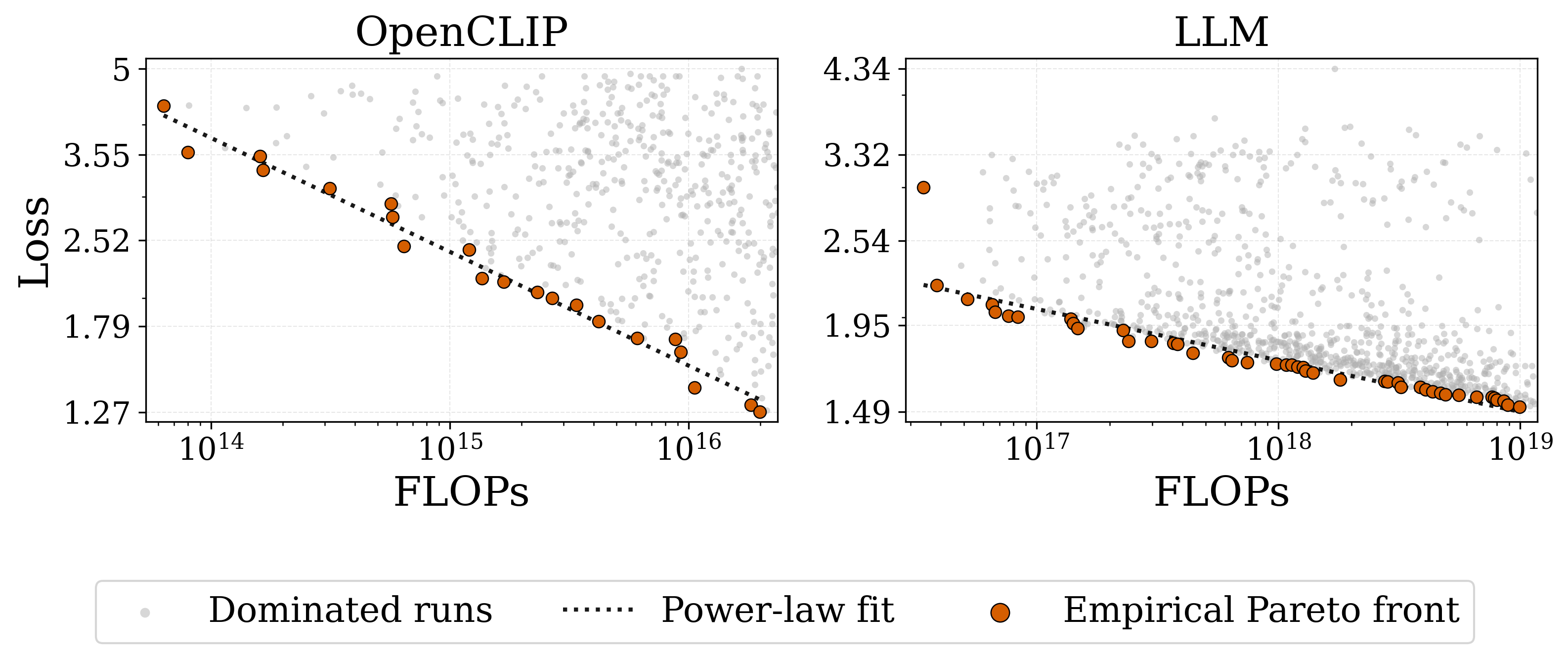
The ScAn-Bench suites. Grey: training runs. Orange: empirical compute-optimal front. Dotted: power-law fit.
Scaling studies are expensive, and every new method pays for them again. To validate a scaling analysis method, groups train hundreds of models, burn thousands of GPU-hours (and the energy that comes with them), then throw the sweep away. The next paper repeats it from scratch.
Existing benchmarks also only cover half of the problem. They either tune hyperparameters such as learning rate and batch size for one fixed architecture, or scale the architecture while fixing those hyperparameters to heuristic values. Scaling analysis needs both to vary together.
ScAn-Bench does the expensive part once. We trained 2,729 configurations across two model families, jointly varying model scale, data scale and training hyperparameters over 2–3 orders of magnitude of compute. Surrogate models fitted to these runs let you query any configuration in the search space, at any scale, in under 20 seconds, with no GPU required.
| Benchmark | Model family | Configurations | Compute range (FLOPs) | Targets |
|---|---|---|---|---|
| VLM | OpenCLIP | 1,535 | 1014 – 1016 | val/test loss, divergence report |
| LLM | Decoder-only Transformer | 1,194 | 1016 – 1019 | val/test loss |
For a general overview of the paper, repository structure and artifact maps refer to PaperOverview.
To create a new benchmark based on this framework refer to BenchmarkCreation.
ScAn-Bench Repository
SDK Installation
We recommend using a conda environment for installing the SDK:
pip install scan-bench
Install pytorch with CUDA, if you want to utilize the GPU.
Quick start
from scan_bench import LLMBenchmark, LLMConfig, LLMTarget, PerformancePredictorType

bench = LLMBenchmark(
    target=LLMTarget.TEST_LOSS,                       # or VAL_LOSS
    predictor_type=PerformancePredictorType.TABPFN,
    device="auto",                                    # or "cpu", "cuda"
)

small = LLMConfig(d_model=512, n_layers=12, n_heads=8, lr=3e-3, weight_decay=0.1,
                  beta1=0.9, beta2=0.95, cooldown_steps=0.2, n_tokens=1_000_000_000)
large = LLMConfig(d_model=768, n_layers=16, n_heads=12, lr=1e-3, weight_decay=0.05,
                  beta1=0.9, beta2=0.95, cooldown_steps=0.2, n_tokens=10_000_000_000)

print(bench.query(small))                  # {"predictions": {...}, "model_stats": {"total_params", "total_training_flops", ...}}
print(bench.query_many([small, large]))    # batched, one result per config
Package usage
Refer to VLM API and LLM API for API usages.
Local development and experiment reproduction
For local development and experiment reproduction, use the cloned repository. The training, evaluation, and plotting shell scripts described below are source-tree workflows and should be run from the repository root.
Surrogate training and evaluation
To train and get the performance results for the surrogate benchmarks, run the provided shell scripts. Change DEVICE to 'cuda' in train_surrogates.sh to use the GPU.
VLM pipeline
VLM performance predictor surrogate
bash scan_bench/vlm/performance_surrogate/train/train_surrogates.sh
VLM divergences predictor surrogate
bash scan_bench/vlm/divergence_surrogate/train.sh
LLM pipeline
bash scan_bench/llm/train_surrogates.sh
Results
After running the surrogate training scripts, a results directory is created under the corresponding directory for each model family. The generated subdirectories contain JSON files with the evaluation results for the trained surrogate models. These JSON outputs include the metrics reported below and are used to construct the corresponding tables in the paper.
For example:
scan_bench/vlm/performance_surrogate/results/
scan_bench/llm/results/
Surrogate Performance (VLM)
| Surrogate | RMSE ↓ | MAE ↓ | MDAE ↓ | MARPD ↓ | R² ↑ | R ↑ | Corr. ↑ |
|---|---|---|---|---|---|---|---|
| TabPFN | 0.21 | 0.06 | 0.02 | 2.69 | 0.96 | 0.98 | 0.98 |
| AutoGluon | 0.26 | 0.12 | 0.06 | 5.79 | 0.94 | 0.97 | 0.98 |
| XGB | 0.35 | 0.20 | 0.12 | 9.11 | 0.90 | 0.95 | 0.96 |
| Mix | 0.37 | 0.21 | 0.14 | 10.11 | 0.88 | 0.94 | 0.95 |
| LGB | 0.42 | 0.29 | 0.24 | 14.88 | 0.86 | 0.94 | 0.95 |
Surrogate Performance (LLM)
| Surrogate | RMSE ↓ | MAE ↓ | MDAE ↓ | MARPD ↓ | R² ↑ | R ↑ | Corr. ↑ |
|---|---|---|---|---|---|---|---|
| TabPFN | 0.27 | 0.08 | 0.01 | 3.02 | 0.77 | 0.88 | 0.95 |
| AutoGluon | 0.30 | 0.11 | 0.02 | 4.66 | 0.72 | 0.85 | 0.91 |
| XGB | 0.35 | 0.15 | 0.04 | 6.80 | 0.63 | 0.80 | 0.86 |
| Mix | 0.33 | 0.17 | 0.07 | 7.65 | 0.66 | 0.82 | 0.86 |
| LGB | 0.33 | 0.17 | 0.08 | 7.97 | 0.66 | 0.83 | 0.87 |
Data
The repository includes pre-collected configuration-performance datasets used to train the surrogate models.
VLM dataset summary
| Quantity | Count | Description |
|---|---|---|
| Training configurations | 1,535 | Total number of collected VLM training configurations. |
| Failed configurations | 134 | Configurations that diverged during training. |
| Successful configurations | 1366 | Configurations that completed training successfully. |
| Collected checkpoint rows | 8,024 | Total checkpoint rows collected across all runs. |
| Successful checkpoint rows | 7,701 | Checkpoints from successful runs |
LLM dataset summary
| Quantity | Count | Description |
|---|---|---|
| Training configurations | 1,194 | Total number of collected LLM training configurations. |
| Collected checkpoint rows | 4,524 | Total checkpoints collected across successful and failed runs. |
| Performance-surrogate rows | 4,524 | Checkpoints from successful runs used for performance prediction. |
Data locations
The table below shows where the data is located:
| Dataset | Path | Description |
|---|---|---|
| VLM performance data | scan_bench/vlm/performance_surrogate/splits |
Training and test splits for VLM performance surrogate modeling. |
| VLM divergence data | scan_bench/vlm/divergence_surrogate/splits |
Configuration-level data for predicting failed (diverged) configurations. |
| LLM performance data | scan_bench/llm/splits |
Configuration-performance datasets for LLM surrogate training. |
Additionally, we host the datasets online, with the corresponding Licenses, source dataset Licenses and corresponding downstream task Licenses:
The Croissant RAI metadata files for each dataset are included in this repository:
VLM-Croissant-RAI LLM-Croissant-RAI
Unit testing
To run the unit tests provided in tests/ make sure that pytest is installed.
pip install pytest
Run the tests with the following command:
python -m pytest
Contributing
Contributions are welcome. Please open an issue or submit a pull request.
For usage and licensing terms, see the LICENSE file.
Citations
If you use ScAn-Bench, please cite:
@inproceedings{sermaxhaj2026scanbench,
  title={ScAn-Bench: Evaluating Scaling Analysis Methodology},
  author={A. Sermaxhaj and N. Alipour and D. Sinani and J. Hog and N. Mallik and S. Adriaensen
          and J. Jitsev and D. Stoll},
  booktitle={Advances in Neural Information Processing Systems},
  year={2026},
  note={Evaluations and Datasets Track},
  url={https://arxiv.org/abs/2609.35707}
}
2 maintainers


Metadata
2 maintainers
Release files for scan-bench 0.4.0
For a detailed explanation of source distributions (sdists) and built distributions (wheels), please see the package formats documentation.
Source distribution (sdist)
| File | Size | Uploaded | Provenance | Actions |
|---|---|---|---|---|
| scan_bench-0.4.0.tar.gz | 23.6 MB | Without provenance | Details for scan_bench-0.4.0.tar.gz |
Built distribution (wheel)
| File | Interpreter | ABI | Platform | Actions Reset |
|---|---|---|---|---|
| scan_bench-0.4.0-py3-none-any.whl | Python 3 | none | any | Details for scan_bench-0.4.0-py3-none-any.whl |
Total release size: 47.5 MB
Release files / scan_bench-0.4.0.tar.gz
| Download URL | scan_bench-0.4.0.tar.gz |
|---|---|
| Size | 23.6 MB |
| Tags | Source |
|
SHA-256 checksum How to use checksums |
4d0d7bd145b56c60b9a8a957d2b7b6f67047e7f4b9ad54419c4205cb836e06d3
|
|
BLAKE2b-256 checksum How to use checksums |
43ae2b24d472d7158f2caed7b1b9e07fcafeaafaf0111e1f6ff6d4b7119573c0
|
| Upload date | |
|
Uploaded using Trusted Publishing? What is trusted publishing? |
No |
| Uploaded via |
uv/0.12.22 {"installer":{"name":"uv","version":"0.12.22","subcommand":["publish"]},"python":null,"implementation":{"name":null,"version":null},"distro":{"name":"Ubuntu","version":"24.04","id":"noble","libc":null},"system":{"name":null,"release":null},"cpu":null,"openssl_version":null,"setuptools_version":null,"rustc_version":null,"ci":null}
|
Release files / scan_bench-0.4.0-py3-none-any.whl
| Download URL | scan_bench-0.4.0-py3-none-any.whl |
|---|---|
| Size | 23.9 MB |
| Tags | Python 3 |
|
SHA-256 checksum How to use checksums |
bee930b4cb09e2ead8863284a96a64061c7c8f8153905b211436bf8049b33d8d
|
|
BLAKE2b-256 checksum How to use checksums |
664605bc9a475590a2303a020141e743a46361c60eba0115954cd532e27558ab
|
| Upload date | |
|
Uploaded using Trusted Publishing? What is trusted publishing? |
No |
| Uploaded via |
uv/0.12.22 {"installer":{"name":"uv","version":"0.12.22","subcommand":["publish"]},"python":null,"implementation":{"name":null,"version":null},"distro":{"name":"Ubuntu","version":"24.04","id":"noble","libc":null},"system":{"name":null,"release":null},"cpu":null,"openssl_version":null,"setuptools_version":null,"rustc_version":null,"ci":null}
|
Security for scan-bench 0.4.0
Provenance
Provenance describes where a file came from. On PyPI, provenance is shared via attestations, which provide a verifiable record of the build or publishing details. View details, limitations and caveats.
No provenance found
None of the files in this release were uploaded with provenance metadata.
A note on package security
PyPI is a repository for distributing packages, not a service for auditing them. While third-party security researchers and our staff do their best to detect and remove malicious packages, PyPI cannot guarantee the quality, security or suitability of any given package.
To learn more about protecting yourself from malicious actors, visit our package security documentation.














