
Interactive Streamlit workbench for visualizing eye-tracking-while-reading scanpaths, computing reading measures, and exporting figures and tabular data.
Verified details
These details have been verified by PyPIProject links
GitHub Statistics
Maintainers

Project description
Scanpath Studio




An interactive workbench for visualizing eye-tracking-while-reading data. Drop in a trial and see the scanpath the way the reader saw it: words at their true on-screen positions, fixations and saccades layered on top, a density heatmap, side-by-side trial comparisons, and animated replay — all tunable, and all exportable as publication-ready figures.
It is dataset-agnostic (auto-detects EyeLink / Gazepoint / snake-case columns) and ships with a small OneStop demo so you can try it with zero setup.
Authors: Omer Shubi, Keren Gruteke Klein, and others (TBD) — LACC Lab, Technion.
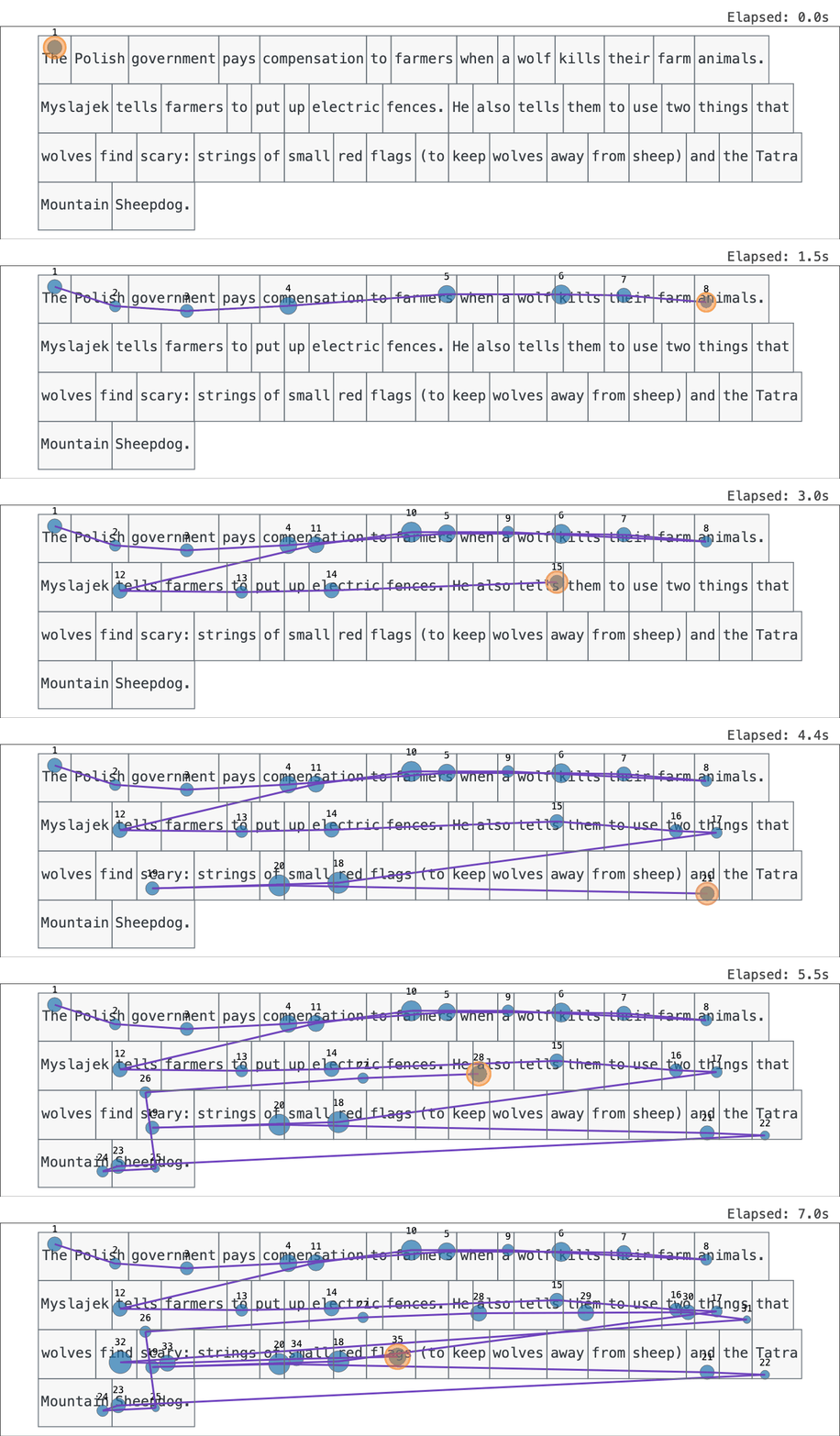
A scanpath replayed fixation by fixation over the text the reader saw (bundled OneStop demo).
Try it
Live demo (zero install): https://scanpath-studio.streamlit.app
Or run locally:
pip install scanpath-studio
scanpath-studio      # launches the app in your browser
What you can visualize
The plot is built from layers you can toggle independently:
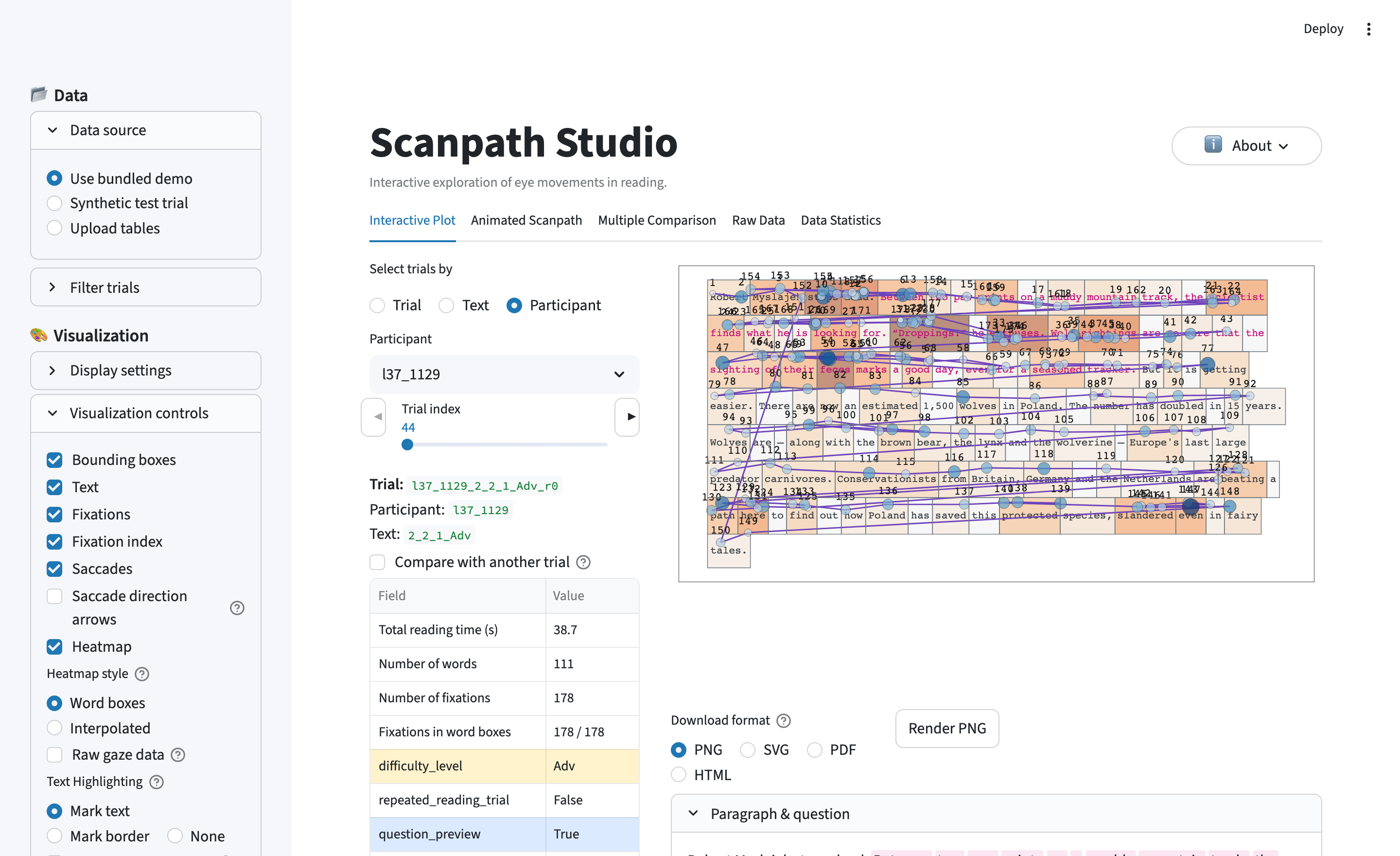
- Text — every word drawn at the exact pixel coordinates the participant saw.
- Fixations — where the eye paused, sized and colored by any column in your data (duration, GPT-2 surprisal, word frequency, …).
- Saccades — the jumps between fixations; backward jumps (regressions) stand out.
- Areas of interest — word bounding boxes that tie each fixation to a word.
- Heatmap — the trial aggregated into a word-level measure (total fixation duration, fixation count, …).
On top of the layered view:
- Animated replay — watch the scanpath unfold fixation by fixation, at real or scaled speed; export it as interactive HTML or a self-playing GIF / MP4 clip for slides and papers.
- Compare two trials — overlaid on one canvas or side-by-side (e.g. ordinary vs. information-seeking reading, first vs. repeated reading, L1 vs. L2).
- Critical-span highlight — mark a region of interest (e.g. an answer span) by color or border to see at a glance whether it was read.
- Out-of-text & by-line — flag fixations that land outside every word box, or color fixations by the text line they fall on.
- Fully customizable — map any field to color, size, or axes; set the plot background (white or a neutral gray); every toggle, palette, and scale is independent.
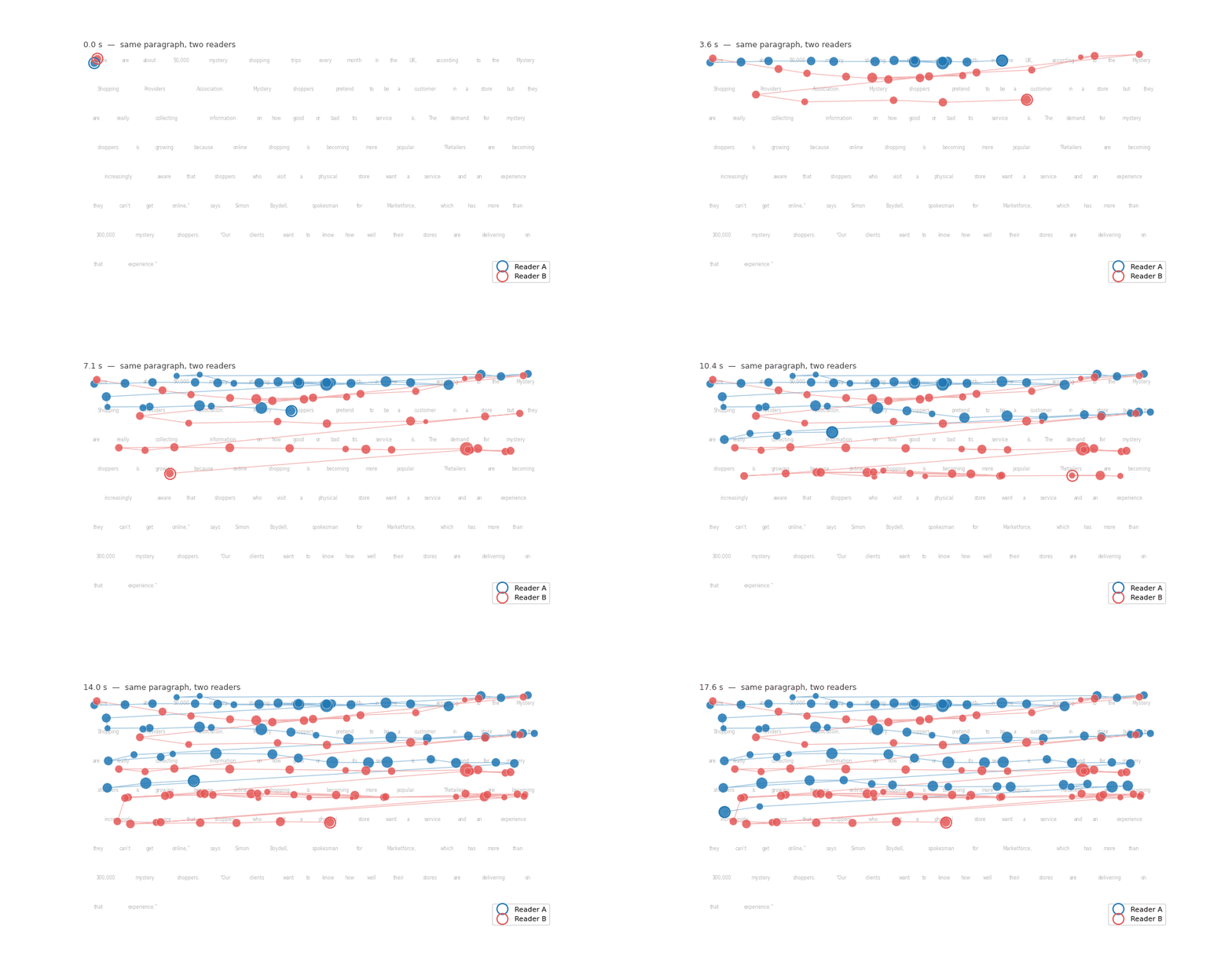
Overlay a second reading to compare two readers of the same text on a shared real-time clock.
The four tabs
| Tab | What's there |
|---|---|
| Interactive Plot | The layered scanpath view, trial picker (by trial / text / participant), trial metadata, and two-trial comparison. |
| Animated Scanpath | Frame-by-frame replay; each frame lasts the actual fixation duration ÷ playback speed. Export as interactive HTML, GIF, or MP4. |
| Raw Data | Paginated word, fixation, and raw-gaze tables, each with CSV + Parquet download. |
| Data Statistics | Summary stats (mean fixation duration, saccade amplitude, regression rate, reading speed), a fixation-duration distribution, and a per-word reading-measure bar plot. |
Reading measures from raw fixations
If your data only carries raw fixations, the app computes the canonical per-word measures itself (pre-aggregated EyeLink columns, if present, take precedence):
| Measure | Definition |
|---|---|
| FFD — first fixation duration | duration of the first fixation to land on the word |
| FPRT / gaze duration | sum of fixations from first entry until the eye first leaves |
| RPD / go-past time | sum of fixations from first entry until the eye first moves past the word |
| TFD / dwell | sum of all fixations on the word |
| fixation count, skip, regression in/out, saccade amplitude | standard reading-research flags and counts |
Definitions follow Rayner (1998) and Inhoff & Radach (1998).
Triage your trials
Filter the trial pool by condition — information-seeking Hunting vs. ordinary Gathering reading, difficulty, first vs. repeated reading, answer correctness — or by your own annotations. Star favorites, tag trials (e.g. "To exclude"), and jot per-trial notes; download everything as a JSON sidecar and restore it in a later session.
Your data
Upload CSV, TSV, Parquet, or Feather tables for words/AoIs, fixations, and (optionally) raw gaze. Columns are auto-detected from common EyeLink, Gazepoint, and snake-case conventions; a sidebar Column mapping panel lets you override any guess. No single column uniquely identifies a trial? Map Trial ID to several columns (e.g. participant + paragraph + repeated reading) and a combined unique trial ID is built on the fly.
Areas of interest come straight from your word boxes — given as
(x, y, width, height) or EyeLink's IA_LEFT/RIGHT/TOP/BOTTOM — the app never
invents them. Fixations are tied to words by bounding-box containment (with a
small nearest-word fallback); fixations that miss every box are flagged
out-of-text.
Real corpora come in many shapes, so the loader bends to fit:
- One file per participant or text. Drop in several files at once (or pass a
glob / list of paths to the API and CLI) and they're concatenated, with each
row tagged by its
source_fileso filename-encoded metadata isn't lost. - Only one report. Have just an interest-area report, or just fixations? Load either one alone — the missing layer is simply skipped, and a words-only table still draws a heatmap from its own pre-aggregated reading measures.
- Stimulus-level AoIs. Word boxes given once per text (no participant column) are broadcast across every reader of that text.
- Fixations as word/AoI sequences. No pixel coordinates, only "which word"? Fixations are placed at the matching word-box centers (or, for character-level AoIs like PoTeC's, at the fixated character's box).
PoTeC (Potsdam Textbook Corpus — 75 readers × 12 German textbook texts, one fixation file per reading and stimulus-level AoIs) loads as a worked example of all four:
import scanpath_studio as sps

words, fixations = sps.load_potec("data/PoTeC", download=True)   # ~45 MB on first call
fig = sps.plot_scanpath(words, fixations, "0", "b0", canvas_size=(1680, 1050))
or scanpath-studio render --potec data/PoTeC -p 0 -t b0 -o potec.png.
Heads-up: PoTeC's raw files can't be loaded through the generic upload flow — its trial/word ids live in filenames and fixation coordinates come from a separate character-AoI file. The dedicated loader handles that join. An in-app Public datasets source built on the same loaders is feature-flagged off for now and will appear in a future release.
When you upload your own tables and a required column can't be auto-detected, the app no longer stops — it shows your raw tables in the Raw Data tab so you can see the column names and finish the Column mapping in the sidebar.
Bulk export
One panel exports artifacts for every filtered trial into a single zip —
per-trial PNG + SVG figures, the exact plot settings (plot_config.json),
fixations, and per-word measures, plus aggregated tables across trials. Ideal
for paper figures or building an image dataset of scanpaths for vision models.
Command line & Python API
Everything the app draws is also available headless — same pipeline, same canonical figure.
CLI — render a trial straight to a file:
scanpath-studio render --sample --list-trials         # what's available
scanpath-studio render --sample -o scanpath.html      # interactive HTML
scanpath-studio render --words ia.csv --fixations fixations.csv \
    -p participant_1 -t trial_3 --no-heatmap -o figure.png
scanpath-studio render --fixations 'fixations/*.tsv' -o scanpath.png   # multi-file, fixations-only
scanpath-studio render --potec data/PoTeC -p 0 -t b0 -o potec.png      # PoTeC corpus
scanpath-studio render --sample --animate -o replay.html
HTML output is browser-free; PNG/SVG/PDF go through Kaleido (install Chrome
once with plotly_get_chrome -y). See scanpath-studio render --help for the
full set of layer toggles. scanpath-studio on its own still launches the app,
forwarding any extra args to streamlit run (e.g. --server.port 8502).
Python API — the same canonical figures programmatically:
import scanpath_studio as sps

words, fixations = sps.load_scanpath_data("ia.csv", "fixations.csv")
sps.list_trials(words, fixations)                # (participant, trial) combos
fig = sps.plot_scanpath(words, fixations, "participant_1", "trial_3")
sps.save_figure(fig, "scanpath.html")            # or .png/.svg/.pdf
anim = sps.animate_scanpath(words, fixations, "participant_1", "trial_3")
measures = sps.compute_word_metrics(words, fixations)  # FFD/FPRT/RPD/TFD…
sps.load_sample_data() returns the bundled demo, and plot_scanpath /
animate_scanpath accept every layer toggle and style option the app exposes
(show_heatmap=False, color_by="pass_index", …).
load_scanpath_data also takes glob patterns or lists of paths, and either
table may be omitted for single-report datasets:
# one fixation file per participant, no separate IA report
words, fixations = sps.load_scanpath_data(fixations="fixations/*.tsv")
# or a ready-made loader for PoTeC's multi-file, stimulus-AoI layout
words, fixations = sps.load_potec("data/PoTeC", readers=[0, 1], texts=["b0"])
Run from source
git clone https://github.com/lacclab/scanpath-studio.git
cd scanpath-studio
pip install -e ".[test]"          # or: uv sync
streamlit run streamlit_app.py
Tested on Python 3.11–3.13. Run the tests with pytest; lint with
ruff check --exclude other_vis .. See AGENTS.md for an
architectural overview.
Citation
A system-demo paper is in preparation — citation TBD. Until then, cite the
software via GitHub's "Cite this repository" button (generated from
CITATION.cff).
If you use the bundled demo data, please cite the OneStop corpus:
@article{berzak2025onestop,
  title     = {{OneStop}: A 360-Participant {E}nglish Eye Tracking Dataset
               with Different Reading Regimes},
  author    = {Berzak, Yevgeni and Malmaud, Jonathan and Shubi, Omer
               and Meiri, Yoav and Lion, Ella and Levy, Roger},
  journal   = {Scientific Data},
  year      = {2025},
  publisher = {Nature Publishing Group},
  doi       = {10.1038/s41597-025-06272-2},
  url       = {https://www.nature.com/articles/s41597-025-06272-2},
}
The bundled demo is a subset of OneStop Eye Movements, used under its original license (docs).
License
MIT — see LICENSE.
Project details
Verified details
These details have been verified by PyPIProject links
GitHub Statistics
Maintainers
Release history Release notifications | RSS feed


Download files
Download the file for your platform. If you're not sure which to choose, learn more about installing packages.
Source Distribution
Built Distribution
Filter files by name, interpreter, ABI, and platform.
If you're not sure about the file name format, learn more about wheel file names.
Copy a direct link to the current filters
File details
Details for the file scanpath_studio-0.18.0.tar.gz.
File metadata
- Download URL: scanpath_studio-0.18.0.tar.gz
- Upload date:
- Size: 736.8 kB
- Tags: Source
- Uploaded using Trusted Publishing? Yes
- Uploaded via: twine/6.1.0 CPython/3.13.12
File hashes
| Algorithm | Hash digest | |
|---|---|---|
| SHA256 |
d9504c96d6a2ccc8df4dd692b86f6dd940678d616b242935773d4f767ede366f
|
|
| MD5 |
60b7d2dcbcfc5696cab5f8496487cc6e
|
|
| BLAKE2b-256 |
b449da46999c9f79b9b1b2b2522a2eef377d37b4b82f17cf9dcdd8b1f3a2a82d
|
Provenance
The following attestation bundles were made for scanpath_studio-0.18.0.tar.gz:
Publisher:
publish.yml on lacclab/scanpath-studio
-
Statement:
-
Statement type:
https://in-toto.io/Statement/v1 -
Predicate type:
https://docs.pypi.org/attestations/publish/v1 -
Subject name:
scanpath_studio-0.18.0.tar.gz -
Subject digest:
d9504c96d6a2ccc8df4dd692b86f6dd940678d616b242935773d4f767ede366f - Sigstore transparency entry: 1801696304
- Sigstore integration time:
-
Permalink:
lacclab/scanpath-studio@eb3292b664147097805935b1b91a6edd1d46c3b7 -
Branch / Tag:
refs/tags/v0.18.0 - Owner: https://github.com/lacclab
-
Access:
public
-
Token Issuer:
https://token.actions.githubusercontent.com -
Runner Environment:
github-hosted -
Publication workflow:
publish.yml@eb3292b664147097805935b1b91a6edd1d46c3b7 -
Trigger Event:
push
-
Statement type:
File details
Details for the file scanpath_studio-0.18.0-py3-none-any.whl.
File metadata
- Download URL: scanpath_studio-0.18.0-py3-none-any.whl
- Upload date:
- Size: 706.3 kB
- Tags: Python 3
- Uploaded using Trusted Publishing? Yes
- Uploaded via: twine/6.1.0 CPython/3.13.12
File hashes
| Algorithm | Hash digest | |
|---|---|---|
| SHA256 |
6b844fa9064efb3a03f67450603d708320eddb39b84369cc5c9bc2f37ac23f0c
|
|
| MD5 |
479dc80acf671f8e8c6a8af11cfb2fb5
|
|
| BLAKE2b-256 |
f38a1392e53af9c250f9ca9e9f705cc3a60845777d1074ccb7e5824d382d8e11
|
Provenance
The following attestation bundles were made for scanpath_studio-0.18.0-py3-none-any.whl:
Publisher:
publish.yml on lacclab/scanpath-studio
-
Statement:
-
Statement type:
https://in-toto.io/Statement/v1 -
Predicate type:
https://docs.pypi.org/attestations/publish/v1 -
Subject name:
scanpath_studio-0.18.0-py3-none-any.whl -
Subject digest:
6b844fa9064efb3a03f67450603d708320eddb39b84369cc5c9bc2f37ac23f0c - Sigstore transparency entry: 1801696917
- Sigstore integration time:
-
Permalink:
lacclab/scanpath-studio@eb3292b664147097805935b1b91a6edd1d46c3b7 -
Branch / Tag:
refs/tags/v0.18.0 - Owner: https://github.com/lacclab
-
Access:
public
-
Token Issuer:
https://token.actions.githubusercontent.com -
Runner Environment:
github-hosted -
Publication workflow:
publish.yml@eb3292b664147097805935b1b91a6edd1d46c3b7 -
Trigger Event:
push
-
Statement type:






