
Convert infrastructure scans into various output formats such as Markdown tables, YAML, HTML, CSV, and more

Project description
 scans2any
Convert infrastructure scans into various output formats, such as Markdown tables, YAML, HTML, CSV, and more. It can also be used to generate launch scripts and target files for various other scanners.
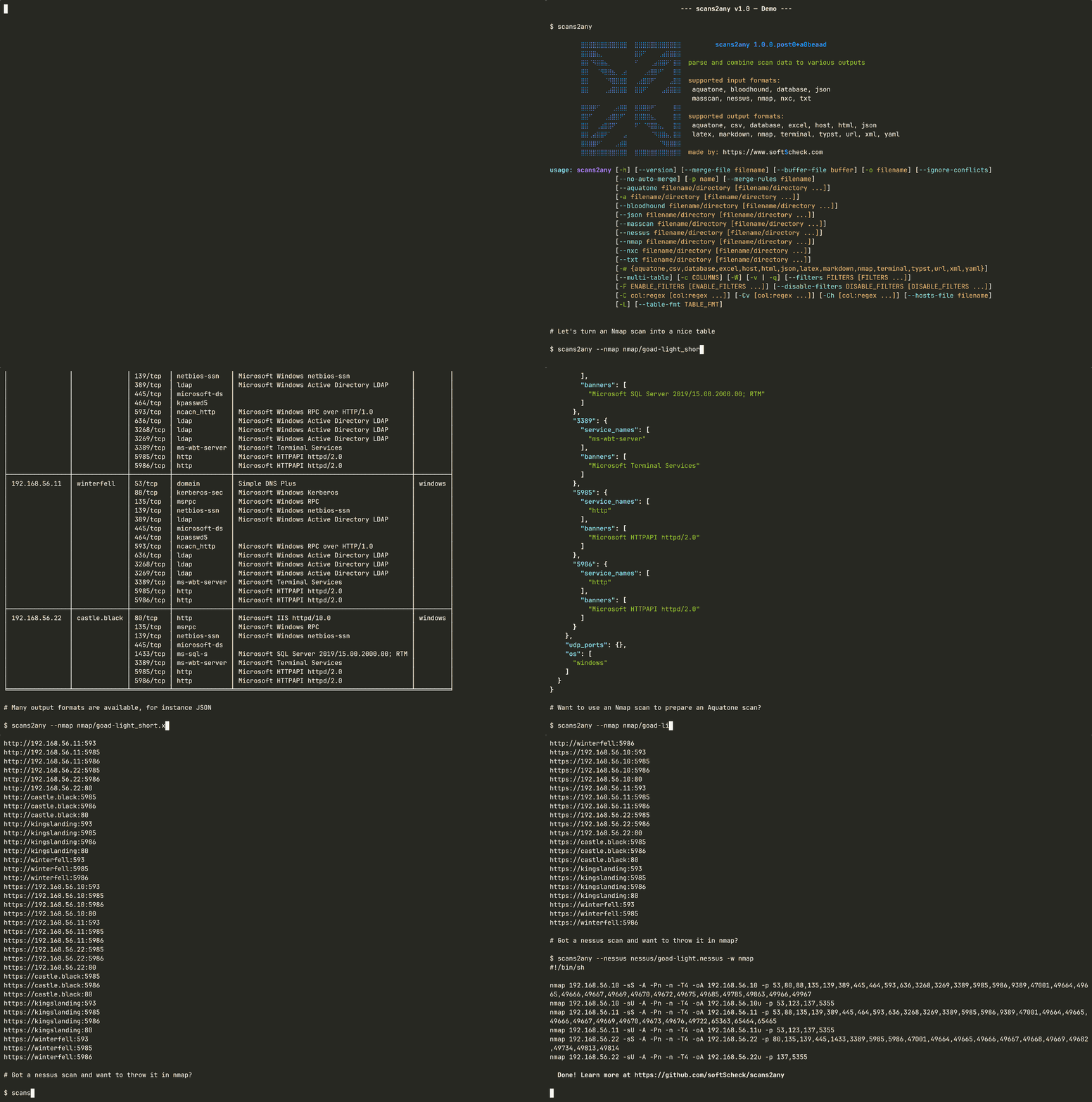
Install & Run
You can either install it via uv in a virtual environment:
uv venv
uv pip install .
source .venv/bin/activate
scans2any
or directly with uv tool install . or pipx install .
It is also possible to simply run it with uv uv run scans2any
Docker
With the provided Dockerfile, you can run scans2any without any prior setup. Simply run:
docker build -t scans2any .
docker run -v $(pwd):/data scans2any
Usage
usage: scans2any [-h] [--version] [--merge-file filename] [-o filename]
                 [--ignore-conflicts] [--no-auto-merge]
                 [-a filename/directory [filename/directory ...]]
                 [--nmap filename/directory [filename/directory ...]]
                 [--aquatone filename/directory [filename/directory ...]]
                 [--bloodhound filename/directory [filename/directory ...]]
                 [--nessus filename/directory [filename/directory ...]]
                 [--masscan filename/directory [filename/directory ...]]
                 [--txt filename/directory [filename/directory ...]]
                 [--json filename/directory [filename/directory ...]]
                 [--nxc filename/directory [filename/directory ...]]
                 [-w {aquatone,csv,excel,host,html,json,latex,markdown,nmap,terminal,typst,url,xml,yaml}]
                 [--multi-table] [-c COLUMNS] [-W] [-v | -q]
                 [--filters FILTERS [FILTERS ...]]
                 [--enable-filters ENABLE_FILTERS [ENABLE_FILTERS ...]]
                 [--disable-filters DISABLE_FILTERS [DISABLE_FILTERS ...]]
                 [-L] [--table-fmt TABLE_FMT]

Merge infrastructure scans and convert them to various formats.

options:
  -h, --help            Show this help message and exit
  --version             Displays version and exits
  --merge-file filename
                        Use file as merge file to resolve conflicts
  -o, --out filename    output to specified file
  --ignore-conflicts    Do not check for conflicts and do not create a merge
                        file
  --no-auto-merge       Do not apply automatic conflict solving using internal
                        rules

input files (at least one required unless):
  -a, --auto filename/directory [filename/directory ...]
                        auto-detect scans types
  --nmap filename/directory [filename/directory ...]
                        xml nmap report(s)
  --aquatone filename/directory [filename/directory ...]
                        aquatone report as txt and/or json
  --bloodhound filename/directory [filename/directory ...]
                        bloodhound json
  --nessus filename/directory [filename/directory ...]
                        nessus report (.nessus) export
  --masscan filename/directory [filename/directory ...]
                        masscan report(s)
  --txt filename/directory [filename/directory ...]
                        plain text formats
  --json filename/directory [filename/directory ...]
                        json files
  --nxc filename/directory [filename/directory ...]
                        NetExec/CrackMapExec SMB.db sqlite database

output writer:
  -w, --writer {aquatone,csv,excel,host,html,json,latex,markdown,nmap,terminal,typst,url,xml,yaml}
                        Specify output writer. (default: terminal)
  --multi-table         Creates one table for each host, if supported by
                        output format
  -c, --columns COLUMNS
                        Specify output columns as a comma-separated list.
                        (default: ('IP-Addresses', 'Hostnames', 'Ports',
                        'Services', 'Banners', 'OS'))
  -W, --list-writers    List writers with descriptions and options

verbosity options:
  -v, --verbose         Increase verbosity level (use twice for debug mode)
  -q, --quiet           Suppresses all output except errors

filter options:
  --filters FILTERS [FILTERS ...]
                        Overwrites default filters with specified filters
                        (default: ['trash_banner', 'trash_service_name',
                        'trash_hostname', 'combine_banner', 'nmap_banner'])
  --enable-filters ENABLE_FILTERS [ENABLE_FILTERS ...]
                        Enables additional filters (applied after --filters)
  --disable-filters DISABLE_FILTERS [DISABLE_FILTERS ...]
                        Disables certain filters (will be applied after
                        --enable-filters)
  -L, --list-filters    List filters with descriptions and options

writer arguments:
  --table-fmt TABLE_FMT
                        Table format for terminal output, see tabulate python
                        package (default: fancy_grid)

Examples: scans2any --nmap tcp_scan.xml --nmap udp_scan.xml --nessus scan.nessus
You can learn more about how to use scans2any in the tutorial.
Output
There are many possible output formats. A simple example for each of them follows:
csv
IP-Addresses,Hostnames,Ports,Services,Banners,OS
188.68.47.54,a2f36.netcup.net - softscheck.com,21/tcp,ftp,ProFTPD,linux
188.68.47.54,a2f36.netcup.net - softscheck.com,22/tcp,ssh,OpenSSH/8.4p1 Debian 5+deb11u4,linux
188.68.47.54,a2f36.netcup.net - softscheck.com,53/tcp,domain,,linux
188.68.47.54,a2f36.netcup.net - softscheck.com,80/tcp,http,nginx,linux
188.68.47.54,a2f36.netcup.net - softscheck.com,443/tcp,http,nginx,linux
188.68.47.54,a2f36.netcup.net - softscheck.com,8443/tcp,https\-alt,sw\-cp\-server,linux
html
<!DOCTYPE html>
<html>
  <head>
      <title>scans2any</title>
      <style>
          .table { width: 100%; border-collapse: collapse; margin-bottom: 20px; }
          .table th, .table td { padding: 8px; text-align: left; border: 1px solid #ddd; }
          .table-striped tbody tr:nth-of-type(odd) { background-color: #f9f9f9; }
          .table-hover tbody tr:hover { background-color: #f5f5f5; }
          .container { margin-bottom: 30px; }
      </style>
  </head>
  <body>
    <h1>scans2any</h1>
    <div class="container">
      <table border="1" class="dataframe table table-striped table-hover">
        <thead>
          <tr style="text-align: right;">
            <th>IP-Addresses</th>
            <th>Hostnames</th>
            <th>Ports</th>
            <th>Services</th>
            <th>Banners</th>
            <th>OS</th>
          </tr>
        </thead>
        <tbody>
          <tr>
            <td>188.68.47.54</td>
            <td>a2f36.netcup.net<br>softscheck.com</td>
            <td>21/tcp<br>22/tcp<br>53/tcp<br>80/tcp<br>443/tcp<br>8443/tcp</td>
            <td>ftp<br>ssh<br>domain<br>http<br>http<br>https-alt</td>
            <td>ProFTPD<br>OpenSSH/8.4p1 Debian 5+deb11u4<br><br>nginx<br>nginx<br>sw-cp-server</td>
            <td>linux</td>
          </tr>
        </tbody>
      </table>
    </div>
  </body>
</html>
host
188.68.47.54
a2f36.netcup.net
softscheck.com
json
{
  "188.68.47.54": {
    "hostnames": [
      "a2f36.netcup.net",
      "softscheck.com"
    ],
    "tcp_ports": {
      "21": {
        "service_names": [
          "ftp"
        ],
        "banners": [
          "ProFTPD"
        ]
      },
      "22": {
        "service_names": [
          "ssh"
        ],
        "banners": [
          "OpenSSH/8.4p1 Debian 5+deb11u4"
        ]
      },
      "53": {
        "service_names": [
          "domain"
        ],
        "banners": [
          ""
        ]
      },
      "80": {
        "service_names": [
          "http"
        ],
        "banners": [
          "nginx"
        ]
      },
      "443": {
        "service_names": [
          "http"
        ],
        "banners": [
          "nginx"
        ]
      },
      "8443": {
        "service_names": [
          "https-alt"
        ],
        "banners": [
          "sw-cp-server"
        ]
      }
    },
    "udp_ports": {},
    "os": [
      "linux"
    ]
  }
}
latex
\documentclass{article}
\usepackage[utf8]{inputenc}
\usepackage{longtable}
\usepackage{booktabs}
\usepackage{geometry}
\geometry{a4paper,margin=2pt}
\usepackage{makecell}
\usepackage{array}
\usepackage{multirow}
\title{Infrastructure Scan Results}
\author{Generated by scans2any}
\date{\today}

\begin{document}
\maketitle

\begin{longtable}{llllll}
\caption{Infrastructure Scan Results} \\
\toprule
\makecell[t]{IP-Addresses} & \makecell[t]{Hostnames} & \makecell[t]{Ports} & \makecell[t]{Services} & \makecell[t]{Banners} & \makecell[t]{OS} \\
\midrule
\endfirsthead
\caption[]{Infrastructure Scan Results} \\
\toprule
\makecell[t]{IP-Addresses} & \makecell[t]{Hostnames} & \makecell[t]{Ports} & \makecell[t]{Services} & \makecell[t]{Banners} & \makecell[t]{OS} \\
\midrule
\endhead
\midrule
\multicolumn{6}{r}{Continued on next page} \\
\midrule
\endfoot
\bottomrule
\endlastfoot
\makecell[t]{188.68.47.54} & \makecell[t]{a2f36.netcup.net \\ softscheck.com} & \makecell[t]{21/tcp \\ 22/tcp \\ 53/tcp \\ 80/tcp \\ 443/tcp \\ 8443/tcp} & \makecell[t]{ftp \\ ssh \\ domain \\ http \\ http \\ https-alt} & \makecell[t]{ProFTPD \\ OpenSSH/8.4p1 Debian 5+deb11u4 \\  \\ nginx \\ nginx \\ sw-cp-server} & \makecell[t]{linux} \\
\end{longtable}

\end{document}
markdown
| 188.68.47.54   | a2f36.netcup.net<br>softscheck.com   | linux                          |
|:---------------|:-------------------------------------|:-------------------------------|
| 21/tcp         | ftp                                  | ProFTPD                        |
| 22/tcp         | ssh                                  | OpenSSH/8.4p1 Debian 5+deb11u4 |
| 53/tcp         | domain                               |                                |
| 80/tcp         | http                                 | nginx                          |
| 443/tcp        | http                                 | nginx                          |
| 8443/tcp       | https-alt                            | sw-cp-server                   |
nmap
#!/bin/bash
nmap 188.68.47.54 -sS -A -Pn -n -T4 -oA 188.68.47.54 -p 21,22,53,80,443,8443,8444
[!NOTE] The nmap output includes a port, that is not part of the infrastructure. This is done because scanning closed ports with nmap can help with OS detection.
terminal (default)
╒════════════════╤══════════════════╤══════════╤════════════╤════════════════════════════════╤═══════╕
│ IP-Addresses   │ Hostnames        │ Ports    │ Services   │ Banners                        │ OS    │
╞════════════════╪══════════════════╪══════════╪════════════╪════════════════════════════════╪═══════╡
│ 188.68.47.54   │ a2f36.netcup.net │ 21/tcp   │ ftp        │ ProFTPD                        │ linux │
│                │ softscheck.com   │ 22/tcp   │ ssh        │ OpenSSH/8.4p1 Debian 5+deb11u4 │       │
│                │                  │ 53/tcp   │ domain     │                                │       │
│                │                  │ 80/tcp   │ http       │ nginx                          │       │
│                │                  │ 443/tcp  │ http       │ nginx                          │       │
│                │                  │ 8443/tcp │ https-alt  │ sw-cp-server                   │       │
╘════════════════╧══════════════════╧══════════╧════════════╧════════════════════════════════╧═══════╛
typst
#set page(flipped: true)

#table(
  columns: (6),
  [*IP-Addresses*], [*Hostnames*], [*Ports*], [*Services*], [*Banners*], [*OS*],
  [188.68.47.54], [a2f36.netcup.net \ softscheck.com], [21/tcp \ 22/tcp \ 53/tcp \ 80/tcp \ 443/tcp \ 8443/tcp], [ftp \ ssh \ domain \ http \ http \ https-alt], [ProFTPD \ OpenSSH/8.4p1 Debian 5+deb11u4 \  \ nginx \ nginx \ sw-cp-server], [linux]
)
yaml
188.68.47.54:
    hostnames:
    - a2f36.netcup.net
    - softscheck.com
    tcp_ports:
        21:
            service_names:
            - ftp
            banners:
            - ProFTPD
        22:
            service_names:
            - ssh
            banners:
            - OpenSSH/8.4p1 Debian 5+deb11u4
        53:
            service_names:
            - domain
            banners:
            - ''
        80:
            service_names:
            - http
            banners:
            - nginx
        443:
            service_names:
            - http
            banners:
            - nginx
        8443:
            service_names:
            - https-alt
            banners:
            - sw-cp-server
    udp_ports: {}
    os:
    - linux
xml
<?xml version="1.0" ?>
<infrastructure>
  <host ip="188.68.47.54">
    <hostnames>
      <hostname>a2f36.netcup.net</hostname>
      <hostname>softscheck.com</hostname>
    </hostnames>
    <os_info>
      <os>linux</os>
    </os_info>
    <tcp_ports>
      <port number="21">
        <services>
          <service>ftp</service>
        </services>
        <banners>
          <banner>ProFTPD</banner>
        </banners>
      </port>
      <port number="22">
        <services>
          <service>ssh</service>
        </services>
        <banners>
          <banner>OpenSSH/8.4p1 Debian 5+deb11u4</banner>
        </banners>
      </port>
      <port number="53">
        <services>
          <service>domain</service>
        </services>
        <banners/>
      </port>
      <port number="80">
        <services>
          <service>http</service>
        </services>
        <banners>
          <banner>nginx</banner>
        </banners>
      </port>
      <port number="443">
        <services>
          <service>http</service>
        </services>
        <banners>
          <banner>nginx</banner>
        </banners>
      </port>
      <port number="8443">
        <services>
          <service>https-alt</service>
        </services>
        <banners>
          <banner>sw-cp-server</banner>
        </banners>
      </port>
    </tcp_ports>
  </host>
</infrastructure>
Contributing
If you want to contribute, there is useful information at contributing.
Wish to learn more about scans2any or us?
Read the blog post about scans2any at https://www.softscheck.com/en/blog/scans2any/.
Release history Release notifications | RSS feed


Download files
Download the file for your platform. If you're not sure which to choose, learn more about installing packages.
Source Distribution
Built Distribution
Filter files by name, interpreter, ABI, and platform.
If you're not sure about the file name format, learn more about wheel file names.
Copy a direct link to the current filters
File details
Details for the file scans2any-0.8.0.tar.gz.
File metadata
- Download URL: scans2any-0.8.0.tar.gz
- Upload date:
- Size: 3.2 MB
- Tags: Source
- Uploaded using Trusted Publishing? Yes
- Uploaded via: uv/0.6.9
File hashes
| Algorithm | Hash digest | |
|---|---|---|
| SHA256 |
c665347f08b800f6eba1d4cab94f1aa310ad312834e72d2370541829a2c90a4e
|
|
| MD5 |
94f6739a4ffc7f2304acd0e13b22dfa1
|
|
| BLAKE2b-256 |
bc6e5a7a60cec228f4d493d84b6f2bd8dd4c74cc1b54303fd65655cef1e30b15
|
File details
Details for the file scans2any-0.8.0-py3-none-any.whl.
File metadata
- Download URL: scans2any-0.8.0-py3-none-any.whl
- Upload date:
- Size: 78.4 kB
- Tags: Python 3
- Uploaded using Trusted Publishing? Yes
- Uploaded via: uv/0.6.9
File hashes
| Algorithm | Hash digest | |
|---|---|---|
| SHA256 |
eb2c17d4b5e5b6fefc8d5853d7c82b5937736c37f42628ce04519ba19d51f2f2
|
|
| MD5 |
509a9d3110693c39b3058ef6a96f9b08
|
|
| BLAKE2b-256 |
744b9db7a3563a4625112fe41bf9a46892dda2347e4bf148a8db55264cbae302
|






