
scarecrow


Adversarial frame pattern optimization for evading ALPR (automated license plate recognition). Given a photo of your plate, scarecrow generates an optimized grayscale frame pattern and can export an SVG frame template for that pattern, aiming to suppress detection while keeping the plate readable to humans. Keeps the flock away.
Why
Flock Safety and other ALPR cameras are in thousands of our neighborhoods, parking lots, and police networks across the US. They capture and index every plate that passes, feeding a searchable surveillance database with no warrant, no notification, and in most cases no public oversight.
A system that can track anyone, anywhere, with no transparency or accountability is fundamentally immoral. This project is my way of exploring what can be done about it, ethically and legally.
Inspired by Ben Jordan's PlateShapez and his investigations into Flock Safety. Where his approach uses random geometric perturbations on the plate, scarecrow uses gradient-based optimization of a frame pattern around it, aiming to be more robust and legally viable since the plate itself is never altered.
Results
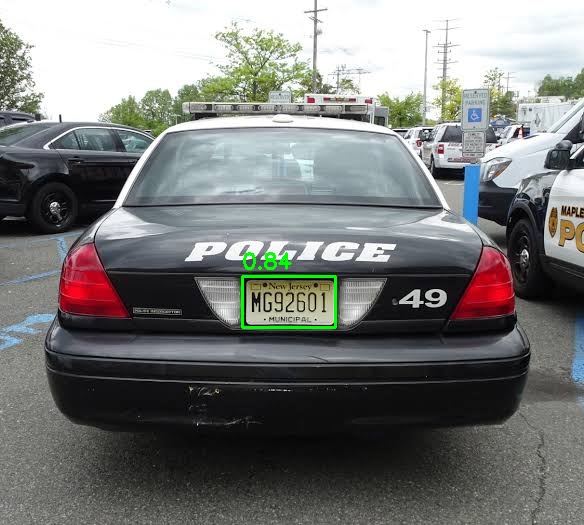
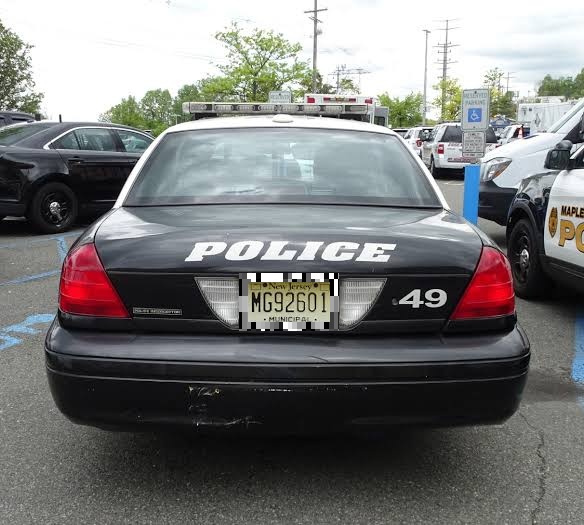
On the included test plate, scarecrow drops detection confidence from 0.84 to 0.00 (full evasion) in 1000 steps, and the plate remains human-readable. OCR is sometimes corrupted as a side effect, roughly 40% of the time depending on the random seed.
| Before | After |
|---|---|
 |
 |
How It Works
Scarecrow optimizes a grayscale frame pattern using gradient descent against a YOLO plate detection model. The pattern sits in the border region around the plate, inside a printable frame, and is tuned specifically to minimize the detector's confidence on your specific plate.
To keep the pattern from overfitting to the reference photo, each optimization step applies random augmentations that simulate what a camera might actually see:
- Radial lens distortion: barrel/pincushion from real camera optics
- Rotation & perspective warp: different viewing angles
- Brightness & contrast shifts: varying lighting and IR illumination
- Gaussian blur: camera motion and focus
- Additive noise: sensor noise in low light
- Scale jitter: different distances from the camera
Flock and most ALPR cameras are rear-facing and mounted at 8 to 12 feet, so the viewing geometry is fairly constrained. The augmentation ranges were chosen with this in mind: rotation stays within 10 degrees, perspective within 20 to 25 degrees, and scale varies from 0.5x to 1.2x to cover plates captured at different distances from the camera.
Optimizing the pattern across this whole range of transformations is called Expectation over Transformation (EoT), and the loss uses logsumexp to upweight the hardest samples, so optimization focuses on the conditions where the pattern is weakest.
The included detection model is a YOLO11n plate detector exported via torch.export. If you're targeting a different detector, see Using your own detection model below.
Installation
Scarecrow requires Python 3.11+. It is published on PyPI as scarecrow-alpr, and installs the scarecrow command.
Install the uv package manager before running these commands.
For the simpler (but slower) CPU install:
uv tool install scarecrow-alpr --torch-backend cpu
If you want GPU acceleration:
uv tool install scarecrow-alpr --torch-backend auto
For RapidOCR support, add the ocr extra to either command:
uv tool install "scarecrow-alpr[ocr]" --torch-backend cpu
Usage
Take a photo of your plate from the front, straight on, with even lighting and some room around the plate. export uses the surrounding area to size the frame. See test_plate.jpg for an example.
Generate the reusable pattern, then export the printable SVG frame:
scarecrow generate plate.jpg
scarecrow export plate.jpg --pattern plate_pattern.png
By default, these write plate_pattern.png and plate_frame.svg.
Preview the pattern on your reference photo, or check detection results:
scarecrow apply plate.jpg --pattern plate_pattern.png
scarecrow eval plate.jpg --pattern plate_pattern.png
Other useful options:
# Reproducible generation with a fixed seed
scarecrow generate plate.jpg --seed 42

# Evaluate RapidOCR reads (requires the ocr extra)
scarecrow eval plate.jpg --pattern plate_pattern.png --ocr

# Emit structured eval results
scarecrow eval plate.jpg --pattern plate_pattern.png --json
Development
For local development from a checkout, use uv sync and run the CLI through uv run:
uv sync
uv run scarecrow generate test_plate.jpg --steps 10
Add RapidOCR support with:
uv sync --extra ocr
Using your own detection model
Convert ultralytics weights
Scarecrow works with any plate detection model, not just the included YOLO11n. The model needs to be in torch.export format (.pt2).
If you have ultralytics .pt weights, you can convert them like this:
uv run --with ultralytics python3 -c "
import torch; from ultralytics import YOLO
m = YOLO('your-model.pt').model.eval()
for p in m.parameters(): p.requires_grad_(False)
ep = torch.export.export(m, (torch.randn(1, 3, 640, 640),))
torch.export.save(ep, 'your-model.pt2')
"
Then pass --weights your-model.pt2 to any scarecrow command.
Limitations
- I haven't tested this against a real ALPR camera, only in simulation against rendered composites. If you have access to Flock or other ALPR hardware and can benchmark, I'd love to hear how it performs.
- The included model is a single YOLO11n plate detector, and adversarial patterns can transfer across similar architectures, but how well they transfer to other detectors (including Flock Safety's proprietary YOLO variant) is untested.
License
Project code is GPL-3.0-only, and the bundled detector model is AGPL-3.0-only. See THIRD_PARTY_NOTICES.md for model provenance.
1 maintainer

Metadata
1 maintainer
Release files for scarecrow-alpr 0.2.1
For a detailed explanation of source distributions (sdists) and built distributions (wheels), please see the package formats documentation.
Source distribution (sdist)
| File | Size | Uploaded | Provenance | Actions |
|---|---|---|---|---|
| scarecrow_alpr-0.2.1.tar.gz | 10.8 MB | With provenance | Details for scarecrow_alpr-0.2.1.tar.gz |
Built distribution (wheel)
| File | Interpreter | ABI | Platform | Actions Reset |
|---|---|---|---|---|
| scarecrow_alpr-0.2.1-py3-none-any.whl | Python 3 | none | any | Details for scarecrow_alpr-0.2.1-py3-none-any.whl |
Total release size: 21.5 MB
Release files / scarecrow_alpr-0.2.1.tar.gz
| Download URL | scarecrow_alpr-0.2.1.tar.gz |
|---|---|
| Size | 10.8 MB |
| Tags | Source |
|
SHA-256 checksum How to use checksums |
98573fb8d77f8f8b98bff2530dedda9c19a0524d1f8dbaa755911952ba0e7d89
|
|
BLAKE2b-256 checksum How to use checksums |
dd4034515bd0f8c63a4f4d300eb9fc1d7431611c38032f3c47a5358a8d233a2c
|
| Upload date | |
|
Uploaded using Trusted Publishing? What is trusted publishing? |
Yes |
| Uploaded via |
twine/6.1.0 CPython/3.13.13
|
Provenance
Provenance describes where a file came from. On PyPI, provenance is shared via attestations, which provide a verifiable record of the build or publishing details. View details, limitations and caveats.


PyPI Publish Attestation
PyPI verified that this artifact, at this checksum, originated from the publisher listed below.
Signed by GitHub Actions, verified by PyPI on Jun 5, 2026.
Transparency logRelease files / scarecrow_alpr-0.2.1-py3-none-any.whl
| Download URL | scarecrow_alpr-0.2.1-py3-none-any.whl |
|---|---|
| Size | 10.7 MB |
| Tags | Python 3 |
|
SHA-256 checksum How to use checksums |
6f7ea615470b753757e6ff3759ac7e11a45d24ebe063b7f82b3f55b469023afa
|
|
BLAKE2b-256 checksum How to use checksums |
077614f681dbc3008194b8ffc32508a57f31c767d1818fb34733e6ee35beaa24
|
| Upload date | |
|
Uploaded using Trusted Publishing? What is trusted publishing? |
Yes |
| Uploaded via |
twine/6.1.0 CPython/3.13.13
|
Provenance
Provenance describes where a file came from. On PyPI, provenance is shared via attestations, which provide a verifiable record of the build or publishing details. View details, limitations and caveats.
PyPI Publish Attestation
PyPI verified that this artifact, at this checksum, originated from the publisher listed below.
Signed by GitHub Actions, verified by PyPI on Jun 5, 2026.
Transparency logSecurity for scarecrow-alpr 0.2.1
Provenance
Provenance describes where a file came from. On PyPI, provenance is shared via attestations, which provide a verifiable record of the build or publishing details. View details, limitations and caveats.
Full provenance
All 2 files in this release have been uploaded with provenance metadata.
Attestation for scarecrow_alpr-0.2.1.tar.gz
PyPI Publish Attestation
PyPI verified that this artifact, at this checksum, originated from the publisher listed below.
Signed by GitHub Actions, verified by PyPI on Jun 5, 2026.
Transparency logA note on package security
PyPI is a repository for distributing packages, not a service for auditing them. While third-party security researchers and our staff do their best to detect and remove malicious packages, PyPI cannot guarantee the quality, security or suitability of any given package.
To learn more about protecting yourself from malicious actors, visit our package security documentation.














