
scatter-cli


The official Python command-line wrapper for the Scattering Core Java library.
This package provides a frictionless way to install and execute the CLI directly from the Python environment or terminal, bypassing manual JAR downloads.
Requirements
Because this package bundles and delegates commands to the underlying Java executable, you must have JRE 21+ installed and accessible in your system's PATH.
Installation
Install the package globally or in a virtual environment via pip:
pip install scatter-cli
Alternatively, you can run the CLI instantly without installing it using pipx:
pipx run scatter-cli --info
Getting started
Once installed, both scatter-cli and the scatter-vis 3D viewer are globally available in your terminal.
To verify your setup, use the built-in demo command. It generates a standard Cluster-Cluster (CC) aggregate composed of 2,048 primary particles with fractal parameters df=1.8 and kf=1.3, exported in the multisphere format.
scatter-cli demo > demo.xyzr        # Save assembly to a file.
scatter-cli demo | scatter-vis      # Show a 3D model of the assembly.
Currently, the scatter-vis utility exclusively supports data streams in the multisphere format.
Usage
Here is a quick workflow demonstrating how to generate a custom synthetic fractal-like aggregate model and measure its morphological properties:
# Generate a Diffusion-Limited Aggregation (DLA) fractal-like aggregate model and save it to a file.
scatter-cli generate model pc dla --rad-fixed 2048,1 --export multisphere --out demo.xyzr
# Measure the Density-Correlation (DC) fractal dimension of the generated model.
scatter-cli measure demo.xyzr --metrics df-dc -i multisphere
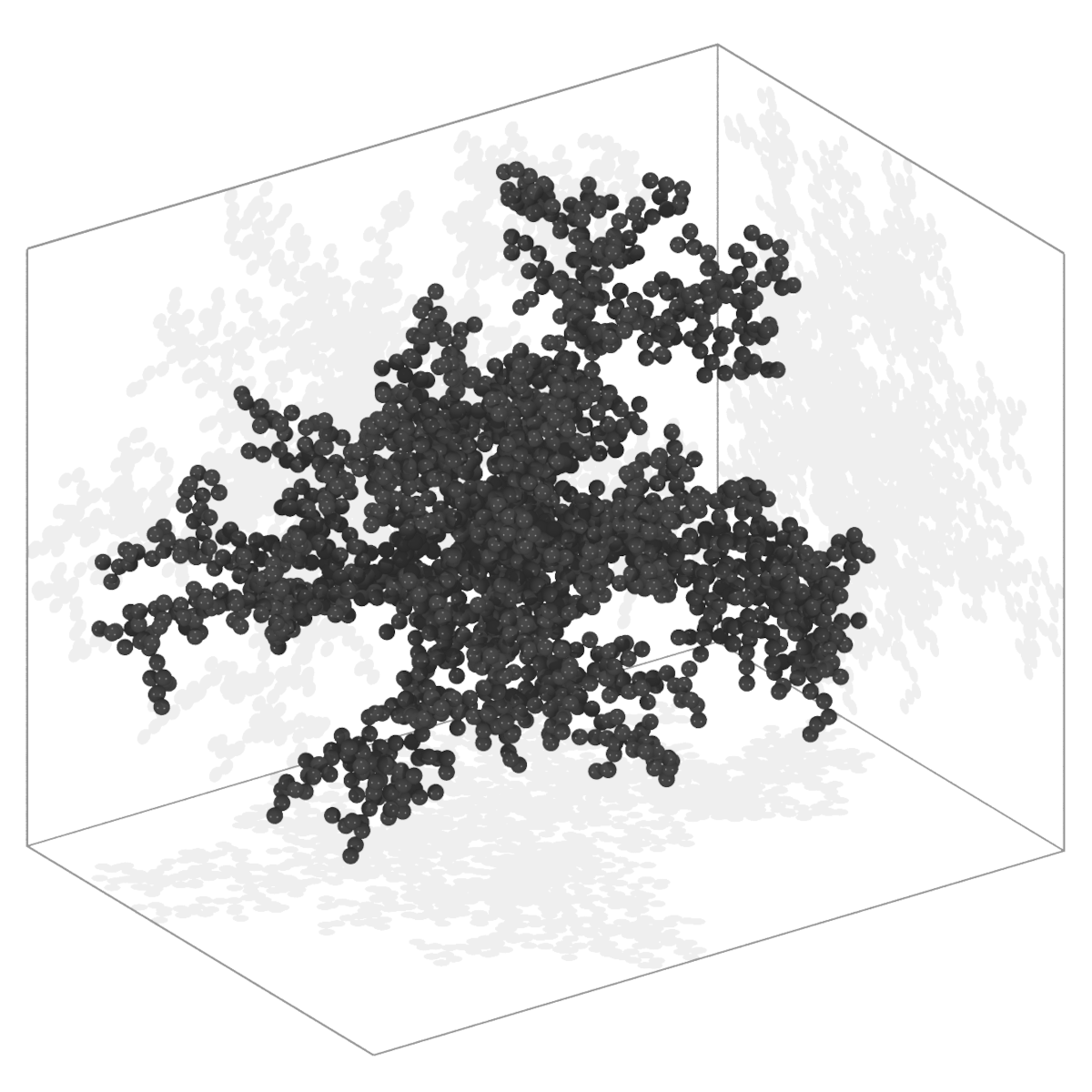 |
| Fig 1: PC DLA synthetic fractal-like aggregate model. |
Documentation
This Python package is a thin distribution wrapper maintained as part of the larger scattering.core ecosystem. To avoid duplication, comprehensive documentation, algorithmic details, and advanced usage examples are hosted on the main repository:
1 maintainer

Metadata
1 maintainer
Release files for scatter-cli 0.4.0
For a detailed explanation of source distributions (sdists) and built distributions (wheels), please see the package formats documentation.
Source distribution (sdist)
| File | Size | Uploaded | |
|---|---|---|---|
| scatter_cli-0.4.0.tar.gz | 1.2 MB | Details |
Built distribution (wheel)
| File | Interpreter | ABI | Platform | Reset |
|---|---|---|---|---|
| scatter_cli-0.4.0-py3-none-any.whl | Python 3 | none | any | Details |
Total release size: 2.4 MB
Release files / scatter_cli-0.4.0.tar.gz
| Download URL | scatter_cli-0.4.0.tar.gz |
|---|---|
| Size | 1.2 MB |
| Tags | Source |
|
SHA-256 checksum How to use checksums |
c49bbdf82ff75857693c2deff4bce5c3eebd69d388e0cb522ff3c6a1de583966
|
|
BLAKE2b-256 checksum How to use checksums |
3b2e0624516b4cc2502cd022b821a3358b9109cfe1dfba6eab8eee9d5620667d
|
| Upload date | |
|
Uploaded using Trusted Publishing? What is trusted publishing? |
No |
| Uploaded via |
twine/7.0.0 CPython/3.14.7
|
Release files / scatter_cli-0.4.0-py3-none-any.whl
| Download URL | scatter_cli-0.4.0-py3-none-any.whl |
|---|---|
| Size | 1.2 MB |
| Tags | Python 3 |
|
SHA-256 checksum How to use checksums |
c141bb5e2f792f0557dabe9abf1513a5ca33963c816cb7483d92403e80ce88ce
|
|
BLAKE2b-256 checksum How to use checksums |
f30da04f033ff984e8184e33807a7d2b76745413d7571f03d94eac91b66279c2
|
| Upload date | |
|
Uploaded using Trusted Publishing? What is trusted publishing? |
No |
| Uploaded via |
twine/7.0.0 CPython/3.14.7
|














