
scDataset






Scalable Data Loading for Deep Learning on Large-Scale Single-Cell Omics
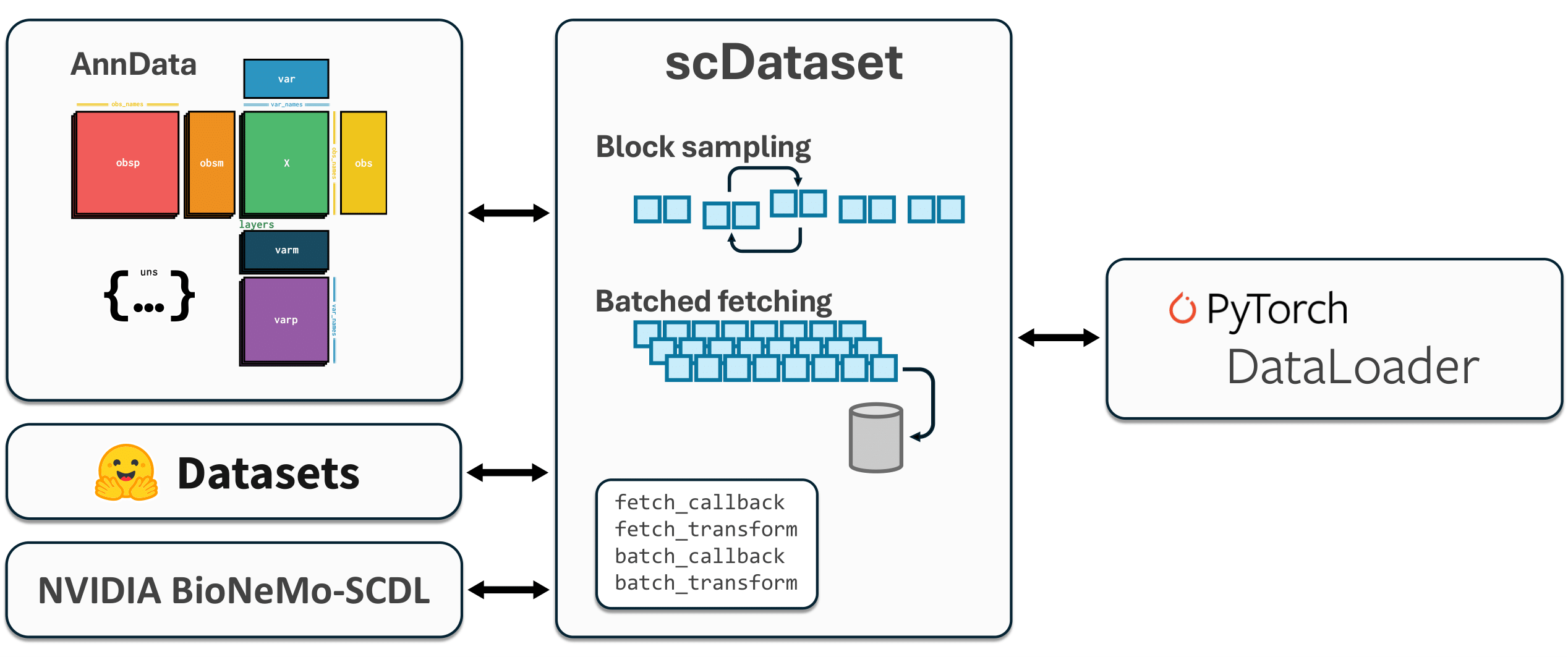
scDataset is a flexible and efficient PyTorch IterableDataset for large-scale single-cell omics datasets. It supports a variety of data formats (e.g., AnnData, HuggingFace Datasets, NumPy arrays) and is designed for high-throughput deep learning workflows. While optimized for single-cell data, it is general-purpose and can be used with any dataset.
Features
- Flexible Data Source Support: Integrates seamlessly with AnnData, HuggingFace Datasets, NumPy arrays, PyTorch Datasets, and more.
- Scalable: Handles datasets with billions of samples without loading everything into memory.
- Efficient Data Loading: Block sampling and batched fetching optimize random access for large datasets.
- Dynamic Splitting: Split datasets into train/validation/test dynamically, without duplicating data or rewriting files.
- Custom Hooks: Apply transformations at fetch or batch time via user-defined callbacks.
Installation
Install the latest release from PyPI:
pip install scDataset
Or install the latest development version from GitHub:
pip install git+https://github.com/scDataset/scDataset.git
Usage
Basic Usage with Sampling Strategies
scDataset v0.2.0 uses a strategy-based approach for flexible data sampling:
from scdataset import scDataset, Streaming
from torch.utils.data import DataLoader

# Create dataset with streaming strategy
data = my_data_collection  # Any indexable object (numpy array, AnnData, etc.)
strategy = Streaming()
dataset = scDataset(data, strategy, batch_size=64)
loader = DataLoader(dataset, batch_size=None)  # scDataset handles batching internally
Note: Set
batch_size=Nonein the DataLoader to delegate batching toscDataset.
Sampling Strategies
Sequential Sampling (Streaming)
from scdataset import Streaming

# Simple sequential access
strategy = Streaming()
dataset = scDataset(data, strategy, batch_size=64)

# Sequential with buffer-level shuffling (like Ray Dataset or WebDataset). The buffer size is equal to batch_size * fetch_factor (defined in the scDataset init)
strategy = Streaming(shuffle=True)
dataset = scDataset(data, strategy, batch_size=64, fetch_factor=8)

# Use only a subset of indices
train_indices = [0, 2, 4, 6, 8, ...]  # Your training indices
strategy = Streaming(indices=train_indices)
dataset = scDataset(data, strategy, batch_size=64)
Block Shuffling for Locality
from scdataset import BlockShuffling

# Shuffle blocks while maintaining some data locality
strategy = BlockShuffling(block_size=8)
dataset = scDataset(data, strategy, batch_size=64)

# With subset of indices
strategy = BlockShuffling(block_size=8, indices=train_indices)
dataset = scDataset(data, strategy, batch_size=64)
Weighted Sampling
from scdataset import BlockWeightedSampling

# Uniform weighted sampling
strategy = BlockWeightedSampling(total_size=10000, block_size=16)
dataset = scDataset(data, strategy, batch_size=64)

# Custom weights (e.g., for imbalanced data)
sample_weights = compute_weights(data)  # Your weight computation
strategy = BlockWeightedSampling(
    weights=sample_weights,
    total_size=5000,
    block_size=16
)
dataset = scDataset(data, strategy, batch_size=64)
Automatic Class Balancing
from scdataset import ClassBalancedSampling

# Automatically balance classes from labels
cell_types = ['T_cell', 'B_cell', 'NK_cell', ...]  # Your class labels
strategy = ClassBalancedSampling(cell_types, total_size=8000)
dataset = scDataset(data, strategy, batch_size=64)
Multi-Modal Data with MultiIndexable
Handle multiple related data modalities that need to be indexed together:
from scdataset import MultiIndexable, Streaming

# Group multiple data modalities
multi_data = MultiIndexable(
    genes=gene_expression_data,    # Shape: (n_cells, n_genes)
    proteins=protein_data,         # Shape: (n_cells, n_proteins)
    metadata=cell_metadata         # Shape: (n_cells, n_features)
)

# Use with any sampling strategy
strategy = Streaming()
dataset = scDataset(multi_data, strategy, batch_size=64)

for batch in dataset:
    genes = batch['genes']       # Gene expression for this batch
    proteins = batch['proteins'] # Corresponding protein data
    metadata = batch['metadata'] # Corresponding metadata
Performance Optimization
Configure fetch_factor to fetch multiple batches worth of data at once:
strategy = BlockShuffling(block_size=16)
dataset = scDataset(
    data,
    strategy,
    batch_size=64,
    fetch_factor=8  # Fetch 8*64=512 samples at once
)
loader = DataLoader(
    dataset,
    batch_size=None,
    num_workers=4,
    prefetch_factor=9  # fetch_factor + 1
)
We recommend setting prefetch_factor to fetch_factor + 1 for efficient data loading. For parameter details, see the original paper.
Custom Transforms and Callbacks
Apply custom transformations at fetch or batch time using the new callback system:
Transform Overview
-
fetch_callback(collection, indices): Customizes how samples are fetched from the underlying data collection. Use this if your collection does not support batched indexing or requires special access logic.- Input: the data collection and an array of indices
- Output: the fetched data
-
fetch_transform(fetched_data): Transforms each fetched chunk (e.g., sparse-to-dense conversion, normalization).- Input: the fetched data
- Output: the transformed data
-
batch_callback(fetched_data, batch_indices): Selects or arranges a minibatch from the fetched/transformed data.- Input: the fetched/transformed data and a list of batch indices within the chunk
- Output: the batch to yield
-
batch_transform(batch): Applies final processing to each batch before yielding (e.g., collation, augmentation).- Input: the batch
- Output: the processed batch
from scdataset import scDataset, Streaming

def fetch_transform(chunk):
    # Example: convert sparse to dense, normalization, etc.
    # Applied to entire fetched chunk
    return chunk.toarray() if hasattr(chunk, 'toarray') else chunk

def batch_transform(batch):
    # Example: batch-level augmentation or tensor conversion
    import torch
    return torch.from_numpy(batch).float()

strategy = Streaming()
dataset = scDataset(
    data,
    strategy,
    batch_size=64,
    fetch_transform=fetch_transform,
    batch_transform=batch_transform
)
Complete Example with Multiple Strategies
from scdataset import scDataset, BlockShuffling, Streaming
from torch.utils.data import DataLoader
import numpy as np

# Your data
data = my_data_collection
train_indices = np.arange(0, 8000)
val_indices = np.arange(8000, 10000)

# Training with block shuffling
train_strategy = BlockShuffling(block_size=32, indices=train_indices)
train_dataset = scDataset(
    data,
    train_strategy,
    batch_size=64,
    fetch_factor=8
)

train_loader = DataLoader(
    train_dataset,
    batch_size=None,
    num_workers=4,
    prefetch_factor=9
)

# Validation with streaming (deterministic)
val_strategy = Streaming(indices=val_indices)
val_dataset = scDataset(
    data,
    val_strategy,
    batch_size=64,
    fetch_factor=8
)

val_loader = DataLoader(
    val_dataset,
    batch_size=None,
    num_workers=4,
    prefetch_factor=9
)

# Training loop
for epoch in range(num_epochs):
    # Training
    for batch in train_loader:
        # Training code here
        pass

    # Validation
    for batch in val_loader:
        # Validation code here
        pass
Citing
If you use scDataset in your research, please cite the following paper:
@article{scdataset2025,
  title={scDataset: Scalable Data Loading for Deep Learning on Large-Scale Single-Cell Omics},
  author={D'Ascenzo, Davide and Cultrera di Montesano, Sebastiano},
  journal={arXiv:2506.01883},
  year={2025}
}
Migration from v0.1.x to v0.2.0
scDataset v0.2.0 introduces breaking changes with a new strategy-based API. Here's how to migrate your code:
Old v0.1.x API
# v0.1.x - No longer supported
from scdataset import scDataset

dataset = scDataset(data, batch_size=64, block_size=8, fetch_factor=4)
dataset.subset(train_indices)
dataset.set_mode('train')
New v0.2.0 API
# v0.2.0 - Strategy-based approach
from scdataset import scDataset, BlockShuffling, Streaming

# Training with shuffling
train_strategy = BlockShuffling(block_size=8, indices=train_indices)
train_dataset = scDataset(data, train_strategy, batch_size=64, fetch_factor=4)

# Evaluation with streaming
val_strategy = Streaming(indices=val_indices)
val_dataset = scDataset(data, val_strategy, batch_size=64, fetch_factor=4)
Key Changes:
- Required strategy parameter: Must provide a
SamplingStrategyinstance - No more
subset()andset_mode(): Use strategyindicesparameter and different strategy types - Create separate datasets: For different splits instead of modifying a single instance
- New import: Import specific strategies like
Streaming,BlockShuffling, etc.
License
This project is licensed under the MIT License.
Contributing
Contributions are welcome! Please open issues or pull requests on GitHub.
1 maintainer

Metadata
1 maintainer
Release files for scDataset 0.3.0
For a detailed explanation of source distributions (sdists) and built distributions (wheels), please see the package formats documentation.
Source distribution (sdist)
| File | Size | Uploaded | |
|---|---|---|---|
| scdataset-0.3.0.tar.gz | 62.2 kB | Details |
Built distribution (wheel)
| File | Interpreter | ABI | Platform | Reset |
|---|---|---|---|---|
| scdataset-0.3.0-py3-none-any.whl | Python 3 | none | any | Details |
Total release size: 98.0 kB
Release files / scdataset-0.3.0.tar.gz
| Download URL | scdataset-0.3.0.tar.gz |
|---|---|
| Size | 62.2 kB |
| Tags | Source |
|
SHA-256 checksum How to use checksums |
1f8b5dbd2db1fb3bd8b44d5d90203e7037c578f360a15d8cc7aa5083f2ee7d1c
|
|
BLAKE2b-256 checksum How to use checksums |
4e8a3a701d94f5ede1b4ba960c5ff39b315ba7c4a057e9f3492387bb3799914a
|
| Upload date | |
|
Uploaded using Trusted Publishing? What is trusted publishing? |
No |
| Uploaded via |
twine/6.2.0 CPython/3.11.14
|
Release files / scdataset-0.3.0-py3-none-any.whl
| Download URL | scdataset-0.3.0-py3-none-any.whl |
|---|---|
| Size | 35.8 kB |
| Tags | Python 3 |
|
SHA-256 checksum How to use checksums |
5fd34bb19f09f284a76343d01512cb48a5379b7b690d36877e27f097f4f2a531
|
|
BLAKE2b-256 checksum How to use checksums |
a5c13fbe4d3d4dd687ff6ab35c11aa3e01a248a6523c9cadd9168c9659fc4f14
|
| Upload date | |
|
Uploaded using Trusted Publishing? What is trusted publishing? |
No |
| Uploaded via |
twine/6.2.0 CPython/3.11.14
|














