

SC-Elephant (Single-Cell Extremely Large Data Analysis Platform)

SC-Elephant utilizes RamData, a novel single-cell data storage format, to support a wide range of single-cell bioinformatics applications in a highly scalable manner, while providing a convenient interface to export any subset of the single-cell data in SCANPY's AnnData format, enabling efficient downstream analysis of the cells of interest. The analysis result can then be made available to other researchers by updating the original RamData, which can be stored in cloud storage like AWS (or any AWS-like object storage).
SC-Elephant and RamData enable real-time sharing of extremely large single-cell data using a browser-based analysis platform as it is being modified on the cloud by multiple other researchers, convenient integration of a local single-cell dataset with multiple large remote datasets (RamData objects uploaded by other researchers), and remote (private) collaboration on an extremely large-scale single-cell genomics dataset.
Tutorials can be found at doc/jn/
Tutorial 1) Processing and analysis of the 3k PBMCs dataset using SC-Elephant
Tutorial 3) Combine 10x MEX count matrices memory-efficiently using SC-Elephant
Tutorial 4) Convert existing AnnData into RamData for collaborative data sharing
Briefly, a RamData object is composed of two RamDataAxis (Axis) objects and multiple RamDataLayer (Layer) objects.
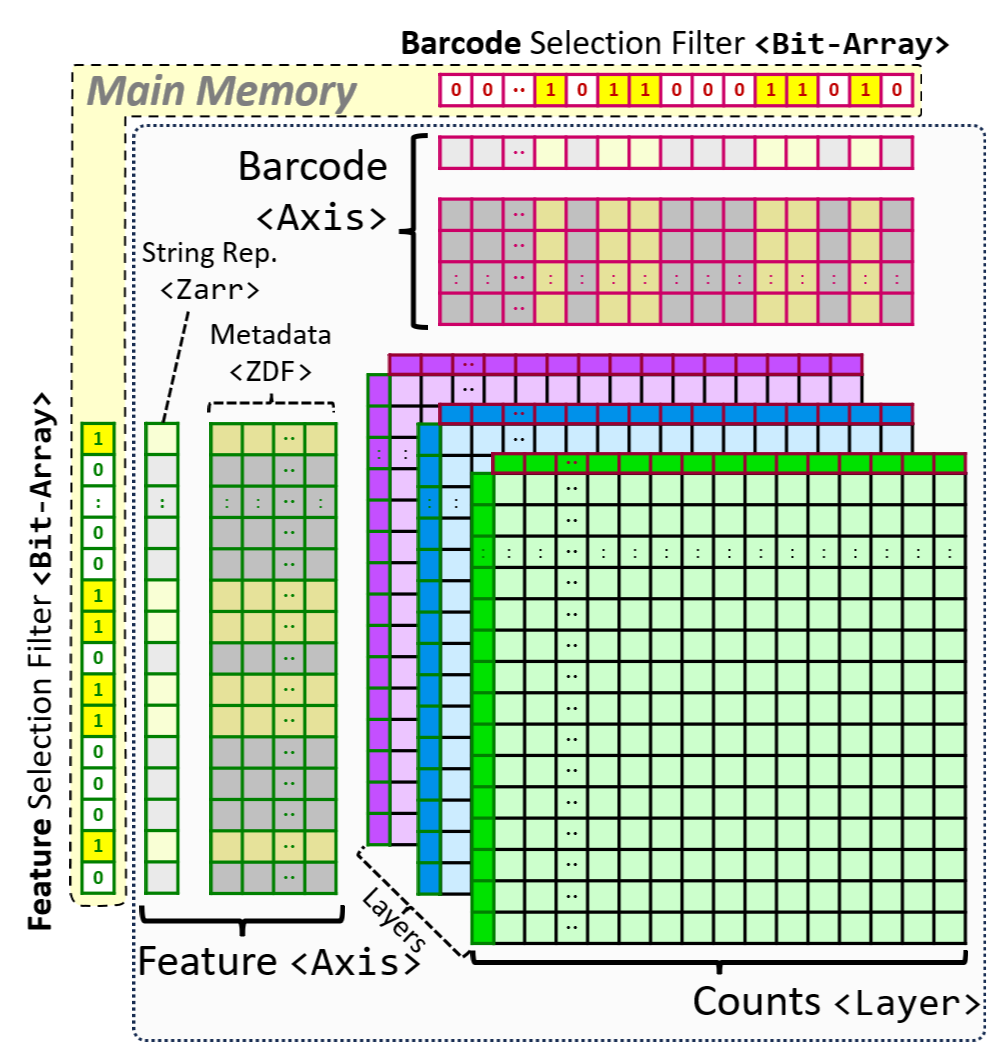
The two RamDataAxis objects, 'Barcode' and 'Feature' objects, use 'filter' to select cells (barcodes) and genes (features) before retrieving data from the RamData object, respectively.
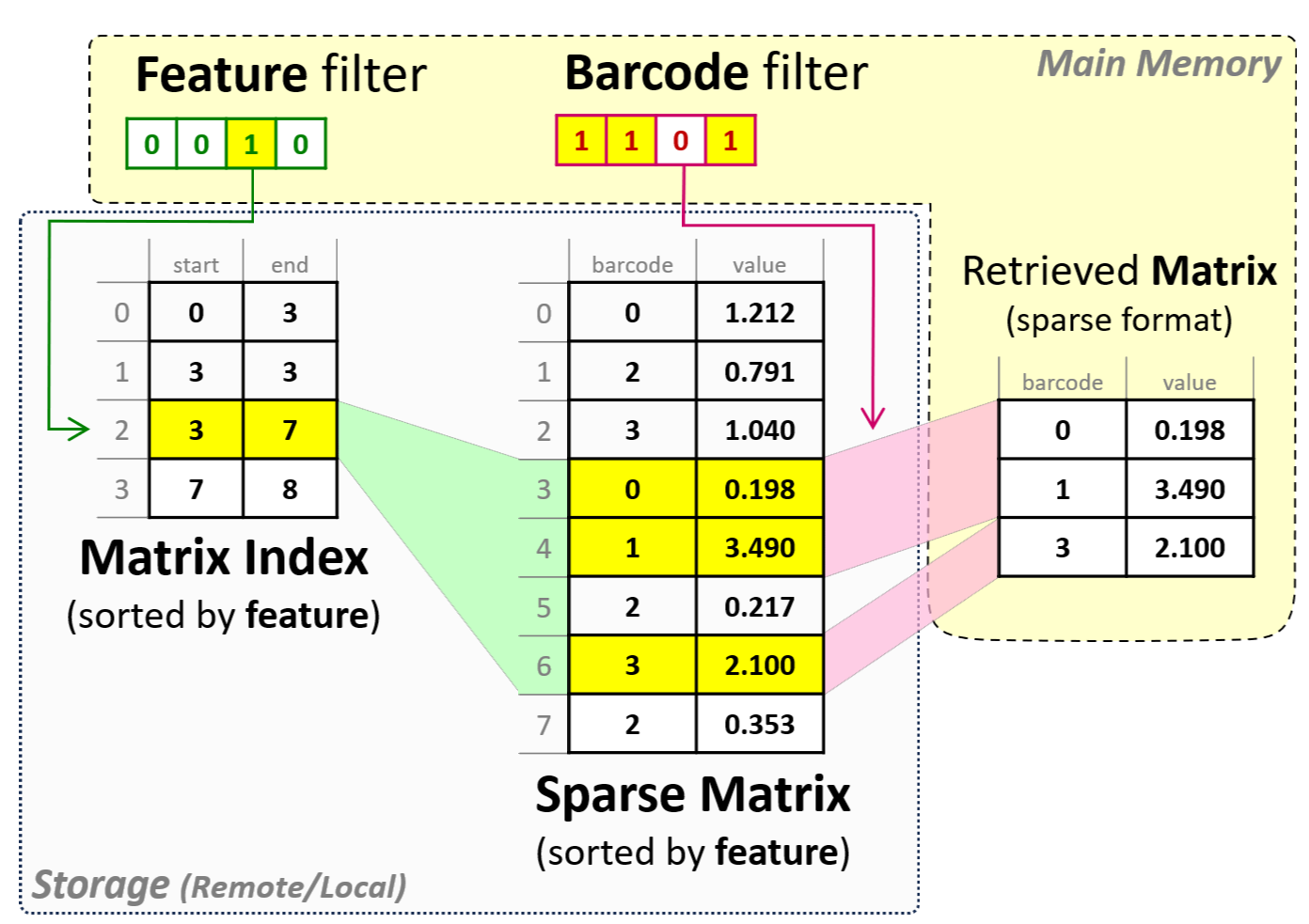
RamData employs RAMtx (Random-accessible matrix) objects to store count matrix in sparse or dense formats.
RamData greatly simplify sharing of very large single-cell datasets on the Web. Once processed by SC-Elephant, RamData can be uploaded to GitHub, Amazon S3 Cloud, or any static file servers to share your single-cell datasets publicly with the research community or privately with your collaborators. The machine learning models, kNN graphs, cell-type annotations, and random-accessible expression count matrices (to name a few) of your single-cell datasets on the Web can be easily explored in Python environments and web browsers using SC-Elephant and SC-Elephant.js, respectively.
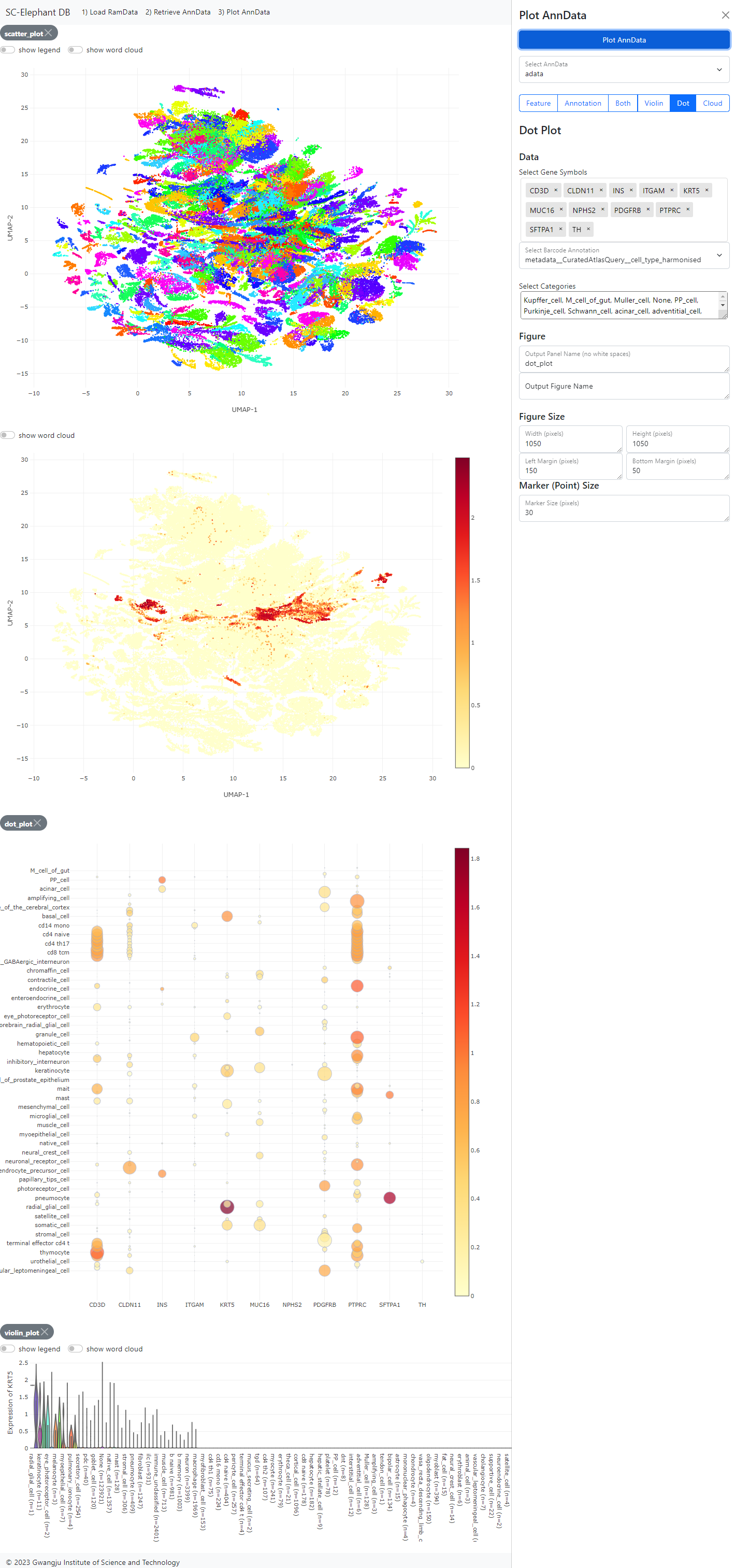
To explore RamData objects publicly available on the Web using a web browser, please visit our SC-Elephant DB Viewer.
1 maintainer

Metadata
1 maintainer
Release files for scelephant 0.2.7
For a detailed explanation of source distributions (sdists) and built distributions (wheels), please see the package formats documentation.
Source distribution (sdist)
| File | Size | Uploaded | Provenance | |
|---|---|---|---|---|
| scelephant-0.2.7.tar.gz | 261.1 kB | Without provenance | Details |
Built distribution (wheel)
| File | Interpreter | ABI | Platform | Reset |
|---|---|---|---|---|
| scelephant-0.2.7-py3-none-any.whl | Python 3 | none | any | Details |
Total release size: 528.5 kB
Release files / scelephant-0.2.7.tar.gz
| Download URL | scelephant-0.2.7.tar.gz |
|---|---|
| Size | 261.1 kB |
| Tags | Source |
|
SHA-256 checksum How to use checksums |
3197606048ba618dceec75057c34497629d20becd42adcf600ec3b871f644b74
|
|
BLAKE2b-256 checksum How to use checksums |
1a51d9a596b6f2b747c655b5f561906e81de88938e67c47b3bfe1cfe47e028ad
|
| Upload date | |
|
Uploaded using Trusted Publishing? What is trusted publishing? |
No |
| Uploaded via |
twine/6.0.1 CPython/3.12.4
|
Release files / scelephant-0.2.7-py3-none-any.whl
| Download URL | scelephant-0.2.7-py3-none-any.whl |
|---|---|
| Size | 267.4 kB |
| Tags | Python 3 |
|
SHA-256 checksum How to use checksums |
6d0be9db4ec702833e3def91cbd9d5015cb73f9f7cc20664dbd728355a5d2c7d
|
|
BLAKE2b-256 checksum How to use checksums |
32c5c50a829aefe8127b90b6ac178b8615b845b28233c008a43ac306225ceb5e
|
| Upload date | |
|
Uploaded using Trusted Publishing? What is trusted publishing? |
No |
| Uploaded via |
twine/6.0.1 CPython/3.12.4
|
Security for scelephant 0.2.7
Provenance
Provenance describes where a file came from. On PyPI, provenance is shared via attestations, which provide a verifiable record of the build or publishing details. View details, limitations and caveats.
No provenance found
None of the files in this release were uploaded with provenance metadata.
A note on package security
PyPI is a repository for distributing packages, not a service for auditing them. While third-party security researchers and our staff do their best to detect and remove malicious packages, PyPI cannot guarantee the quality, security or suitability of any given package.
To learn more about protecting yourself from malicious actors, visit our package security documentation.













