

Documentation • Installation • Quick start • Examples • Datasets • API reference




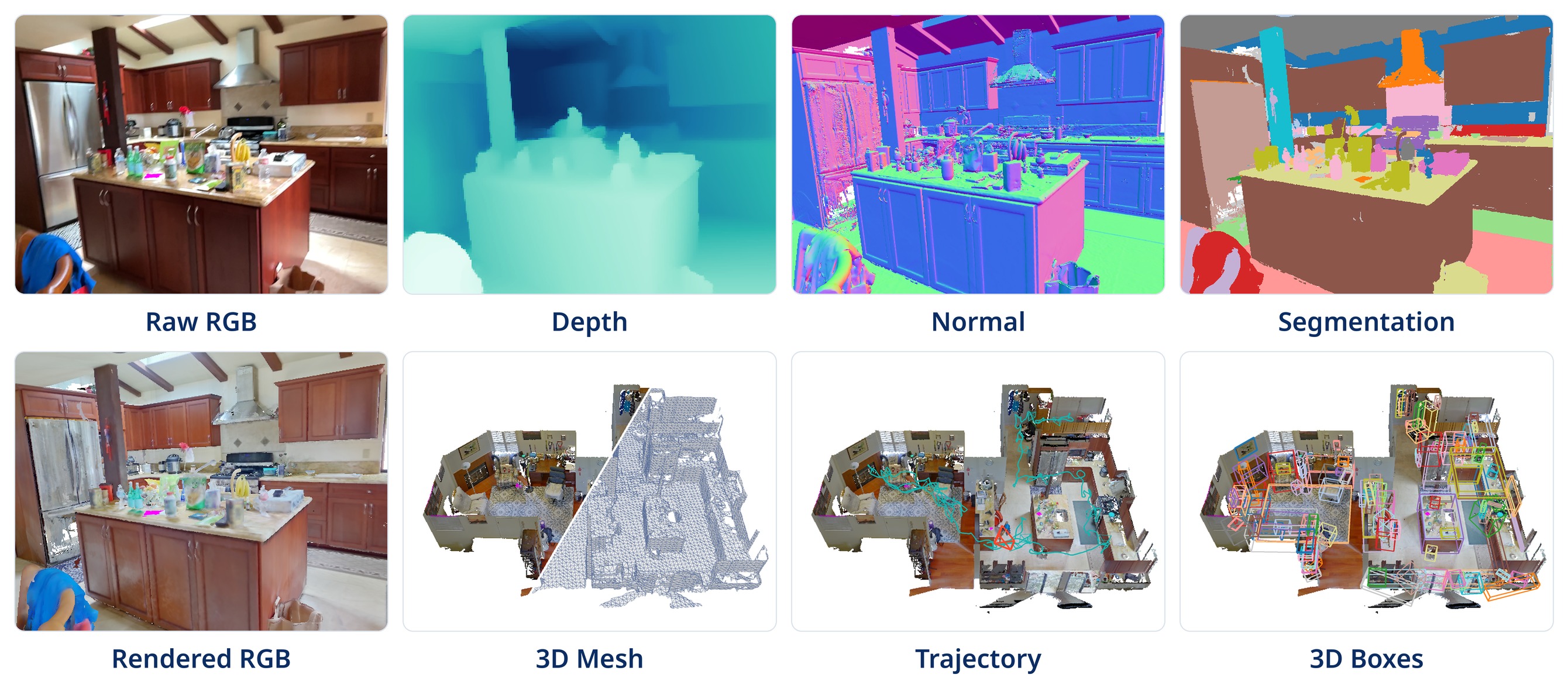
SceneZoo reads popular 3D indoor-scene datasets (such as ScanNet, ScanNet++, ARKitScenes, and Matterport3D) through one Python API. Point it at a dataset you have downloaded, and get meshes, point clouds, segmentation labels, 3D boxes, and synchronized RGB-D frames with cameras as NumPy arrays and Open3D objects, without writing a new loader for every dataset.
Installation
SceneZoo supports Python 3.10 to 3.14.
pip install scenezoo
Quick start
Every dataset is read through the same calls. Each call returns NumPy arrays or Open3D objects, with the same conventions for every dataset.
from scenezoo import get_dataset

dataset = get_dataset("scannetppv2", "/path/to/scannetpp")
scene_id = dataset.get_ids("nvs_sem_val")[0]

mesh = dataset.get_mesh(scene_id)                  # Open3D TriangleMesh
labels = dataset.get_segmentation(scene_id)        # per-vertex labels
boxes, names = dataset.get_boxes(scene_id)         # 3D boxes and class names
frames = dataset.get_frames(
    scene_id,
    source="iphone",
    indices=[0, 60, 120],
    items=("rgb", "depth", "rgb_intrinsics", "world_to_camera"),
)
print(frames.rgb.shape, frames.world_to_camera.shape)
See the quick start and the user guide for splits, frames and camera conventions, checking a download, and more.
Built-in datasets
SceneZoo currently has built-in adapters for the datasets below. Other datasets can be registered locally and used through the same API; see Adding your own dataset.
| Canonical name | Aliases | Mesh | Points | Segmentation | Boxes | Frames |
|---|---|---|---|---|---|---|
scannetv2 |
scannet |
raw/decimated/semantic | no | instance + NYU40, vertex | yes | RGB-D, camera, 2D labels, timestamps, IMU |
scannetppv2 |
scannet++, scannetpp, scannet++v2 |
yes | laser scan | vertex, multilabel | yes | iPhone, DSLR, panorama |
arkitscenes |
— | yes | no | vertex (box-derived) | yes | multi-source RGB-D, confidence |
multiscan |
— | PLY/textured | no | object/part instance + semantic, face | yes | RGB-D, confidence, camera metadata |
ase |
aria-ase, aria-synthetic-environments |
no | semi-dense SLAM points | no | wall/door/window layout OBB | fisheye RGB, ray-depth, instances, poses |
3rscan |
threerscan |
textured/instance | no | instance + Global/NYU40/Eigen13/RIO27/RIO7, vertex | yes | RGB-D and camera |
s3dis |
stanford3d, stanford-3d |
no | XYZRGB + labels | instance + 13-class semantic, point | yes | no |
matterport3d |
— | textured/house/region/Poisson | no | instance + semantic, face | official OBB | raw + undistorted RGB-D, normal maps |
scenenn |
— | yes | no | vertex | no | no |
structured3d |
structure3d |
reconstructed room layout | RGB-D fusion | semantic + instance, point | official OBB | perspective + panorama RGB-D and labels |
3dfront |
3d-front |
textured house/room/layout/furniture | no | furniture instance + category, layout type, face | furniture OBB | no |
Adding your own dataset
Subclass Dataset, register it under a name, and implement the operations
your data supports:
from scenezoo import Dataset, get_dataset, register_dataset


@register_dataset("my-scenes")
class MyScenes(Dataset):
    def _load_splits(self):
        return {"train": ["scene-001"]}

    def get_mesh(self, sample_id, *, mesh_type=None):
        return load_my_mesh(self.root_dir / sample_id)


dataset = get_dataset("my-scenes", "/path/to/my_scenes")
The guide walks through a complete example.
Citation
Please cite SceneZoo if you use it in your research.
@misc{Zhang2026SceneZoo,
    author       = {Yiming Zhang},
    title        = {{SceneZoo}: A Unified {Python} Interface for {3D} Indoor-Scene Datasets},
    year         = {2026},
    howpublished = {\url{https://github.com/eamonn-zh/scenezoo}},
}
1 maintainer

Metadata
1 maintainer
Release files for scenezoo 0.3.1
For a detailed explanation of source distributions (sdists) and built distributions (wheels), please see the package formats documentation.
Source distribution (sdist)
| File | Size | Uploaded | |
|---|---|---|---|
| scenezoo-0.3.1.tar.gz | 178.9 kB | Details |
Built distribution (wheel)
| File | Interpreter | ABI | Platform | Reset |
|---|---|---|---|---|
| scenezoo-0.3.1-py3-none-any.whl | Python 3 | none | any | Details |
Total release size: 333.5 kB
Release files / scenezoo-0.3.1.tar.gz
| Download URL | scenezoo-0.3.1.tar.gz |
|---|---|
| Size | 178.9 kB |
| Tags | Source |
|
SHA-256 checksum How to use checksums |
745602c9e81f7e72e688392682f93f972cd829b633e77c3049f5b2776c6ac51d
|
|
BLAKE2b-256 checksum How to use checksums |
40276e7f1342d0c498a9a0c766e74bb56b1b0a809a431d376c33f41391b89944
|
| Upload date | |
|
Uploaded using Trusted Publishing? What is trusted publishing? |
Yes |
| Uploaded via |
twine/7.0.0 CPython/3.13.14
|
Provenance
Provenance describes where a file came from. On PyPI, provenance is shared via attestations, which provide a verifiable record of the build or publishing details. View details, limitations and caveats.


PyPI Publish Attestation
PyPI verified that this artifact, at this checksum, originated from the publisher listed below.
Signed by GitHub Actions, verified by PyPI on Oct 9, 2026.
Transparency logRelease files / scenezoo-0.3.1-py3-none-any.whl
| Download URL | scenezoo-0.3.1-py3-none-any.whl |
|---|---|
| Size | 154.6 kB |
| Tags | Python 3 |
|
SHA-256 checksum How to use checksums |
5de7fa46b45ea6f9a2727e9d488dcdbe769709f9463854935a9d37bb74c062c7
|
|
BLAKE2b-256 checksum How to use checksums |
88a5b8613c7129c66da28b20ebe8393c8fe14f903f35855b0d863d82795f7dd5
|
| Upload date | |
|
Uploaded using Trusted Publishing? What is trusted publishing? |
Yes |
| Uploaded via |
twine/7.0.0 CPython/3.13.14
|
Provenance
Provenance describes where a file came from. On PyPI, provenance is shared via attestations, which provide a verifiable record of the build or publishing details. View details, limitations and caveats.
PyPI Publish Attestation
PyPI verified that this artifact, at this checksum, originated from the publisher listed below.
Signed by GitHub Actions, verified by PyPI on Oct 9, 2026.
Transparency log













