
scEPS
scEPS (single-cell Expression exPlainability Statistics)
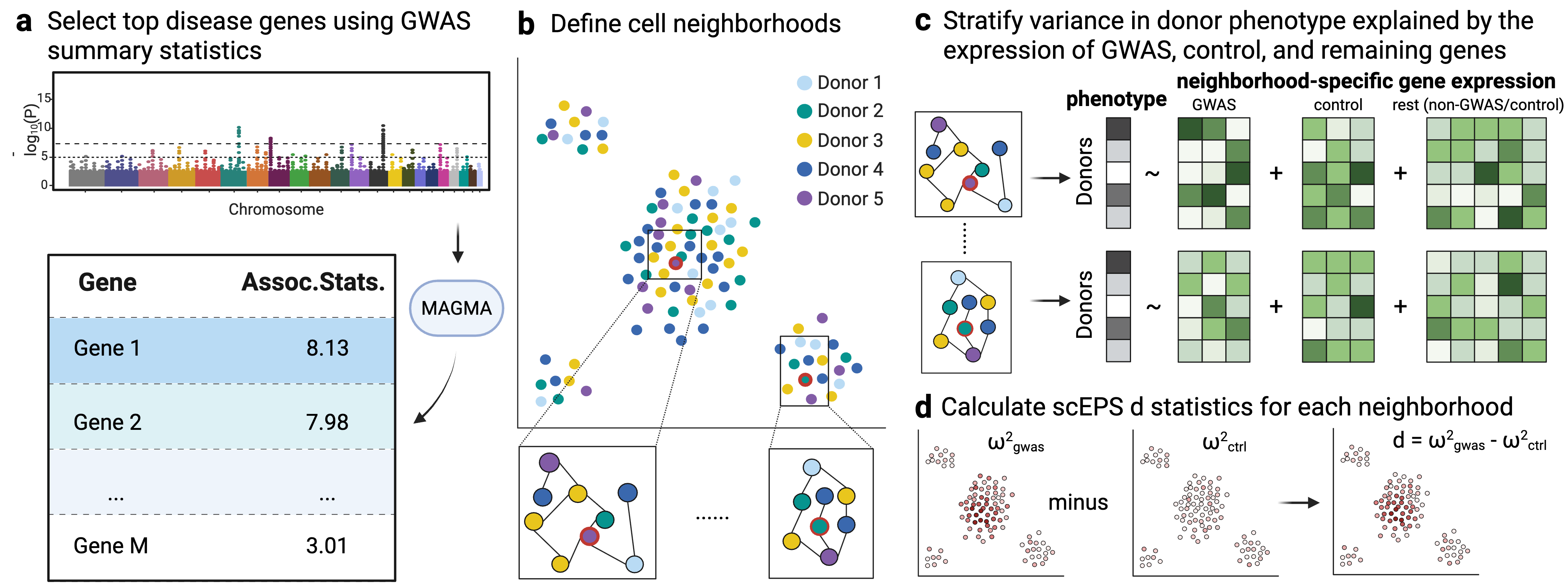
This repo contains the code of the method, scEPS, for integrating GWAS and single-cell disease cell atlas data to identify disease-associated cell neighborhoods. scEPS calculates a $d$ statistic at each cell neighborhood, representing the difference between the variance in disease explained by variations in the expression of each GWAS vs. each mean-expression matched control gene. An illustration of the scEPS method is shown below:
Reference
The current draft of the manuscript is available here. The code we used to create the figures in the manuscript is available here. We also implemented CNA*, a simple extension of CNA, for estimating the variance in disease attributable to variations in cell abundance at each cell neighborhood.
We also provide a web UI for visualizing the results in the scEPS manuscript here.
Manual
We provide a detailed manual of scEPS in the Wiki page.
Installation
Option 1: using pip
The easiest way to install scEPS is from PyPI:
pip install sceps
This installs the sceps Python package along with the four command-line tools described under Usage.
Option 2: using Anaconda or Miniforge
scEPS may also be installed into a dedicated environment through Anaconda or Miniforge. To do this, please first install Anaconda or Miniforge on your machine. You may then install scEPS using the following commands:
git clone git@github.com:Genentech/sceps.git
cd sceps
conda env create -f sceps.yml
conda activate sceps
pip install .
The sceps.yml file installs the dependencies through conda; the final pip install . installs scEPS itself and its command-line tools. Use pip install -e . instead if you intend to modify the scEPS source.
Option 3: manually install required packages
The user may also manually install the required packages to run scEPS. scEPS requires Python 3.9 or newer and the following packages:
| Package | Minimum | Version pinned in sceps.yml |
|---|---|---|
| numpy | 1.23 | 1.26.2 |
| pandas | 1.5 | 1.5.3 |
| scipy | 1.9 | 1.13.1 |
| anndata | 0.10 | 0.10.7 |
| scanpy | 1.10 | 1.10.3 |
| scikit-learn | 1.1 | 1.3.2 |
| statsmodels | 0.13 | 0.14.5 |
| tqdm | 4.60 | 4.67.1 |
| packaging | 20 | 25.0 |
| matplotlib | 3.6 | 3.9.4 |
| seaborn | 0.12 | 0.13.2 |
These can be installed with a single command:
conda install -c conda-forge python=3.9 numpy=1.26.2 pandas=1.5.3 scipy=1.13.1 \
    anndata=0.10.7 scanpy=1.10.3 scikit-learn=1.3.2 statsmodels=0.14.5 \
    tqdm=4.67.1 packaging=25.0 matplotlib-base=3.9.4 seaborn=0.13.2
The pinned versions are those used for the analyses in the manuscript, and sceps.yml reproduces that environment exactly. The minimums are the floors declared in pyproject.toml; scEPS has also been verified to reproduce identical output on numpy 2.x, pandas 2.x, anndata 0.12 and scanpy 1.11.
The optional preprocessing helper script misc/preprocess_scdata.py additionally requires harmonypy for batch integration. This is also available as an extra:
pip install "sceps[preprocess]"
Once the required packages to run scEPS are installed, the user may then install scEPS using:
git clone git@github.com:Genentech/sceps.git
cd sceps
pip install --no-deps .
Usage
Installing scEPS provides four command-line tools, corresponding to the four steps of the scEPS workflow:
| Command | Purpose |
|---|---|
sceps |
Estimate scEPS statistics for individual cell neighborhoods |
sceps-cluster-neighborhood |
Define approximately independent cell neighborhood blocks |
sceps-aggregate |
Aggregate scEPS statistics across cell types and across all cells |
sceps-corr |
Correlate scEPS statistics with gene expression |
Pass --help to any of them for the full list of options, e.g. sceps --help. A detailed description of each step is available in the Wiki page.
scEPS can also be driven from Python rather than the command line:
from sceps.sceps_core import *
See misc/run_sceps_from_python.py for a worked example.
Testing scEPS
We provide examples script to test the scEPS workflow here.
Contact
Please create a GitHub issue if you experience any issue with running scEPS.
1 maintainer

Release files for sceps 0.1.0
For a detailed explanation of source distributions (sdists) and built distributions (wheels), please see the package formats documentation.
Source distribution (sdist)
| File | Size | Uploaded | |
|---|---|---|---|
| sceps-0.1.0.tar.gz | 34.7 kB | Details |
Built distribution (wheel)
| File | Interpreter | ABI | Platform | Reset |
|---|---|---|---|---|
| sceps-0.1.0-py3-none-any.whl | Python 3 | none | any | Details |
Total release size: 73.5 kB
Release files / sceps-0.1.0.tar.gz
| Download URL | sceps-0.1.0.tar.gz |
|---|---|
| Size | 34.7 kB |
| Tags | Source |
|
SHA-256 checksum How to use checksums |
94f059d396978c256cd9e02f0fee2d5751c52ca8d8cb28620b243f5b1a1f2061
|
|
BLAKE2b-256 checksum How to use checksums |
c67903591edbffd8703c0da42cd9ae2ebe1ceb2c707820b910055422b9155331
|
| Upload date | |
|
Uploaded using Trusted Publishing? What is trusted publishing? |
Yes |
| Uploaded via |
twine/7.0.0 CPython/3.13.14
|
Provenance
Provenance describes where a file came from. On PyPI, provenance is shared via attestations, which provide a verifiable record of the build or publishing details. View details, limitations and caveats.


PyPI Publish Attestation
PyPI verified that this artifact, at this checksum, originated from the publisher listed below.
Signed by GitHub Actions, verified by PyPI on Sep 21, 2026.
Transparency logRelease files / sceps-0.1.0-py3-none-any.whl
| Download URL | sceps-0.1.0-py3-none-any.whl |
|---|---|
| Size | 38.8 kB |
| Tags | Python 3 |
|
SHA-256 checksum How to use checksums |
6b473be0c36a89f9ca00020fd389c15d03047efeac2daaf04fc682aa5d3cf484
|
|
BLAKE2b-256 checksum How to use checksums |
1bb02bf2fbd553bf3a96926de0edf951279afbf3b67496ed4150f014cfa9dd8b
|
| Upload date | |
|
Uploaded using Trusted Publishing? What is trusted publishing? |
Yes |
| Uploaded via |
twine/7.0.0 CPython/3.13.14
|
Provenance
Provenance describes where a file came from. On PyPI, provenance is shared via attestations, which provide a verifiable record of the build or publishing details. View details, limitations and caveats.
PyPI Publish Attestation
PyPI verified that this artifact, at this checksum, originated from the publisher listed below.
Signed by GitHub Actions, verified by PyPI on Sep 21, 2026.
Transparency log













