
Sceptic
Installation | Enviroment | Example | Advanced Features | Input | Output | Parameter | Citation | Contact
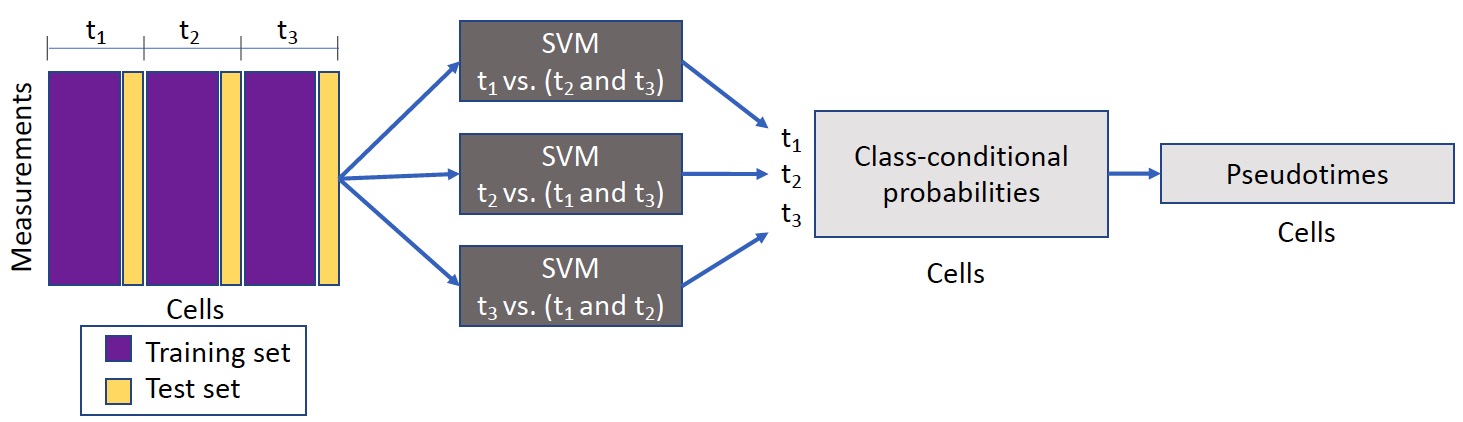
Sceptic can perform pseudotime analysis on various types of single-cell/single-nucleus data. The model takes as input a collection of single-cell/single-nucleus data and then learns the relationship between the observed data and the associated time stamps, and finally uses the trained model to assign to each cell a real-valued pseudotime. Ideally, the pseudotimes assigned by Sceptic reflect each cell's progression along a notion of time---developmental, cell cycle, disease progression, aging---that is appropriate to the given data. Ideally, the pseudotimes assigned by Sceptic reflect each cell's progression along a notion of time---developmental, cell cycle, disease progression, aging---that is appropriate to the given data.
Installation
Sceptic software is available on the Python package index (PyPI), latest version 0.4.1. To install it using pip, simply type:
$ pip install sceptic
Enviroment
Sceptic is associated with the following packages.
- python >= 3.7.7
- numpy >= 1.19.5
- pandas >= 1.3.5
- sklearn >= 1.0.2
Example (python script)
We downloaded the processed scGEM dataset from UnionCom’s GitHub page.
$ python test/scGEM/scGEM.py
The script will generate 4 outputs from Sceptic described in the section above and save it at: test/scGEM/.
Advanced Features
Simplified Workflow (NEW!)
Sceptic now automatically handles time label encoding! You can pass actual biological time values directly:
from sceptic import run_sceptic_and_evaluate

# Option 1: Pass actual time values directly (easiest!)
time_labels = np.array([0, 0, 8, 8, 16, 16, 24, 24])  # hours
cm, pred, pseudotime, prob = run_sceptic_and_evaluate(
    data, time_labels, method="xgboost"
)

# Option 2: Use encoded labels with time mapping
encoded_labels = np.array([0, 0, 1, 1, 2, 2, 3, 3])
actual_timepoints = np.array([0, 8, 16, 24])  # hours
cm, pred, pseudotime, prob = run_sceptic_and_evaluate(
    data, encoded_labels, label_list=actual_timepoints, method="xgboost"
)
Benefits:
- ✅ No manual label encoding required
- ✅ Pseudotime values in meaningful biological units
- ✅ More intuitive and less error-prone
- ✅ Backward compatible with existing code
Two-Timepoint Datasets
Sceptic supports classification datasets with exactly two time points for both
svm and xgboost.
Please note:
- this setting was not benchmarked in the original Sceptic study
- results should be interpreted with additional caution
- pseudotime values in this setting are derived from binary class probabilities
For time-series applications, datasets with three or more time points remain the intended use case.
IMPORTANT: Regression Mode Label Requirements
When using regression mode, labels must be the actual time values, not encoded class IDs.
Correct usage:
time_labels = np.array([0, 8, 16, 0, 8, 16])
Incorrect usage:
encoded_labels = np.array([0, 1, 2, 0, 1, 2])
Using encoded labels in regression mode can artificially inflate performance and lead to misleading pseudotime estimates. If your labels are categorical class IDs, use classification mode instead.
Sceptic also includes utility modules for comprehensive evaluation and publication-quality visualization!
Evaluation Utilities
The sceptic.evaluation module provides comprehensive metrics for assessing pseudotime predictions:
from sceptic import evaluation

# Comprehensive evaluation with all metrics
results = evaluation.evaluate_sceptic_results(
    confusion_matrix=cm,
    y_true=label,
    y_pred=label_predicted,
    pseudotime=pseudotime,
    true_time=true_time_values,
    include_regression=True,  # Optional: include MAE/MSE
    verbose=True
)
Available metrics:
- Classification: Accuracy, balanced accuracy, per-class precision/recall
- Correlation: Spearman, Pearson, and Kendall correlations
- Regression (optional): MAE, MSE, RMSE
Plotting Utilities
The sceptic.plotting module provides publication-quality visualizations:
from sceptic import plotting

# Set publication style
plotting.set_publication_style()

# Create confusion matrix heatmap
fig = plotting.plot_confusion_matrix(
    confusion_matrix=cm,
    label_list=label_list,
    output_path="confusion_matrix.png",
    dpi=300
)

# Create violin plot
fig = plotting.plot_pseudotime_violin(
    pseudotime=pseudotime,
    true_labels=time_labels,
    output_path="violin_plot.png",
    dpi=300
)

# Stratified analysis by groups (e.g., cell types)
plotting.plot_pseudotime_by_group(
    pseudotime=pseudotime,
    true_labels=time_labels,
    group_labels=cell_types,
    output_dir="violin_by_cell_type"
)
Examples
For detailed tutorials, see the examples/ directory:
- basic_usage.ipynb: Introduction to Sceptic workflow
- custom_evaluation.ipynb: Advanced evaluation and visualization
Parameters of Sceptic
The list of parameters is given below:
eFold: # of folds for external cross-validation (default=3).iFold: # of folds for internal cross-validation (default=4).
For SVM implementation:
kernel: The kernel function for sceptic SVM classfier (default=('linear', 'rbf')). Sklearn supports four kinds of kernels: linear, polynomial, rbf, sigmoid.C: The C parameter for rbf kernel (default=[0.1, 1, 10]). The C parameter trades off correct classification of training examples against maximization of the decision function’s margin. See more details here.
For XGboost implementation:
max_depth: Maximum depth of a tree (default=[3, 5]). Increasing this value will make the model more complex and more likely to overfit. 0 indicates no limit on depth. Beware that XGBoost aggressively consumes memory when training a deep tree. See more details here.learning_rate: Step size shrinkage used in update to prevent overfitting (default=[0.1, 0.3]). After each boosting step, we can directly get the weights of new features, and eta shrinks the feature weights to make the boosting process more conservative. See more details here.
Input
In case the user is providing the input data:
data_concat: the input cell by measurement matrix. (# of cells by # of measurements)label: processed cell time label. (# of cells by 1)label_list: unique list of possible cell time labels. (# of time points by 1)parameters: Sceptic parameter dictionary. (SVM default={'kernel': ('linear', 'rbf'), 'C': [0.1, 1, 10]}; XGboost default= {"max_depth": [3, 5], "learning_rate": [0.1, 0.3], "n_estimators": [100], "subsample": [0.8]})method: "svm" or "xgboost" implementation. For large dataset, we recommend "xgboost" implementation.use_gpu: Only applies if method="xgboost".
Output
When one uses sceptic.run_sceptic_and_evaluate function, several outputs are generated:
cm: the confusion matrix for Sceptic's nested cross-validation. (# of time_points by # of time points)label_predicted: Sceptic's predicted discrete label for each cell. (# of cells by 1)pseudotime: Sceptic's predicted pseudotime (continuous) for each cell. (# of cells by 1)sceptic_prob: the class-proabilities for each cell. (# of cells by # of time points)
Contact
In case you have questions, reach out to gangliuw@uw.edu.
Citation
Pseudotime analysis for time-series single-cell sequencing and imaging data
If you have found our work useful, please consider citing us:
Li, G., Kim, HJ., Pendyala, S. et al. Sceptic: pseudotime analysis for time-series single-cell sequencing and imaging data. Genome Biol 26, 209 (2025). https://doi.org/10.1186/s13059-025-03679-3
@article{li2025sceptic,
  title={Sceptic: pseudotime analysis for time-series single-cell sequencing and imaging data},
  author={Li, Gang and Kim, Hyeon-Jin and Pendyala, Sriram and Zhang, Ran and Vert, Jean-Philippe and Disteche, Christine M and Deng, Xinxian and Fowler, Douglas M and Noble, William Stafford},
  journal={Genome Biology},
  volume={26},
  pages={209},
  year={2025}
}
1 maintainer

Metadata
1 maintainer
Release files for sceptic 0.4.1
For a detailed explanation of source distributions (sdists) and built distributions (wheels), please see the package formats documentation.
Source distribution (sdist)
| File | Size | Uploaded | |
|---|---|---|---|
| sceptic-0.4.1.tar.gz | 413.8 kB | Details |
Built distribution (wheel)
| File | Interpreter | ABI | Platform | Reset |
|---|---|---|---|---|
| sceptic-0.4.1-py3-none-any.whl | Python 3 | none | any | Details |
Total release size: 428.7 kB
Release files / sceptic-0.4.1.tar.gz
| Download URL | sceptic-0.4.1.tar.gz |
|---|---|
| Size | 413.8 kB |
| Tags | Source |
|
SHA-256 checksum How to use checksums |
45034ee2618e0c23bc3dec7b3d58630dac4e43971f377b0862d431e9abb4ffdb
|
|
BLAKE2b-256 checksum How to use checksums |
48cd5e450c1b3d57736d931856d48cd7714e52ea3adb012a3cd2b13b56d23e2a
|
| Upload date | |
|
Uploaded using Trusted Publishing? What is trusted publishing? |
No |
| Uploaded via |
twine/6.2.0 CPython/3.14.0
|
Release files / sceptic-0.4.1-py3-none-any.whl
| Download URL | sceptic-0.4.1-py3-none-any.whl |
|---|---|
| Size | 14.9 kB |
| Tags | Python 3 |
|
SHA-256 checksum How to use checksums |
2d8966a3b729ebc9cc782c99f308f4ddd9a1823957efb050390b83b628f23b17
|
|
BLAKE2b-256 checksum How to use checksums |
fae238f7e8d69a82c9511c2a73fac5cc8c16235e023f922dd31f38b0ad3e52cb
|
| Upload date | |
|
Uploaded using Trusted Publishing? What is trusted publishing? |
No |
| Uploaded via |
twine/6.2.0 CPython/3.14.0
|














