
Supply Chain Firewall


Supply Chain Firewall is a command-line tool for preventing the installation of malicious npm and PyPI packages. It is intended primarily for use by engineers to protect their development workstations from compromise in a supply-chain attack.
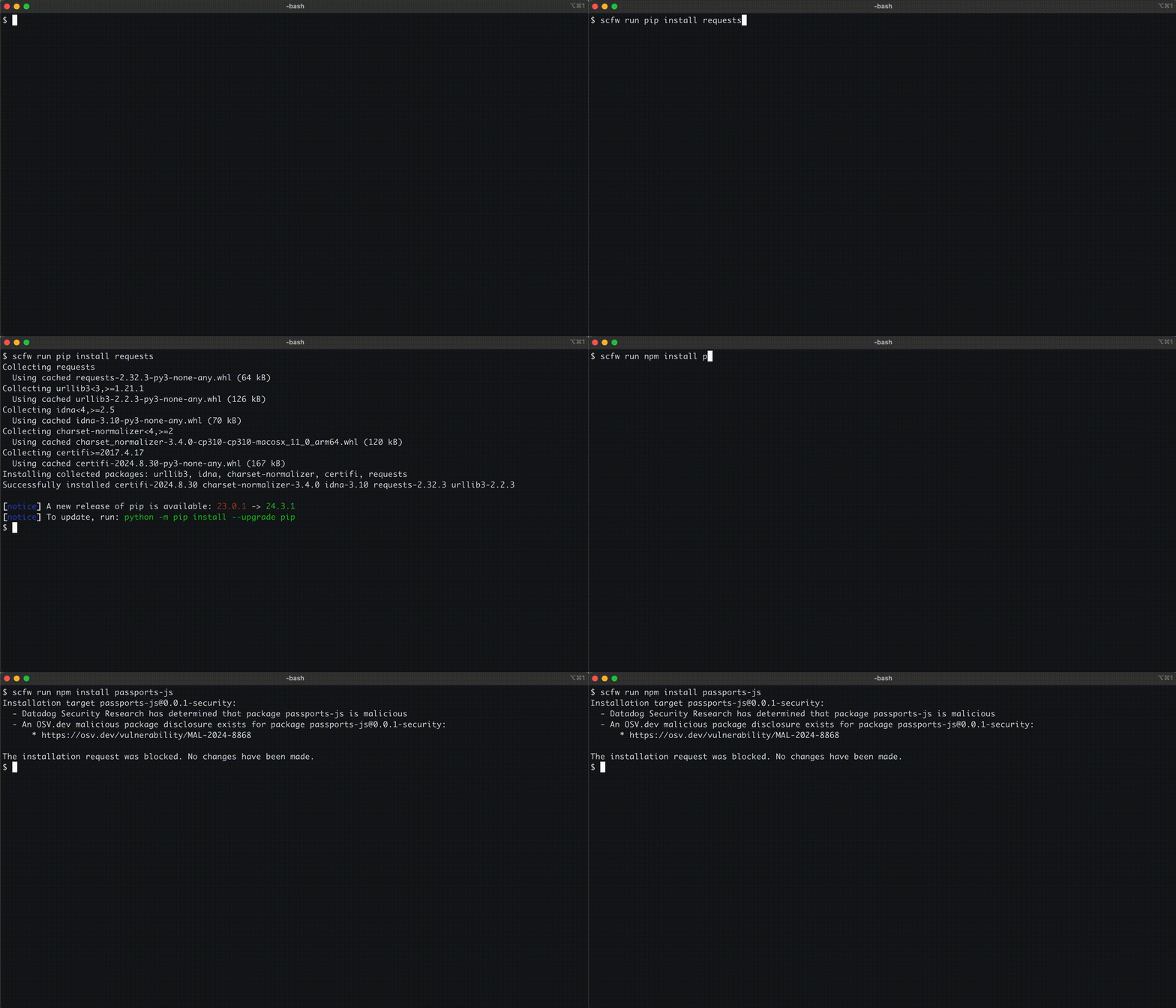
Given a command for a supported package manager, Supply Chain Firewall collects all package targets that would be installed by the command and verifies them against reputable sources of data on open source malware and vulnerabilities. The command is automatically blocked from running when any verifier returns critical findings for any target, generally indicating that the target in question is malicious. In cases where a verifier reports warnings for a target, they are presented to the user along with a prompt confirming intent to proceed with the installation.
Supply Chain Firewall includes default verifiers for the following data sources:
- Datadog Security Research's public malicious packages dataset
- OSV.dev advisories, both for malicious packages as well as vulnerabilities
- Package registry metadata, warning when a package was published very recently
- User-provided lists of custom findings for specific packages
Documentation specific to each default verifier and the configurable options they support may be found here.
Users may also implement their own custom verifiers for alternative data sources. A template for implementating a custom verifier may be found in examples/verifier.py. Details may also be found in the API documentation.
The principal goal of Supply Chain Firewall is to block 100% of installations of known-malicious packages within the purview of its data sources.
Interested in SCFW for your business use-case? Enroll as a design partner.
Check out the new Datadog Agent integration and Cloud SIEM content pack for SCFW.
Getting started
Installation
The recommended way to install Supply Chain Firewall is via pipx:
$ pipx install scfw
This will install the scfw command-line program into an isolated Python environment on your system and make it available in any other Python environment, including ephemeral ones created with venv or virtualenv. pipx may be installed via Homebrew on macOS or via the system package manager on major Linux distributions. Be sure to run pipx ensurepath after installation to properly configure your PATH.
Supply Chain Firewall can also be installed via pip install scfw directly into the active Python environment.
To check whether the installation succeeded, run the following command and verify that you see output similar to the following.
$ scfw --version
3.1.0
Post-installation steps
To get the most out of Supply Chain Firewall, it is recommended to run the scfw configure command after installation. This script will walk you through configuring your environment so that all commands for supported package managers are passively run through scfw as well as enabling Datadog logging, described in more detail below.
$ scfw configure
...
See the configure command documentation for details and command-line options.
Compatibility and limitations
| Package manager | Supported versions | Inspected subcommands |
|---|---|---|
| npm | >= 7.0 | install (including aliases) |
| pip | >= 22.2 | install |
| poetry | >= 1.7 | add, install, sync, update |
Supply Chain Firewall may only know how to inspect some of the "installish" subcommands for its supported package managers. These are shown in the above table. Any other subcommands are always allowed to run.
By default, scfw will refuse to run inspected subcommands with an unsupported version of a supported package manager. This is in keeping with its goal of blocking 100% of known-malicious package installations. In order to get the most out of scfw, please verify that you are running a supported version of your package manager and upgrade accordingly before using this tool.
Currently, Supply Chain Firewall is only fully supported on macOS systems, though it should run as intended on common Linux distributions. It is currently not supported on Windows.
Uninstalling Supply Chain Firewall
Supply Chain Firewall may be uninstalled via pip(x) uninstall scfw. Before doing so, be sure to run the command scfw configure --remove to remove any Supply Chain Firewall-managed configuration you may have previously added to your environment.
$ scfw configure --remove
...
Usage
$ scfw --help
usage: scfw [-h] [-v] [--log-level LEVEL] {audit,configure,run} ...

A tool for preventing the installation of malicious npm and PyPI packages.

positional arguments:
  {audit,configure,run}

options:
  -h, --help            show this help message and exit
  -v, --version         show program's version number and exit
  --log-level LEVEL     Desired logging level (default: WARNING, options: DEBUG, INFO, WARNING, ERROR)
Inspect package manager commands
To use Supply Chain Firewall to inspect a package manager command, simply prepend scfw run to the command you intend to run:
$ scfw run npm install react
added 1 package in 226ms

$ scfw run pip install -r requirements.txt
Package urllib3-2.6.2:
  - An OSV.dev advisory exists for package urllib3-2.6.2:
      * [High] https://osv.dev/vulnerability/GHSA-38jv-5279-wg99
[?] Proceed with installation? (y/N):
The installation request was aborted. No changes have been made.
See the run command documentation for details and command-line options.
Audit installed packages
Supply Chain Firewall can also use its verifiers to audit installed packages:
$ scfw audit npm
No issues found.

$ scfw audit --executable venv/bin/pip pip
Package pip-23.0.1:
  - An OSV.dev advisory exists for package pip-23.0.1:
      * [Medium] https://osv.dev/vulnerability/GHSA-mq26-g339-26xf
  - An OSV.dev advisory exists for package pip-23.0.1:
      * [Low] https://osv.dev/vulnerability/PYSEC-2023-228
Package setuptools-65.5.0:
  - An OSV.dev advisory exists for package setuptools-65.5.0:
      * [High] https://osv.dev/vulnerability/GHSA-cx63-2mw6-8hw5
  - An OSV.dev advisory exists for package setuptools-65.5.0:
      * [High] https://osv.dev/vulnerability/GHSA-5rjg-fvgr-3xxf
  - An OSV.dev advisory exists for package setuptools-65.5.0:
      * [High] https://osv.dev/vulnerability/GHSA-r9hx-vwmv-q579
  - An OSV.dev advisory exists for package setuptools-65.5.0:
      * https://osv.dev/vulnerability/PYSEC-2022-43012
See the audit command documentation for details and command-line options.
Datadog Log Management integration
Supply Chain Firewall can optionally send logs of blocked and successful installations to Datadog.
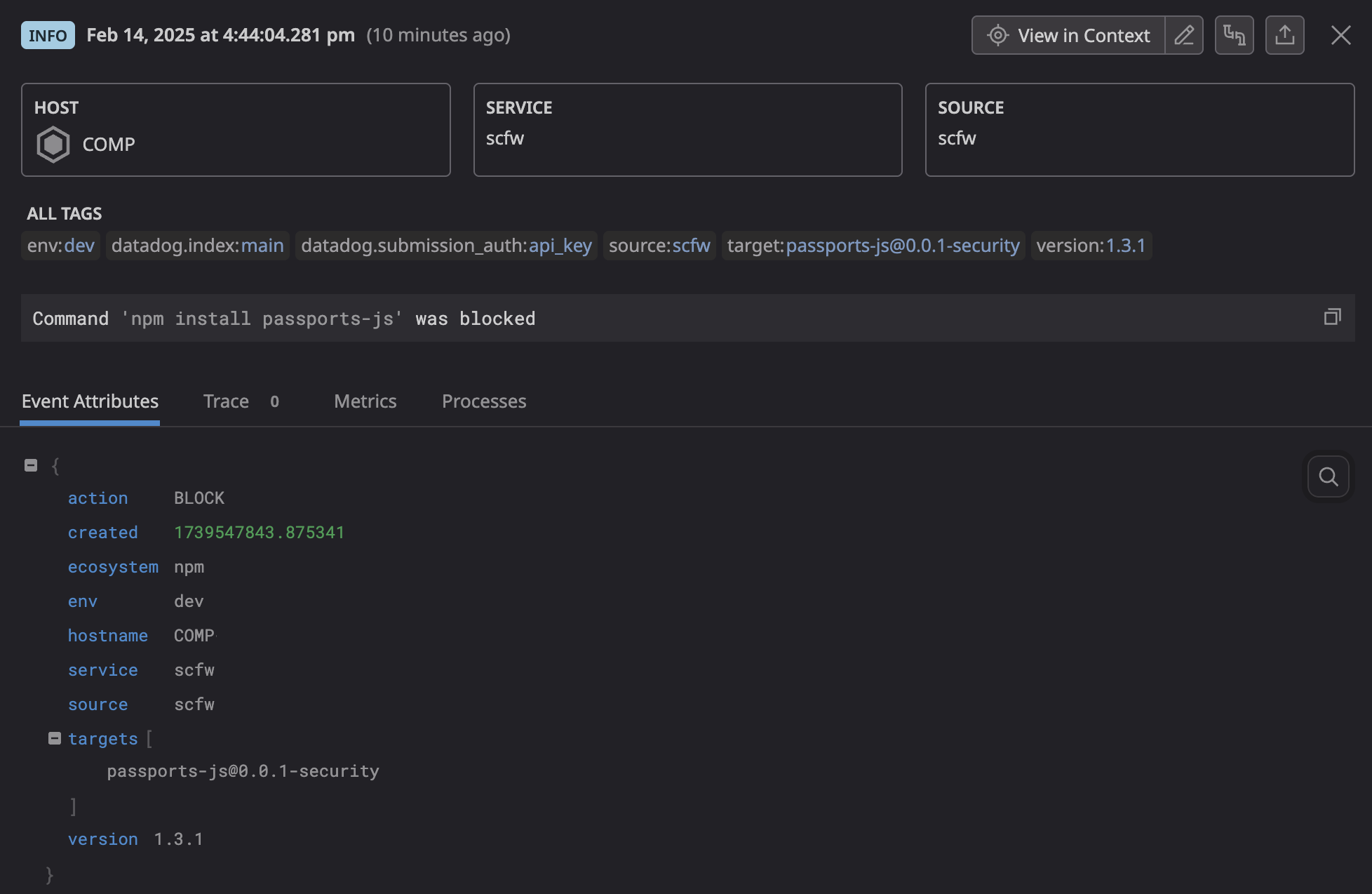
Logs may be forwarded to Datadog via the HTTP API or a local Datadog Agent process. A Datadog API key is required to enable log forwarding. Documentation on how to enable and configure these loggers may be found here.
Supply Chain Firewall can maintain a local JSON Lines log file that records all completed run and audit executions. Users are strongly encouraged to enable this logger, as having a centralized record of executed package manager commands, their outcomes, and installed packages over time can be useful in incident response scenarios. Once file logging has been enabled, users may separately configure the local Datadog Agent to tail this file and thereby ingest logs from SCFW with no additional overhead.
Supply Chain Firewall can also integrate with user-supplied loggers. A template for implementating a custom logger may be found in examples/logger.py. Refer to the API documentation for details.
Development
We welcome community contributions to Supply Chain Firewall. Refer to the CONTRIBUTING guide for instructions on building the API documentation and setting up for development.
Maintainers
1 maintainer

Metadata
1 maintainer
Release files for scfw 3.1.0
For a detailed explanation of source distributions (sdists) and built distributions (wheels), please see the package formats documentation.
Source distribution (sdist)
| File | Size | Uploaded | Provenance | |
|---|---|---|---|---|
| scfw-3.1.0.tar.gz | 60.8 kB | With provenance | Details |
Built distribution (wheel)
| File | Interpreter | ABI | Platform | Reset |
|---|---|---|---|---|
| scfw-3.1.0-py3-none-any.whl | Python 3 | none | any | Details |
Total release size: 134.6 kB
Release files / scfw-3.1.0.tar.gz
| Download URL | scfw-3.1.0.tar.gz |
|---|---|
| Size | 60.8 kB |
| Tags | Source |
|
SHA-256 checksum How to use checksums |
615189119af3b9c46f5f6aed64026e2a500d613a0df712f0b1997cdb37bc08fa
|
|
BLAKE2b-256 checksum How to use checksums |
20709579246fe7e1afe3a2a35b1e1b3d995890b33158802f35bcc6d2eb45e655
|
| Upload date | |
|
Uploaded using Trusted Publishing? What is trusted publishing? |
Yes |
| Uploaded via |
twine/6.1.0 CPython/3.13.7
|
Provenance
Provenance describes where a file came from. On PyPI, provenance is shared via attestations, which provide a verifiable record of the build or publishing details. View details, limitations and caveats.


PyPI Publish Attestation
PyPI verified that this artifact, at this checksum, originated from the publisher listed below.
Signed by GitHub Actions, verified by PyPI on Jun 26, 2026.
Transparency logRelease files / scfw-3.1.0-py3-none-any.whl
| Download URL | scfw-3.1.0-py3-none-any.whl |
|---|---|
| Size | 73.9 kB |
| Tags | Python 3 |
|
SHA-256 checksum How to use checksums |
7161769b648577c32c958c9c2abdc52e098bf88a47d08dae036c6e0d3e040073
|
|
BLAKE2b-256 checksum How to use checksums |
88263f7a3d50256e079d9001a711fd7bc3358dfd3165fc193246387413a4b50a
|
| Upload date | |
|
Uploaded using Trusted Publishing? What is trusted publishing? |
Yes |
| Uploaded via |
twine/6.1.0 CPython/3.13.7
|
Provenance
Provenance describes where a file came from. On PyPI, provenance is shared via attestations, which provide a verifiable record of the build or publishing details. View details, limitations and caveats.
PyPI Publish Attestation
PyPI verified that this artifact, at this checksum, originated from the publisher listed below.
Signed by GitHub Actions, verified by PyPI on Jun 26, 2026.
Transparency logSecurity for scfw 3.1.0
Provenance
Provenance describes where a file came from. On PyPI, provenance is shared via attestations, which provide a verifiable record of the build or publishing details. View details, limitations and caveats.
Full provenance
All 2 files in this release have been uploaded with provenance metadata.
Attestation for scfw-3.1.0.tar.gz
PyPI Publish Attestation
PyPI verified that this artifact, at this checksum, originated from the publisher listed below.
Signed by GitHub Actions, verified by PyPI on Jun 26, 2026.
Transparency logA note on package security
PyPI is a repository for distributing packages, not a service for auditing them. While third-party security researchers and our staff do their best to detect and remove malicious packages, PyPI cannot guarantee the quality, security or suitability of any given package.
To learn more about protecting yourself from malicious actors, visit our package security documentation.














